
Ah, back to ‘real’ UMPCs at last. This last week has been so packed with netbook news that I’m starting to think that you can only use an ultra mobile PC at a table! This should fix it! The Wibrain accessory set.
The Wibrain starts with Linux at at under 475 Euros (inclusive tax) now which if you take into consideration that it’s running the same processor as the Cloudbook and includes hard drive, touchscreen, bluetooth and weighs just over half the wight of an Eee PC, is a pretty impressive price. Who said UMPCs were expensive!
Wibrain have sent over the accessory pack and you can see where they are going with it. From office to home via the car.

More after the break…
I’ve been testing out the car mount and its a really solid bit of kit. Not something I’d want on my own dashboard every day but for long journeys and for people that spend a lot of time in the car, truck, lorry, its perfect. The built-in SiRF III GPS receiver means you don’t have to worry about battery life on bluetooth GPS receivers and the built-in speakers and volume control allow you to run navigation software loud enough so that you don’t have to feed it into your car stereo. It also includes a 12v car adaptor that powers the GPS, speakers and charges the WiBrain.


The suction pad and fixing is very good quality and it’s easy to drop the WiBrain in and take it out. When you plug an audio cable in it’s detected and if configured for port monitoring, the audio software pops up to allow you to switch the output.I tested it out with PC Navigator 7 and because of the bright and soft touchscreen, it worked a treat. I can seen people aborting their home-build CarPC projects to go for this one because its just so easy. The only thing the carPC crowd will need to know is that the VGA port is not replicated on the dock so you can’t feed a second monitor. This is a shame because the Wibrain would be capable of running navigation on the front screen and a video for the guests in the back seat. No doubt someone will come up with a way to retro-fit the port on it though!
One note for people that have UV filters on their screens, it kills GPS signals. Driving around town, my signal level was very low and yet at home, I was picking up a GPS signal in the middle of my house which i’ve never had before. Some more info about this problem here. The Car mount kit is available for 166 Euros inclusive of Euro-land tax and for $160 in the US.
The leather pouch is really nice. Good quality leather, a flip-out stand, air vents and two cable pockets. I really like it. Here are some pics of the case.


The case is available for $50 in the US and 42 Euro (inc tax) in Europe.
Finally, I want to mention the docking station. In my opinion it’s no ‘looker’ but you can’t deny that it’s got some great functionality. I’m a huge huge fan of docking stations because I believe that there are some users out there, including me that could use a ultra mobile PC as their main PC. I use my Q1 Ultra all the time as my desktop plugged into a large monitor and I’ve used the excellent Tablet Kiosk i7210 with the excellent docking station in the past. As processors like the Core Solo (e.g. on the Q1 Ultra Premium) and the VIA Isaiah start appearing (Isaiah-based WiBrain anyone?) the processing levels increase to a 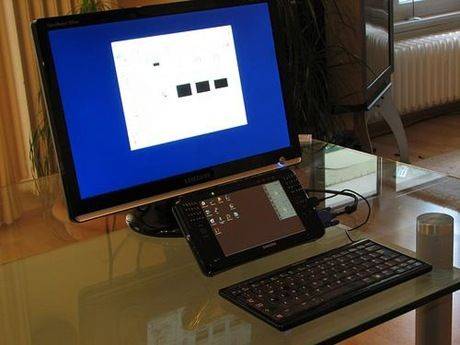 point where probably 50% of home users would be happy. Why use an expensive, noisy, heavy desktop PC when you can go modular with a ultra mobile PC and get an all-in-one device. The WiBrain docking station features built-in speakers (not very good but quite loud) a spare battery charger slot, DVD/RW slot loader (also available without the DVD slot) an Ethernet port, VGA-out, SD card slot, audio out and 4 USB ports. I haven’t confirmed it yet but I think there’s even an IR receiver on the front. Its available for under 240 Euros (166 Euros without DVD) in Europe (inclusive tax) and for $249 in the U.S.
I’ll leave you with some pictures at the moment because I’ll be writing more about the docking station in a future article. I’m going to use it as a mini PVR with a DVB-T stick and a monitor. I’ve tried out the Terratec Cynergy USB Diversity and it works without a hitch. Playback, live-pause and recording don’t seem to be a problem at all. With a USB drive attached to the dock or some network storage via the built-in ethernet port or even over Wifi, the possibilities for building a versatile portable mini media center are high. MythTV should run on this baby with no problem at all as I used to run that on a 1Ghz VIA Epia board and I’ve already tried out Sage TV on the WiBrain. Sage TV has some heavy background processing requirements for it’s 3D menus and image previews but I think it’s going to work. More about that though in a future article.


More images in the WiBrain galleries here and here.
Check out Dynamism for the U.S. and Mobilx, my affiliate in Europe for more details. All products are available at the time of writing.
More details about the WiBrain B1 models can be found in the product portal. Here’s a comparison list of the different models with links to news and reviews.
Thanks to Wibrain for sending over the accessory set.











hmm, now thats a interesting dock :)
Is the name of this UMPC pronounced “Y” Brain? Like in wifi.
I call it ‘Why’brain, yes. I’ve heard others call it Weebrain though!
ooh! Yeah, that dock isn’t sexy, but it looks like it’d be great to have.
Is the Linux version also $499 in the US? I kinda want a maxed out Linux version… and with that dock and leather case, that might be just perfect.
I love the dock. Reminds me of an old Dot Matrix Printer. Nobody seems to like WiBrain’s style, but I like the look of the Dock AND the unit itself.
http://www.msxarchive.nl/pub/msx/photos/hardware/Philips_NMS-1421_MSX_matrix_printer.jpg
I’ve got one, its really amazing, I’ll rather loose my apartment than loosing it
Lol, echt gut. Komme nun