
Last week I posted some tips on how to squeeze 3 hrs browsing time out of the Kohjinsha SC3. The method was a bit of a trick as it utilised a mobile phone data connection over Bluetooth but it was the only way to achieve 3 hours on the 20wh battery. It equates to an average 7W drain which is, even in ultra mobile PC terms, very efficient but it’s not as good as I hoped from a Z-series Atom-based system.
The reason why it’s not as good as I expected (and the reason why i’m not using the SC3 to write this post in my tent while the rain beats down outside) is that the Samsung Q1 Ultra (with SSD mod) is just as efficient with the previous generation Intel platform. As I write this post, perfom (try it, start->run->perfmon. Its fun to watch the battery drain) is telling me that the average drain is 6.9 watts. Meebo is running in the background, Friendfeed is updating, CPU utilisation is averaging 20%, brightness is set at 25% and I’ve got a LED lamp attached to the USB port to give me some light. With the standard battery, thats over 4 hours of online time. I’ve got the extended battery here which is showing 5.5 hrs @ 61% battery. (9hrs total)
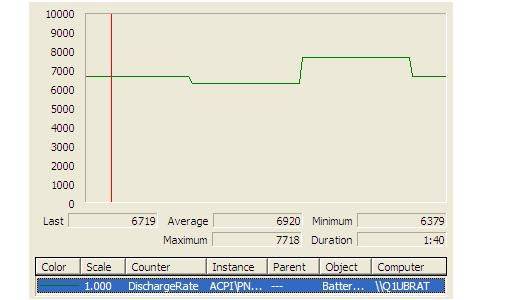
With a refresh to a 1.33Ghz Atom processor and some tweaks to the motherboard, I’m sure Samsung could shave 20% off that drain figure and produce a 5-6 hr, 600gm device. They’ve proved themselves as one of the best at electronic design with their Q1 products and it excites me to think about what they might come up with next – as long as it has a lighted keyboard!










Some questions that I hope will help others too. How are you connecting the Q1U to the internet – bluetooth and phone or what? Which OS is installed and how optimised is it? How much memory?
And I guess we have to ask for a reminder of how many watts the SSD mod saved?
I think a real trick is that the CPU is running at 25%. When you get back it would be interesting to see what cpu figure you get on newer devices in similar use. eg: M512, M912, SC3. I think the older kit must have better designed hardware and drivers. The newer stuff seems more power & cpu happy.
Hi Kevin.
Yes, BT and phone is the connection method.
SSD nod didnt have any measurable change on battery life. (see the mod article linked above for details on that.)
Ive got three Samsung UMPCs and each one has a good background efficiency and thats the point here.
Other devices in the same league for background efficiency:
Raon Digital Everun
OQO
HTC Shift
Overall though, the Q1 seems the best so far.
“best at electronic design” ? you must be talking about the internal design right? All of the slate and thumb input designs are not very popular and would not to be ever be considered as best. What I think is the best on exterior design is the new Sharp D4; maybe the Q1 has the best internal design but definately NOT on the outside. imho
Dave I think I agree with you on this one. I don’t like the ergonomics of the Q1U. That being said, I haven’t tried one, so maybe having that mini-keyboard on either side of the screen (for moving about) and then using a larger bluetooth keyboard (for when you’re sitting down) really is the ‘better way to go’. Chippy can you elaborate on the differences between the SC3’s design and the Q1U’s in terms of its practical use? Do you find it better to have something like the SC3’s keyboard built in rather then having to carry around a spare keyboard, or is your extra keyboard setup better?
Excellent analysis, thanks!
Please also make a comparison with pda/smartphones running win mobile etc: eg 300gr, 12 hrs batt at my HTC 7500, slight problems with screen size (5 inch is small)and keyboard (detached so never at hand if you need it), but it fits in my shirtpocket and runs the whole day (web, mail, etc).
As long as UMPC/MIDs with XP (I hate Vista) doesnot come near 300gr/12hrs, i prefer pda/smartphones like HTC 7500 (or netbooks).
Regards, Wouter
It`s an shame that the exterior design and functionality
of samsung q1 sucks!and that is the reason i will never buy one of those!
I could argue against that. Of all the umpcs ive tried, the q1u has been the best, able to perform in every situation.
But not because of exterior design.
Keyboard is more useful than at first-sight. For a web content consumer, being able to type the first charachter of a URL and have it match in FF history or to type a password or select a file from a big list, its better than a slider.
The battery design is excellent too. It even looks good.
As UMPCs go, the Q1 Ultra is a good design, inside and out.
Obviously, there’s room for improvement (SD slot, better keyboard) but its reallynot bad once you’ve spent time with it.
The exterior design and functionality is actually pretty good, the keyboard is pretty bad though and needs to be more like the one on the Wibrain to be usefull. I personally do not like the UMPCs designed like notebooks, Asus eee, Fujitsu U1010 etc. and would not buy anything that I can not use when standing and use my thumbs to type. Then again, I do not type much and for surfing and blogging the Q1U keyboard works pretty well.
Its a real shame that the SC3 doesn’t perform as well as I had hoped. I’m still clinging to the dream that its all down to bad drivers, but I fear it might just be a dead duck.
The device itself is very nice looking, convertible, has all the gadgets I want (BT, WiFi, LAN, and GPS) and feels solidly build. Yes, the keyboard could be bigger, but as a tablet PC I can live with that.
The Atom I would say has been the real disappointment with this device for me. Its no better – and in many was worse – then last years chipsets, (despite having a fancy new 1.33GHz sticker on it), and the driver support has been horrible.
By example, all the Vista drivers are still in “Beta mode”, and I just went through the process of installing XP on my machine, which required me to download Intel’s video tools, install a C compiler, configure my own video definitions, and build myself a driver set! And this was just to get basic video on the machine – extra features like 1024×768 scaling, proper rotation handling, and power saving settings are still not working for me. (I shutter to think what will happen if/when I try to install Ubuntu on this device).
In short, I feel less like a customer here and more like a beta tester. :/
I find the comments about the Q1 keyboard suprising.
On mine I tried inking, pen software input and finger software input, and I always end up going back to the hardware keyboard.
Even tried the new version of dialkeys and still prefer the hardware.
I really like the slate design of the q1, very usefull when you are out and about. Only reason i want to upgrade is cause i miss Vista.I only got a 600mhz ver. but its a joy in XP.
my dream device is a 8.9 inch slate.
I think the key point here is that Samsung have a good size/weight with a decent screen size and resolution with what we want in a UMPC for battery life. If they can do it with the old gen. CPU etc. then other manufacturers should be able to do as well with the new gen. of CPU. They haven’t so they suck!
Good design is key and I don’t like this exterior design which is why I don’t like the Wibrain either. But they do have the best battery life – and this is something that should be praised and copied.
I have a blog about HDTV.Thanks for the information ^_^