
Welcome to part 1 of the 4 part Ultra Mobile Computing Buyers Guide – What is an Ultra Mobile Computer, a UMPC?
This complete series is available a the original PDF. (Subsequent updates will be missing so we advise reading this updated web version.
Part One: ‘What is Ultra Mobile Computing?‘ We give you a history of Ultra Mobile computing, show you how the devices break down into segments and show you what each segment is capable of.
Part Two: ‘Details and Choices.‘ It covers the form factors, the keyboard, storage, the screen and connectivity elements of an Ultra Mobile PC. You’ll find a good overview and a lot of tips that will help you refine your choice.
Part Three ‘Details and Choices (contd.)‘ continues the details about the components and covers CPU (including a detailed overview of the currently available solutions) GPU, memory, battery, weight and cost.
Part Four: ‘Additional Information and further reading.‘ In this section we cover some of the less commonly found features on Ultra Mobile computers and give you information and links to further reading resources.
Also available as a single document in PDF format.
Part 1 – What is Ultra Mobile Computing?

A Short History of Ultra Mobile Computing
Mobile computing is not new. For many years there have been small and portable personal computers. Early portable computers in the late 70’s and early 80’s were big, clumsy and expensive but during the 90’s, as technology advanced, the notebook or ‘laptop’ computer became a very successful mobile form factor. During the time that notebooks were becoming successful though, there were many attempts to make computers truly portable by shrinking them to handheld and pocketable sizes. Early attempts were nothing much more than programmable calculators but by the early 90’s these had evolved into personal organisers with loadable software, touch screens and pocketable sizes. The Apple Newton and Psion Organisers were early, popular examples. During this period, Microsoft also started one of its first handheld computing projects, the ‘Winpad’ project. Various iterations of similar project during the mid 90’s resulted in what is now known as the PocketPC platform which is now the basis of most Windows-Mobile smartphones.
While these projects and products were successful handheld computing devices and platforms, the branch of computing we are concerned with here, UMPCs, is a sub category of the PC; the x86-based platform that nearly all desk, office and notebook PCs are built on. Simply put, Ultra Mobile PC’s are notebook computers in extremely small, handheld proportions while still offering elements of productivity, connectivity and entertainment. Its all about computing on-the-move rather than between home and office desks. Toshiba were the first to make a successful product in this category in 1996 when they released the Libretto. Since then, the genre has been developing.
 In 2006, the available technology allowed for the first time, ultra-mobile computers to be built running off-the-shelf PC components with desktop operating system and a flexible applications suite at a consumer level cost. Microsoft had been running a project called ‘Origami’ which had been looking again into alternative form factors, input methods and marketing to consumers. When the team announced the project, and the results of the project, at CeBIT in March 2006, the market received a healthy boost as OEMs started to produce devices in line with the Microsoft Origami concept. Either because of bad marketing, bad design, or bad timing, the Origami devices never reached mass market acceptance and remained, as had previous mobile PC’s, in the geek, pro-mobile and business markets. The lack of battery technology advances, poor transfer of the desktop interface to touch and keyboard-driven interfaces and the introduction of a new, much more heavyweight operating system in Windows Vista have also prevented OEMs from producing successful, low-cost alternatives
The concept, however, of a mobile computer has not gone away. During 2006 and 2007 Intel were developing high-efficiency processors capable of meeting design and user requirements head-on. At the same time VIA had been marketing their existing low-cost, low-power computing platforms that could enable OEM’s to make small computing devices and eventually, in 2007, Intel and Asustek managed to create a mini storm in the mobile computer market. First, Intel announced their dedicated silicon developments. Menlow was the platform name and it was targeted squarely at the mobile consumer and slated for launch in 2008. Later in the year (2007) Asustek took a risk and decided to launch a simple, small notebook using the same components as the Origami devices that came before it. For the first time a mobile version of a familiar mobile device came with an extremely low price. The success has surprised many and today, there are many tens of similar devices all within the 900gm to 1500gm range, all with consumer-focused pricing.
Today, in 2008, we are left with 3 main categories of ultra mobile computer.
Today’s Mobile Computing Categories
1 – The Pro-Mobile focused device based loosely on Microsoft’s original Origami specifications and often called a ‘UMPC.’ has business-targeted builds, full operating systems, 6-7″ screens, pro-mobile features and pro level pricing. Mostly modular, slate or slider devices in the 300-800gm range using leading-edge technology.
2 – The mobile notebook. Notebook-style devices targeted at 1) the low-cost consumer, education and developing countries. Known as Netbooks. 2) The mobile productivity market.
3 – The Mobile Internet Device (MID). The device category defined by Intel as consumer focused, handheld, low cost and capable of full Internet, navigation and entertainment usage models. These devices are largely Linux-based. Other OEMs including Microsoft, ARM and Qualcomm are also starting to use this term but it appears to be converging on the consumer usage model with some targeting at the high-end smartphone market.
There is no strict definition of these terms and you will find them used for all three of those product categories. Even Smartphones are starting to move into the mobile Internet device territory now as technology and software advances and the term ‘ultra mobile PC (Ultra Mobile Personal Computer) is often used as a synonym for the pro-mobile and Origami devices. The following diagram shows the common terms in use in four product categories.
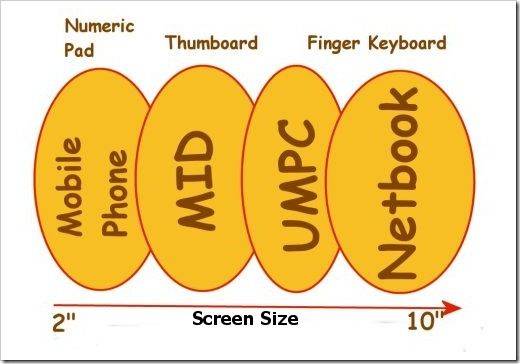
Common categories for various mobile computing devices.
Here’s our definition of an Ultra Mobile Computer from 2006.
A highly portable hand-held computing device with 4-10″ screen, wired and wireless connectivity that is able to load and run common Internet, office, media and information applications operated through a graphical user interface.
As you can see, the three common categories of MID, pro-mobile/ultra mobile PC and netbook defined above, fit into this, definition. This report continues with that 3-category definition but takes into account the emerging high-end smartphone market where some devices are using high-end screens and high-end processors.

Mobile computing Device capabilities.
The following diagram (click to download a PDF version) summarises the four main categories of mobile computing device shown in the above diagram and shows the capabilities of devices in the categories. The diagram was created in 2006 and so the label names have changed (at that point we were calling the 4-5″ segment a ‘Pocket PC’ and the 6-7″ segment a ‘Carrypad’ but the content remains valid.) Of course, a few devices don’t fit well into these categories but for the purposes of understanding requirements, and understanding the different types of mobile devices, this is a good starting point. More details on ultra mobile PC market segments and definitions in the diagram can be found in the 2006 report here. We dont expect this diagram to change for the next 3-5 years until foldable/rollable screens become mass market.
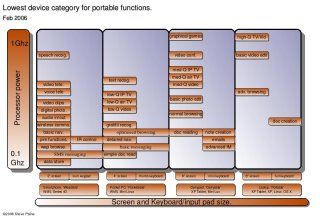
In the diagram you can see the four categories of mobile computing. The ‘wearable’ smartphone is identified by its very small screen and minimal input mechanism. The ‘pocketable’ Pocket PC identified by its slightly bigger screen and more input options, the ‘carryable’ device with a medium sized screen, more processing power and optional input mechanisms and finally the ‘portable’ notebook PC with its full-sized keyboard and screen and much higher processing power and weight. In each category we’ve identified the common functions that can only be performed by this category (and the more powerful categories of devices to the right.) For example, you can perform most PIM (address book, calendar etc.) functions on a smartphone but if you want to watch high-quality videos, you have to use a ultra mobile PC or better.
What device(s) do you need?
This is obviously a difficult question to answer and one that will be asked many times by people looking at these relatively new product segments. There is never a ‘best’ or ‘one device fits all’ solution so the only way to find your ideal device is to analyse your current and near-future requirements. In all three of the categories, MID, ultra mobile PC and Netbook, there are varying levels of mobility and a different list of scenarios where you may use the device and a different list of how you might carry the device. There’s also a huge range of prices, styles, form factors, features and brands.
 If you are new to mobile computing, there’s one rule you should know about: The more mobility you have, the more places you will find to use your device. The speed of use may be less but often, been able to use a device slowly but successfully is better than not be able to do it at all. For some people, this capability translates directly into productivity. If you are able to watch a time-shifted training video on the bus, standing up, you will save yourself time. If you are able to lie in bed and read emails before you get to work, again, you will have saved time. For other people, this mobility just translates to more fun and flexibility. Think about having a web browser at your side on the sofa. The ability to check emails, weather, traffic info and news even before you get out of bed. Being able to check on recipe details in the kitchen. Having a lightweight, handheld Internet access device in the cafe, waiting room, train, bus, car etc, etc, etc. There are scenarios that you wont even think of until you have your Mobile Computing Device.
As was mentioned earlier though, there are compromises to be made. A mobile device is smaller than a normal notebook PC. The screen space is limited and the keyboards are always smaller than a normal desktop PC. The processing power inside a ultra mobile PC is often less in order to get the required life from the smaller batteries and to keep the heat down in the small casings .There are cost considerations too as the market is still new and the components require more detailed design and in some cases, more expensive components.
In order to decide whether you need a ultra mobile PC you simply have to decide if the improvement in mobility (and resulting increase in productivity or fun) is worth the compromises.
As the price comes down, the designs get refined and the Internet access capabilities improve, the compromises become less and less and more and more people are seeing the positive side of the equation. Eventually its possible that the prices will get so low that you might be able to justify buying a device for one usage scenario. We look forward to that day!
In Part Two, ‘Details and Choices.’ We will cover the form factors, the keyboard, storage, the screen and connectivity elements of an Ultra Mobile Computer. You’ll find a good overview and a lot of tips that will help you refine your choice.










Good idea to publish this. Might be good to link your article series to a Wikipedia entry for the same.
Of course, by next spring we shall see all the segments hitting full stride with each company with better offerings. Battery life is still not what we all want in the netbook category, and we shall see if any new technologies come along to help that? The Nokia, Intel Moblin and Ubuntu 9.04 OS offering’s by next spring will be interesting to watch as well. The low end of the net book market will be evolving at the low end using non-intel “other than x68” CPUs and the next CES will be interesting to see what is about at the sub-$98 price range?
Today, with all that are out there, it is very confusing for the average consumer to survey the market place and make a selection. Articles like this one will be a great help.
PS- Regarding Netbooks, I was interested in seeing if anyone knows anything about RAID 1 and scatter gather technology (that improves read times when used with Disk based RAID), and if this CF/SATA RAID capable 2.5 inch drive replaement Flash Device could make quicker access and boot times:
http://www.addonics.com/products/flash_memory_reader/ad2sahdcf.asp ???
Chippy, I think I found an error in your report.
“First, Intel announced their dedicated silicon developments. Menlow was the platform name and it was targeted squarely at the mobile consumer and slated for launch in 2008. Later in the year Asustek took a risk and decided to launch a simple, small notebook using the same components as the Origami devices that came before it.”
I guess you’re speaking about the famous Eee PC 701. But the 701 was first release in late 2007 and did not use the Intel Atom processor that was to come in 2008.
Or am I just misunderstanding your sentence?
Hi JP
This does refer to 2007
“In 2007, Intel and Asustek managed to create a mini storm in the mobile computer market…”
and the asustek ref talks about the Origami platform not Menlow, Happy to mod the sentence if its not clear though.
Steve
Well after re-reading it I understood the sentence the way it’s meant, but it was unclear. Now that I read it again, I understand that 2008 was just Intel’s previsions, but this prevision was given in 2007. Everything is in 2007 actually :-)
Yes this is not really clear but I don’t know how you could make it better, so do as you wish.
By the way, you added “(2007}”, you mistyped a curly brace instead of a parenthesis…
Thanks JP.
Such an important topic I would like to see an honorable mention of the Toshiba Libretto series and the Transmeta crusoe chip after that.
I loved my Libretto. I wish I didn’t over clocked and killed it.
I failed my driver’s test. The guy asked me “what do you do at a red light?” I said, I don’t know… look around, listen to the radio… (Bill Braudis). :P