
Categorized | operating system

Tags :

Moblin V2 Beta now available. (Video)

Posted on 19 May 2009 by


The easiest thing for me to do right now is to post the demo video.

Looks great!

Moblin V2 Beta is available for netbook and nettop architectures right now and you can download it from Moblin.org.
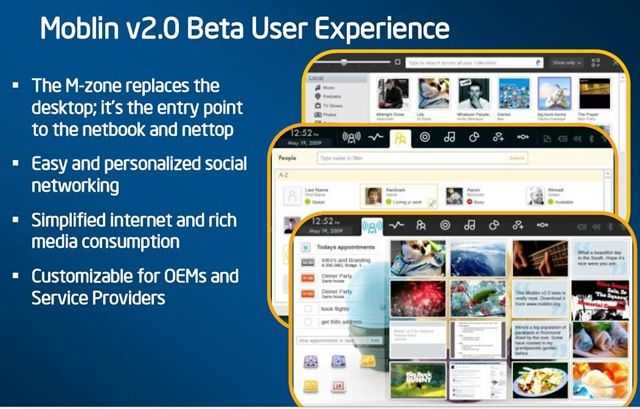
moblinv2

Also note that you can find out more information at Moblinzone.

10 Comments For This Post

  1. Steve 'Chippy' Paine says:

    New article: Moblin V2 Beta now available. (Video) http://cli.gs/X9jnBh

  2. Colin Tye says:

    RT @chippy: New article: Moblin V2 Beta now available. (Video) http://cli.gs/X9jnBh

  3. Charles-Axel says:

    Moblin 2 Beta looks really good! I thinks I’m going to download and try it this evening. Video: http://bit.ly/v23bP (From @chippy)

  4. Andre H. Beckedorf says:

    Trying out Moblin V2 Beta on my Fujitsu U810: http://bit.ly/3wGYRZ

  5. squirrel says:

    Chippy, is it for Atom-based devices only or it can be installed on ARM MID?

  6. turn_self_off says:

    looks to me like intel is building another webos…

  7. Sokonomi says:

    Hmm, normally im rather deterred from linux because its usually a bit unfriendly, but moblin looks kinda productive. I will be giving it a go on VMware to see what it can do.

    @Squirrel: Im not too familiar with program coding, but I think moblin is built for the x86 instruction set, since it mentions running on an atom infrastructure only.

    turn_self_off Reply:

    still, if all the parts are open source, it could be looked over and recompiled to work on ARM. linux and all that already runs on arm, as seen from maemo (nokia), android (google) and openmoko.

  8. squirrel says:

    Is Moblin more touch-friendly than Windows 7?

  9. Sokonomi says:

    Hahah, I fail at linux yet again. :’) How on earth do you get this iso running? Theres no boot files in its root.

    tampigns Reply:

    huh? .img file is a bootable file…

    Sokonomi Reply:

    It only contains 2 folders?

  10. Sokonomi says:

    Gotta love the hanous instructions that always seem to accompany anything linux..

    Quote:
    dd for windows works very much the same way as dd in Linux.
    1. Download dd-0.5.zip. Extract the program.
    2. Plug in your USB key and find the drive letter that gets assigned. For example:
    BUNCHA CODE THAT MIGHT ASWELL BE THE FORMULA FOR COLD FUSION.
    3. Copy the image to the USB key:
    SOME MORE CODESLAPPING
    Unquote.

    Its redicilous!
    Why oh why is linux not shaking microsofts hold on consumers… HA!

    ardnimr Reply:

    and just how do you install Windows on netbooks without an optical drive?

    Sokonomi Reply:

    By sticking it on a usb stick without having to invent flying pigs?

Search UMPCPortal

Sales Information


Our Network

  • ARMShowcase Tracking ARM-based mobile products
  • Big Beach Our marketing advisors. Located in UK.
  • Carrypad Tablets and consumer mobile products
  • Chromebook News Chromebook news, products and specifications
  • Device Manufacturer List List of all device manufacturers, and products, from our database
  • JKKMobile JKKMobile – Mobile computing and hacking – Partner of UMPCPortal
  • Liliputing Netbooks and small-form-factor laptoping – Partner of UMPCPortal
  • MeeGoNews News, reports and inside info from the MeeGo Ecosystem – Partner of UMPCPortal
  • MeetMobility Mobile computing podcast broadcast every two weeks – Partner of UMPCPortal
  • Netbooknews Netbooks and other mobile devices – Partner of UMPCPortal
  • Ultrabook News Ultrabook products, specs and news

Donators (Last 20)

Buy Laptop (€5.00 EUR) Says:
Sep 18, 2011 at 7:43 am

Awesome website, great read!

Jez@SammyTablet Says:
Oct 15, 2010 at 8:25 am

Keep up the good work! UMPCPortal and Carrypad are always a good read :)

MiKeN (€5.00 EUR) Says:
Oct 15, 2010 at 5:13 am

Microsoft AutoRoute Says:
Sep 3, 2010 at 10:46 pm

Trip planning and satnav software for PC

MMORPG Says:
Oct 6, 2009 at 2:07 am

Keep up the great work on UMPCPortal :)

Laptop Computers Says:
Jun 9, 2009 at 8:00 pm

Laptop reviews, ratings and netbook computer buying guides.

Laptop GPS World Says:
May 10, 2009 at 2:01 pm

PC GPS SatNav reviews and forums.

Ultimate-Netbook Says:
Apr 11, 2009 at 2:48 pm

Ultimate-addons supplier of netbook accessories

Steve Paine Says:
Apr 2, 2009 at 8:44 pm

Test from Steve








