
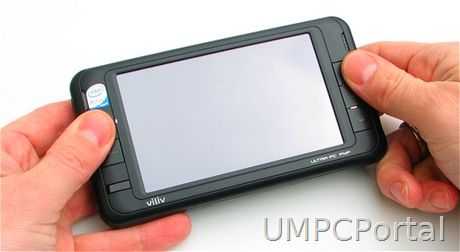
After many months of wondering if the S5 was going to be as good as we first imagined it to be, it’s time to review the final retail version and make some conclusions. The Viliv S5 is one of the smallest tablet PC’s in the world. It includes a full PC hardware architecture and Windows XP software. The manufacturer has used a mature design from it’s PMP range and the end result is a solid, well-built pocketable device aimed at media, web browsing and, due to the built-in GPS, navigation.
Vilis S5 specifications, discussion, links, videos and images in the community specifications page.
First five minutes.
Viliv clearly have experience at pleasing the customer in the first few minutes of ownership. The packaging was good and included a surprise car package and leather pouch. This isn’t a standard accessory pack but we have seen a standard retail kit and again, the packaging was excellent. The S5 feels really solid in the hands. Tough in build but also rather dense. It only weighs 395gm (14oz) but as it’s so small, it feels slightly heavier than it should. Plastics are well fitted all round, there’s a nice matt finish to the black plastics and the cursor joystick feels well built. Plugging the battery in is easy and the device was booted in around 75 seconds. You’re presented with Viliv’s Cube UI overlay software and for the rest of your first five minutes, you’ll probably be playing around with it. It’s a new, fun, interesting way to view applications and shortcuts.
The unboxing and overview video is available here.

Review package contents included some nice accessories.
Specifications
The Viliv S5 is based on the Intel Menlow platform that includes the Z520 Atom CPU and the ‘Poulsbo’ chipset (US15W) which includes a GMA 500 GPU and video decoding hardware. It’s exactly the same setup as on the Kohjinsha SC3 and Sony Vaio P which are much bigger devices. On the review model we had a 60GB hard drive (not SSD) and 1GB of RAM. There’s Wifi, Bluetooth, the GPS module, an infra red receiver, stereo speakers, a 1024×600 glossy, LED-backlit touchscreen and a number of back-lit buttons. The battery is a relatively large 24hr unit. Full specifications can be found on the product page.
Initial impressions
We wrote our initial impressions and link to a lengthy Q&A and testing video in a separate article, available here.
No showstoppers and an overall good feeling makes me want to use this device more and give the on-screen keyboard a chance. The battery life is incredibly impressive and the device truly is giving the user the full internet experience. Even without 3G and a fast SSD its up there as the best pocketable ultra mobile PC in my opinion but the lack of keyboard will be a not-starter for some. A real mouse pointer would have made it so much easier to navigate and it’s the only thing I’d class as a failure although some are also going to add the lack of microphone under that banner. Windows XP works well, the on screen keyboard and Viliv touch UI work well but Windows 7’s touch optimised interface and on-screen input could make this even better and give it even more character. The Viliv S5 raises the bar for UMPCs.
From the outside.
It’s clean looks and quality switchgear all-round with the Viliv. On the top you find an antenna (for the unused, Korean, DMB TV receiver) a three way (up, down, mute) volume switch, and on the top left, a headphone port. This is not a headset port and note, there is no built-in mic so you’ll have to think about Bluetooth or usb audio dongle for audio input.


Click for larger versions.
On the left you find a flip-down cover that hides a mini-usb (for using the S5 as a USB drive) usb and a/v breakout port. The a/v breakout port is for an optional cable that can supply component, S-Video, VGA, audio and composite signals. We didn’t have this accessory so it hasn’t been tested. Underneath the device are two airflow ports.On the right is the power/lock switch and the battery release catch. The rear of the device is covered by the battery.
Controls
On the frame of the the S5, you’ll notice the joystick on the top left. It’s a cursor control that can be turned into a directional pointer for the mouse and has a ‘tab’ response when pressed. As a mouse pointer its not accurate and not proportional which is a shame. A mouse pointer would have been far more useful considering the positions of the left and right mouse buttons on the right side. Underneath the joystick is a ‘menu’ button that’s equivalent to the Windows key on a keyboard. Underneath that is the IR receiver. On the right-hand side are the left and right mouse buttons (the left mouse button, marked MENU, also turns the screen off after along press) and a dedicated on-screen-keyboard button.
Note that there is no stylus silo. A pick-style pointer is attached to the lanyard and due to the very high resolution screen, is often needed for menu items. The lanyard is a useful addition and we kept it attached to the S5 all the time.
Screen
The 1024×600, 4.8 inch screen is impressive. High quality images and videos look fantastic. Colors are good and the brightness too. The glossy finish helps fingers slide across the touchscreen for dragging actions but in sunlight, the glossy screen is an annoyance. Watching videos on a sunny day is a no-no. The other issue with the screen is the high resolution. Default windows XP fonts and window elements such as scrollbars and close buttons can be difficult to use and see. The XP font size needs to be set at the 120dpi level to improve readability. ClearType is recommended too.
Viliv S5 photo galleries here.
Screen Viewing Angle
Viewing angle in the horizontal plane is good from both sides. It’s viewable from below too but there’s a big drop-off in clarity and brightness when viewed from above.
On screen keyboard and haptics.
The on screen keyboard is well thought out. It’s activated using the dedicated button (bottom right on the frame) and also uses haptic feedback. A small vibration provides feedback that you’ve pressed a key and for an on screen keyboard, it’s a reasonable experience. There’s no word completion though and numerics are hidden under a ‘Mode’ button. Function keys are missing too. There’s also a problem with focus. Some applications push themselves in front of the keyboard. Most noticeable was the Awesome Bar in Firefox which is a great help when matching typed characters against web history and search. Unfortunately, the selections cover the keyboard and if your next key is hidden by the options, you’re in trouble.
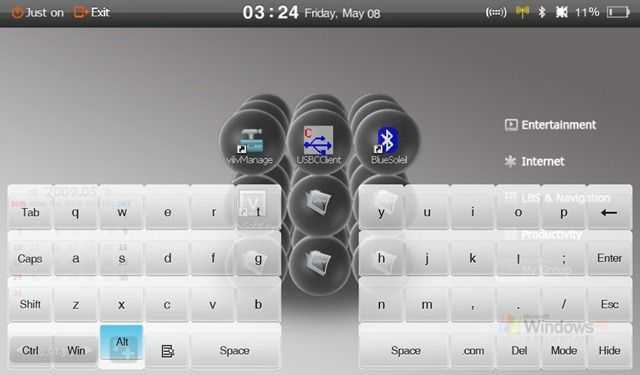
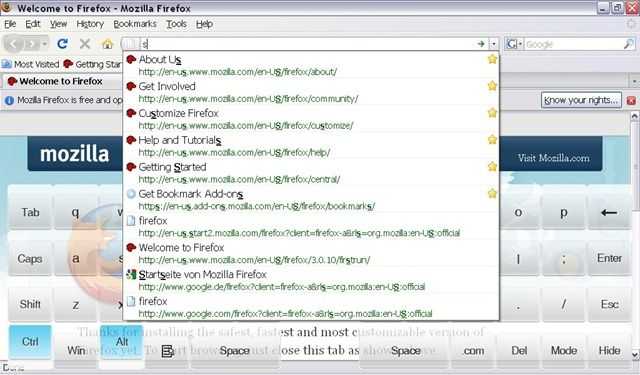
On screen keyboard and firefox drop-down issue. (Click to enlarge.)
Overall, the OSK is useful and for a media consumption and navigation device where the most you will be typing is a URL or password, it wouldn’t have made sense to reduce the battery size to fit a slider or clamshell keyboard into the design.
CubeUI
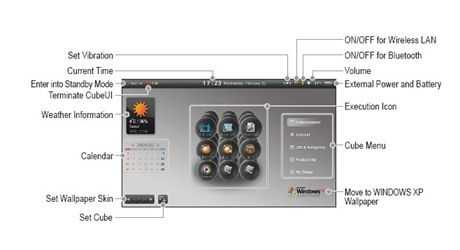
The CubeUI software is an interesting application. At first it felt like a fun addition to the package but after a while we found ourselves turning it off in favour of the standard, and often quicker, XP desktop. We see where it could be useful though. It can house over 100 applications, shortcuts or bookmarks, includes an easy way to control BT and Wifi, a nice calendar and weather application and is easy to push into the background if you need to access raw XP.
FastWeb Browser
Viliv have included a touch-friendly browser which we believe is based on uZard by Logicplant. The UI is simple and easy to use but the browser itself is slow. The reason is that Viliv have implemented a proxy server, in Korea (fastweb.myviliv.com port 7999.) For users in Korea this is obviously going to be a fast and efficient solution but outside Korea, its not. From our location in Germany, traffic was router over Amsterdam, New York, San Francisco and out through a series of routers in Asia resulting in 0.5 second round trip times. Apart from the potential privacy issues, its slow. Not recommended.
Additional Software:
- I-Viliv update manager: No updates were found through this but we assume it will provide easy access to Viliv software updates.
- Viliv Manager: A simple application for controlling Wifi, Bluetooth, screen brightness, vibration and enabling CubeUI to start on Windows boot. Most of these options are duplicated in CubeUI itself.
- Music studio: A simple music player. Some controls appear in Korean and the application doesn’t run in full screen. A basic application.
- Viliv Player: Plays back video and, where possible, enables hardware decoding. See below.
Infra Red.
We can only assume that the IR panel is for a future upgrade because there doesn’t appear to be any hardware associated with it. We tested with a Media Center remote and got no response.
Performance.
We’ve tested the Menlow platform extensively on 4 different PCs now and we’re extremely happy with it’s balance of performance and efficiency for mobile usage. We pages load promptly and media playback works well. As a synthetic test, we ran CrystalMark:
CrystalMark test results
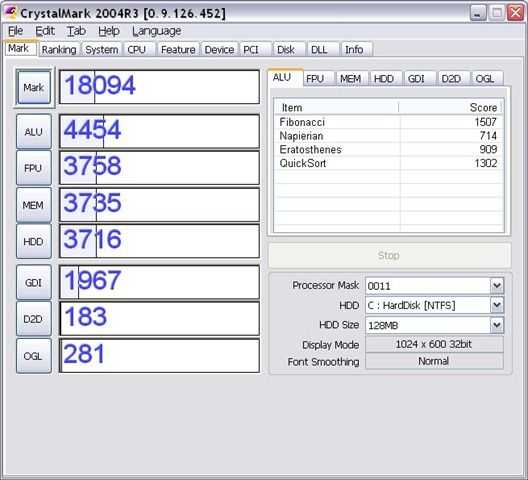
CPU, GPU and Memory scores are all on par with other 1.3Ghz devices we’ve tested. The hard drive scores are typical of a 1.8 inch drive and, compared to some of the new SSD drives we are seeing, quite slow. Given that this is targeted as a media device though, a 64GB SSD would have added $200 or more to the price so that speed/capacity trade-off is acceptable.
Video performance.
The Viliv S5 includes the Intel US15W chipset which includes the GMA500 GPU and video decoding hardware for H2.64, WMV, MPEG4 and MPEG2. Out of the box, Windows XP isn’t set up to use this hardware so video decoding results with Windows Media Player aren’t as good as they could be. Installing the Cyberlink PowerDVD 8 software and utilising the codecs included in the software can result in very impressive H.264 and WMV performance figures. With these tweaks we were able to successfully run a 1920×1080 H.264 that averaged over 12mbps.
Viliv include an application called Viliv Player. It’s a simple video player but a useful one as it enables some high performance playback using the build in hardware decoding. Not only does this improve the performance, it saves battery life by keeping the CPU usage down. For example, when playing a 4mbps 720×400 DIvx, the CPU level was at about 30%. A 1280×720 H.264 file (at 3.5Mbps with AC3 audio and subtitles in a Matroska envelope) played perfectly with just 25% CPU utilisation. There appears to be some acceleration of WMV files too but this doesn’t seem to be as good. A 6.5Mbps file we played started stuttering after about 20 seconds. In general though, the media player performance is very good and the colours, sharpness and contrast are exceptional on the high-resolution screen.
[Note: Video playback results will vary with different files, filters, drivers and playback software]
As for inline flash video, the normal quality YouTube videos work well in both windowed and fullscreen modes. HQ videos are smooth in windowed modebut some frame loss creeps in when in fullscreen mode. The Viliv S5 CPU is not powerful enough to show HD quality YouTube videos despite these being in H.264. The flash player does not link with the Intel hardware to enable hardware decoding. [Tip: YouTube HD videos can be downloaded with the help of 3rd party software and then played offline from the disk and outside the flash environment. ]
Audio.
Audio quality from the Viliv S5 is excellent in comparison to other UMPCs and Viliv also included a good quality set of earbuds. The speakers are far from full-sounding but compare well and are loud enough for watching a video or streaming audio. The Bluetooth stack is capable of A2DP too so there are good options for listening to audio tracks.
Heat and noise.
Viliv have designed the S5 without fan which results in near-silent operation. Only the HDD can be heard and even this appears to be well insulated. The device can get warm under load but we didn’t notice any worrying heat build-up. We tested the device for short (sub 1hr) periods while on in a bag and heat build-up started to increase but with the screen off, locked and with the device in power saving mode, it should be possible to play MP3s for an extremely long time (estimated over 10hrs)
Stability.
During the three weeks that we had the Viliv S5 we so no indication of instability.
Boot-up, standby, hibernate speeds
Boot-up from cold requires about 1 minute. Standby (return) varies from around 2 seconds to 6 seconds indicating that there is a two-stage standby operation going on in the background. Viliv claim 200hrs standby which we weren’t able to test but based on overnight standby battery drain, we would expect well over 100 hours standby .
Hibernate is difficult to achieve through the start menu due to the backgrounding of the on-screen-keyboard (shift key is needed to enable the hibernation button) but in a test, return from hibernation was an acceptable 30 seconds.
Battery life.
One of the best features of the Viliv is its battery life. One of the problems on the Viliv S5 is that the battery life indicator was unreliable and didnt ever show a remaining time making it hard to measure battery drain. In a full Battery Eater Pro test, a worst case scenario, the device lasted for 234 minutes, over 4 hours. That’s an average of 6 watts which is about half of the power that even the most efficient netbooks would use under the same test.
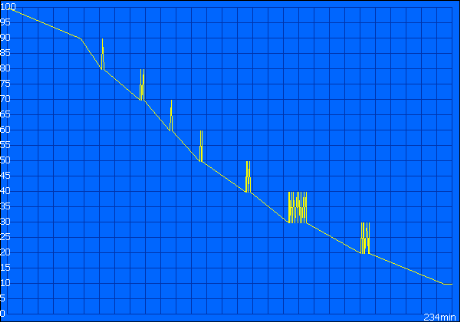
6hrs of Wifi-on browsing should be expected on the Viliv S5. 6hrs video playback (using hardware decoding) and 6-8hrs of Ebook reading (wifi off, 50% screen brightness.)
GPS.
A SirfStarIII GPS chipset is included and in the first device we had, we couldn’t get any software to hook up to it within a reasonable timeframe. Viliv sent us a second review model which worked better but we’re still not convinced that everything is working 100%. It seems that despite the GPS sending signals over the COM1 port, applications don’t see the correct protocol and don’t sync-up. In some cases applications never got a GPS signal, in others, the lock was extremely quick. We will be testing the Viliv S5 with Mapfactor PC Navigator 9.
Application tests.
- Firefox3, Chrome, Opera, Tweetdeck and Thwirl all tested perfectly.
- Skype V4.0.0.224 works well but USB or Bluetooth headset is needed. No cam for video.
- YouTube – works well All normal quality YouTube videos tested well in windowed and full-screen mode. All HQ videos tested worked in windowed mode. Many worked perfectly in full-screen mode too. (Always-on battery mode) No HD YouTube support.
- Google Earth (4.2.0205) worked reasonably well in DirectX mode. Certainly not as smooth as on a desktop or laptop but usable.
- Other software tested: Ipoki plugin. Mapfactor Navigator.
Firefox load times.
- Firefox application startup time: 11 seconds.
Page load examples (full script and flash support over Wifi.)
- UMPCPortal: 6-7 seconds
- Google News: 1-2 seconds
- CNN.com 7 seconds
- Facebook 3 seconds to login screen
- uk.yahoo.com: 2 seconds
- Techmeme: 6 seconds
- Gmail (full version): 7 seconds
- Google Reader (633 items): 4 seconds
Overall, page loading times were extremely fast and matched almost exactly, the times seen on the UMID M1.
Gaming.
We haven’t tested any games with the Viliv S5 and due to the relatively poor 3D performance figures, wouldn’t recommend this for modern gaming. Casual gaming will be fun as the controls seem well-placed.
WiFi/Bluetooth quality.
Bluetooth quality was not extensively tested. The system uses BlueSoleil version 5.4.244 which, in our opinion based on a number of devices running the same stack, is stable and easy to use.
We had no problems at all with Wifi configuration or reception. Reception appears to be slightly better than average for UMPCs. The Marvell sd8686 only supports B and G modes.
Missing features: Media Slot, Webcam, MiC
In our opinion the Viliv S5 is capable of running as a Skype client for many hours so the ommision of a MIC or MIC input is a mystery. A Bluetooth headset is the answer here. We also missed a media slot. The S5 could have made a great partner device for previewing and geotagging photos with an SD card slot. A USB SD-Card holder solves the problem. Finally, and linked with the Skype observation, we would have liked to have seen a web cam built in.
Optional accessories.
The accessory pack provided was of very high quality. The leather case (Viliv call is a pouch but we would call it a case) is well made with a plastic clip-in holder for the S5. It also includes a stylus but we don’t expect it to last long before dropping out and getting lost!


Click to enlarge. Full gallery available here.
The car kit comprises a two-part suction mount that we’ve seen and tested before with the Raon Digital Everun. It holds well and adjusted in two directions. Also included in the car kit is a 12V adaptor. Not shown in the photos (but viewable in the photo at the top of this article) is an acrylic protective case. For those with an adventurous spirit, this allows you to protect the device and even use it when protected. It fits easily and holds well.
Who’s the target customer?
The Viliv S5 is squarely targeted at mobile media consumption and in that role it’s a high-class, well-built, flexible, adaptable device. We won’t say that it’s as easy as an Archos device to operate but it’s way more flexible. As Windows 7 nears, the S5 becomes more interesting. Windows 7 supports hardware decoding for H.264 out of the box (we’ve tested it on similar Intel platforms and it works well) and has much better built-in media facilities . The screen resolution is as high as you could sensibly go for a media device of this size and the colour and brightness are great. Its only the glossy screen that needs to be considered if you’re planning to use the device outdoors or by windows (in busses and trains for example.) Battery life for video playback (wifi off) should easily reach over 5 hrs and 6hrs if you are able to enabled the hardware decoding on the chipset. As a music player we expect the device to last over 10 hours. With 60GB storage, there’s enough for a good selection. Its stylish on it’s own and looks great in the case.
As a navigation device the S5 falls a little short in that it doesn’t come pre-installed with any software. The time to get a GPS lock on our device also makes us think about cheaper dedicated options but if it’s a navigation and media center you want in the car, it’s a different matter. We’ve seen the S5 running StreetDeck and it’s an impressive setup. The breakout cable has potential for being permanently wired into a car system. The chipset even supports clone and extended monitors so you could run the navigation software on the device and a video on an extended screen.
As a pocketable web tablet the Viliv has some value but only for web consumption. Text input with the on-screen keyboard is difficult to get comfortable with. Web page quality and load times are really the best you could ever hope for in the market today so if you’re the type that needs to flip through a set of bookmarks or simply track a single web application, this is a good quality, long battery life solution.
The Viliv S5 works as a mobile computer but we found it difficult in table-top mode with an external keyboard. At 50cm you have to increase font sizes a lot and there’s no stand. It’s not ideal but because of it’s excelent standby time, it does make a very good backup computer.
The Viliv S5 doesn’t work well as a traditional tabletPC. The resistive touchscreen is not palm resistant and you’ll have to find a copy of Windows XPTE to load onto it to get a chance to use the tablet input panel. Even then, we’re not sure if the touch drivers are TabletPC compatible. We haven’t tested Windows 7 RC1.

Summary
High quality. Great battery life. Excellent build. Class leading PC portability. Fast, high quality web browsing, high-end video quality and a good range of accessories make the Viliv S5 a confidence-inspiring package for flexible, high quality, mobile media and carPC setups. The on-screen keyboard limits its text input capabilities but its a PC for the pocket and if needed, could be used as a complete desktop system. We’re impressed with the Menlow platform and the significant improvements in battery life over the last generation of ultra mobile platforms. Glossy screen, missing microphone and GPS lock times are things we’d highlight as possible issues and it’s a shame that the mobile browser and digital TV don’t work but all-in-all, it’s a great package and highly recommended for people looking for a pocketable tablet-style, media-focused UMPC.
Pricing and availability
The Viliv S5 is currently available as an exclusive at Dynamism.com where, on the 14th May, they will be offering 400 pre-orders with a special accessory pack included. Car kit, additional battery and leather case along with the Viliv S5 Premium, as reviewed here, for $599.
Many thanks to Viliv for sending the S5 over and being available for questions.











New article: Viliv S5 Premium UMPC. Full review. http://cli.gs/NVMyWD
RT @chippy: New article: Viliv S5 Premium UMPC. Full review. http://cli.gs/NVMyWD
RT @chippy: New article: Viliv S5 Premium UMPC. Full review. http://cli.gs/NVMyWD
I see that Mobilx have removed any mention of Viliv from their website. Is America the only place to get one of these? I was hoping that the one with the keyboard would be released in Europe soon.
Ive noticed that aswell. And having it sent from conics costs me 100 bucks, so thats a bit steep.
[reading] Viliv S5 Premium UMPC. Full review. | UMPCPortal – The Mobile Internet and Computing Referenc.. http://tinyurl.com/o278rs
Chipping under gaming you mention UMID…
Nice review, confirms that I won’t be getting one, though it is nice.
I wish they would have thought twice about the USB location though. wibrain/e-king learned from their mistakes, viliv should too.
My choice was between this device because of its pocketability, and the E-king i1 because of its productivity, but since mobilx has sniped the S5 from their webshop now, I guess theres no more choice to be made for me. :’)
Great Review!! I wish I would get one.
Probably we’ll have a distribution in Spain of the Viliv s5 in todoumpc.com. This shop says that the model
in the shop probably the ssd with hdspa.
SSD might be costly, but it would give the batterylife a nice little extra bump.
I wish I could speak a word of spanish. :’) I have no clue what im paying for if I buy from that site.
Sorry for my poor level of english.
Just spoken to Dynamism and mine is in today’s post. Luckily this review hasn’t made me want to change my mind!!
Found: UMPCPortal: Full review of Viliv S5 http://tinyurl.com/o278rs
It is a very nice device, but my UX380n has still a better performance :)
I hope your wallet has better preformance too. ;) For some people price matters too.
Chippy,
On one previous video i saw that applications were launched by drawing symbols on the screen. Did you test this very interesting UI feature?
Did you open the device? Can the HDD be replaced, for example by SSD and WiMAX :-)
Squirrel. There’s no gesture-based s/w on this. You might be thinking of StreetDeck which works nicely on the S5 and includes gesture-based commends.
Yes the internal drive can be replaced… I have tested mine with a Mtron MOBI 3000 1.8″ ZIF drive and also a a compact flash card using a zif to CF converter from Addonics.
No idea on the WIMAX tho…
Also the ram cannot be replaced or changed as it is embedded into the board.
maybe intel echo peak 5150 (half size)
http://www.intel.com/network/connectivity/products/wireless/wimax/wifi/index.htmusb is needed for wimax (pci-e for wi-fi, but it’s aleady built in)
RT @chippy: Found: UMPCPortal: Full review of Viliv S5 http://tinyurl.com/o278rs (KK says: I gotta get one of these with 3G!)
@squirrel
I think that is StrokeIt and not the UI
Nice review!
Can you please say a word about Portraitmode (browsing and reading ebooks)?
Rotation works although there’s no shortcut button or on-screen menu apart from the Intel graphics software and shortcut. (CTRL-ALT-Cursor keys.)
Touch still works ok.
Because of the vertical viewing angle limitations (it fades quickly when viewed from above), there’s a slight problem because when you hold the device close to the eyes, each eye gets a different color / contrast level. It’s a bit like the effect you get when wearing red/blue 3d glasses. It only occurs when you hold the device close, i think most people could put up with it and some people may not even notice it. It happens with a lot of devices but is more pronounced on hi-res handhelds because you hold the screen closer to the eyes.
Steve
Goodd review! It is one more confirmation not to buy this strange device.
haha. Like it!
As with all UMPCs and MIDs, form factors and software vary wildly. It’s a very personalised segment of computers. The real personal computer!
Hi Chippy
Great review thanks!
Do you have any idea if there’s enough room for an 1.8″ 8mm hdd?? It’s the only thing I need to know before I’ll get mine!
Cheers
Great review Chippy,
I see you are planning to test MapFactor Pc Navigator 9 on the S5.
I’m using Pc Navigator 8 on my Aigo and aside from the obvious battery life issue it is working very nicely,
the interface is very well suited to the touch screen (The menus and icons seem to stay the same size no matter what resolution you have the device screen set to) which i think will be a useful feature on the S3 as the resloution is so high.
Even on the Aigo voice commands are clearly heard (which again i think will be better on the S5)
I will be very interested to see your impressions of the Pc Navigator 9 on the S5, from what i have experienced on the Aigo it should make the S5 into a near perfect Navigation device.
Chippy,
nice review thanks. Just one question: you know something about the release of S5 with SSD and HSDPA? I didn’t participate to the previous Dynamism rush sale, and I don’t know if to participate in the one on this Thursday, because I was waiting for the device with these features. But if it is a matter to wait too long, it is not a good point to wait.
May, June? No details at the moment. I’m guessing if Viliv are focusing on north america right now that European (HSDPA) launch could get pushed out into June.
S
I’ve just received my S5 from Dynamism. Now just why does the US distribution not include that nifty plastic encasing? Alas, it would have been perfect for some of my work related use. Any chance you’ll sell yours? ;)
Its not mine. All on loan from Viliv! Sorry.
S
Thanks Chippy,
if it is few months to see available the HSDPA and SSD it’s worth it to wait. Since with an eventual USB modem would be not so confortable to handle for the USB position.
I had a chance to look at this up close in South Korea last week. It does feel pretty solid and the touchscreen was precise. The reason I didn’t purchase it was the resolution was way too small for my old eyes. It may appeal to you younger folks… The price came to $531 after the conversion which is more than I had guessed.
Hi DK. It’s a good point.
It’s not the resolution that’s too high, it’s the default font size in pixels (or ‘points’) that’s too small.
There’s a setting in all versions of Windows (from XP and up, and most other desktop OS’) that allows you to boost the default font size which results in bigger fonts that are the same size as on bigger screens (actually screens with a lower pixels-per-inch to be more accurate) but better defined.
The only downside to this is that you lose the ability to put a lot of text of the screen and that some applications don’t play well with the settings.
I wrote an email to viliv about 2 weeks ago asking them when the S5 Premium Air will be available in the US and europe and thats what they answeared:
…..
We don’t release yet S5 Air/S7 with SSD and HSDPA in Europe and USA.
(we are talking about several potential partners about launching date and the price of S5 but we haven’t decide it yet)
…..
Do they have an english version of that site? did you just scour the page for an email?
yes they do, but there is still much under construction…
http://www.myviliv.com/eng/index.html
I don’t know… it seems that waiting for a more pocketable and functional Tegra Windows Mobile (or Android) phone seems like the better solution.
http://www.nvidia.com/object/mobile_games_demos.html
Yes, we all think about ARM Cortex (Tegra=ARM Cortex+GeForce+UI), so let’s wait Computex (June 2-6) where Nvidia promise to say when the devices on it will be lauched
Sorry, Tegra is based on ARM11, so it’s not so interesting for universal MID, more for 1080p video and 3D graphics
I know this isnt exactly built for any kind of gaming, but I’d really like to see “Quake 3 Arena” benchmarked, i would think even an underpowered machine could handle it.
What??? No Mic and no SD/Micro SD slot? Even the PSP has a memory slot (granted it’s the stupid Memory Stick).
Uggh, why make such a great device and not include those things. Seems like a no brainer. Geez, at least include it in the Premium models.
Now the hard decision, go for the current model or wait until they fix these glaring annoying problems.
No Mic I can live with, no memory card slot is silly, but I can get over it.
After five minutes with this device (just arrived in UK from Dynamism) and I have to say I’m pretty impressed, the build is great and XP seems to just work. The potential deal breaker for me isn’t the memory card slot, mic or lack of keyboard, it could be the lack of stylus/place to put stylus.
The thing on the lanyard works fine, but it’s already annoying me…
Oh, and if you are waiting for a card slot and mic, then I think the wait will be long. If they are a problem look for another device…
Oh wow, really no SD card? Not even microSD? That makes my decision final, E-king i1 it is then. I have about 32gb worth of SD 8gb cards laying around, and not being able to use these them would be a big loss. As for no mic, I guess a bluetooth headset is nicer to use anyway.
Another detail that made me doubt the S5, was the USB port location. The thing would become useless with an external drive hooked up to it. You would be barely able to hold on to it, not to mention typing on it.
Had another quick play (I really should be doing some work).
Leather case is very nice, and you can use it as a kick stand (at least on a still surface, would need to test a train), would have been nice if they had made that a deliberate feature like Samsung did with the Q1 case, it wouldn’t have been difficult.
The case does have a stylus and place to put it. Surely that means they realised it would be a good idea to have one in the unit?
So I think I’ll keep it in the case, rather than keep the lanyard on. Neither ideal.
Runs all my normal websites beautifully. Need to see if I can find a way to do an increase zoom in firefox from some kind of shortcut. Default text is a little small. It’s probably mentioned in the review, but browse with firefox and install grab and drag. Perfect!
HD seems to have a regular annoying tick. I think there is a thread on Pocketables on it. Will have to check that later.
Seems like they could easily get rid of the antenna and put a stylus silo in it’s place on models exported from the country.
Viliv S5 – Premium UMPC – Full review http://bit.ly/OMEgb #UMPC
Just bought one of these beauties on dynamism and was wondering if anyone knows of a compatible uk mains adaptor (charger) that I can purchase?
I expect that the default charger will be a 2pin and different voltage than uk :(
Power supply is a worldwide 100-240volts so works fine in the UK.
All you need is one of these at a massive $1.92 delivered to the UK. (Be warned dealextreme can be an addictive place):
http://www.dealextreme.com/details.dx/sku.2709
Hi guys
Do you think this can play warcraft 3? It’s not really a modern game, considering the age, but I’m not sure if the GPU is able to handle it..
thanks
Chippy,
I am wondering how to use the virtual keyboard in a pre boot environment, like for example in Bios or in multi boot menu etc..?
You couldn’t, you would need a USB keyboard.
In a boot menu, or in the bios, the buttons on the device would provide certain functionality such as cursor control and enter.
Is it OANDA software possible on this UMPC ?
How much space free after Installing a clean OS? ~28GB?
Anybody got any idea if the F-log model from korea means it includes the 3g module? Or we cannot get the S5 with 3g module from korea directly? tks
I received my s5 3g from Dynamism. Sadly they only supplied it with the battery charger with only north american type electric socket. That socket is changeable on the battery charger, so they could have supplied it with other regions socket too, especially when people send an order from Europe. That changeable socket part is a very cheap spare part but can be very annoying to the buyers not having that with the device. In my country, in Hungary, we use the german standard of electric socket.
Chippy, is it normal that dynamism sent the s5 with that only north american socke type?
Dynamism are a US based operation and get the S5s supplied to them for a US market. They choose to sell them internationally, but don’t have the parts for the rest of the world.
I agree it is annoying.
I couldn’t find the correct part and just paid a couple of euros for an adapter. Not sure what you have in Hungary, but something like this should do the trick?
http://www.dealextreme.com/details.dx/sku.13525
Did you test the wireless speed of the built-in marvel wlan adapter? Mine is disappointingly slow. I didn’t read thouhgts about that in this reveiew. Mine is under the factory installed windows xp home only could around 5Mbs (350-450 kbyte/sec file transfer speed tested in totalcommander and netmeter ) which is much below what 54Mbit/s standard in real world condition usually can (2300-2500kbyte/sec).
Chippy, did you notice that wlan bandwith issue? I updated the drivers and was playing all the settings of the wlan card, but nothing helped.
Finally since few days I got my S5 3G from Dynamism. The first impresssion is very good even the lack of a onboard microphone and webcam is incomprehensible (I knew anyway) the same for the lack of the card reader, but what has really surprised me is that is not even possible to use the microphone of a headset!!!! (there is only the place for the hearphone jack!!!) So it is necessary to use an USB headset or a Bluetooth one.
The onscreen keybord is ok since I will do mainly a “consumer” use of this device and not a “producer” one.
The 3G works good and was surprisingly positive to find the software to use the device as a cellphone for voice and sms.
The speed of the wireless connection is good.
Another remarks is about the documentation. The manuals are very poor and the support on the website is still not very helping.
Now I am wonderig how to do certain things, like:
– somebody knows how to scroll webpages( and maybe other documents like Word etc.) moving the finger on the touchscreen? I have seen this done on some youtube videos, like the one of the review of JKK. If I do that on the Chrome or Mozilla or IE I got the elements selected instead scrolling pages.
– someone knows how to install the drivers dowloaded from the myviliv website? They are not execurable files, so a not IT expert like me doesn’t know where to put these files.
Thanks
Fra
ok, about the fact that is not possible to use a headset with microphone is not true!!! I just read this http://forum.pocketables.net/showthread.php?t=3164
Fra
Use Firefox as your browser and then get the ‘grab and drag’ plugin. It does what you need and makes Firefox the first choice browser for devices like this.
Thanks Marc I will try. Even my preferred web browser is Chrome. You know if there is the same functionality in it? I guess not till it is still under development. And what about other software like Acrobat Reader, Word etc:?
Fra
Chrome is my preferred browser too, but as it doesn’t support add-ons it can’t do this and won’t be the first choice for tablet devices until it does.
You also want to get the full screen add-on. It let’s you put a full screen icon on the toolbar. Useful for maximising screen space rather than trying to find it in a menu.
Not looked into other drag scrolling stuff for Windows, but do vaguely remember there being a thread over on Pocketables forums. A quick google suggests this may do the trick if you can adjust the settings??
http://lifehacker.com/399221/mouseimp-pro-makes-scrolling-windows-easier
Ok Marc thanks again. I will give a look to that link.
Moreover… you know how to use handwriting recognition in windows xp? There are special software or there is something in windows wp?
Fra
You need XP Tablet edition to do this.
Sadly you can’t buy it. So you can’t get it unless you have access to MSDN/technet or a ‘unofficial’ source.
There is a way of hacking in XP Tablet functionality onto XP and a website about how to do it somewhere, but I can’t find my link right now! (I’ll have another look in a minute.)
Again this has been discussed in the S5 forum on pocketables. I suggest you go and have a look over there as you’ll find some other useful tips.
Good luck!
Here it is:
http://www.winmatrix.com/forums/index.php?/topic/21199-tablet-pc-input-panel-for-xp-pro-home-mce-and-original-windows-7-mat/
Quite confusing as they talk about lots of things in one post and the English isn’t perfect.
ok, thanks once again Marc.
now I have allot to study :)
Fra
not sure if this has been posted but, I have a problem with the awesome bar on firefox when I use the on screen keyboard. So to fix this I followed the direction here
http://www.downloadsquad.com/2008/06/17/dont-think-the-firefox-3-awesome-bar-is-awesome-heres-how-t
and set the value to 2. Now it does not interfere with my keyboard
I really appreciate the effort that was put into this info you have posted.