Tag Archive | "cpu"

MSI Windpad U120W. Video Overview, Cedar Trail N2600 Test.

Tags: , , , , ,


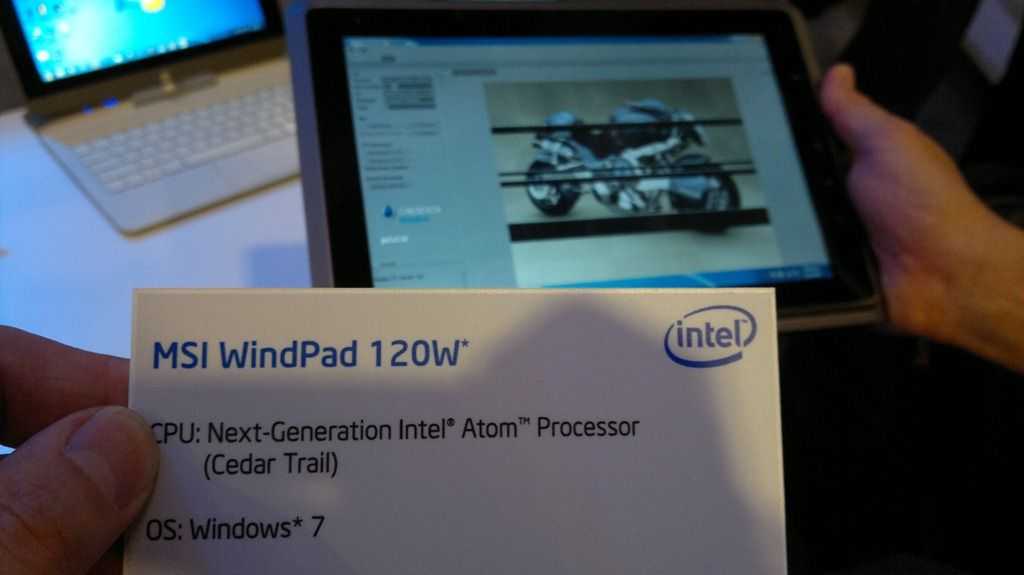
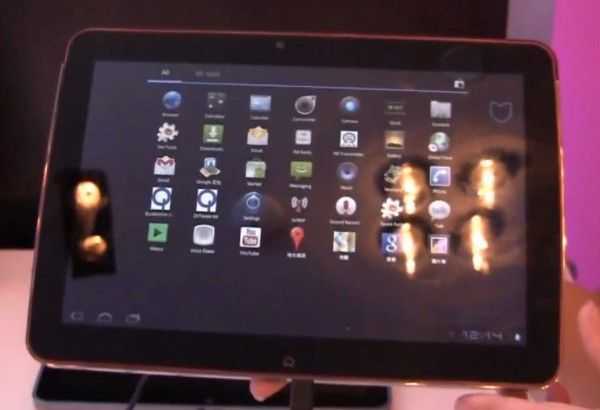
The MSI Windpad 120W is the Cedar Trail version of the Windpad U110W – an AMD Fusion device.  We reported on the 120W in June where it showed at IFA with a Cedar Trail 1.86Ghz CPU. We saw it at IDF a few weeks ago and it had a low-power platform inside. We had the chance to give it a few tests.

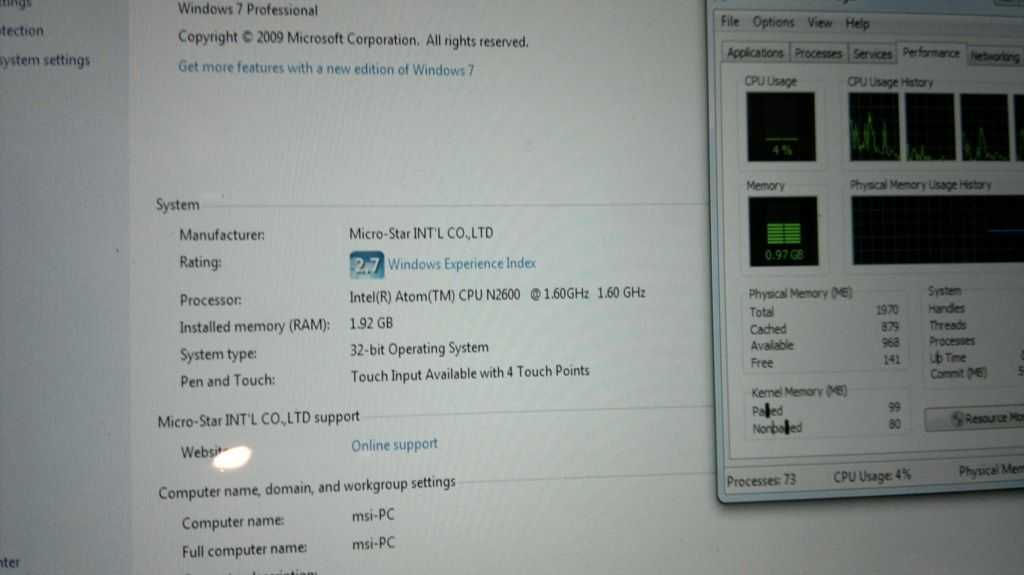
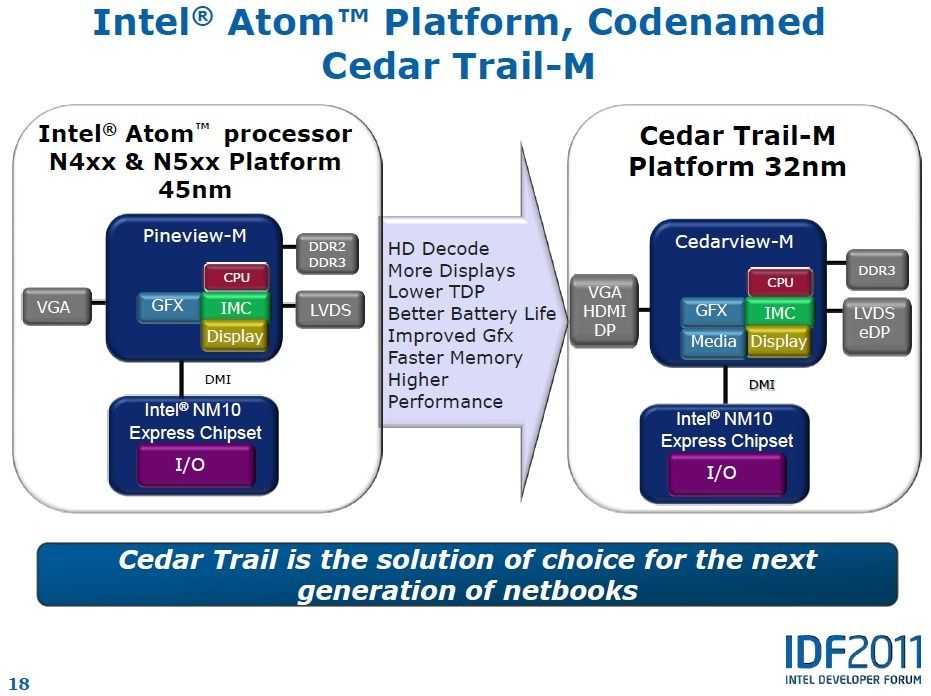
The Windpad 120W shown at IDF used the Intel Atom N2600 with 32nm CedarView-M with dual-core, 2-threads per core (contrary to specs) and 1.6Ghz clockrate. The PowerVR SGX545 graphics operates at 400Mhz and forms part of the GMA graphics unit. The TDP is 3.5W and it is coupled with a communications chip (NM10) that uses 1.5W.

13092011744

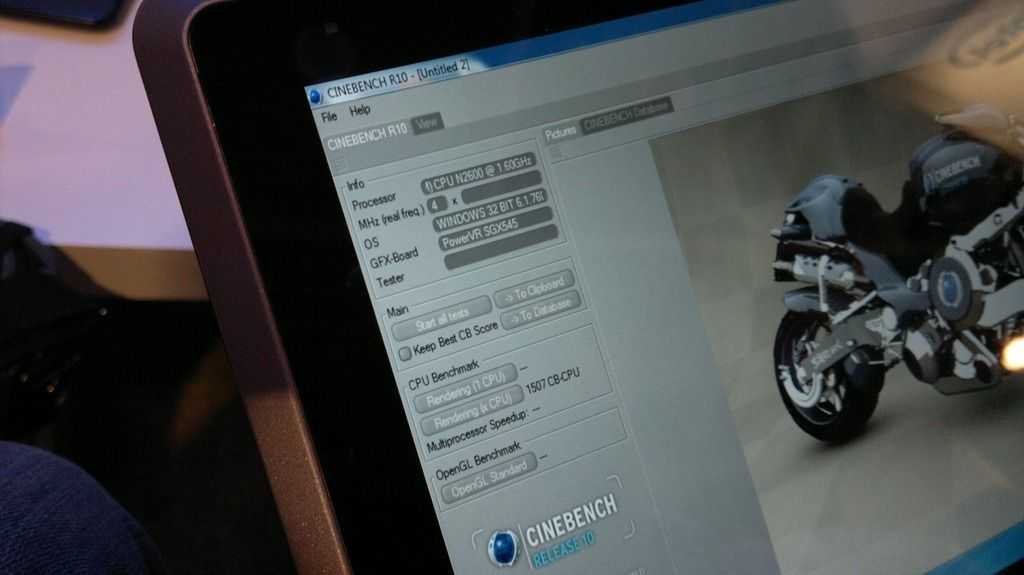
We only had time to do some CPU and battery tests but in Cinebench R10 we get a good idea of the CPU performance. A multi-core result of 1507 matches Atom N550 and very closely.

13092011749


The 120W comes with 2GB of RAM

13092011751

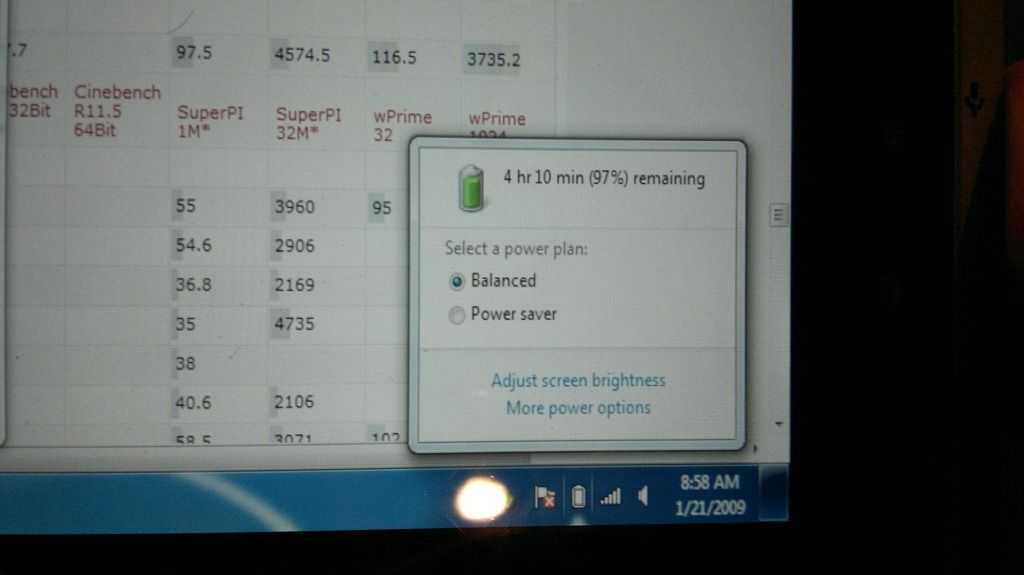
And after a good 10-15 minutes of testing, we saw over 4hrs left on the battery (97%) which is an indicator of working time. Given the low TDP of the Cedar Trail platform we expect it to idle down well to add a few hours to that.

13092011752

One thing we still haven’t worked out is the screen resolution although the 110W has 1280×800. If that’s the case, this could make the perfect entry-level Windows 8 tablet.

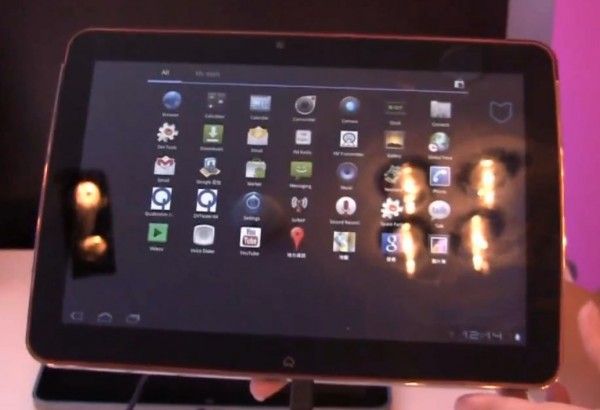
MSI WIndpad U120W–Cedar Trail Tablet

Still outstanding from Cedar Trail tests are definitive 3D graphics performance tests. We’ve seen an indication that the N2800 with the graphics clocked at 650Mhz will be twice as good as the graphics on the Pine Trail generation but remember, the N2600 graphics are clocked lower. Don’t expect anything ground-breaking here.

Cedar Trail Summary, Architecture, Features.

Tags: , , , , , , ,


Technical sessions at Intel’s IDF in Beijing have all finished now so it’s time to go through some of the presentation material, the press releases and interview information from various sources to put together a summary of what Intel are planning with Cedar Trail in the netbook market. some details are still misssing but at this stage we can put together a fairly complete picture.

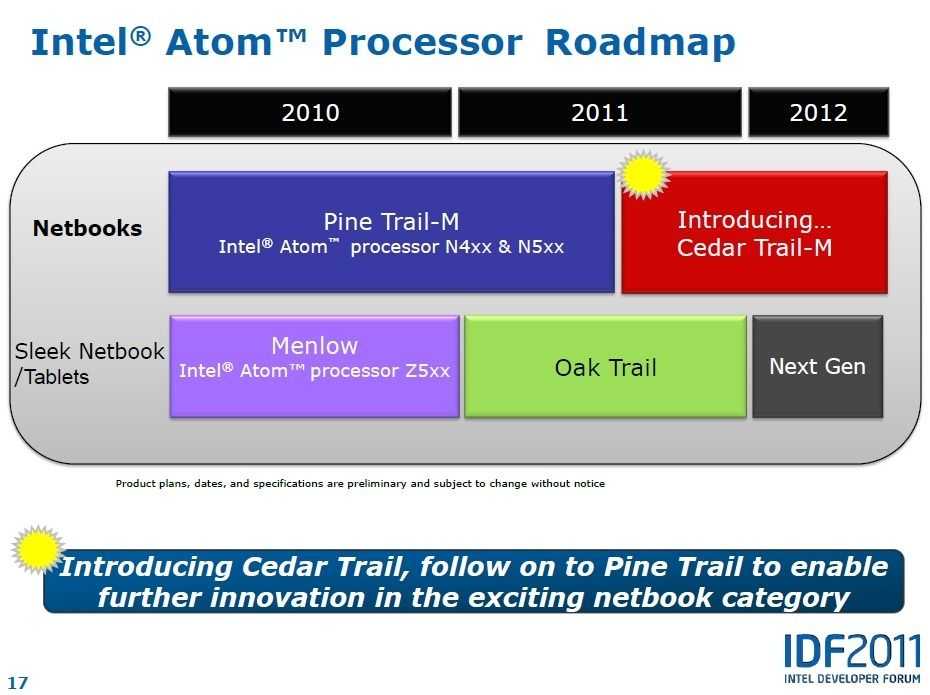
Intel’s netbook strategy comprises two platforms. The first, and the one that appears on most netbooks, is the Pinetrail platform. That is due for an update later this year and the new platform will be known as Cedar Trail, the one we’re discussing here.

The second platform is a more specialist, low end [performance] platform that grew out of the Menlow UMPC platform. Oaktrail, which uses the Z6xx Lincroft cpu is shipping now and offers a lower TDP with refined graphics and enhanced power-saving features. Oaktrail is for embedded, tablet and thin, light and rugged netbook solutions. Information on Oaktrail can be found here.

atom roadmap

Netbook market predictions.

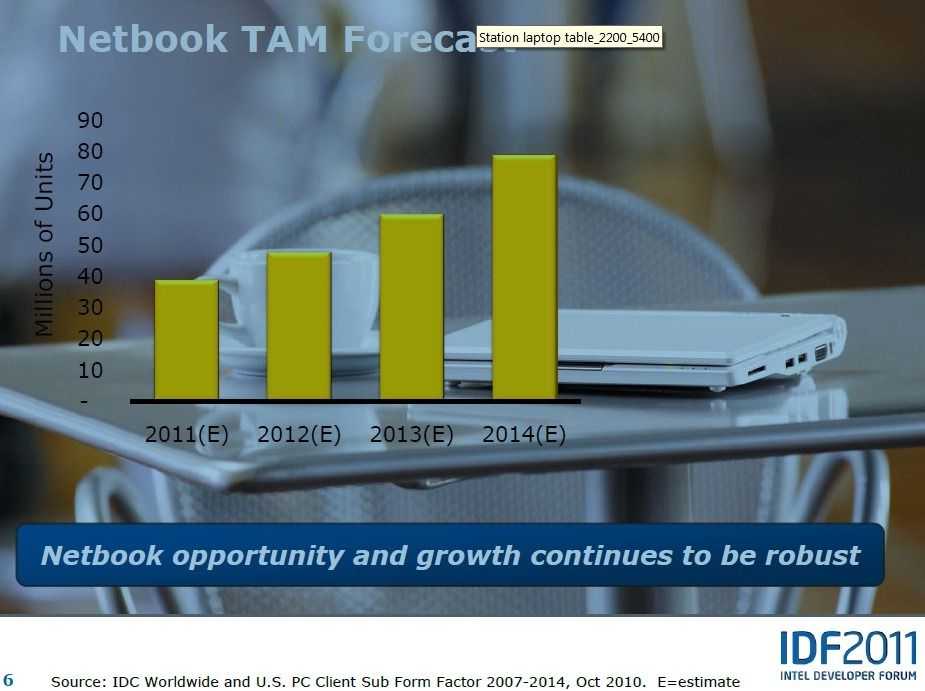
While excitement in the netbook sector has cooled off somewhat and most commentators agree that some parts of the market are seeing competition from tablets, the sales numbers remain significant.

netbook tam

Note that this is the total addressable market. AMD Fusion, ARM and VIA-based devices will be competing for this market too. For Intel to compete it needs to address the top, bottom and specialist segments of the market.

Ultra Mobile Video Editing Part 4 – Lenovo S205 / AMD Brazos Video Editing Test

Tags: , , , , , , , , , , ,


You may recall that I lost a number of days work last week. Test results, screen caps and a whole bunch of text went out the window when I did a factory re-install on the device I was both testing and writing the article on. That will teach me!

The article was Part 4 of the Ultra Mobile Video Editing series and was a detailed look at two Brazos-optimised video editing applications on the Lenovo S205 AMD E-350 device. The results were, in general, quite impressive with both Cyberlink Power Director 9 and Corel VideStudio X4 showing use of the platforms features. In some cases, hardware video decoding and effects rendering was significantly speeded up through use of AMD Brazos features. In some cases, the results weren’t so good. It all depended on the type of output file.

After I lost my work on the reivew I wrote an overview of AMD APP enhancements amd i’ve just updated that with input from AMD and Cyberlink. The key thing to know with the C and E-Series APUs is this – AMDs video encoding acceleration subsystem (which used to be called Avivo) which is used by many of the AMD enhanced video editors and converters, is not implemented on the E-350 (or its drivers.) It’s likely to be because it’s actually slower than the CPU but the end result is that there are limits to the enhancements that can be made.You can’t expect General Purpose GPU (GP-GPU) enhancements.

cyberlink pipeline

The diagram above shows the Cyberlink PowerDirector Brazos acceleration process. Note that the encode stage is 100% CPU bound. Actually this Cyberlink diagram is slightly wrong because there are some encode enhancements implemented in specific effects code that has been written to use Open CL/APP by Cyberlink.

videostudiopro

pd screen cap
Corel Video Studio X4 (above) and Cyberlink PowerDirector 9 (bottom) video editing panes.

vs accel optionspd-hw-accel
Click to enlarge. These are the hardware acceleration features in Video Studio (left) and PowerDirector.

Ultra Mobile Video Editing Test Results.

The parameters I’ve set for the project are shown below and you can read about why these parameters have been set here.

  • PC and software to cost less than 600 Euros
  • PC to be less than 1.5KG with 12” screen or less.
  • Total camera + PC solution to weigh less than 2KG and cost less than 1000 Euro
  • Source video should be 720p
  • Video sent to YouTube should be 480p minimum
  • Editing solution must include watermarking, overlays, crossfades, and multiple audio tracks.

Testing results. (Summarised from paper notes taken during testing.)

Source file: H.264 720p 8mbps 25fps. Output file H.264 720p 5mbps.  All possible acceleration turned on. System power settings set to ‘always on’ (full power.)

1 – Corel VideoStudio X4 managed to do this test in 3.7x real time which, for such a heavy processing job, is impressive. PowerDirector 9 took significantly longer.

2 – In this test, the video decoding accelerations and memory transfer accelerations implemented tend to have little effect as the processing is very CPU intensive. Hardware video decoding and memory optimisations start to have a more significant effect where output files are smaller and use a less complex codec. 720p H.264 input and MPEG-2 DVD file output is a good example. Resutls were the same with and without accelerations enabled. Using the AMD System Monitor (V0.91) very little GPU activity was seen.

3 – Using Corel VideoStudio, the E-350 CPU was 1.5x faster than the C-50 and 2X faster than an N450 CPU on this specific video encoding test.

4 – For this project (480p minimum output size requirement) there wasn’t an output profile on either software suite that supported the required 852×480 output resolution. 852×480 is a favorable resolution for enabling HQ/480p  experience on YouTube.

5 – By adding DivX Pro to the Lenovo S205 I was able to create the required output in an AVI container. I was not successful in getting MP3 audio into the container but I’m confident this is possible. Divx Pro is a 19 Euro license. Divx Pro is a similar implementation of MPEG4 to H.264 (MPEG 4 Part 10) The rendering speed was approx 2.2X real time. This was the best result I achieved in all the tests I did and one that proves the AMD E-350 is capable of producing fast results for my specific video editing and upload requirements. Based on this test it appears that Divx Pro is more tunable (for both resolutions and encoding speed) than the H.264 codecs used in these editing suites.

6 – I was able to output a 720×576 file with 16:9 aspect ratio (correct when re=sized to 852×480) using Power Director 9. The rendering speed was an impressive 1.8x real time. This option as sub-optimal as some resolution is lost when the rendered file is squashed into a 720-wide frame.

Other notes:

  • The YouTube processes on both Cyberlink PowerDirector 9 and Corel Videostudio X4 don’t support an HQ profile. On Cyberlink, the profiles outpur WMV files which took much longer then H.264 files to output. (Aprox 5.5x real time)
  • VideoStudio took a very long time to start from fresh boot. Over 60 seconds. PowerDirector 9 is about 25 seconds to start up in the same scenario.
  • Both video editing suites were fluid in their editing processes.
  • Power Director has some effects that are implemented in OpenCL for a significant acceleration advantage.

NotebookItalia also did tests (translation) with Corel VideoStudio and got similar results with Corel VideoStudio . We worked together on cross-checking our articles before posting.

Summary

Editing 720p content with these two software packages is quite acceptable for small, in-field projects. Rendering profiles need to be chosen carefully though to get the best out of the system. For my requirements – a 720p H.264 file input and a 480p file output for optimal YouTube uploading I found that a combination of Corel VideoStudio and Divx Pro worked best. Hardware and memory acceleration works in this process and with an 8mbps H.264 720p file input and 480p 30fps file output with ‘fastest’ Divx encoding settings and a 2Mbps bitrate. Rendering rate was 2-2.5x real time depending on audio codex setup. (Using high-power ‘always on’ battery settings on the system.) The images below show most of the configuration settings used.

imageimage

imageimageimage

With most of the process being CPU-load though, one wonders what a dual-core N570 CPU would achieve with the same test. I will be looking to get that result added to this report as soon as possible.

Let us all know about your mobile video editing experiences in the comments/discussion below.

Stay tuned for the next part of this series where I will be testing a standard laptop CPU and chipset, possibly an Intel Sandy Bridge system.

AMD C-50 (Ontario) – CPU Performance Round-Up

Tags: , , , , , ,


By now we’re fully aware that the Fusion platform comprising AMD Ontario/Zacate CPU and Radeon 6250 can turn in some impressive 3D performance. With HD video decoding on board too it’s a double-punch to Intel platforms with the Atom CPU but with the high-end E-series requiring power that most mobile computers can’t deliver it’s only the C-series (C-30 single-core and C-50 dual core) that we’re concerned with here and in day-to-day usage mobile computing usage, where the CPU is all-important, we need to find out how it’s going to compare with dual-core Atom CPUs

I have a personal interest in getting as much CPU power as possible in my netbook but all I want to do here is highlight some reports that are coming in via the C-50-based Toshiba NB550D. Overall, it looks like the high-end Atom N550 is still the best performing mobile CPU. Here are the test results we’ve seen so far.

Passmark, a company that collects 3rd-party reports via its own software now has a few reports in from the C-50. The first benchmark was received just a few days ago so be aware that there are only 2 data points so far. The C-50 is clocking in with an average CPU mark of 480. It’s a better score than the older N470 (score:355) but the Atom N550 is averaging a score of 559 – 16% more.

Eprice have had reports of the NB550d before but on the 25th Jan a new report was posted that included PCMark05 scores. Unfortunately the device used is an engineering test sample with a single-core C-30 APU inside so bear that in mind. The report does links to a Cinebench mark of 1271 for the C-50 CPU, however. For the Atom N550 CPU i’ve found cinebench scores of 1504 and 1461 and 1444 – An average 15% more.

Netbooknews are currently testing an NB550D and has delivered a full suite of test results and a video.

NB550DCM

It’s an interesting Crystal Mark score. The total is about the same as I’ve seen on two Atom N550 based devices but the CPU score is down, especial for the ALU tests. Below is a result I took from an Acer D255. (Atom N550.) I saw similar results on a Samsung N350.

D255 ALU result

Overall then, were seeing the C-50 CPU score lower than the Atom N550 .

It’s not the complete picture of course (Graphics and video decoding on the C-50 APU is in another performance bracket altogether!) but for those wanting to number-crunch on a netbook, these results should help you decide.

With my requirements firmly in the ‘office’ space with a view to some low-end video editing, I’d choose the dual-core Atom-based devices. What about you?

Moorestown and Pinetrail graphics core thoughts. GMA500 likely.

Tags: , , , , ,


graphic One of the things I expected to find out at the Intel Developer Forum this year were details about Pinetrail and Moorestown graphics. GMA950 on the current netbook platform clearly needs a boost in the video codec department and if Moblin 2 is only going to support Moorestown and Pinetrail along with the current generation of netbooks, it makes sense that they have the same graphics core right? It fits perfectly with Intel’s ‘Continuum’ of devices on the Atom platform. Unfortunately the information on the graphics was limited to notes about OpenGL 2.0 ES and a mention of a PowerVR core in a ‘Sodaville’ Atom-based media processor presentation (image right.)

During a session at IDF this week though, I had fairly concrete confirmation from people in-the-know that the graphics on the Moorestown platform would be a GMA500 (PowerVR SGX core) as you’ll find in the Menlow (Poulsbo chipset as seen on the Asus T91, Viliv X70 and other mobile and long battery-life-focused solutions.) I was a little surprised that it’s the GMA500 but have no reason to disbelieve the info I was given.

Dovetailing nicely with that information though is continuing speculation that Pineview, the CPU+GPU on the Pinetrail netbook platform is also going to use the GMA500. The original info comes from a June article by HKEPC but LinuxDevices seem fairly confident that it is in fact a GMA500 core in Pinetrail.

Its looking like we’re going to have a very closely-matched range of platforms come mid-2010 then.

  • Pinetrail – Netbook platform. Atom 1.66Ghz + GMA500 GPU
  • Menlow – MID platform. Atom ranging from 800Mhz-2.0Ghz + GMA 500 GPU (with PowerVR SGX core)
  • Moorestown – Atom CPU (clockrate unknown) + GMA 500 GPU (With PowerVR SGX core)
  • Sodaville – Atom  CPU + PowerVR SGX core.

Note: In each case the graphics may be clocked at different speeds ranging from 133 – 400Mhz. On current devices we see a 133Mhz graphics clock.

The exciting thing about this is that everything is aligned well to keep it simple for developers and there’s just one operating system that will sit on top of all these to provide optimised kernel, drivers, SDK and app-store. Moblin. From smartphones to netbooks through set-top boxes, PNDs, PMPs, Web tablets and more. One platform for developers that covers, in the 2010-2012 timeframe, an addressable market of over 400 million units, in just the mobile internet device and smartphone segment. Add a few hundred million on top of that for netbooks!

Image2

Intel’s ‘Continuum’ is starting to come together.

Improve your UMPC performance….for free.

Tags: , , ,


Loox U with desktop screen

I’m sitting here in front of a huge 1920×1080 screen with a 1280×800 screen as an extended display. Windows 7 is running and I’ve got 10 Firefox tabs open, Windows Media player, Tweetdeck, Windows Live Photo Gallery, Windows Live Mesh, Windows Paint and Windows Live Writer running. (Love those Windows Live apps!) It’s all running smoothly on the tiny Fujitsu Loox U (U820/U2010) in 1GB RAM.

The last time I was able to do this was with the 1.8Ghz version of  the OQO 2+  but it wasn’t as smooth as this. Why?

1 – OS

2 – Fast SSD

3 – NoScript

Point 1. Windows 7 is better than Vista. No argument.  The second point is also well known. A fast SSD helps with program and file access. It also helps with swap files when, in situations like this, you’ve used up all your memory. I’ll talk more about the (awesome) Runcore Pro IV that i’ve got installed, in another post. (Hint: 80MB+ max read speed)

The last point is something I’ve talked about before but can now highlight in a very very simple way.

With 10 tabs running on Firefox, the chances are that you’re using a few heavy ajax or flash-based sites. It should be no secret that web browsing is one of the most CPU intensive tasks you can do on a device and even if you’ve got windows minimised, it’s still using the CPU in the background.

Enter Noscript.

I’ve used Noscript in the past to optimise my browsing experience and there are other, more scientific tests that highlight the advantages but today, because of the dual screen setup I have here, the effect is extremely pronounced.These two CPU graphs taken over about 2 minutes of browsing, show the difference.

Before. Browsing websites. Hitting CPU limits. You can see the typical heartbeat of a flash animation.

beforenoscript

After. Browsing websites. CPU not hitting limits. Average utilization is much much less and that heartbeat has gone. A few more processes running in this test too.

afternoscript

Side-by-side view:

 beforenoscript (2) afternoscript (2)

The difference is huge, very noticeable and within 2 minutes of installing NoScript, the fan turned off. It’s firing up every now and again but it’s not pegged on like it was before. As I type this I have 12 tabs open, the Firefox process is averaging 4.5%. I’ve done tests like this in the past and seen the CPU averaging 15-20%.

Bloggers and advertisers will hate you for it but if you’re using a UMPC, it’s one of the best CPU/Battery life/heat/noise savers there is out there. And it’s free.

Pause when minimised.

There’s something else that can be learned from this. When using web-based applications, there is no such thing as a device in standby. ARM and Intel would do well to encourage desktop browser developers to enable an optional ‘pause when minimised’ feature (there’s a reason that the iPhone doesn’t multi-task) . It will have a huge effect on the mobile web experience. If it saves as much as I’ve just seen it would be more significant for the mobile web than a couple of years of technology development. I vote for Opera 11 to have this feature. Combined with ‘Turbo’ it would make Opera the best browser for mobile computers.

MIDs, UMPCs, Smartbooks. Where Are We on the Timeline?

Tags: , ,


We’ve been talking about the area of mobile internet-connected devices between the smartphone and notebook for a long time now. Many companies have tried with many many different designs but in reality, none of them have been a success. OQO, Flipstart, Wibrain and Raon Digital are proof that it’s a market where many are going to fail before a winner comes along but what is it going to take to make that winner and how close are we to it? Where are we on the Mobile Internet Timeline?

There are three components to a successful mobile internet product. Hardware (including technology and design), software (including UI, apps and community) and the magic pixie dust that is the combination of pricing, branding, distribution and marketing needed to bring the device to the people in just the right way. Unfortunately I don’t know enough about marketing to be able to comment (apart from the fact that I think that certain marketing teams are easily capable of making it happen today) but my experiences with ultra mobile devices and customers over the last 3 years gives me some idea about what’s needed for the hardware and software components.

One of the keywords that I keep coming back to in this segment is the word ‘microblogging.’ In my mind, microblogging is the word that connects to all the elements that go to make up a good mobile internet device. I’ve listed those below.

  • Portability and form factor
  • Always-on, connected and fast in use
  • Content, image and video creation, optimisation and playback
  • Fully web capable
  • Position awareness
  • Local storage
  • Capable of multiple communication methods
  • Flexible, reliable and up-to-date software set
  • Pervasive and low-cost mobile internet connectivity.

I talk a bit more here about my own ideal microblogging device and the markets it addresses but let’s focus on a more generic level here.

Of all the items listed above, the first two are the biggest issues. These are the ones that are limited by current technology and have prevented engineers from creating what could be the ideal device so lets take a closer look at these.

Portability

mid-d-a It goes without saying; a mobile internet device needs to be portable but how portable is portable? Through my conversations with thousands of mobile computing and smartphone fans I’ve learned that it can be vastly different to many people although it largely centers around ‘the bag.’ If you’ve got a bag with you all the time (as I do, I hate carrying things in my pockets) then portability goes all the way up to 7” screens and nearly 2lb in weight. For those that are looking for a jacket pocket solution, forget anything over 4.8” and 1lb. One important thing to note though is that the smaller the device is, the easier it is to hold in one or two hands but that it gets harder to display information. Pixel density can only go so high before websites become unreadable and need to be zoomed. 4-5”, 250gm, 15mm thick and an 800×480 screen is going to be the target in my opinion for the next few years. How far away from that are we? We’re there already. Devices have already been designed with both X86 and ARM cores that achieve this size. [Example]

Form Factor – Style. Keyboard. Screen.

There’s no real answer here expect to say that most styles and form-factors in most materials are possible today. A keyboard creates a thickness problem and a folding screen option would be nice for the industrial designers but I’m confident that given current industrial design knowledge, materials, skills and production technologies, almost anything is possible today. Fasion changes but given economies of scale, anything should be possible.

n810hsdpaallday Always-on and connected

Being always connected means not having to charge a device for a whole day of about 15 hours. This has been possible with mobile phones for along time but we’re talking about a different level of ‘always connected’ with a mobile internet device. This is not a device that will sit idle. Background software will be checking emails, waiting for instant messages, polling social networks, processing GPS signals, updating locations, checking for software updates, playing music, checking accelerometers and ambient light levels, scheduling alarms and the device will probably be in-use, with the screen backlight on, every 15 minutes during the day. Idle devices are a thing of the past and that’s where the technology challenge comes in. Running these scenarios on a phone architecture results in a dead battery within hours. I know because i’ve tested it!

Always-on Internet applications increases the average power requirement of a smartphone by a minimum of 1000% and up to 3000%

gtdbattThe answer here is not to use the lowest power CPU but to use a very closely coupled hardware and software layer that can schedule events at the right times and make sure the device sleeps for as long as possible. In general, low power devices take longer to perform general purpose processing tasks so the power advantages are outweighed by the need to keep screens and radios active. In general, a device that can perform tasks quicker in processing ‘windows’ and then resume to a standby state is probably going to have the advantage. [See this article for more thoughts and view the image on the left.] How far away from that are we? Quite far. We’re in a very early stage of mobile internet software development and unless a golden bullet comes along in the form of new battery technology, the problem will need to be worked on for some time before true all-day mobile internet ‘computing’ is possible.

Fast in use.

Getting a task completely quickly and efficiently means better user satisfaction and more productivity. The days of waiting 20 seconds for a web page to load on a smartphone are over and we need to be looking towards the sub 10-second page load. Ultimately, 5 seconds for every page on the internet. Not only that but applications need to start instantaneously and user interfaces need to react in a physical way in order for the device to become more a part of the user. How far away from that are we? Quite far. The new generations of smartphone are improving very well and reaching the 15 second average page load level along with having great almost instantaneous interfaces but its still the exception. UMPCs and netbooks are into the sub 10-second level for web page processing but still struggle to meet the battery life requirements when doing so. In general we need about 4x efficiency improvement from the X86 based devices and about 4 x processing power improvements in the ARM-based devices. Both sides are moving very quickly towards it but we’re a couple of years away from what I would call a thrilling experience.

Pervasive 3G networks

As for the rest of the list, we’re pretty much there now. Location, storage, video and software is available. It’s just a matter of sticking it al together in the right way and focusing on the limitations above.

The dream of that ultimate mobile internet communications device is spread wide across potential consumer base and the industry itself but we’ve still got a long way to go. 2009 is an early point on the timeline where although devices are possible, customers are burdened with issues. Be it battery life or slow web processing, heavy form factors or tiny screens. The good news is that everyone working in the industry is already working on those problems and we’re now only a short few years away from seeing devices that satisfy everyone.

What Moorestown means for Consumers

Tags: , , ,


I wake up this morning to a clearer understanding about where Moorestown fits but to an article that highlights that there’s a lot of marketing to be done by Intel. The new platform, demonstrated yesterday on a number of working devices, appears to be technically very capable and extends through a number of product sectors. It brings new levels of processing power and leads in making the Internet in your pocket more ‘real’ than with any other platform I’ve researched and yet there’s a surprising lack of interest. In fact, over the last 24 hours, there has been more interest in Intel’s deal with Wind River than with their move into the smartphone market. What happened?

Image3

E3, smartbooks, booth babes, an Apple conference, Palm Pre reviews and a lot of other news have a lot to do with it so perhaps the timing wasn’t exactly perfect. Perhaps Intel could have helped too. They’re calling it a MID platform and up to now, there really hasn’t been much penetration for the term and certainly no big-number consumer hit so attention levels could have been low when Intel mentioned that the platform is voice-call capable. They also failed to mention that the platform is 720p recording capable and that it could be used to make some amazing Moblin-based smartbooks. Intel is confident that they would be better than the ARM based ones too!

Maybe I can help, just a little, by trying to simplify the key points. What does Moorestown mean for consumers?

Moorestown is a computing platform, based on a more efficient version of the Atom CPU and big changes in the way that the other components in a traditional ‘computer’ are built. There will be versions that will run Windows XP or Windows 7 or other desktop platforms but that’s not really what Moorestown is intended for. Intel have built their own software to go on top of it and its a snug fit. It controls the ‘computer’ in a way that means it can continue working in a state where it’s effectively sleeping with one eye open and that opens up a whole new world of possibilities. Here’s some examples:

IMG_9425 Smartphone

Expect Moorestown-based devices to be as small as a smartphone and to be able to run, on a smartphone sized battery, for over 24 hours. Intel are telling us that devices will idle with 50x less power drain than today’s Intel Mobile Internet Devices. The worst MID I ever tested ticked-over for about 1 hour on the juice of a smartphone-sized battery. Intel says that this will increase to 50 hours. The best-case scenario, based on testing I’ve done on the current best-of-Intel is 3-times that figure. 3-days active standby.

Smartbook

Moorestown scales. It sleeps with one eye open but when it wakes up it’s capable of Internet browsing speeds, accuracy and richness that you will have never seen on an ARM-based device. I’m expecting high-end versions of Moorestown to bring sub 10-second average page loads to every web page on the Internet. The current best smartphones take twice as long as that and the next-gen may only shave 50% off that.

Mobile Creativity

I really wish Intel had highlighted HD video  recording as it’s an important benchmark figure these days. Smartphone manufacturers are building these facilities into their devices and HD video is a huge growth area on the Internet. Moorestown enables 720p video recording. Not only that but the software layer has been designed with that in mind too. GPS-enabled applications with social-networking capabilities are baked into the software making it easy to make compelling mobile applications.

No more 99c apps

Moblin, the name of the software that runs on Moorestown, is a standard-compliant software stack too so there’s a huge library of free software out there. Moblin has the potential to offer a very rich choice of software, for free and because it scales and can be connected to the internet all day, introduces new revenue generating models.

For me, those are the key features of Moorestown but it clearly brings advantages for existing MID, PMP, Navigation, and UMPC market segments too. Think about it – you won’t have to turn Intel’s mobile devices off any more. That alone, is a huge change for a mobile ‘computer.’

Intel still has a journey ahead and there’s some good competition out there but I, for one, will be looking forward to putting the Moorestown Internet experience in my pocket

ARM Cortex Browsing Test shows the Full Internet Experience.

Tags: , , , , ,


cortexbrowser Here’s another one of those ‘we can beat Atom’ tests where the fine detail of the result is irrelevant. The important thing here is that, like the VIA Nano comparison test, significant, market-changing progress has been made.

I’ve been talking about ARM’s Cortex A8 for a while now and keeping an eye on it in terms of its suitability for Mobile Internet Devices. Its a powerful computing core and people like Ti are using it to build very small, power-efficient media and Internet-capable platforms. Apart from Pandora, we’ve seen it being promoted for use in OHA Android phones and even for netbooks.

But how fast is the Cortex A8? How fast would Firefox 3 run on a Cortex-based Android smartphone? And how accurate would it be? Intel keep pusing the ‘real internet’ and about how many errors you’ll find with smartphone browsers but when you’re running Firefox 3 on both platforms, the difference disappears. Intel also talking about speeds but when the processing power is the same on both hardware, that difference disappears too. ARM’s partners have already fought back against the Intel Atom machine a few times in the past (Nvidia here and here) but this video strikes right at the heart of Atom/Moblin. It shows Firefox 3 running at impressive speeds. Forget the normalised comparison at the end of the video, any browser that can average under 10 seconds per page as shown in this demo is going to be good enough for almost everyone. Its twice as fast as previous ARM-based devices and completely removes the 9-second disadvantage that I’ve talked about before. [see video below]

Read the full story

VIA Nano info and test reveals UMPC-friendly Products, Atom-like performance.

Tags: , , , ,


Many of us have been anxiously waiting for news about the VIA Nano (formerly Isaiah) processor from VIA. Previous leaked info indicated a 2-4x improvement in processing power for a similar power drain over the older VIA C7 processors and with the Atom processors barely improving on the previous platform in terms of processing power, pro-mobile users were looking for something to fill the high-end gap.

Eeepcnews.de have been testing, (yes, they had one in their hands!) a 1.8Ghz version of the Nano CPU which isn’t the CPU we’d be looking for in UMPCs but the results give us some new data points. Firstly, here’s the model range. (test results after the image…)

nanorange

Read the full story

New AMD Netbook CPU?

Tags: , ,


EeePCNews.de have a very interesting news article about a possible AMD CPU aimed at netbooks and UMPCs. Its a 64 bit, single core CPU running at 1Ghz with a TDP of 8W. Effectively half of a Turion X2 dual-core CPU.

amdbgacpu

Note that the CPU includes the memory controller (Northbridge) but no Southbridge or GPU. At 8W  TDP, it is an option for netbooks and possibly high-end UMPC like the AMD UMPC seen at Computex but unless an underclocked version appears at 5W or less, it’s probably not going to be cool or even small enough to squeeze inside an MID. For that job, only the Atom and ARM-based products fit the bill.

Source: EeePCNews

Search UMPCPortal

Sales Information


Our Network

  • ARMShowcase Tracking ARM-based mobile products
  • Big Beach Our marketing advisors. Located in UK.
  • Carrypad Tablets and consumer mobile products
  • Chromebook News Chromebook news, products and specifications
  • Device Manufacturer List List of all device manufacturers, and products, from our database
  • JKKMobile JKKMobile – Mobile computing and hacking – Partner of UMPCPortal
  • Liliputing Netbooks and small-form-factor laptoping – Partner of UMPCPortal
  • MeeGoNews News, reports and inside info from the MeeGo Ecosystem – Partner of UMPCPortal
  • MeetMobility Mobile computing podcast broadcast every two weeks – Partner of UMPCPortal
  • Netbooknews Netbooks and other mobile devices – Partner of UMPCPortal
  • Ultrabook News Ultrabook products, specs and news

Donators (Last 20)

Buy Laptop (€5.00 EUR) Says:
Sep 18, 2011 at 7:43 am

Awesome website, great read!

Jez@SammyTablet Says:
Oct 15, 2010 at 8:25 am

Keep up the good work! UMPCPortal and Carrypad are always a good read :)

MiKeN (€5.00 EUR) Says:
Oct 15, 2010 at 5:13 am

Microsoft AutoRoute Says:
Sep 3, 2010 at 10:46 pm

Trip planning and satnav software for PC

MMORPG Says:
Oct 6, 2009 at 2:07 am

Keep up the great work on UMPCPortal :)

Laptop Computers Says:
Jun 9, 2009 at 8:00 pm

Laptop reviews, ratings and netbook computer buying guides.

Laptop GPS World Says:
May 10, 2009 at 2:01 pm

PC GPS SatNav reviews and forums.

Ultimate-Netbook Says:
Apr 11, 2009 at 2:48 pm

Ultimate-addons supplier of netbook accessories

Steve Paine Says:
Apr 2, 2009 at 8:44 pm

Test from Steve