This low-light handheld test is important for me as it’s one of my most-used scenarios. I’m also interested in telephoto shots at on-stage press events and various types of video but for my first Panasonic Lumix Z150 test I wanted to see how much better it was than my old (5 year old) Canon S2IS 5MP bridge camera. Of course it’s a massive improvement. I’m estimating a total 8x quality improvement of sensitivity, stabiliser and definition through sensor pixel count and lens. That’s a massive 3 f-stops of usefulness.
In this test I took a large number of shots of a multimeter (showing a LUX reading of around 95 from a big 30W daylight-temperature CFL energy-saving bulb 2M away) and chose the best pictures to analyse.
The other two devices used were the Canon S2IS and my Nokia N8 which has a larger sensor than both of the bridge cameras. To help make the images easy to compare I set the ISO at 400 and took the images at about 15 cm, the distance at which the multimeter was full-frame in the non-zoom Nokia N8.
The more I test Intel Sandy-Bridge based systems the more I am becoming convinced that laptop silicon will eventually extend as a high-dynamic-range platform into to ultra-mobile PCs and tablets. The reason is that the new laptop platforms are using advanced processes and techniques and are extremely efficient at getting things done. ‘Hurry Up Get Idle’ is a simple concept that means if you can get the same job done quickly, you can turn off or idle a pc and thus reduce the power used. The area under the power curve is smaller.
In practice, its difficult to make HUGI work because a lot of the tasks we do are either very short, can only work as fast as a human can input or rely on data coming from other sources. PC’s aren’t very good at idling either but from my recent video editing tests, I can see that there’s at least one scenario where it works very well.
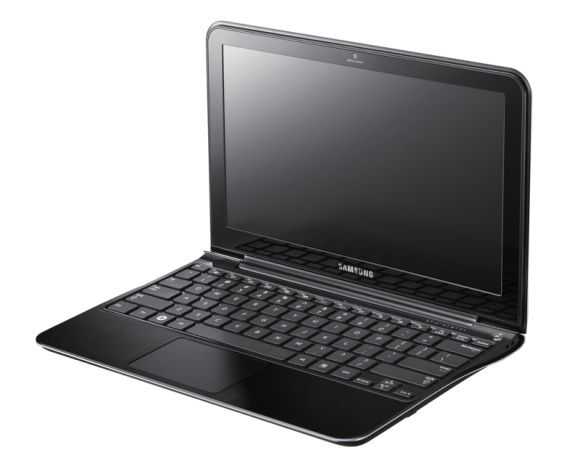
The problem with getting laptop silicon into a handheld product is the thermals. Intel leads the way in this market and their products provide plenty of thermal monitoring and control but it will take a little bit more than what is currently on offer to be able to easily design and produce a 7″, tablet running a laptop-style processor. It’s been done before though. Samsung, experts in electrical engineering, produced a 7″ Tablet running a 1.3Ghz Core Solo but that was at a time when there was no competition from ARM-based devices, $1200 tablets were common and there wasn’t an Atom processor around. The latest tablet example would be the Eee Slate EP121 and for a 1.06KG laptop, the Samsung 900X1A gets close but that’s a little larger and heavier than a handheld device should be.
As silicon processes get better though and thermal control, dedicated silicon and single-chip solutions become more common, you can expect both Intel and AMD to try to offer the ultimate processing power in the handheld space. You can expect these products to have premium prices and to be targeted at niche markets but with Windows 8 as a catalyst and competition increasing from the latest ARM designs, offering these niche product is one way that the X86 chip makers can retain an advantage and one way manufacturers can differentiate their products.
The tech blogs of the western world are literally full of slate, pad and tablet talk. ‘Smart’ this or ‘App-store’ that; There’s nothing like a new and controversial product category to get traffic flowing. Meanwhile, sitting in the background and forming a nuclear part of the handheld category of computing devices are the UMPCs that have been serving pro-mobile, industry and education users for many years. Consumers generally aren’t interested in a device targeted at getting work done while on the move but maybe that will change with the smooth-looking Viliv N5 which is meeting many of our expectations and could teach the ‘pads’ a few tricks too.
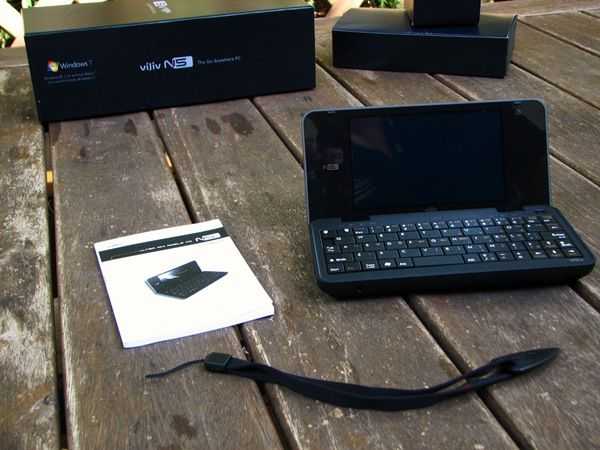
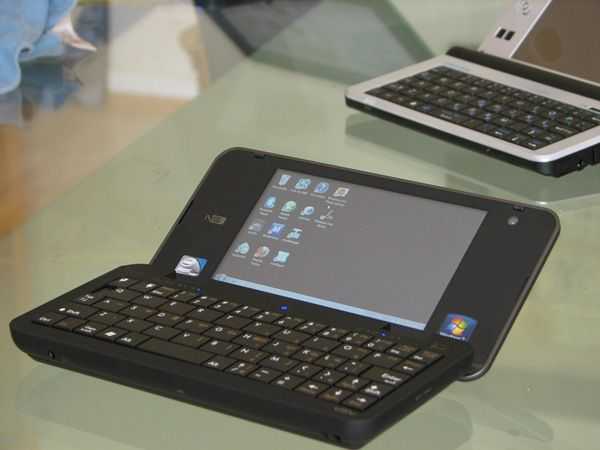
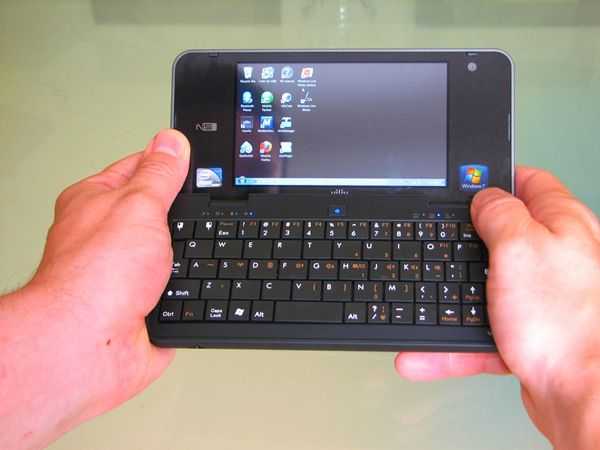
I could almost copy and paste the ‘first five minutes’ overview from the Viliv S5 because it was almost the same. In fact the packaging was even better this time round. It’s a shame there was no case included but the unit itself more than makes up for that. It has velvety smooth black rubberized plastic, rounded edges, an extremely clean look all over (the slab battery slots in and forms the back of the unit) and on opening the unit you’re pleased at the feel of the keyboard as you instinctively give it that mock thumbing action. Taking the Windows 7 and Intel Atom stickers off improves the look (as always!) but exposes the huge frame that exists around the 5 inch screen. Its somewhat disappointing to see so much unused space on either side of the screen.
Open Review Videos.
We often record a live, open review of devices and the Viliv N5 was no exception. in 2hrs with JKKMobile and a hundred or so more people interacting live via a chat session we went over the device and exposed the good and bad. All the videos from the live session are available, unedited, here. Check back regularly on UMPCPortal and Carrypad for news about more live sessions.
The Viliv N5 is based on the Intel Menlow platform that includes the Z520 Atom CPU at 1.3Ghz and the ‘Poulsbo’ chipset which includes a GMA 500 GPU and video decoding hardware. It runs Windows 7 Home Starter operating system. On the review model we had a 32 GB SSD and 1GB of RAM. There’s Wi-Fi, Bluetooth, the GPS module, stereo speakers, a 1024×600 glossy, LED-backlit resistive touchscreen and a built-in 3G module to make the device truly mobile. The battery is a slim 16wh unit.
Full specifications can be found on the product page.
From the outside.
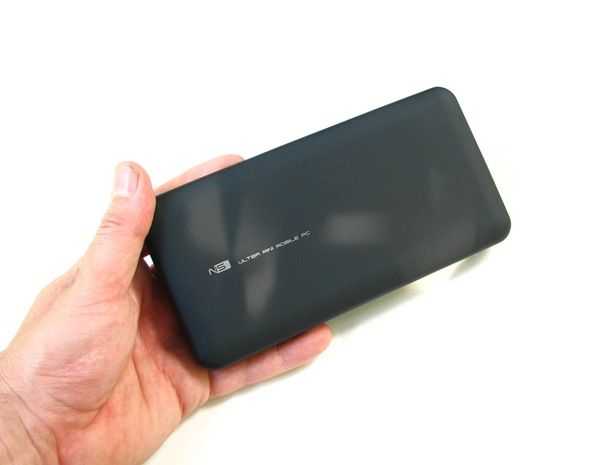
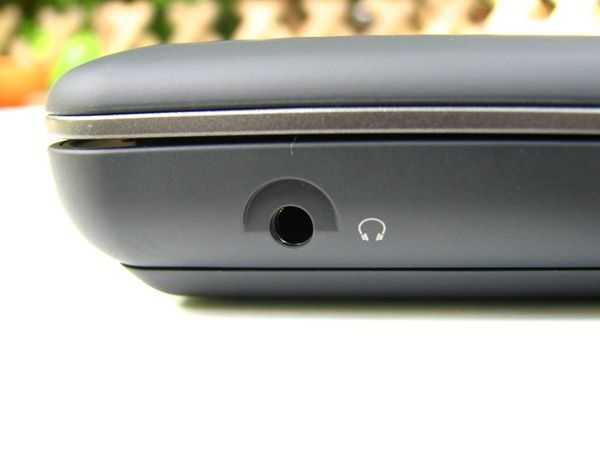
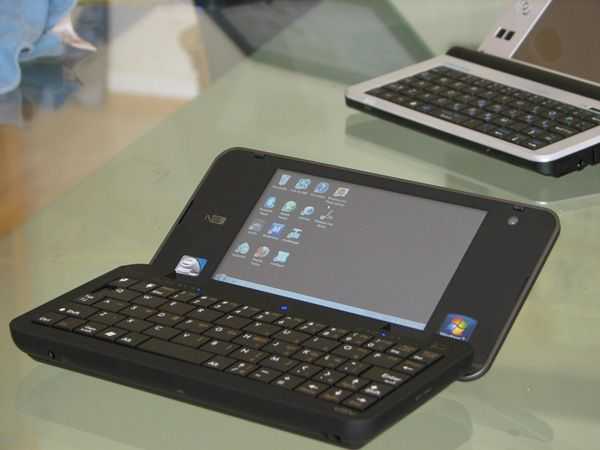
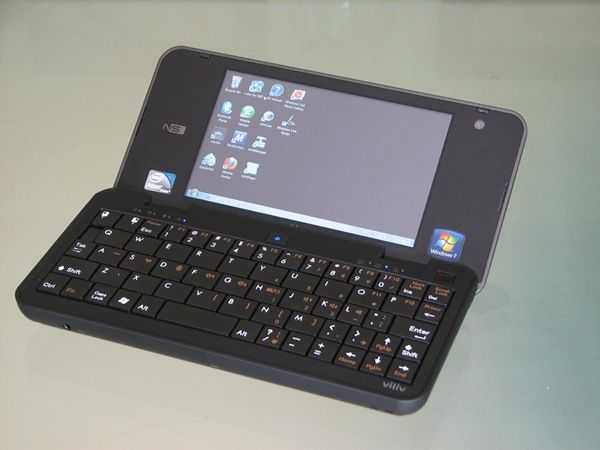
As mentioned above, the N5 is a very clean and stylish looking unit with a rubberized plastic finish and a shaped slab-battery that forms the rear of the device in a very similar way to the old OQO Model 02 that the N5 could be compared with. All ports except the headphone port are covered which again helps to make the device look clean. In the hand, the N5 suffers from being rather dense. It is, of course, lightweight coming in at 400gm / 14oz but due to its size, feels like a solid package. The comparable UMID BZ is noticeably lighter. If its anything like the Viliv X70 though, it will be due to strong casing. Only time will tell on that but checking the hinge and hearing from Viliv that the screen is covered with a hardened glass seems to confirm it. Opening the device could be easier though and the hinge does seem to be a bit tight.
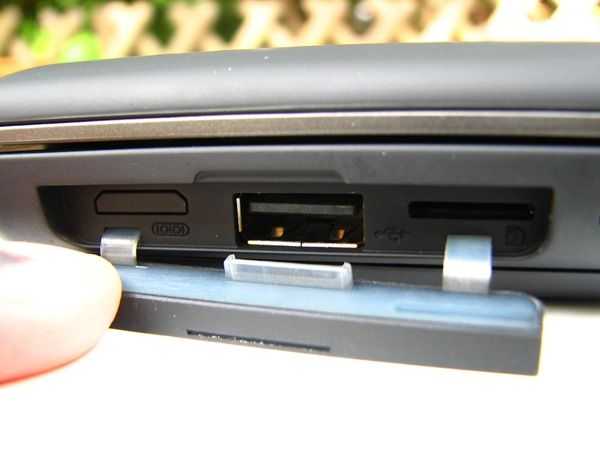
Don’t expect the full range of netbook-style ports on the N5. Although you’ve got a USB, headphone and microSD slot, there’s no Ethernet and importantly, no analogue video out. It’s a surprise omission from a device that could have been a real Swiss-army knife for traveling salespeople. A USB-VGA dongle is the only option if you want to use the N5 to show presentations. The 3G SIM card slot (connecting to a 5.6/7/2 Mbps and voice-capable Huawei EM 770W) is located behind the battery. Voice capability is included and working. SMS capability is also included in the Mobile Partner software.
The rubberized plastic finish is relatively resistant to finger grease but you’ll still need to carry a cloth if you want the device to remain smudge-free.
Controls
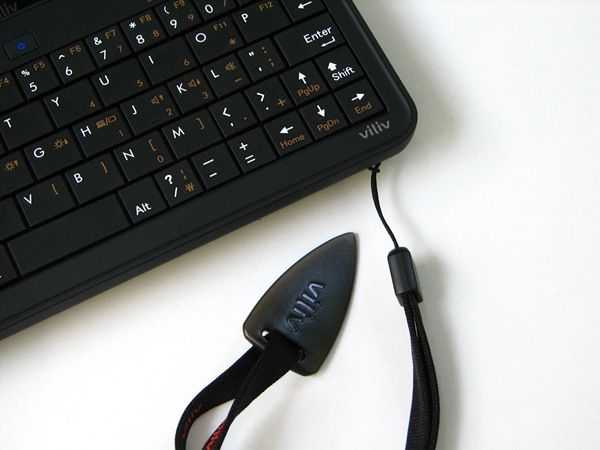
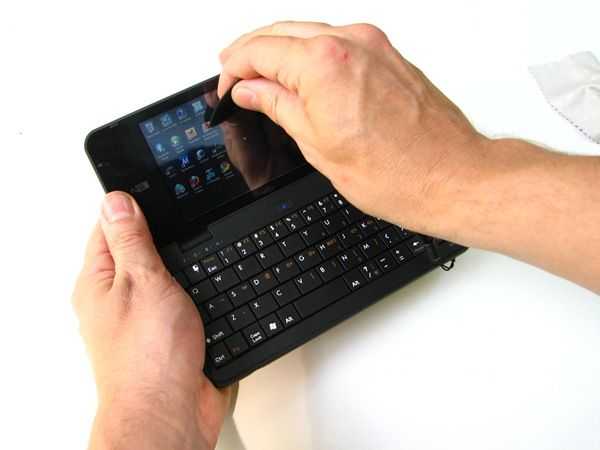
One of the things we really missed on the Viliv S5 was a mouse pointer. Using a 5 inch screen as a tablet is fine but can be difficult when the operating system isn’t designed for it or even aware that the screen DPI is very very tight. This is where a thumb-controlled mouse pointer comes into it’s own. The pointer on the N5 is an optical type which is accurate and easy to use. It’s much easier to use than the equivalent on the UMID BZ and makes the touchscreen less of a critical point which it could have been if the mouse pointer were not there. It’s a relatively heavy-touch resistive layer that we don’t find enjoyable or easy to use. It’s good enough for fingernail scrolling in Firefox (using Grab and Drag) but can be difficult for many operations. [Tip: Switch the screen display settings to 125%to get large icons and easier-to-hit Window elements.] You do have the ‘pick’ pointer though (below) which is a handy way to get some relatively accurate action on the screen. Having options is always good and we think that most people won’t find many Windows devices that are as easy to use in two hands.
Keyboard
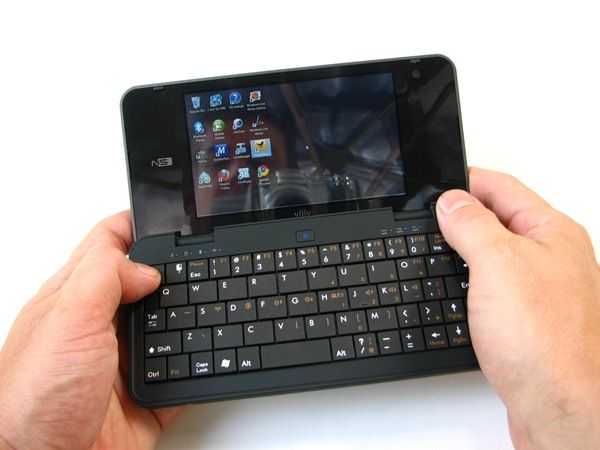
The keyboard is one of the most important aspects of the N5. It’s a very high quality part with 5-rows of silent and solid keys, two shift keys, a full set of F-keys and shortcuts for brightness, volume, Wi-Fi and even printscreen and scroll-lock keys but it it suffers from the compromises inherent in a handheld computer. Viliv have done an excellent job of making the keyboard usable in a multi-finger pecking style. This cut-down touch-typing method can get very fast but comes with higher stress levels than on larger devices. For a device of this size though, it’s one of the best. The downside of this great keyboard is that it makes thumbing, that is holding the device in two hands and using the thumbs to hit the keys, less easy. Very low profile keys with very short travel in a space slightly smaller than that offered on the N5 would be better but then you’d lose the good ‘pecking’ capability. As with all of the handheld devices with keyboards, they get better the more you use them and Viliv seem to have chosen a set-up that will suit both scenarios well.
Screen
The 1024×600, 4.8 inch screen is covered by a hardened glass layer and covered across the whole of the device with a custom resistive touch layer which yields no screen edges. Its another clean look but there seems to be an issue with brightness. The maximum setting is noticeably less bright than other devices we’ve tried. The UMID BZ, the main competitor for the N5 has a much brighter screen making it much more suitable for outdoor work. Maybe this is something that can be fixed by Viliv in firmware. Colors and definition are good though and in normal room lighting, videos and images look great. The glossy layer is a disadvantage when using the device outdoors.
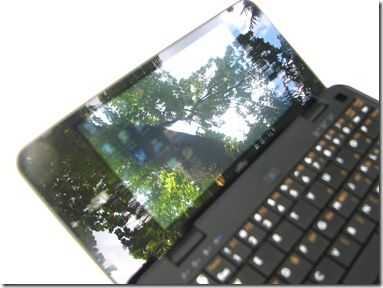
N5 not the best for outdoor use.
Screen Viewing Angle
Viewing angle in the horizontal plane is good from both sides. It’s viewable from below too but there’s a big drop-off in clarity and brightness when viewed from above. This is disappointing for a device that already has a low brightness level and is often viewed from above when holding in two hands.
Included Software
There are a number of software applications included in the build.
Viliv manager allows the user to turn the camera, modem, Bluetooth and Wi-Fi on or off independently. The GPS is not controllable through this interface and we assume it runs continuously when connected through the COM1 port. Wi-Fi and Bluetooth are also controllable through the keyboard but there are no keyboard shortcuts for 3G or the camera.
Viliv Cam is a capture applications for the built-in web cam. It allows simple photo and video capture.
FastWeb Browser
Viliv have included a touch-friendly browser which we believe is based on uZard by Logicplant. The UI is simple and easy to use but the browser itself is slow. The reason is that Viliv have implemented a proxy server, in Korea (fastweb.myviliv.com port 7999.) For users in Korea this is obviously going to be a fast and efficient solution but outside Korea, its not. From our location in Germany, traffic was routed over Amsterdam, New York, San Francisco and out through a series of routers in Asia resulting in 0.5 second round trip times. Apart from the potential privacy issues, its slow. Not recommended for US and EU users.
Norton Internet Security and Norton Backup 60 day trial.
We uninstalled this to remove the annoying pop-up.
Additional Software:
I-Viliv update manager: No updates were found through this but it should provide easy access to Vili software updates.
Music studio: A simple music player. The application doesn’t run in full screen. A basic application.
Viliv Player: Plays-back video and, where possible, enables hardware decoding. See below.
GPSSwitch allows the user to switch the GPS port between 4800 and 9600 baud. There is no Windows 7 driver for the GPS, it appears, unannounced, on the Com1 port.
Performance.
We’ve tested the Menlow platform extensively on many different UMPCs and netbooks now and we’re extremely happy with it’s balance of performance and efficiency for mobile usage. In general, it’s slightly slower than the Intel netbook platform that uses the N250 or N450 CPUs but has other advantages.
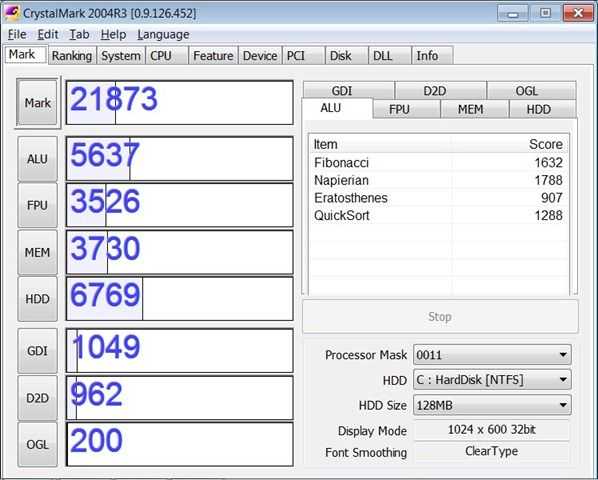
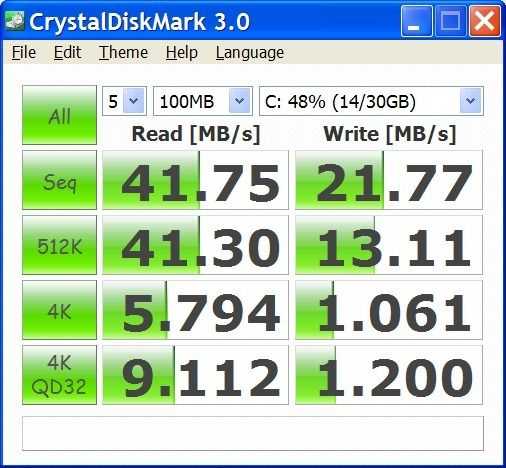
As a synthetic test, we ran CrystalMark:
CrystalMark test results
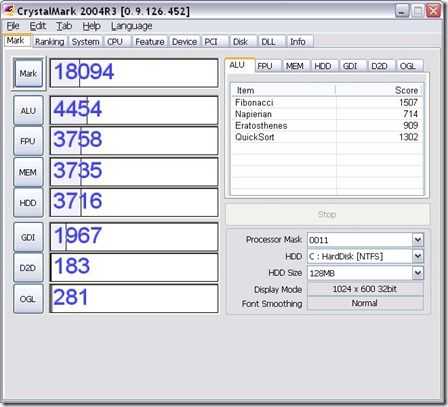
For comparison, here’s the score we got with the Viliv S5. Despite the 3D graphics performance score being lower, the SSD speed is double that of the 60gb hard drive in our S5 and boosts the overall score above that of the S5. ALU results are significantly higher too and this could be a function of Windows 7 rather than the CPU as the two processors are exactly the same.
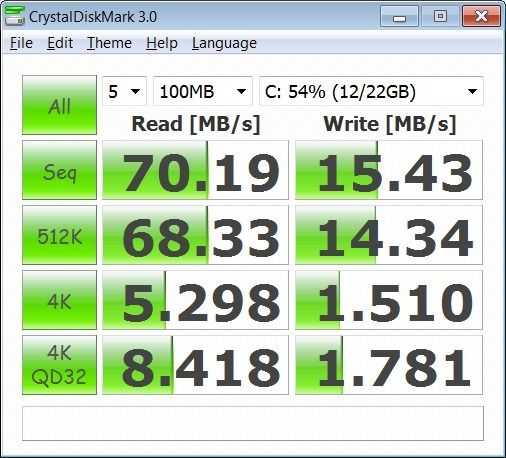
Crystal Disk Mark
In the Crystal Disk Mark scores above you can see the excellent results on the sequential data transfer test using large block sizes. Write speed is just average and 1.5MB/s at 4K blocks is just about acceptable. The results for the UMID BZ are shown below for comparison. Read speeds are much lower but it’s the 4K write speed that really affects usage. Write operations can ‘lock’ very easily causing a complete lock in the user interface. (The relatively small 512MB RAM on the UMID BZ is likely to contribute to this ‘lock-up’ problem too.)
As with the Viliv S5, The Viliv N5 includes the Intel US15W chipset with the GMA500 GPU and video decoding hardware for H.264, WMV, MPEG4 and MPEG2. Viliv have also included some Cyberlink software and the K-Lite codec pack on the device and combined with Windows 7 support for multiple video types and hardware decoding the video performance is fantastic. We were able to run most of our test suite without problems.
H.264 up to 1080p (12mbps average)
WMV up to 6.5 mbps (720P)
MPEG2 (DVB-T signal at about 3Mbps)
M-JPEG (about 10 Mbps)
MKV container with 6Mbps H.264 and multiple audio tracks Slight stutter (estimated 5% frame loss)
All tests were done with stock settings on Windows Media Player. We expect better results on 3rd party players with some tweaking (KMPlayer, GOMPlayer for example)
Viliv Player.
As an alternative to the Windows Media Player, Viliv have included their own player. Results are similar to Windows Media player although we did see some blocking and render problems with WMV videos. In general though, the media player performance is very good and the colors, sharpness and contrast are exceptional on the high-resolution screen.
[Note: Video playback results will vary with different files, filters, drivers and playback software]
As for inline flash video, the normal quality (360p) and HQ (480p) YouTube videos work well in both windowed and full screen modes. See below for more information on YouTube playback.
The Viliv N5 CPU is not powerful enough to show HD quality YouTube videos despite these being in H.264. The flash player does not link with the Intel hardware to enable hardware decoding. [Tip: YouTube HD videos can be downloaded with the help of 3rd party software and then played offline from the disk and outside the flash environment. ]
Audio.
Audio quality from the Viliv N5 speakers is acceptable for brief video clips and windows sounds but the Mono speaker (the speaker grill on the RHS is only for show) fails to deliver anything that could be classed as loud. The Viliv s7 is miles ahead in this area. The headphone jack provides a very clear and powerful signal and with the extensive equalizer on the audio module, tone can be finely adjusted. The Bluetooth stack is capable of A2DP too so there are good options for listening to audio tracks.
Bluetooth headset profile works and once the device is set as default it can be used with the mobile partner software for voice calling. We tested this successfully with an MSI Bluetooth headset module with integrated mic.
Heat and noise.
Viliv have designed the N5 without fan which results in silent operation. The device can get warm under load and we noticed it getting uncomfortable after testing a series of videos.
Stability.
During the three weeks that we tested the Viliv N5 we saw no indication of instability. Startup and standby operations were 100% without problem.
Boot-up, standby, hibernate speeds
Boot-up from cold requires about 1 minute. 75 seconds to Wi-Fi internet connectivity. Standby (return) is about 5 seconds with an extra 20 seconds for internet connectivity over Wi-Fi.
Hibernate takes about 1 minute and return from hibernate is a very respectable 20 seconds. (again, Wi-Fi connectivity taking another 15-20 seconds on top of that)
Battery life.
One of the common trade-offs with handheld devices is battery size vs. keyboard. This is obvious in the comparison between Viliv S5 and Viliv N5. The S5, a tablet device, is able to carry a 23wh battery. The N5 manages only a 16Wh battery in a similar weight. Clearly with a similar screen size and build, we can’t expect the N5 to have longer battery life than the S5 but at about 4hrs connected time, the N5 does well. Considering that the slate-style battery is so thin, a secondary would be very easy to carry.
Viliv claim up to 6hours battery life. This would be achievable with a low screen brightness and no Wi-Fi/3G connectivity.
In comparison the S5 with it’s 24wh battery provides 6hrs of Wi-Fi-on browsing which is exactly the same battery drain rate.
Battery drain on sleep seems very very low meaning the device will be available for many days before going into the frozen ‘hibernation’ state.
GPS.
A GPS chipset is included and appears on COM1 at 4800 or 9600 baud (configurable) Sensitivity seemed good with a signal lock available in good time outdoors (up to one minute.) Indoor use is possible but only where walls are thin. We were able to retain a signal near a window. The GPS driver is not Windows 7 sensor compliant and many applications such as browsers and social media applications are not GPS-aware.
Application tests.
Firefox3.6 (cold startup time 4s) ,
Chrome 5.0 (cold startup 4s)
Tweetdeck (cold startup 11s)
Windows Live Writer (cold startup 7s)
Skype V5 Beta (cold start 12s) Video working smoothly in a test between Viliv S10 and Viliv N5. No audio feedback was heard but speaker volume was relatively low. Headphones recommended.
YouTube works well. All normal quality (360p) YouTube videos tested well in windowed and full-screen mode. All HQ (480p) videos tested worked in windowed mode and in full-screen mode too which is better performance than we’ve seen on a 1.3Ghz Atom before now. We attribute this to Windows 7 graphics drivers and the new Flash version 10.1. Unfortunately 720p videos aren’t working smoothly but with 480p working so smoothly, there’s really no need to be watching 720p videos. CPU usage levels are high when watching YouTube so battery life will take a hit but for an hours casual browsing, the N5 provides a great experience.
Productivity With Open Office.
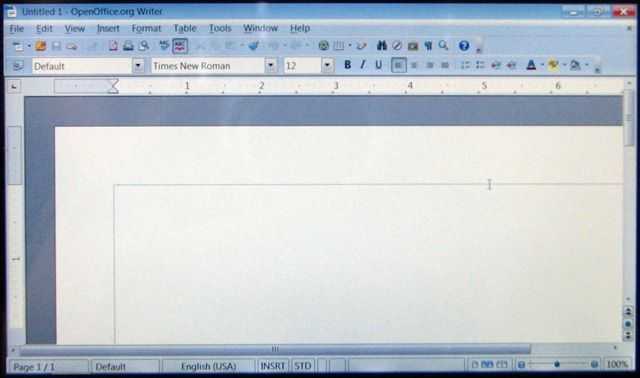
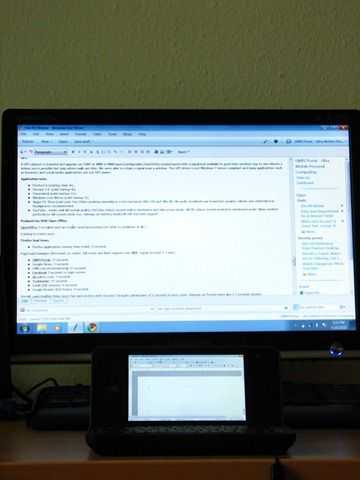
OpenOffice 3 installed and ran a basic word processing test with no problems at all.
More detail on Open Office on the Viliv N5 coming in August.
Firefox load times.
Firefox application startup time (cold): 4 seconds.
Page load examples (first load, no cache, full script and flash support over Wi-Fi. Signal strength 2-3 bars)
UMPCPortal: 11 seconds
Google News: 3 seconds
CNN.com (international) 15 seconds
Facebook 3 seconds to login screen
uk.yahoo.com: 7 seconds
Techmeme: 11 seconds
Gmail (full version): 6 seconds
Google Reader (633 items): 9 seconds
Overall, page loading times were fast and testing with Chrome 5 brought advantages of 2 seconds in most cases. Reloads on Firefox were also 2-3 seconds quicker.
Gaming.
We haven’t tested any games with the Viliv N5 and due to the relatively poor 3D performance figures, wouldn’t recommend this for modern gaming. Casual gaming will be fun as all keyboard can be used.
Wi-Fi/Bluetooth quality.
Bluetooth reception quality was not extensively tested. (File transfer, A2DP and headset profiles were tested OK) The system uses BlueSoleil version 5.4.281 which, in our opinion based on a number of devices running the same stack, supports most profiles, is stable and easy to use.
We had no problems at all with Wi-Fi configuration or reception. Reception appears to be average-to-good compared with other UMPCs and netbooks we’ve used. The Marvell sd8686 WiFi mofule only supports B and G modes.
Micro SD
Write speed 6Mbps tested on a Class 6 8Gb card. The card slots fully in with a spring-loaded release.
3G
The review device came with a Huawei EM770W modem installed. It is HSPA and voice capable. In tests we experienced good reception. A quick open-air test resulted in 3.37 Mbps download speed and 1.12 upload speed (O2 Germany, Location:Bonn)
Who’s the target customer?
With one of the highest quality desktop-style handheld computing experiences we’ve seen under 500gm, the Viliv N5 offers a lot for those looking to take Windows on the road. Where the S5 leant more towards media consumption, the N5 leans more towards getting emails,docs and creative processes done. Having said that, the N5, with it’s Win7 build outperforms the S5 in video playback. It’s a real all-rounder.
We see the N5 appealing to a wider range of users than the average ultra mobile PC because of the quality and form factor. A clamshell style is practical and understandable. A stylish one is even better. Those looking for a full Internet experience in the hand won’t find a much better solution than on the N5.
For support staff, this is the perfect remote access tool with guaranteed access to web-based systems, FTP and SSH tools and of course, remote desktop.
As a navigation device, the N5 would sit comfortably on a dashboard but the glossy screen and low brightness could be a serious problem in that scenario. Navigation software on PC’s isn’t free as it is on many Nokia or Android devices so you’ll be looking at another $100 for that software.
As a travelers and moblogging device we find the N5 quite attractive. It’s small, well connected and free of any hard drive. The clamshell format gives it natural screen protection and with the 5V DC input there could be some nice external batteries and solar chargers available. Live Gallery helps to manage and share photo’s on the go too. Those wishing to write an extended log might want to look at the netbook market though.
Limited disk space (11Gb Update: other owners report 13GB availailable from the 32GB drive) means that you won’t be storing your complete music and video collection on this which is a shame as it really would make a great backup PC for syncing to although there are some tiny 1.8 inch USB drives around now that go up to 250Gb storage.
For Skype video, the N5 is up there with UMID BZ as one of the most compact solutions on the market.
Thanks to the accurate mouse pointer, the N5 works well to get around many of the issues associated with using touchscreens with Windows operating systems. A fast SSD and 1GB RAM helps to speed up the experience too. Windows 7 Home Starter seems to work without any hitches at all. Battery life isn’t the best for the weight but at about 4 hours, it’s a good balance for a device with a full keyboard weighing just 400gm/14 oz.
The missing video output port is a mystery and will annoy many that were looking to take this on the road for presentations, those looking for a mini hotel PC and those looking to hook it up to a large screen for some occasional video playback experiences. With 1080p playback possible, it seems silly not to have exposed this through a video port.
High quality. Excellent build. Class-leading PC portability. Fast, high quality web browsing, high-end video quality and a a great keyboard make the Viliv N5 a confidence-inspiring package. It’s almost a repeat of the Viliv S5 but with the keyboard attached it opens it up to wider range of uses.
Pricing and availability
With a video-out port the N5 could have set new price/capability standards but unfortunately, it’s a case of Viliv pricing the N5 against the competition. We really can’t get over the lack of video output on a product that starts at $645 but if that doesn’t come into your checklist then you don’t need to worry as the N5 is best, most attractive handheld ultra mobile PC we’ve seen to date. Pricing for the 3G version goes up to $800 which we think is slightly too much of a premium to be paying for the ‘mobile’ in ‘ultra mobile PC’ so we hope to see those prices drop soon.
Two clamshell-style handheld PCs; Both offering great features, good battery life and usability at a price that would have been unheard of a few years ago. For the ultimate in thumb-able PCs, the Viliv N5 and UMID BZ have no competition. Sure, the Fujitsu UH900 and Sony P-Series look the same but these two are in a different sizing category and make a great alternatives to the OQO Model 02+ that never was. These two devices have the same adventurous spirit that the Psion 5 had all those years ago and that says a lot.
I’ve rounded-up my thoughts in a 17-minute video below but if you want the text version, read-on. Feel free to ask questions below. I’ll attend to all of them.
It’s actually very easy to summarise the difference between the two devices. One uses relatively low-cost components, skimps on memory and is built to a price. The other uses high quality parts both inside and out in order to offer a more rounded computing experience. A better, less stressful computing experience. The Viliv N5 is the latter and really offers more of a multi-tasking experience where you’ll be able to run 5 Firefox tabs, Media-player, Livewriter, Tweetdeck and a background media player without any real hiccups. The UMID BZ isn’t bad though because if you’re only using one or two apps and can put up with the occasional ‘pause’, the UMID offers excellent value and even some additional features not found on the Viliv N5.
Key Differences:
Style The Viliv N5 wins hands-down. The UMID BZ looks cheap in comparison. In our experience the UMID build quality is high though.
Screen The UMID BZ screen is brighter. Noticeably brighter. If you’re looking to use these devices outside, by the window in a train or on the dash of your car, the UMID BZ is the best.
Touchscreen The UMID has a much lighter touchscreen. I find it easier to use than the slightly heavier weight of the N5 touchscreen.
External Screen Only the UMID BZ offers you a video-out possibility so if you want to use these devices for presentations or as a low-power, low-end desktop PC (it’s possible) then don’t go for the current Viliv N5. [A pro-model might add this feature at a later date.]
Keyboard VERY IMPORTANT. The N5 offers a keyboard that can be used for thumbing but is wide enough to allow a good rate of touch-tapping. The UMID offers a better thumbing keyboard (smaller width, less spongy keys) but is much harder to use on a table.
CPU The 100Mhz speed difference on the CPU is hardly noticeable. On average, you’ll probably get to see a web page 1-second quicker on the Viliv N5.
3G The N5 is available with 3G for the ultimate in mobility. The UMID BZ will need to be tethered to a mobile phone or connected to a MiFi router which isn’t as easy to set-up or use.
Price The UMID BZ is $150 cheaper than the entry-level Viliv N5.
Battery Life In tests so far, the Viliv is lasting between 3 and 3.5 hours in full use. With optimisations (lower screen brightness, good radio control) the Viliv N5 should reach 4 hours. The UMID seems to last for 4 hours without much attention from the user.
Video playback – Out of the box, the Viliv provides excellent local file playback capabilities. Up to 1080p (H.264 tested) works better than on any other ultra mobile PC we’ve tested. YouTube HQ (480p) to full-screen size works better on the Viliv N5. (Flash 10.1 and Windows 7 appear to work well together)
Phone features – The Viliv N5 is able to make voice calls through the cellular modem. (Only on the 3G version.)
Operating System – The Viliv N5 runs Windows 7 Home Starter edition. The UMID BZ offers Windows XP Home. The latter uses less memory and disk (the UMID BZ offers over 20GB of space. The Viliv N5 only 11GB. Both have 32GB drives) and neither operating systems offer any sort of special touch or input features.
Update: GPS – Correctly pointed out by a couple of people that sent emails, the Viliv N5 has GPS which makes it usable as a navigation system. There are no Windows-7 compatible (sensor) drivers though, the GPS simply appears on COM1 at 9600 or 4800 bps depending on configuration. First lock (using VisualGPS) took about 2 minutes (for full 3D fix) but the lock was lost indoors next to a window. For people thinking about using this in a car, consider the glossy screen and brightness.
Video Comparison– See the video below for an overview of the differences. For Viliv N5 specific reviews, see this page. For UMID BZ reviews, see this page.
For those looking for the perfect handheld PC for road-warrior and productivity work, the Viliv N5 has to be near the top of the list. Sliders and tablets are great but nothing beats the clamshell format for practicality in terms of usage and ruggedness. Very similar to the UMID BZ, the Viliv N5 offers a desktop operating system on a very efficient Intel Menlow platform with long battery life, an excellent video playback experience (up to 1080p tested successfully without any modifications) fast SSD and, in the version we’re testing here, the convenience of built-in 3G. The optical mouse really helps navigating round Windows where sometimes, a small touchscreen isn’t the best solution and, like the Fujitsu UH900, the N5 goes for a keyboard size that works for both touch-tapping and thumb usage although as always with keyboards that try and do both, it’s not optimal for either scenario.
In testing over the last 4 days I’ve been impressed with the multitasking performance of the device. Compared to the UMID BZ it offers a smoother experience with none of the SSD-overload that is all too easy to experience on the BZ. The finish of the device is fantastic and represents Vilivs usual attention to detail.
On the downside there’s no analogue video out (the VGA, composite, S-Video port is blanked-off) and the screen touch-layer is heavier than a lot of modern UMPCs. The brightness, too, is noticeably less than on other devices, especially the BZ. Windows 7 Home Starter limits how you can change your desktop (setting the display DPI to 125% really helps though and the video below was taken before I had made that adjustment.) The 32GB SSD is partitioned for a recovery installation and you end up with just 11GB of user disk space.
A note about battery life.
As I type this I’m seeing 25% battery left after 2.5hrs of use which equates to over 3hrs online usage. The screen brightness has been at 100% during this period and both Wi-Fi and 3G have been on concurrently for about 1 hour of this. Unfortunately, the battery life indicator on the Viliv N5 only shows remaining capacity in steps of 5% and it can be inconsistent and non-linear. With careful set-up, I expect users to be able to get 4hrs out of the device but not much more than that. The battery has only 15Wh capacity so with Windows 7 on the Menlow platform, don’t expect anything more than this.
All the important points are covered in the video below but as I write this, a second video is uploading which compares the Viliv N5 to the UMID BZ. There are advantages on both devices and as we learn about the UMID SE, maybe there’s a third option coming soon. Stay tuned for a second post focusing on the differences between the UMID BZ and Viliv N5.
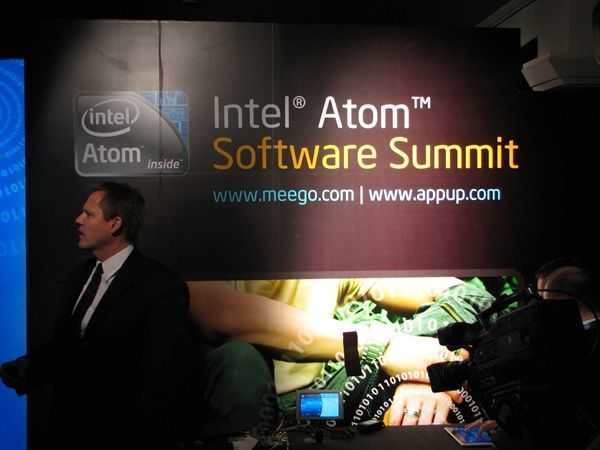
The Atom Software summit is just kicking of here at Computex. We’re expecting to hear about roadmap, support for advanced features such as multitouch, sensors, gestures. Different UI models from handset to netbook will be shown too. There’s also some hardware here that we’ll get to play with.
Stay tuned for updates throughout the day because later we join the ultra mobility group for their presentation.
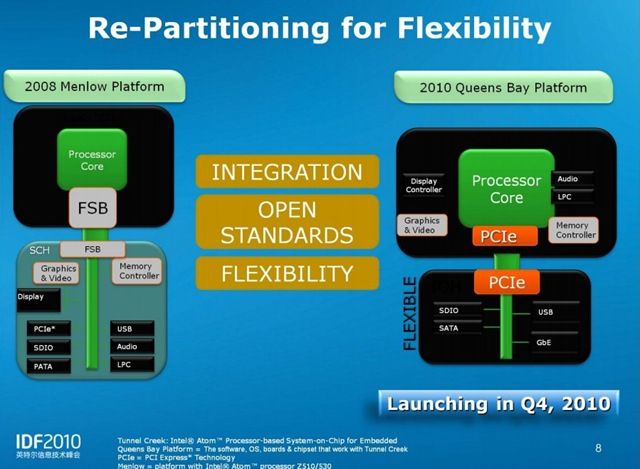
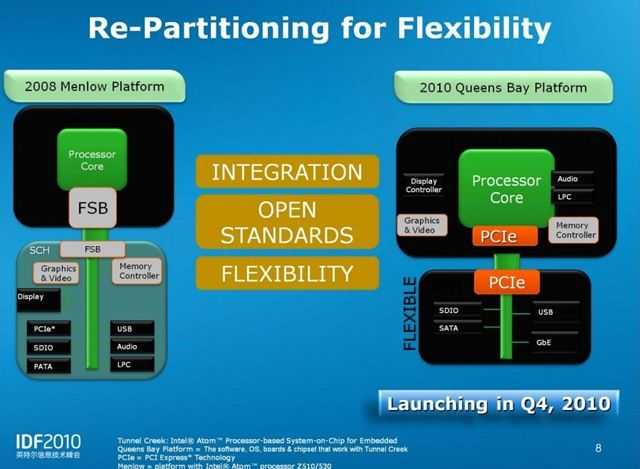
A few days ago I did some research and analysis on the new ‘Queensbay’ platform from Intel It’s a highly integrated 2-chip system comprising Tunnel Creek processing platform and I/O chip that takes the platform used on many current MIDs and UMPCs and optimizes it in a similar way that Pinetrail did for netbooks. Despite some improvements in size and graphics power and a hint that it might be capable of some cool consumer and media devices, it’s not the Apple A4 / Tegra 2 competitor that I’m guessing will get referenced in articles today. That job lies with Moorestown and I’ll tell you more about that later today on Carrypad. Update: Intel Moorestown article now available.
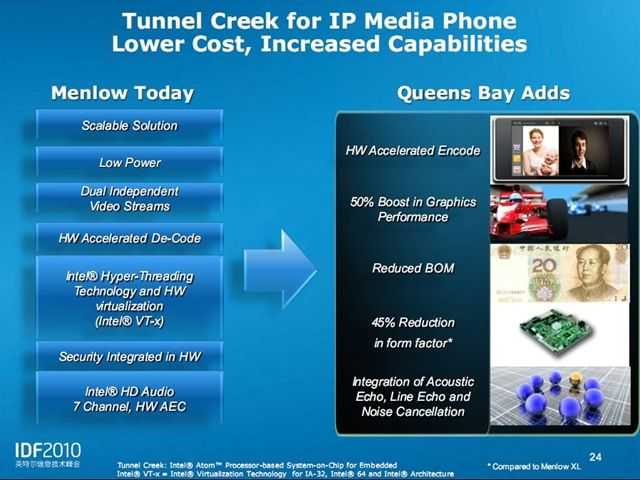
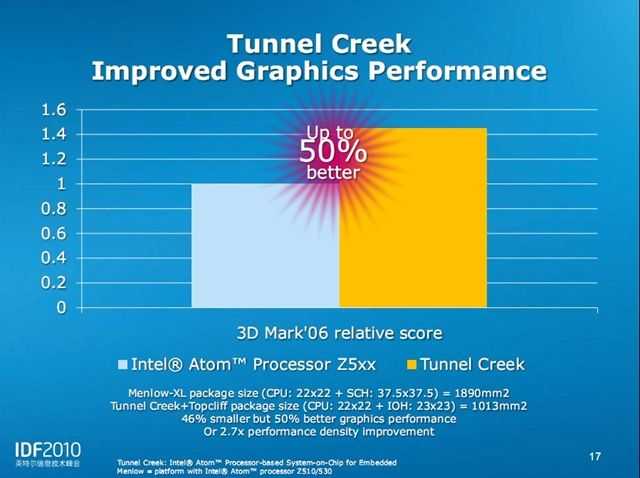
Tunnel Creek integrates a lot of activity on one die and offers a doubling of GPU power, an increase in memory bus speed, an open PCIe bus Southbridge architecture that allows for third party chipsets, a SATA storage interface and a promise of a lower bill of materials. It is possible to build some nice little handhelds out of it and one could imagine interesting tablets with Nvidia Ion on board but later today, we’ll hear more about something that’s been build ground-up for handheld tablets, mids, smartphones, active remote controls and of course, the ‘iPad killers.’
I’ll write about Moorestown later today but for the time being, here are some schematics for Tunnel Creek; the first showing the differences between Menlow (I’m using a PC based on Menlow right now) and Tunnel Creek and the last slide showing Tunnel Creek vs Menlow in a mediaphone scenario.
There are a couple of things there that I didn’t mention in my previous article. Number 1 hardware accelerated video ENCODE. 2) Audio DSP functions. This leads me to believe that Tunnel Creek is in fact a version of Lincroft, the processing unit used in the Moorestown platform. We’ll talk more about that later.
For the Intel IDF presentation on Tunnel Creek (from which the above slides were taken) see the IDF 2010 Beijing Content Catalogue and search for ‘Tunnel Creek’ (Unfortunately I can’t link direct as the catalogue generates one-time URLs.)
For a primer on Moorestown, see the links below. More detailed information on Moorestown architecture is expected from IDF later today.
MeeGo gets an outing in China this week as Intel takes its developer-focused conference, IDF, to Beijing. As I write this, Intel’s Lynn Wang, Strategic Relationship Manager and Rao Yeleswarapu, a Product Marketing Manager have just finished their talk on MeeGo Technology and Benefits. Danny Zhang, Senior Engineering Manager and Horace Li a Software Engineer with Intel have also given a technical overview talk.
As always, Intel publish the slides from the talks and they contain some great new information. I’ve picked out a few interesting slides from the first presentation which also include the first images of MeeGo’s handheld reference UI for smartphones.
Netbooks.
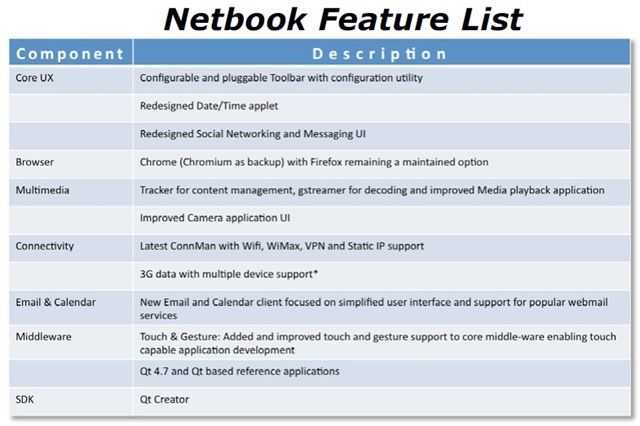
First off, lets look at the Netbook feature list for MeeGo (we assume 1.0) which confirms a previous tidbit that I picked up from DevMob (that apparently, shouldn’t have leaked.) Mozilla’s browser will be replaced by Chrome (or Chromium, the open source browser.) Quite how significant that if for Mozilla I don’t know but it’s something that should generate quite some discussion. [Sidenote: There’s been a lot of Google/Intel/Android/Chrome rumors lately. Relationships are definitely good and don’t forget, Intel is part of the OHA. Stay very closely tuned to the Linux Foundation Collaboration Summit which starts tomorrow and runs for three days. Intel, Nokia and Google are all there. I wish I was too but i’ll be glued to the live stream as much as I can.]
You’ll also see that the social messaging app is to be redesigned (the application on Moblin 2.1 very very thin indeed) along with the camera application,email and calendar and date/time app. Best of all, the media application will get an overhaul. Again, the media app on Moblin was extremely basic. Remember that what drops out of MeeGo is not necessarily what you’ll see on netbooks. These code drops (starting with 1.0 in May) are for 3rd partys to take and build on so what you see in V1.0 is not what you’ll see in a final, retail build delivered on a netbook.
In other news, a number of companies have just re-affirmed their support for MeeGo as it transistions out of the Maemo brand. Note that Canonical isn’t in the list. That’s what happens when you move to an RPM-based distro I guess!
Note that the promised touch and gesture support is in there although I don’t see sensor support yet. That’s important for GPS. (It is, however, mentioned in other parts of the presentation.) Also missing is any mention of an application store. Intel’s AppUp is available for Moblin, OVI for Maemo so I wonder if this is simply left out of the core and left up to the OEMs. Remember that happened with Skype on Maemo 5, hopefully that particular relationship, optimisation and integration will spread over to netbooks.
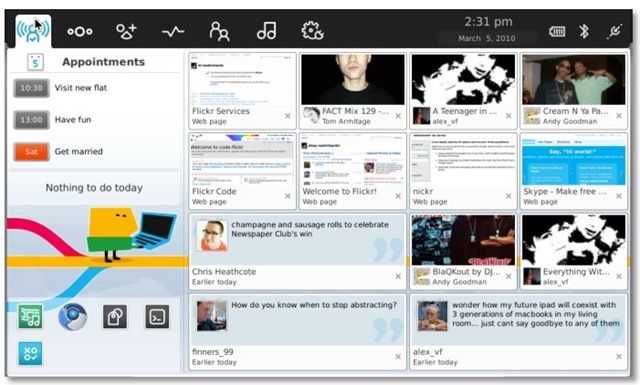
As for netbook eye candy, here’s a snip from the presentation. I don’t know if it’s the proposed 1.0 UI though.
The center column has been dropped from the home zone and filled out with social network tiles. Having used these on Moblin, all I can say is inefficient. 13 status updates on a 1024×600 screen is not an efficient way to use the device for anyone remotely familiar with making friends on the Internet. Let’s hope that the MeeGo UI teams offer an ‘advanced’ front end. Again, it’s not clear if this actually is the UI for release 1.0 though. Update: It is!
Handhelds.
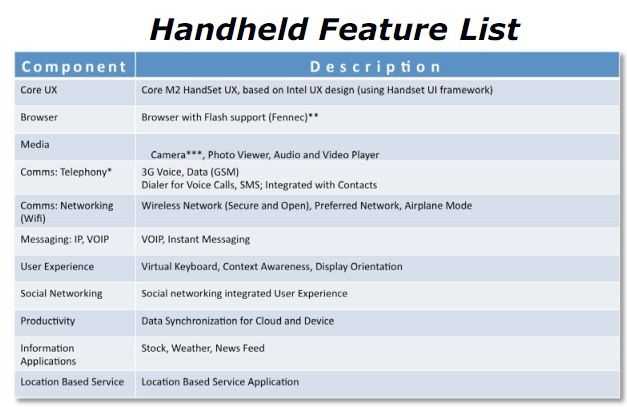
It’s not clear whether this is Intel’s proposal here of if this is 100% agreed between Nokia and Intel but this is what Intel have to say about handhelds using Intel architecture.
As you can see, Fennec, the mobile browser from Mozilla, has been chosen to present the Web. You’ll also get Flash support. Contacts and dialer functions will be integrated (as you’d expect) and there will be VOIP (it will be interesting to see if carriers want that ripped out) and instant messaging. I’m happy to see that the social networking ‘integrated experience’ is mentioned because this is an excellent core feature on the Maemo 5-based Nokia N900. Data sync is also provided along with an LBS app indicating that at least GPS sensors will be supported.
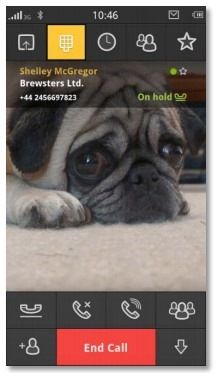
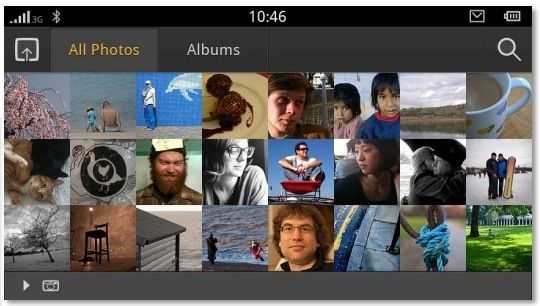
And now for the smartphone eye candy, including cute doggie!
Portrait mode support. N900/Maemo fans rejoice! Note the interesting activity stream in the first picture.
One would assume that emails, tweets and other network events can be included in that stream.
This is typical understated European styling and I bet Nokia were heavily involved here. Personally I love the design but remember, once again this is just a reference design. It’s the sort of UI you’ll see if you take the 1.0 build and drop it on an Aava Moorestown reference design (which I’m trying hard to get hold of) and possibly, the N900. As I said before, I’m not sure if this is Intel’s proposal for the handheld UI or an agreed, across-the-board Nokia/Intel final reference design. We’ll see in May when V1.0 drops.
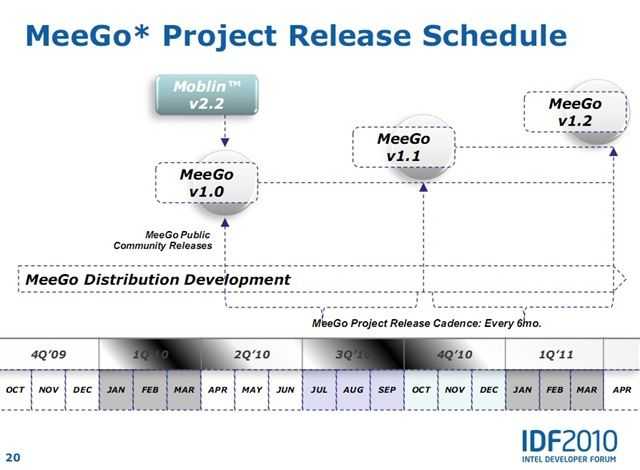
The key date for me is the v1.1 release in the latter part of October. That’s when the MeeGo Summit is likely to occur and it’s right in the Q4 timeframe for product availability. LG GW990, Nokia Nxxx and who knows what else we’ll see. Interestingly, the U.S-based Intel Developer Forum will be in the middle of Sept so it will be interesting to see if Intel and partners have products to announce. October will be a very exciting time and wherever that MeeGo Summit is, i’ll be there!
MeeGo Developers.
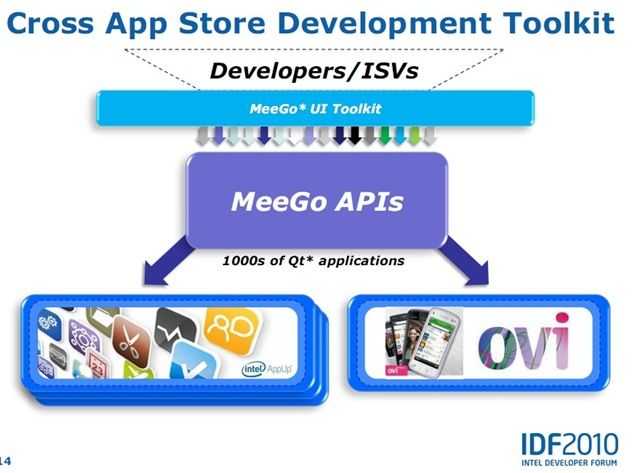
You’ve got your very own PDF to browse through too but this slide just smacks me in the face…
‘Cross App Store Developement’ is something special for devs to consider. The diagram doesn’t actually do the feature justice because it omits to mention the Intel app-store framework that can be used to make branded 3rd-party app stores. One API, many stores, many devices. In a separate presentation on the AppUp store I saw this… line. “World’s largest potential TAM (for a single API) ” When you think of the opportunity there, the mind boggles. Smartphones, Netbooks and the many many devices in-between including home, car and TV.
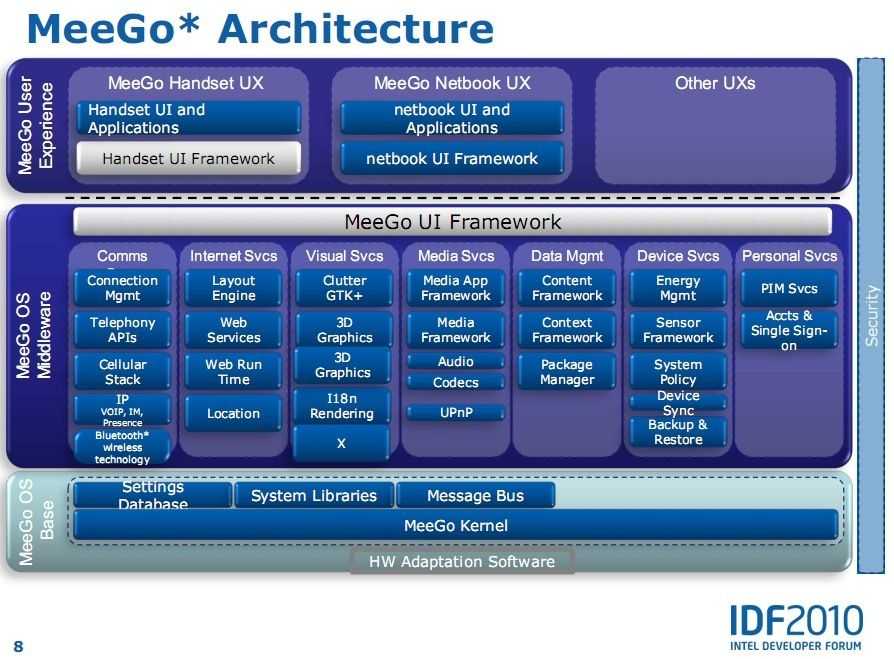
For more (very) detailed information on the MeeGo stack and the development toolkit, download and read SFTS010 from the content catalogue. (I can’t directly link as it’s a one-time URL used for statistics and tracking.)
all the above slides were taken from the publicly available PDF file SFTS009 available through in content catalogue.
Stay tuned to that catalogue over the next 48 hours as more PDF’s feed in. Particularly interesting could be the Moorestown presentation.


 This low-light handheld test is important for me as it’s one of my most-used scenarios. I’m also interested in telephoto shots at on-stage press events and various types of video but for my first Panasonic Lumix Z150 test I wanted to see how much better it was than my old (5 year old) Canon S2IS 5MP bridge camera. Of course it’s a massive improvement. I’m estimating a total 8x quality improvement of sensitivity, stabiliser and definition through sensor pixel count and lens. That’s a massive 3 f-stops of usefulness.