Tag Archive | "oqo"

Oqo.com Hacked in Response to Model 03 News?

Tags: , ,


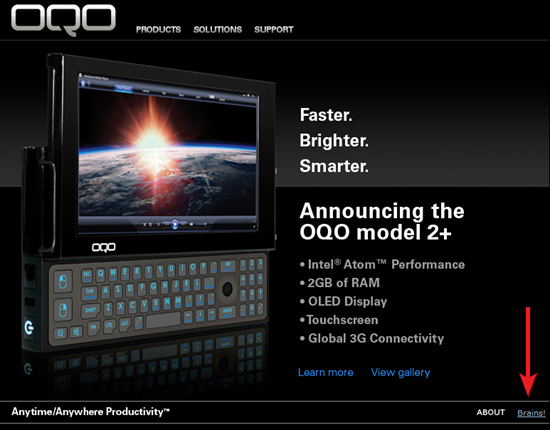
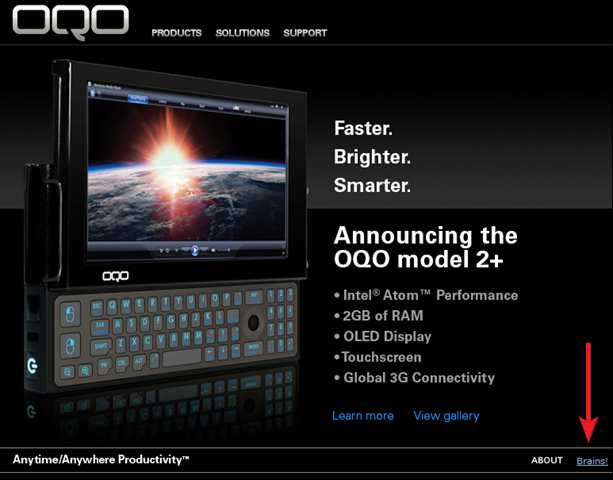
oqo brains This story is getting more interesting by the minute. We told you yesterday that Oqo.cc appears to be set to launch a Model 03 OQO UMPC in Q3 2010 (more specifically, August, according to the site). Now it looks like the official US OQO site (which hasn’t seen any updates since the company went out of business in April, 2009) has been tampered with.

According to a comment on the story on Engadget, the site was briefly updated with text at the bottom stating “We did not sell out to Audiotone. Anything by them is a Clone.” This text has since been removed, however a peculiar link on the site remains (which certainly wasn’t there yesterday before our story). At the bottom right of each page on the site, a single word, “Brains!” links to: http://www.brains4zombies.com/ which appears to be a parody page of Amazon, and is somehow connected to the web comic hosted at http://www.goats.com/.

A very odd hack if you ask me. I’m unsure of exactly what to make of this, but if you know something more about these sites than we do, definitely let us know in the comments.
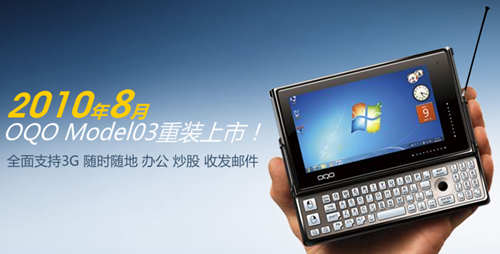
OQO Model 03 Rises From the Ashes? "Third Quarter of 2010"

Tags: , , ,


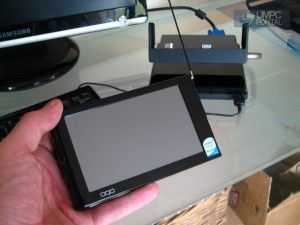
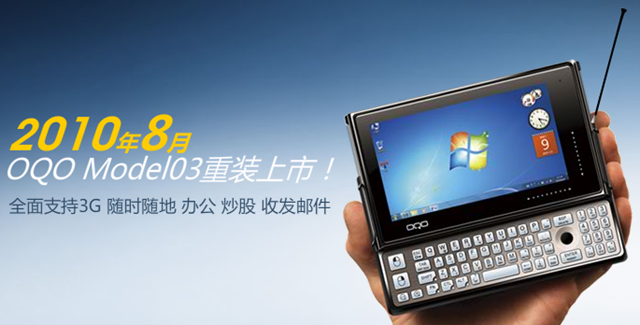
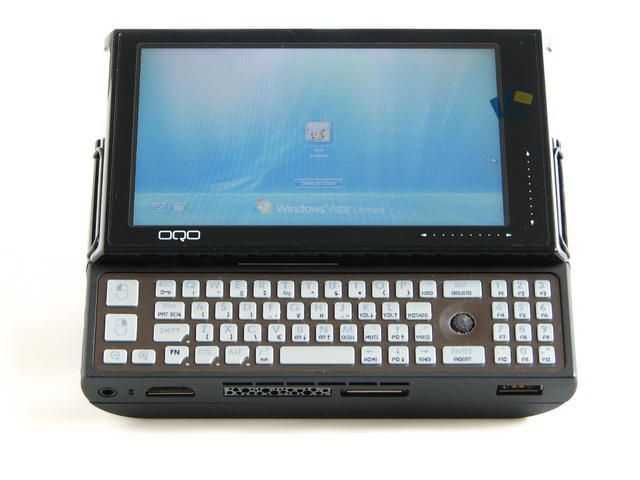
oqo 03 A very interesting bit for the UMPC world has just come to our attention. User aekayser from our forums has pointed out that the site www.oqo.cc is now showing something that they are calling the “OQO Model03”. You’ll probably recall that OQO sadly went out of business in April of 2009 just before they were able to get the Atom powered OQO Model 2+ [Portal page] into the hands of customers. This was a sad moment for UMPC fans, but new hope may be emerging for anyone willing to pay premium prices to get their hands on this “OQO Model03” which is an upgrade version of the OQO 2+.

The entire site is in Chinese, but I’ve extracted as much info as I could using Google Translate.

Oqo.cc appears to be the official Chinese arm of OQO – An article on the site dated December 12, 2007 notes that “Austrian Technologies Co., Ltd. Beijing Century OQO exclusive commissioned by the United States, will complete the Greater China business.” It would seem as though Oqo.cc went into hibernation after the US OQO went out of business, but now they have returned.

In an article dated July 18th, 2010, the OQO’s return is heralded with the hilariously translated headline “Return of the King! OQO Model 03 heavy equipment listed!” The new Model 03 is of the Atom variety and features a 1.2GHz Z515, 1.6GHz Z530, 1.86GHz Z540, or 2.0GHz Z550, depending on the edition. Other notable changes include Windows 7, “WCDMA \ EVDO \ TD-SCDMA and other 3G network support”, and supposedly a multi-touch screen. The same article says that this device will be launched in the “third quarter of 2010″.

Check out the specs list for the top end “Special for the Version of Industry” model (I think it’s safe to assume that this means Special Industry Edition):


Operating system Windows 7
Processor 2.0 GHz Intel Z550
Memory SSD 128GB
Memory 2GB
LCD 4.8-inch bright LCD screen (supports 1024X600)
Touch mode Multi-touch
Graphics GMA500
Sound Performance Built-in speaker and microphone
Communication Wireless LAN, Bluetooth 2.0 chip, 3G, Ethernet (optional), etc.
Computer Interface High-speed USB2.0 port headphone jack DC power input port HDMI port
Interface expansion slots Power input port VGA port Ethernet interface (optional)
Input Devices Built-in keyboard pointer keys
Battery Type Polymer lithium battery
Power adapter V AC 12 V DC/100-240
Supplied Accessories Standard Battery Double the battery power adapter
Manual and the Windows CD
Volume 14.32 × 8.42 × 2.78 cm
Weight 426g (built-in standard battery)
Price 31,888 yuan

Looks cool huh? It’s still going to be an ultra-premium product just like the Model 2+ – that 31,888 yuan is around $4700 USD!

As far as I can see, there is nowhere to purchase any of the OQO’s that are offered on the site at the moment. I’ve dispatched an email to the company to see if they really will be selling the Model 03. Fingers-crossed for this legendary UMPC. We’ll keep you updated as we find more info.
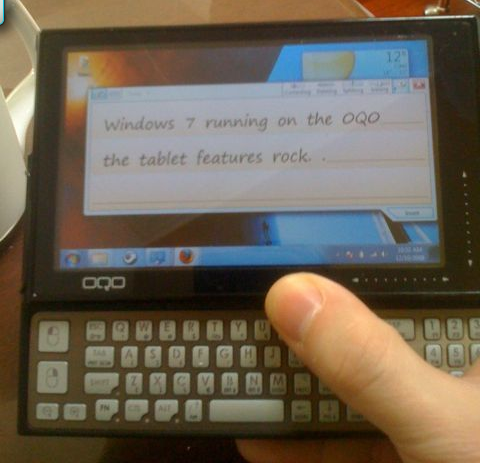
OQO 02 running Windows 7

Tags: , , ,


oqo win 7 One of the guys from the Viliv Boys’ Blog has put Windows 7 on a recently aquired OQO 02, and claims to be thoroughly enjoying it. The interface definitely looks cramped on the OQO 02’s 800×480 screen, and despite some initial issues it sounds like everything is functional. Just goes to show that a great UMPC will never die, even if the company behind it shuts its doors.
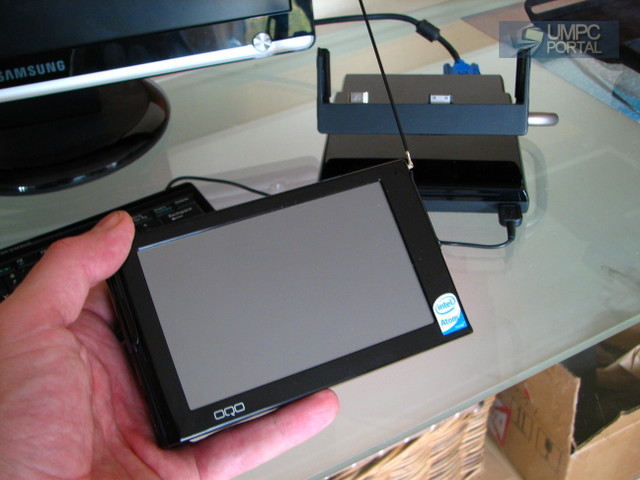
OQO Model 2+ is a Collector’s Item?

Tags: , ,


oqo2plusThis is strange. I was thinking about the 1.86Ghz version of the Atom CPU this morning and wondering why there hadn’t been many devices using it. The OQO 2+ was the only device I’ve ever tested with it and it worked well, even with windows Vista!

The first story I find on Yahoo News this morning is one about the OQO 2+ sales on Ebay. We’ve already reported on one that sold for 4.5K after the company went down but it seems that there’s another one on ebay now, presumably coming from an ex-employee or partner that had production samples. Bidding for this one has already passed the 5K mark which is rather stupid considering this isn’t a one-off device and if it’s from the same production run that I tested will have a few issues. Battery life, heat and noise weren’t quite 100%!

“It’s not a final production sample and therefore it’s impossible to talk about battery life, noise and heat with any degree of accuracy. I have been a little disappointed that the device wouldn’t reach 3hrs online on a single charge but I also get the feeling, after looking at detail at power drain on various components, that there’s another 10-20% to be squeezed out of the device” [One-week with the OQO 2+ review]

More info and links here for people that are thinking of buying. Oh, and if you see this sticker on it, it’s the one I had! [Maybe that serial number helps to ID the device on Ebay?]

IMG_7768

Is OQO Model 2+ Becoming a Collector’s Item? – PC World.
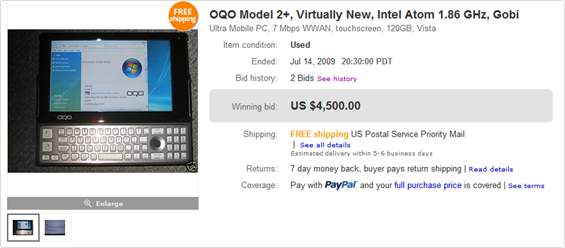
Would you pay $4,500 for an OQO 2+?

Tags: , ,


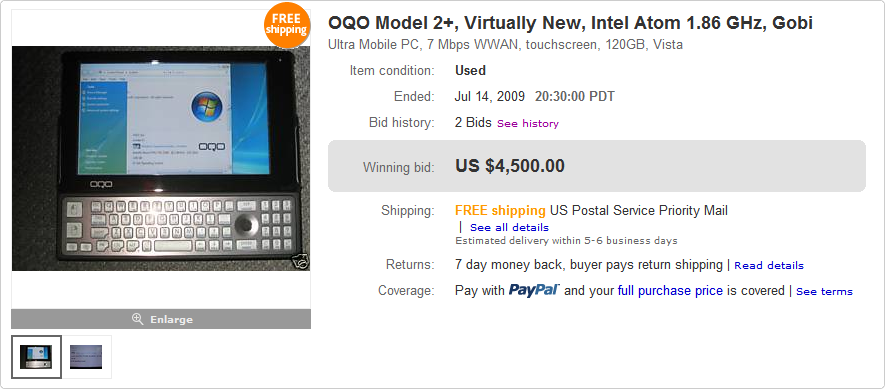
oqo2  bid I hope the answer is no, however, if yes someone has already beat you to the punch.

As you’ll recall, the OQO Model 2+ was shown off at CES 09 where it made a pretty big splash around the web with its OLED screen and Intel Atom CPU. Unfortunately OQO went under before the Model 2+ made it to market.

A pre-release model made it way onto Ebay, and the ensuing bids pushed the unit up to $4,500 for the winner. It would be pretty cool to be one of a few people to actually own a Model 2+, but I think for most of us, it would be hard to justify that price!

[Engadget]
OQO Shuts Up Shop.

Tags:


What a shame. One of the companies at the core of the UMPC movement and with a history that goes back beyond my first blogs about the topic has gone under. The confirmation came through GottaBeMobile and all we’re left with is the thought about what could have been with the OQO 2+ Atom-based UMPC that we first spotted on stage at Intel’s IDF Sept 2008.

The economic slowdown, netbooks, the increasing capabilities of smartphones and the introduction of some lower-cost ultra mobile computing options were obviously too much to bear for a company that kept a tight focus at the top end of the UMPC market with their innovative designs. From the high quality keyboard including sticky keys with indicators to pulsing LED power cables, external battery chargers and desktop docks, they always put the extra effort in to make the whole product suite as complete as possible.

OQO in docking station. Off

OQO Everun background

OQO is trying to seal a deal for the technology and engineering teams so we keep our fingers crossed that they managed to find a new, exciting venture for them. We also hope they manage to find a way to repair and return owners broken OQO devices that still haven’t been recieved back by the owners yet.

OQO seeks buyer. (Updated)

Tags: ,


Originally posted 15th April.

It’s been confirmed today that OQO is seeking a buyer. Naturally, this affects the OQO 2+ which is not likely to go into production until the financial problems are sorted out.

The company’s cash shortage could delay the delivery of Model 2+, said Bob Rosin, OQO’s senior vice president of sales and marketing told with The Wall Street Journal.

There arent any more details at this point.

Update: 23rd April. BuildYourUMPC.com send out a note on the 22nd April saying:

We have been informed that the 2+ will not be released and all pre-orders currently on file will be cancelled.

We also will not be receiving any new OQO inventory. Any remaining inventory has been discounted and posted in our Open Box/Clearance section on our website.

OQO have not responded to our requests for an official statement.

Struggling OQO seeks buyer News – PC Advisor.
OQO Rumors

Tags: ,


oqo2 jkOnTheRun have relayed some rumors from the OQOTalk forum that there are problems over at OQO. The rumors have been around for a while and we even contacted OQO about them a few weeks ago but at the moment there’s nothing much that we can be sure of. The official line from OQO was that the OQO 02/e2 was no longer being produced and that the production line was being re-tooled for the OQO 2+. We also found out that the UK-based global sales manager is no longer with the company.

With devices like the Aigo and UMD around and a global financial slowdown in progress, it’s not difficult to imagine a scenario where OQO are having to re-organise and re-finance the new production run so we keep our fingers crossed that they can pull through because not only is the OQO 2+ a good step forward [prototype review] but they have design skills that we’d really like to see put to work on an OQO 3.

Use Windows Live Mesh to setup and customize your MID

Tags: , , ,


As much fun as a small device is on the road once it is setup, you need to get it to that point. With or without keyboard may not matter once you are on the go, but you need to get your device to that point.

Using the example of the OQO + Windows Live Mesh we will use the slightly hidden but very useful Live Mesh Remote Desktop to achieve our goal. (This procedure of course can be used for other devices running Windows as well using any remote desktop application which works for you.)

Why use a remote Desktop?

Syncing files is just one part of the equation and even if your MID has a nice keyboard, it is no comparison to your big keyboard, mouse and monitor when you want to setup all your tools and applications. And before that, you want to familiarize yourself with all the bells and whistles the little device might have. This is much easier achieved when you are not distracted by a different input device.

You can make a regular routine out of how to use the device in combination with your main computer. Usually when I travel, I have a special folder containing all the files I need and also save all files I need back on a special folder on my mobile device. This way I am crystal clear what needs to be synced or not. Using it with Live Mesh has the additional benefit that you should be able to sync files against the cloud and just switch on your MID before you go onto tour.

Step 1: Take care of your battery

One of the more expensive and fragile parts of your MID is the battery. Call me superstitious, but I like like to remove the battery so I do not have to worry about any kind of strain on the battery. Plus you do not need to worry about running out of battery if you leave the device on for some hours during syncing / installing.

Unplug the battery, connect to power and boot the OQO (Additional settings should be done once you are connected with the big computer).

Step 2: Install Windows Live Mesh on all machines

In order to use the device syncing and remote desktop capability of Live Mesh you need a Windows Live ID and the software. Head over to mesh.com and take a look at the feature list or more detailed information. While the main purpose is to have a ‘place in the cloud’ for your data or access your home computer through the web, we will use it ‘just’ for setting up our tools.

  • get a Windows Live ID if you don’t have one yet
  • download the Live Mesh Software
  • install it on both machines, your main computer and the MID device
  • start the software on each and add your device to the mesh

livemesh-oqo-3

A more detailed instruction with pictures can be found here.

You can now try and sync folders and more, but we will work with the Remote Desktop. If you already have folders in your mesh, it will add these to the desktop without syncing them – but with a remote desktop it is easy to clean up.

Step 3: Connecting the devices

As soon as both devices are online and are connected through a Wifi (make sure it is not a connection through your Sim card unless you have a flat rate) you will be able to see the ‘Connect to this device’ in your main computer. In the picture below you can see that I have several computers in my cloud – Noir is my big computer, Cutie my laptop (currently offline) and Live Desktop is your desktop in the cloud. By default you get 5 GB of storage on that Live Desktop, more than enough for most.

livemesh-oqo

After clicking "Connect to device" it may take some time until your MID shows a popup window asking you to accept the remote access. Once you have agreed, you now have access to your little device through your big computer!

This is how the screen looks like (click on it for a larger image):

livemesh-oqo-4

Step 4: Switch on the power

Now that your devices are connected and you are on normal power, you should change the power plan (right click on the power symbol, Power options).

livemesh-oqo-5

I switched to "high performance" but remember to switch back.

Step 5: Setup and Install

You can now work with the device to run

  • anything requiring installation / download because it is much easier to configure this through the remote desktop on the device
  • anything needing login / passwords – you can fill your browser / apps with all the relevant ones, like for example twitter / Flickr / Friendfeed
  • setup complicated bookmarks like for twitter search or others which would be hard to type on the keyboard
  • setup tools like Google Gears for Gmail and sync them while connected to real power and possible strong Wifi


Step 6: Disconnecting

Disconnecting the systems is very easy, you just click CTRL-ALT-Delete or press the according menu point on the Live Mesh Screen. If you are done for the day with installing and setting everything up, remember to switch the battery settings back and shut down the little device from the big desktop. Voila.


Problems I ran into

  • Size of the desktop: As Live Mesh insists to have a special side bar, I was not able to have a screen in full resolution without scrolling or a slightly ugly font. Also the bar "You are now connected to OQO" was located at a least useful place on the screen, if I would run Firefox in full screen mode it would be exactly on the tab bar.
  • you need to remember to switch back the power plan once you are back on normal battery. In my opinion it should automatically switch to high performance when it detects the power cord connection.
  • the keyboard layout still is in English while I am typing on a German keyboard. This is relevant more for the special characters like :.?@ etc which are on a different keyboard than I am used to, but rather than switching over to a German setting, if I had something I was not able to type right away, I used copy and paste which works seamlessly between the desktops
  • Usually, everything is synced through the cloud. But according to the Live Mesh team you can setup some fold
    ers to only be directly connected without the cloud which would be helpful for files which are large or should not go into the cloud. Problem I found was that this does not work, at least not on my side. But in theory it should.


Overall it is an easy and simple way to connect the two devices out of the box with one another and setup everything I need and want to use.

You had me at Windows …

Tags: , , , , ,


How is it that we feel instantly connected with some devices and really not with others? Today I ‘upgraded’ from my Compal / Aigo device with Linux to something running Windows. Being a die hard windows person who can work her way around Linux (I don’t do cake but I baked myself some kernels …) but does not really want to,  I convinced Steve that is really is a great idea to swap devices. As in “I want that other one!”.

It was nice getting to know you but the other one is sexier …

The gadget session at MBC09 today had more than one person who was happy that “no crappy windows” was running on the machines, while I am the opposite. Give me that familiar loved interface! And if it happens to be on a shiny new OQO 2 that is fine with me as well. ;)

Meaning:  if there had been a windows on the compal / aigo, that would have been a totally different game for me. Though I sound subjective, I did test the little one with the flaw during the short time I had it and will provide more insight why I think we did not bond (and why this is relevant). Now let’s see how the new gadget behaves over the next days so I really can get going with some crazy stuff as everybody else once I am back from my travel thursday!

I am also using this time to familiarize myself with the device and like to see how I can use it in a typical mobile situation for me: being on a conference / event, wanting to tweet around and maybe something more. I’ll keep you posted!

OQO 2+ screen brightness and battery life.

Tags: ,


I’m beginning to doubt that I really do have an OLED screen on the OQO 2+ here because the power drain test I just performed showed some relativelt poor results. I knew that OLED screens could be tweaked for power or brightness but I didn’t expect to see so much of a difference in my power-drain test results. There really isn’t any power advantage over LED in this case and with amazing LED-backlit screens like the one on the Wibrain, you wonder why they did it. Did I just hear someone say ‘marketing’? Keeping things in perspective though, these results are ‘good’ but just not as good as I expected.

The first image show power drain as measured by Vista’s ‘performance and reliability monitor’ in battery-saving power profile with the OLED brightness turned down to minimum.

Drain at minimum brightness

Drain at minimum brightness

This image shows the graph for the same setup but with max OLED brightness.

Battery drain under full brightness

Battery drain under full brightness

Be aware that I’ve got a production sample OQO+ here and again, don’t forget that in the big world of mobile computing, these results still represent amazing efficiency.

From the drain graphs above, you can calculate how long the 17wh battery will last. I’ve written a bit more about this over at MID Moves.

As always, full specs and more links available in our product database.

Article written on the train with the Wibrain i1.

Seat-back space.

Tags: , ,


I’m on my way to MBC09, the microblogging conference that starts tomorrow in Hamburg so its a good opportunity to do some more testing.

OQO 2+, Wibrain i1 and a mobile phone on a seat-back table.

oqosize

Delighted by the OQO Model 2+

Tags:


Not only was Chip thrilled to learn about the new OQO and how it could help him keep track of his acorn stash, he also said that with the extended battery, he could put Dale to work on it too. A combination of portability and power, the Model 2+ is ideal for mobile professionals who do a lot of their work in the field. With the native Vista operating system, users can access, edit, and create files and documents that can easily be transferred to their office computers and shared in a presentation.

Note: My original plan of having the mascots pose with the devices has been foiled by their oversized gloves and cautious photographer companions. Unlike at Magic Mountain, the characters here at Disneyland aren’t allowed to hold anything. So we’re going to make do with statues and figures until we find a mascot with human hands.

Grilling the PIG about the MID

Tags:


I bumped into Porky Pig at Magic Mountain today while using the OQO Model 2+. He waved at me and pointed at the device. "Is that a mini computer?" his uncostumed photographer asked.

Well, with a question like that, how could I not take a moment to explain to him all about MID Moves, Intel, the Atom CPU, and of course MIDs and UMPCs. I could tell from his enthusiastic nodding that he was pretty impressed. Just look at his expression. That pig wants an OQO!

Rollercoasters are no match for hard drives

Tags:


In case you were wondering, the answer is yes. Yes, you can take an OQO Model 2+ on a rollercoaster while it’s in sleep mode and have it running just fine after all the sharp turns, drops, loops, rattles, and jostles.

OQO 2+ arrived.

Tags: ,


While Jenn prepares mind and body for some MID Moves action at fun park in southern California, I’m getting ready for my own MID  action. The OQO 2+ (64GB SSD, 1.8Ghz, OLED screen version) arrived today and its siting on a table right now in ‘desktop’ mode.  I think it’s fair to say that this is one of the most transparent Vista experiences I’ve had on a UMPC. The 1,8Ghz drive, 2Gb of RAM and fast SSD are really working well together.

I’ve written up a few notes at MID Moves already and there are some piccies being put into the gallery but let me just highlight a few points here.

Overall performance – Excellent.  Vista is useable and apps start quickly.  YouTube full-screen isn’t very good.

Battery life – So so. 2hrs with Wifi on. 2.5 at 800Mhz. 3hrs wifi off.  This is with the small battery. I was hoping for  more.

Screen – High quality.  Not that much better than the best we’ve seen before (Wibrain, Q1 Ultra) but still, the best I’ve seen.  I instantly noticed the restrictions of the 800×480. Interpolated isn’t that bad though. Probably the best interpolated mode i’ve seen.

3G – Can’t test as its locked to EVDO at the moment. So much for Gobi ‘global’ 3G chipsets.

3G is now working. After finding another layer of setting in ctrl panel,  switching to HSDPA, disabling  spring  and verizon software, ticking a box and entering my APN (!) it’s  working. Actually to fair, now that it’s set up, its an easy one-click connect.  HSDPA is working and it’s giving me 700kbpsupload which indicates HSUPA but havent  been able to see any  high speed  downloads yet.

Noise and heat – Dissapointing fan noise. Fan is on all the time and can get very loud. Heat isn’t an issue though so I imagine there’s scope for some tweaking of the fan settings. Maybe it can be made silent at 800Mhz. Update: setting  the heat/noise  bar in ctrl-panel  helped this somewhat. I will do mroe  testing and report on this later.

Disk speed. Good. 50MB read. 37 Write. (max)  This  isn’t  high-end in terms of SSDs  but for the system, it’s probably about as good as it needs to get unless you want some high-speed hibernation action.

I tested the video performance with the Coral Reef Adventures WMV demo supplied on the device. It’s a 1280×720, 6.5mbps WMV9 and the OQO handles it with ease averaging just 50% CPU using Windows Media player hinting to me that there might be some hardware decoding going on somewhere. The OQO even handles it when locked to 8000Mhz which I’ve never seen on any other Silverthorne based device. I moved on to test a 16mbps (average) 1080P file and at this point I found what I think is the reason why all the video is working.  Cyberlink Power DVD V7 is installed. I’ve tested it in the past and seen H.264 working well but i’ve never seen WMV working so well and i’ve never seen H.264 play in Windows Media  player like it’s doing here. Considering this has HDMI out, it could make an amazing portable video player.

Feel free to ask questions. I won’t be monitoring the comments all the time but i’ll make sure I dedicate 30 minutes to answering the questions later. Unfortunately I wont have time for a live video session tonight as I need to prepare for MID Moves activities tomorrow but i’ll be pulling together more thoughts over the week and will be able to present you with a full review soon after.

Thanks to the Intel, OQO and the MID Moves project for the time with the device.

Specs and info on the OQO 2+ here. Feel free to add your thoughts at the bottom of the specification page as a reference for others.

Another OQO 2+ arrives.

Tags: , ,


There are still some devices  winging their way over to  Europe but I was lucky and got the  OQO 2+  delivered this morning. Within 1 minute of closing the door on Mr UPS, I was  filming….

I’ve turned on the device and tested through to see if everything is working and the first thing I’ve set up is a new grab-and-go desktop at home…

OQO desktop

So far I’m impressed with its processing power and (64GB SSD) disk speed. The Vista experience is fine and I’m easily able to multitask with multiple apps. The fan noise is a bit annoying though. Hopefully that will be fixed before this device goes on sale!

I’ve come across a small problem with the 3G. My plans to ditch my cable broadband for a week have been scuppered due to the 3G being locked to EVDO. In theory the Gobi chipset should handle global 3G bands and types but it looks like its either been locked down of that the firmware isn’t complete yet.
Update. we’ve fixed that problem now. HSDPA is working fine.

I’d tether via bluetooth but the Toshiba bluetooth software refuses to talk with my Nokia N82 meaning i’m left with very few options. OQO are trying to find a solution as I type!

The screen is obviously extremely high quality although not as nice as I expected. I think i’ve been spoilt by high-end screens on the Wibrain and Q1 Ultra and the brightness and contrast isn’t far off what i’m used to on those devices. Still, i’m comparing against the best here and it’s easily as good.

Wifi-On, in-use battery life is looking like 2 hrs. With some tweaking I’m expecting this to stretch to 2.5 hours (browsing at 800Mhz isn’t a problem when you’re on the go) and with a spare battery weighing just 150gm it’s no problem to carry a spare.

Built quality is fantastic; just as it was on the previous OQO E2/02. The keyboard is excellent and the finishing is very stylish. The slider is smooth and they’ve even kept the pulsing LED inside the power adapter connector so you know it’s connected to the mains. Smart!

I’ll be writing more about the OQO as I go along but for the rest of today i’ll be preparing and testing. Tomorrow I attempt a 5-country tour so I’ve got a few things to prepare!

Update: More images available here.


Become a Member of UMPCPortal

Join the forum and join us for discussion about all aspects of ultra mobile computing. Ask questions about devices and usage scenarios and learn from owners and experts. Join up here. If you're already a member, login here.