Foreword: Many, many thanks to Er Lern out in Malaysia for sending us this review of the CSL Mi700 tablet before posting it on his own blog. Er will be bringing part 3 of the review soon. Make sure you follow Er on Twitter.
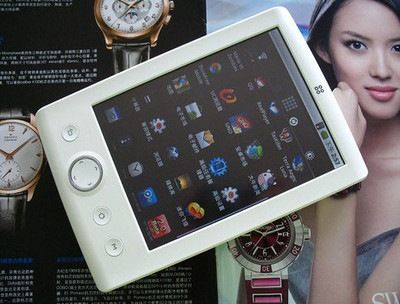
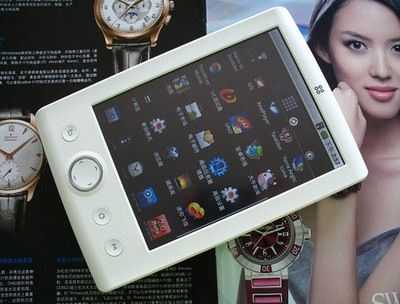
Readers might notice that the Mi700 is the same as the Camangi FM600, the OlivePad and the Viewsonic Viewpad 7 that should be launching soon. (all product details here with links and videos) For a 7 inch tablet with 3G, voice, GPS, capacitive touchscreen and Android 2.2, this is shaping up to be a really nice product. The pricing should be competitive (we’re hearing 399 Euros for the Viewpad 7 with 3G included) so this is one review to read carefuly. Take it away with Part 2, Er Lern….
See Full Mi700 Specifications here
Okay, the first part was the easy part. Now comes the hard part… the software aspect of the DroidPad. First of all, let us remind ourselves that this tablet is running on Froyo, Android 2.2. Take note that this is based on my full week’s experience of the tablet. In the week that has passed, I have already installed about 30 programs (mostly free and some paid). Not only that, I have transfered over 2GB worth of media files. All in all, this should be a more balanced review and not just a ‘first look’ at the device. Onwards with the review:
Performance
1. Mflops: Mflops basically stands for Million FLoating point OPerations per second. It is a calculation intensive test where the higher the numbers, the better. Using Linpack for Android, the device scored 7.5 Mflops on average in 11 seconds. This is considered reasonable when we take into account the CPU which is an MSM7227 600Mhz (a slight upgrade from the older, and much despised, MSM7201A 528Mhz). Comparing with similar CPU devices, we find that the HTC Aria scores 5.2 Mflops with a slight overclock to 806Mhz while LG Ally/Aloha scores 9.1 Mflops with 30% overclock and HTC Legend scores 9.8 Mflops with 37% overclock. Certainly the Mi700 can hold its own.
2. BenchmarkPi: Basically the time it takes to calculate Pi. The lower the better. The DroidPad scores an average of about 2,800 milliseconds, not too bad considering a Snapdragon processor averages about around 2,000 milliseconds.
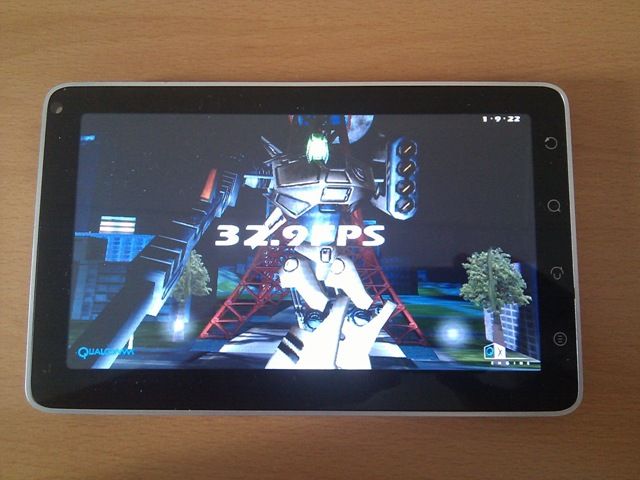
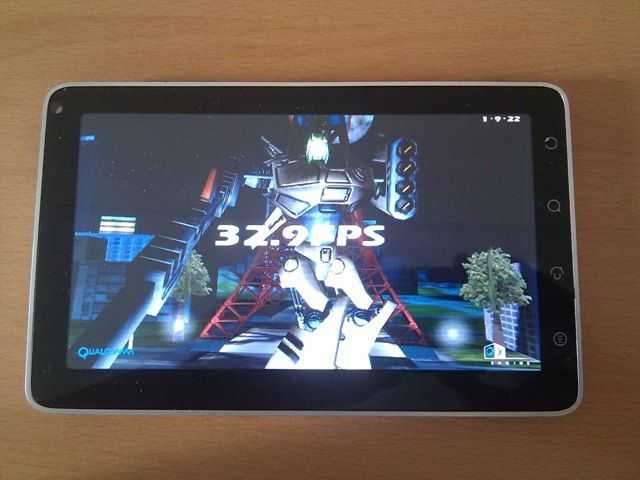
3. Neocore: This is an OpenGL-ES 1.1 graphics performance benchmark test. The DroidPad’s MSM7227 actually shares the same GPU as the Snapdragon; Adreno. I am pretty surprised by the outcome, since the DroidPad performed slightly better than my HTC HD2 Android (using a Snapdragon CPU and running Froyo) with an average of 32fps while the latter only a paltry 30fps.
4. Boot Time
This was timed from the moment the power switch was pressed and slight vibration felt, until the time when everything was loaded and lock screen appeared (SD card finished mounted). The total average boot time was approximately 60 seconds (1 minute). Frankly, I think this is acceptable although it should be improved. Somewhere around 45 seconds would be good.
Home Screen Performance


Click to enlarge
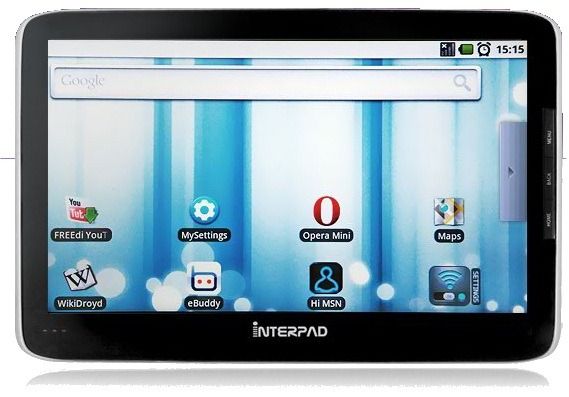
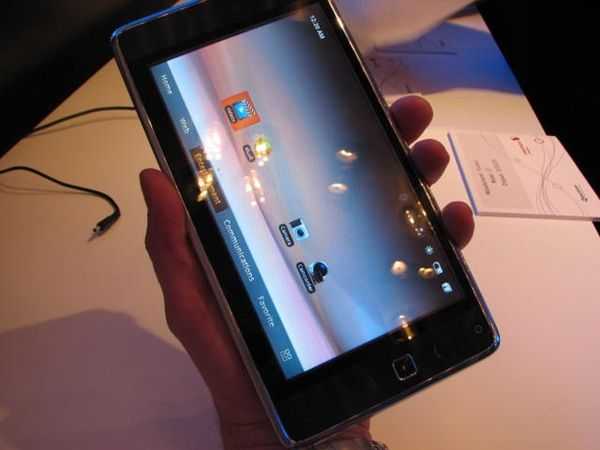
1. Custom Shortcuts: This is the version that came with the DroidPad. It looks very much like Android 2.2 stock, but with the added difference of a strip to the left hand of the tablet screen which contains 4 distinct icons. The top most is for mails, followed by an e-book reader, media and social networking shortcuts. I found this to be a redundant add-on since the system already allows users to put on widgets of their own. However, I suspect that this is not part of CSL’s customization but Foxconn’s, since the same shortcuts strip is seen in the similar devices shown elsewhere (Camangi Webstation and Viewpad 7). I have to say that they were not efficient to use at all. I found that the mail program took time to load, and was laggy. Same also for the media player. To its credit, it had a ‘cover flow’ type interface, but again, it was laggy and I kept selecting the wrong song since it either went too far ahead or too short before the one I wanted. Same goes for the social networking program which incorporates Facebook and Twitter. They look too much like the old web 1.0 interface.


2. Scrolling: The saving grace comes in the parts that are untouched, mainly the apps drawer. There is no lag in using the apps drawer and it was all smooth no matter how many apps I had installed and have open at any one time. Scrolling between screens were slightly laggy on the stock version. I have no idea why, but it just is. Not noticeable if you have never used another Android device, but still, it is just a little annoyance that I wished they would have cleaned up a bit more before shipping the devices out. As a matter of comparison, it felt slightly jerkier than using CyanogenMod 6 (Froyo) on a G1/HTC Dream phone.

3. Resolution: Because the tablet shares the same resolution as many of the more advanced Android devices, the grid that is available for widgets remains 4 by 4 (in all, you can put up to 16 application shortcuts on a single screen). The stock version only allows 3 home screens. If there is one glaring weakness of the Mi700, it would be the resolution size. Even though we have a considerably large screen, stretching an 800 by 480 resolution on it wastes that spacious capacity. What we get is the same 4 by 4 grid available, which translates to widgets getting blown up double the size, making them look awkward at best and ugly at worst! And the result is big spaces between each widget or shortcut; wasted space! I think if it was using the conventional netbook resolution of 1,024 by 600 pixels, this would have made the DroidPad near perfect! For some people, this might be a dealbreaker. Certainly, it would improve on the utility of the home screen.
4. Live Wallpaper: One of the most loved features of Android 2.0+ is the introduction of live wallpapers. Basically these are your normal wallpapers plus added interactivity and animation that adds to the level of ‘fun’ and ‘zazziness’ of a phone OS experience. I found that the DroidPad could handle all live wallpapers fine, without any hitch in the interface. The only problem stems when you are coming back to ‘home’ from a memory intensive application; it takes time for the live wallpaper to reload. That is the only problem that I have encountered, and this is nothing to do with the device, but to the software itself.
5. Alternative (LauncherPro): Personally, I ditched the stock home screen launcher and installed LauncherPro from the market. Buy it. It is worth it. This made the home screen less of a bore for me, as I am able to reclaim the whole screen for myself (no pesky strip to mess with the symmetry), and have up to 7 home screens. Not only that, but LauncherPro allows the user to heavily customise the feel of the home screen. The transitions between screens were smooth and flawless. The app drawer opened speedily and scrolling is smooth when there are only a few apps installed. However, after more than 25 apps in the drawer, I notice that it does tend to lag just a little. But besides that, there is nothing else that I would recommend for speedy experience. LauncherPro also allows the user to change the size of the widgets on the screen to suit their wants. Resizing helps to save space, especially when there is a need to put as many widgets as possible into one single screen.
One last reason to change the home screen launcher to the new one? The stock version only allows the user to use the tablet in landscape mode. This limitation is very frustrating upon me because of my tendency to do work in portrait mode. Thankfully, LauncherPro allows for this.
Note that the more active widgets (auto update) the user uses on the home screens, the slower the UI performance will be. However, based on my usage, I found that the 512MB RAM is well worth its size; I rarely felt that the screen was lagging because of the many applications that are open and the widgets that are actively updating itself.
6. Inputs – Virtual Keyboard, Accelerometer and Touch


Click to enlarge.
I have not much problems with the touch sensitivity of the screen (as mentioned in part 1). However, I notice that in some situations, my swipes are not registered at all. Somehow, at times, I notice that some applications cannot seem to register my swipes and touches. A good example would be in the app drawer (stock version); swiping using my left thumb would result in absolutely smooth scrolling. However, if I were to use my right thumb to do the same gesture or swiping motion, there would be no response from the application. Strange, but these small ‘problems’ appear almost randomly throughout the week.
The accelerometer worked well on games in general. The user is given the option to calibrate the accelerometer whenever the necessity arises. I could easily play the game “Labyrinth” and see how accurate the motions were. However, it is to be noted that the game “Abduction” was problematic to play, as the accelerometer just went haywire.
The virtual keyboard provided as default is the stock Android virtual keyboard. The keys are well spaced on the tablet, but it makes it a bit hard to thumb type, since our fingers will not be able to stretch that far out. Nevertheless, if the tablet is rested on a surface, typing is much faster and more accurate. It is unfortunate that the keyboard does not respond as fast as the iPhone’s; there is a very slight delay and this is more noticeable when the haptic feedback is turned on. I do not think I can type fast using the stock virtual keyboard provided. As an alternative, I used Smart Keyboard Pro (paid version) which is much faster in response, and supports multi-touch points.
Applications
The best news concerning apps on the DroidPad is the access to Google’s Marketplace. Depending on the country you are in, you will be able to either access only free apps (this limitation applies for places like Malaysia) or both free and paid apps (only selected countries). In this section, I will just give an overview of the type of performance experienced in using various types of applications on the DroidPad.
1. E-reader

The DroidPad comes with the popular Android e-book reader Aldiko installed in the system. Aldiko is the best reader that allows for offline reading, unlike other reader apps like Kindle. What makes Aldiko popular stems from its intuitive graphical user interface and ease of transitioning between pages. When the pages are rendered on the DroidPad’s 7″ screen, I have to admit that the words are so easy to read. There is no more need to squint or to move the device closer to us like other smaller devices. The 7″ inch display allows for more words to be fitted into a single page. Though the resolution for such a device might be low, yet I did not find myself struggling to focus on the text. This is definitely one of the plus points of having a device with ample screen size. Just like LauncherPro, the user is able to customise the way they read using Aldiko, till they have satisfied their own requirement.
2. Video Player
The DroidPad’s player only plays a very limited type of video formats (mp4 being the chief of them). I find the video player to be too simplistic. In order to test the video rendering capabilities of the DroidPad, I installed two video players; Rockplayer and Yxplayer. Both of the players could play a common .avi (dvix, xvid) file smoothly. The file played had a resolution of 624 by 352 pixels. However, the playback was not so smooth when playing a true HD 1080 video. On Yxplayer, the result was choppy at best. I tested MKV files and both players failed to play it adequately.
One of the missed opportunities for this device is to provide adequate coverage on video file formats that it can play. This is more surprising considering that this device has a graphical processing unit. Here’s hoping for a better update for the customers, incorporating these suggestions.
3. Social Networking Apps
There are many in the market for free from which you can choose from. I have to confess that it is quite a joy to see a substantial amount of updates without having to zoom in and to subsequently zoom out from using the device. Sharing news, photos and other media are as provided under Android 2.2. Everything works efficiently (minimal battery usage). There are no real surprises here.
4. Games
Most games played well using the MSM7227 chip. The only thing to be careful is to know the limits of the CPU; cannot play certain emulators that are made for Snapdragon or Cortex chips. Zenonia (something like Legend of Zelda) played on the tablet at full screen. The controls and the performance of the game was really good, without any lag. Besides that, I tested a few emulators on the DroidPad. It seems that all emulators (e.g. Gameboid, Gensoid) can work well with the device, except for the PSX emulation. The screen size really helps to make the game more immersive for the most part.
5. Voice Search
This is a Google app that is integrated in Android 2.2. To enable this search, one needs to only hold onto the “search” button for 1 full second, and the app will start to receive the voice input from the device’s microphone. It works well enough for me; I spoke the words, “Wikipedia” and “Great wall of China”. The results returned was almost instantaneous, clocking in at 1 second. I am really impressed with this.
6. GPS Navigation

The device comes with 2 maps that can utilise the internal GPS; MapKing and Google Maps. The former is included as part of the DroidPad package. Malaysian buyers get to use MapKing products for free using the 1-year subscription that they offered. Somehow MapKing (from what I can see) is not a good GPS application. It is definitely not an attractive package (unlike Garmin). The only other option for me at the moment is to use Google Maps. Unfortunately, Google Maps can only be used with a data connection (either 3G or wifi). I found that the GPS fix was very fast on Google Maps, within a few seconds (with AGPS turned on and while I was in the house and not open air).
7. Music Player
The stock player is the same boring app that has not seen much changes since Android 1.6. There was no problem in detecting my whole library of songs which I transferred via USB from my desktop. I installed Mortplayer (free) from the Market and used the widget to play songs when I am on the go. Surprisingly, the widget requires a few taps before it registers my touch. Once the app starts, it works smoothly with not much delays.
8. CSL Custom Apps
 You might be wondering what type of customization CSL made for the devices. There are a few that is quite obvious from the apps drawer; Blueberry Messenger, Blueberry Store, CSL Azan Alarm (for muslims) and CSL Fun Club. All these apps surprisingly (except 1) are web-based; the icons only bringing up a shortcut to the respective website. The Blueberry Messenger is their attempt to have an IM (Instant Messaging) app that encompass as many social sites as possible. Blueberry Store is their web-based online store, while the CSL Fun Club is just a sort of gateway for people to explore their offerings given to potential customers. The only useful application that I could observe was CSL Azan Alarm… basically it is an alarm clock to remind the user of their obligations for worship. I found that the work done on these apps were minimal and therefore quite deplorable.
Multitasking
 Multitasking works with these apps. I am able to switch on the music player while surfing and reading an e-book from Aldiko. Again, this is the benefit of having ample RAM size, which I am glad this device have in spades! There is no need for the application to reload all the data all over again when you are switching between applications. I tried to test the limit of its multitasking by using several memory intensive applications and switching between them to see whether they needed to be reloaded (a sign of insufficient memory). I opened Engadget’s app, Astro file manager, Aldiko, CadreBible, Market, Music, Browser (to a specific website that is graphically intensive), Angry Bird Lite (the game) and Mortplayer. It is surprising, but I actually had NO problems switching from one to the other. They were all still working without reloading the contents. I am thoroughly impressed because this is one of the aspects that are important in daily usage; worrying over memory management (I had a G1/HTC Dream and it was always a horror to switch applications).
Battery Life
According to the specifications, the DroidPad houses a 3,240mAh Li-Pol battery. I have done some test on this and have found some approximation of how long the battery can last. For simple usage, some surfing, checking of mails, typing, music and reading, you can easily squeeze nearly a day’s life from it. For heavy usage, where the above are done more frequently, then you can squeeze probably 7 hours.
The playing of media files will drain the battery faster than surfing does. To test how durable is a single charge (from the wall charger and not from desktop) I performed the following things: I played a 20 minute divx clip for 7 times while at the same time playing music from Mortplayer (continuously) and also switching on the display to the brightest setting and watch the battery drain away. The test started at 10am and when the device powered down by itself, it was at 3.30pm. Based on my simple test, the device lasted for 5.5 hours of heavy media usage!
Take note: charging the battery takes time, even when it is done from the wall charger. It takes approximately 3 hours plus.
Flash Implementation
Unfortunately, for Adobe Flash 10.1 to run, the minimum requirement is for an Arm7 chipset, which the DroidPad does not have (it has only an Arm11 chip). Well, do not worry much, since the iPad also does not have this and people are well content with it. For small Flash usage, there are always alternatives that can be used on the DroidPad. A good substitute for websurfing Flash enabled sites is by using Dolphin HD browser. It is quite fast and shows off some Flash contents (I have not use it extensively). This is a limitation that is not due to the software, but rather the hardware of the device.
Development
To round up this side concerning the software performance of the DroidPad, I would like to say that there are some other concerns that I would like to put forth. The main one being, there are a lot of ways that the DroidPad can be made more useful and attractive, and all these involves having more developers to thinker on the software itself. I can only imagine getting Cyanogenmod 6 working on this device, thereby solving any buggy code or inefficient coding. Many of the problems detected in this review can be solved. Unfortunately, in order to do that, we need to get ‘root access’ on the device. Something that is for now elusive.
I cannot even seem to get ADB (Android Debug Bridge) to work with the device! I found that even the “terminal emulator” that is ‘installed’ on the device cannot be accessed by users. I have to install Android Command Shell app to use command line actions. It makes me wonder whether the DroidPad and CSL is open to the developers community? For certainly, they can gain so much more when the developers are collaborating to extend the lifespan of this device.
From my initial discussions with them over the matter of open development, they have shown some interest in pursuing this, especially in line with the massive third-party independent developers for the first batch of Android phones. We can only hope that CSL will show their support for such endeavour instead of just seeing this as a product.
The last part of this review will cover the final parts of the DroidPad: Camera, Phone Functionality and Other Uses.
[Again, many thanks to Er Lern out in Malaysia for sending us this review of the CSL Mi700 tablet before posting it on his own blog. Er will be bringing part 3 of the review soon. Make sure you follow Er on Twitter – Chippy]