Tag Archive | "smartbook"

Chrome for Android – The Turning Point For Android Tablets

Tags: , , , , , , ,


Chrome for Android has just been launched.

Many of you know I run three sites. Carrypad, the tablet-focused site. Ultrabooknews, the thin-and-light laptop site and this one, UMPCPortal.  At UMPCPortal we’ve been focused on productive mobility since 2006 (almost exactly) and as you will probably know, the last few years have been hard on us. Trying to get productivity into a two-handed mobile experience has been completely ignored by mainstream manufacturers. We’ve all tried tablets of course and all been disappointed at the lack or processing power, lightweight apps and of course, the full web experience which requires a full web browser. Mozilla tried with Firefox for Android but didn’t really get there yet. Most people settled on Dolphin HD as the best of the bunch but it wasn’t anywhere near the experience needed for web-based productivity and creation.

Intel offered us some hope with Meego, an optimised Linux-based OS that included a Chromium browser…

MeeGo offers me some hope. A full internet experience and an app store but it’s something needs to mature until at least late 2011 and in fact for it to function fast enough to be productive it will need a high-end dual-core ARM or Intel Moorestown platform that will not be able to provide all-day battery life in a smartphone form-factor. [ref June 2010]

… but we all know what happened there.

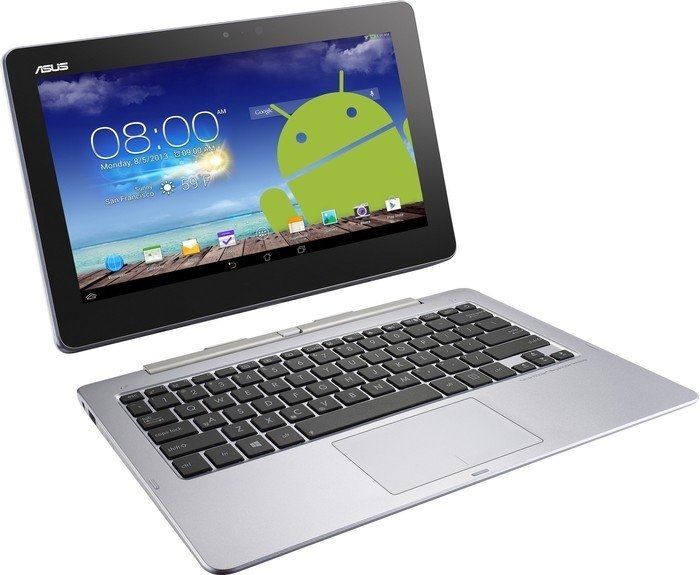
And then along came the best smartbook yet. The Asus Transformer Prime has fantastic looking hardware, 18hr battery life (with leyboard dock) and some great sensor, touch and app experiences. The problem was that it also had issues when addressing productive and creative work. The apps are still thin and the browser still terrible.

But there was nothing else to choose from. Until today that is.

Chrome for Android has been launched. It’s in the Android Market for anyone with an Android Ice Cream Sandwich device and it’s fully functional. Well, it seems to be. This Beta software may have a few bugs but it represents the best step yet towards a productive handheld ‘UMPC’ solution. There will still be problems with low-quality, unstable and badly supported native apps,  but Chrome on Android is going to develop fast, encourage a new market for Android tablets and  enable a whole new world of desktop-quality browsing.

There are early issues. Mouseover doesn’t seem to be working well and there could be performance issues related to the (relative to laptops) lack of CPU, memory and general platform speed but these are likely to be fixed very quickly given the effort Google is putting into its browser.

Unfortunately for me, I don’t have an ICS tablet right now. I will be looking for ‘ROM’ upgrade for the Acer A500 I have here as it supports USB host (for keyboards/mice etc) and would work well as a smart, Chrome-based desktop device but that could take a few days before I get round to it. Maybe I’ll be looking for an ASUS Transformer Prime though. Given its smartbook credentials and Chrome for Android it now has the potential to span Carrypad, UMPCPortal and Ultrabooknews!

A quick note on the Android 4.0 requirement. I think it’s a brave bu neccesary move. It means that only ‘Google Android’ gets the best browser and encoruages a big shift to ICS over 2012. it might be annoying for some now but it makes absolute sense to encourage a move away from 2.x and 3.x variants and get everyone moving with ICS. When that happens, ISVs will be far more likely to invest in high-quality tablet application development and that’s where the turning point comes. Following the turning point, the niche designs will jump in too. There’s every chance that we’ll start to see UMPCs again…running Android. I know you’ll be concerned with security, apps, interfaces and such but I feel sure we’ll see those issues solved. The market for alternative designs is going to grow quickly so watch out for a fresh batch of UMPC news!  It also makes Apple think hard again about a smartbook although my guess is that they have been working on one for a long time already.

Don’t forget that this app is very likely to be in development for X86 devices too. Intel will be putting massive effort into getting this optimised for Medfield-based devices. Comparing Sunspider tests, hopefuly at MWC later this month, will be fun!

I’m interested to hear your thoughts below. I’m sure we’ll have a good discussion.

Updates:

Noted – There’s no Flash support. I’m not sure too many are going to have a problem with this and it sends an important message out to web developers – Stay clear of Flash!

There seems to be a problem with agent-id. I’m reading that Chrome for Android is identifying itself as a mobile browser.

Eee Pad Transformer used as Productivity Tool

Tags: , , ,


image

The Asus Eee Pad Transformer is a very popular device and I’ve seen a number of reports of it being used in productivity scenarios. The gaps between devices like this and traditional laptops are closing and so it’s no surprise that people are testing the limits.

Find out where these gaps are with the start of another good series over at Carrypad. The question is, is Android good enough to allow all the gaps to be closed through 3rd party software or are there jobs that will always need doing on a PC?

http://www.carrypad.com/2011/08/14/using-the-eee-pad-transformer-as-an-enterprise-productivity-device/

Eee Pad Transformer Trips Up in Productivity Scenarios.

Tags: , , , , , ,


UMPCs, we’re not shy to say, are still important. They’re becoming more important too as people realise that there is a life for devices between 4 and 10 inches. UMPCs offer something that you can rely on to give you a high quality work and web experiences with the minimum of brick walls and maximum compatibility and flexibility.

Unfortunately for pro-mobile fans, the number of true UMPCs has dropped to near-zero with only large-screen windows tablets getting any sort of attention. It’s the Android and IOS tablets that are getting the lions share of attention and development funds though and we are now in a position where we need to keep an eye on the desktop and mobile worlds for solutions that could satisfy our needs.

I’ve done extensive testing and research on the smartbook market over that last 18 months with devices like the Compaq Airlife 100 and Toshiba AC100 but I haven’t found anything that I could call pro-quality. While the industrial designs and computing hardware reach acceptable levels, the immature operating systems and applications truly limit capability and introduce inefficiencies and risk.

Honeycomb, the tablet-oriented version of the Android system is the next-in-line for major testing and the Asus Eee Pad Transformer is the ideal product to test it with.

Image via Laptopmag

Although I haven’t yet been able to get hold of a Transformer as my Amazon UK order was delayed to June, I have been carefully reading between the lines of the many reviews that are out there. I’m trying to get a feel for web experience, applications, keyboard usage, connectivity and battery life along with an idea about how those ‘HD’ apps are coming on.

So far, I am not seeing an acceptable solution being presented.

While a lot of reviewers seem impressed with the price and design of the tablet, keyboard and docking feature, the battery life and general usability of Honeycomb, there seem to be issues with Web (once again, not the full desktop internet experience) performance and applications. It’s the latter that concerns me the most as it will take the longest to fix and relies on a healthy Honeycomb ecosystem to even seed. I’m also not so impressed with the price.  It may be cheaper than other tablet options but it’s still an inflated price for what you’re getting. Finally, at 1.3KG, it weighs 130gm more than the Aspire One 522 that i’m using right now that has nearly double the CPU processing power and 3D graphics that just don’t compare along with an OS developed for professional use and a huge range of professional software available.

Keyboard – Good ID

In general, the keyboard and mousepad are getting good reports. A good level of mousepad/OS integration ensures that the unit is not relying on touch input when docked. The battery in the keyboard unit is used to recharge the tablet battery (a very inefficient, but cheap, way of using an extended battery) and the USB ports are of limited use. Mass storage and external mice are supported but don’t exptect to be able to plug in a webcam, usb headset or many other common USB accessories that ‘just work’ under Windows.

Battery Life – So-So.

In total, the Asus Eee Pad Transformer returns around 9hrs in tablet mode. Some reviews are reporting down to 6hrs. Usage in docked mode is going to depend on whether you dock the device when the tablet is fully charged as the battery in the docking station will try to re-charge the battery in the tablet while also powering the system. The battery to battery re-charge process is going to cost 20-30% of energy. From results I’ve seen the maximum you can expect from the docked unit is about 16hrs which, with a 48wh battery, shows that ARM-based devices ultimately rely on screen, wifi and engineering to get the best out of them, just like X86-based devices. I haven’t seen any screen-off, wifi on figures yet (always-on mode) but am hoping for at least 4 days. If the Transformer is very well engineered, that figure should go up to the 7-10 days range. ElectricPig indicates that the Transformer loses about 10% of battery with Wifi on in a screen-off, syncing on scenario. Assuming that’s about 10hrs of idle, it indicates a reasonable always-on, Wi-Fi connected capability of about 4 days (tablet only) or about 6 days (tablet and dock.)  That beats the Toshiba AC100 my a big margin.

Web Experience – Not FIE

Tabbed browsing is nice, but many reviewers are focusing on this , and the Flash 10.2 experience as a big step forward. For productivity users, these are entry-level features. While thre aren’t too many details in the reviews I’ve seen so far there are indications that the quality of the browsing experience is compromised. I’m particularly interested to hear how Google Docs works with the keyboard. AnandTech reports ”occasional issues’ that include a poorly formated Reddit front page.

Applications – Back to the Smartphone

As I mentioned above, this is the major issue for Android Smartbooks and it’s not one that manufacturers can solve. It will only resolve itself when Honeycomb gets traction, proves numbers and drives teams to develop quality software over a period of months. At the current rate of change in software, we’don’t expect Honeycomb to offer anything like a serious 3rd party productivity application range until at least late in 2011.

Other issues to consider.

  • No 3G / 4G
  • No VGA output (for projectors, monitor compatibility)
  • Video playback not smooth (as reported by a number of website reviews.)
  • Some reviews are reporting speed slow-down after a couple of hours of use.

Sidenote: The Anandtech review is an interesting read that explores the idea of continuous client and smartphone-based modular solutions.

Summary.

For smartphone and tablet users, the Asus Eee Pad Transformer must appear quite exciting. It did for me too but I knew there would be issues. The issues of application availability will haunt every attempt at an Android productivity device for at least the next 6 months, probably longer, but if manufacturers fail to capitalise on battery life possibilities and if Google can’t update Honeycomb to finally support a Chrome-like internet experience, there will be limited reason to accept these attempts into the realms of profesional environments and little enthusiasm for creating rich, high quality, professional applications. The few points mentioned above are obvious failings but there are other hidden items that will rise to the surface as people truly start to try these devices out for productivity. Think about multi-user capability for example. Disk encryption, memory upgrade, VGA ports and 3G support are just a few more to consider.

I’m disappointed in the battery life reports, video playback issues, weight and web experience that I’m reading about so far. So much so that i”ve decided to skip the Eee Pad Transformer. I will try to get hold of a review sample but it won’t be something I’ll take on board into my work life. Like the Airlife, AC100, Atrix and other attempts, there’s so much missing, so many brick-walls, so few applications that I don’t expect any major progress until later in the year. The Transformer proves the point that Honeycomb can move in the right direction and as a tablet device, it may well be good value but for pro-mobile users, I’m not recommending it.

Caveat -These thoughts based on my experience with smartbooks, my own hands-on with the Transformer, feedback from contacts and information available in the public domain. Find full reviews of the Asus Eee Pad Transformer in our product page. Reader, owner feedback is encouraged below.

The 1K Challenge: Working my E-book in Grams, Euros, Words and Kilometers.

Tags: , , , , , ,


How easy is it to work for a day on a PC. Easy! How about writing 1,000 words and carrying less than 1KG of equipment that costs under €1000? How about doing it while traveling and not carrying any mains adapters?

Next week I have three days on my own and I plan to get away from the home office. I’m not sure where I’m going but I do know that I will be setting myself a challenge – to finish my e-book which is now nearly a year past my planned schedule. I’m also going to throw in some other targets too and it should be interesting for you to watch. Can I work for a full day carrying less than1KG of equipment worth less than €1K.

This isn’t going to be easy because what I’m talking about here is a full mobile office with the following features:

  • ‘PC’ with email, web browser, document editing capabilities, storage, screen, keyboard and Wifi
  • 3G internet connectivity
  • Navigation system
  • Camera (minimum 2MP)
  • Video camera (MIN VGA)
  • MP3 player and headphones

IMG_5325

The PC alone is quite the challenge as you’ll see from an article I wrote in the summer. Finding a netbook under 1KG is impossible so you’re left with specialist devices or ARM-based tablets and ‘smart books’ and even then, adding the additional capabilities (obviously via a smartphone) and ensuring you’ve got enough battery power is something i’ve never been able to do in 1KG before. My reporting kits of the past have rarely got close to 1KG. This one was an exception.

I’ve set a few ground rules which also narrow down the choice.

  • Screen: 7” or more. In my experience, trying to work efficiently on anything less is going to result in stress, aches and embarrassment as you crouch over the device to read the screen or enlarge the text so much that you haven’t got enough working space. For most people 9 or 10” is entry level.
  • Battery life: 5 hours. A full day would be regarded as 8hrs or more by most but there are only a few devices around that could deliver more than that in an always-connected, screen-on scenario. The iPad springs to mind as the #1 choice in terms of battery life but I need to consider other, more business-oriented options.
  • Document editing capabilities includes offline text input and formatting capabilities with embedded images and links. In summary: offline rich text.
  • Connectivity does not have to be on-board and can be provided via BT tethering, 3G dongle , MiFi or free wifi connectivity.
  • Charging: No re-charging. Spare batteries allowed if they fit in the 1K allowance
  • Multiple test rigs per day. I know that some of the solutions won’t last for more than 5hrs. In order to get the most out of my 3 days, i’ll be taking multiple ‘rigs’ so that I can switch to a new setup if needed.
  • 4 Setups will be tested. If I can’t get a rig working in under 1KG, I will make it as near as possible using the resources I’ve got.

The Shortlist.

As I mentioned, there isn’t a netbook out there that can do this so we’re looking at UMPCs. The Viliv S7 (830gm), Sony Vaio P11 (632gm) and Viliv X70 EX (660gm) head up the list of PCs that I could choose from although there’s a good chance that the Tega V2 will turn up here in time for the test. That would be an interesting one at 800gm and with a nice 10” screen. Adding a keyboard and the phone would probably take it to 1.2KG though. We’ll have to see. There are some other non-windows devices too. The Toshiba AC100 runs for 7hrs and weighs only 800gm. I would only need to add a smartphone to complete that setup in under 1KG. The Viewsonic Viewpad 7 would be a very very interesting option. It would only need a keyboard to complete the set-up as it already has GPS, 3.2MP cam, navigation, voice, SMS and 3G built-in. I will try my best to get hold of one of these for the test. There’s the iPad to consider too but getting a stand and keyboard in under 1KG could be a challenge. I’ll see what I can do about getting an iPad setup for the test.

Current shortlist:

More K’s?

The 1K challenge starts on Saturday and I’m thinking of adding one more ‘k’. Can I travel 1000 kilometers while I do this?

Sponsorship.

Naturally this project is open to sponsorship. If you’re a reseller of mobile computing solutions and want to put your name or products forward, please contact me. German resellers, I’d especially like to meet you! Lass uns zusammen ein bier trinken! Get in contact with me via the contact form available through the link on the site header

Help / Meet-and-greet.

If you live in Germany/UK/Netherlands and have a Vaio P11, an iPad 3G or another solution you want me to consider, (UK or German OS please) get in contact with me via the contact form available through the link on the site header. If you live in Duesseldorf, Hannover, Stuttgart or some other major city and you fancy a mobile blogging meet-up, let me know and I’ll try to plan it in.

Stay tuned to UMPCPortal for more information on the 1K challenge later this week.

Android and Productivity – Live Testing with the Toshiba AC100

Tags: , ,


Update: Live testing is over. Videos are available here.

A few days ago on UMPCPortal I wrote about the differences between smart devices and netbooks. Tonight, I put one of the latest and more productivitiy-angled solutions to the test.

Tegra2 testing begins tonight because within the next few hours I expect the AC100 to be delivered.

The Toshiba AC100 is the first Tegra2 device to hit outside Japan and only the second true smartbook to hit any global market. We’ve already reviewed the Airlife 100 so now its time to see if Toshiba and Tegra can bring anything new to the table.

Oh, and of course we’ll be running an Email Notification Rave so bring a few beers and join in. “‘Here come the emails!”

Live VIDEO Q&A and chat session on Carrypad.com/live tonight at 2200 Berlin time (1600 New York, see other locations. Approx 11 hours from the time of this post.)

JKKMobile will join to help moderate this independant review session.

We’re sorry for the late notice but with IFA creeping up on us it’s now or never! We hope you can drop in. (parts of the session will be recorded.)

Summer Breaks, Products Wait. Round-Up and Outlook Q3/Q4 2010. (Pt. 2 of 2)

Tags: , , , , , , , ,


smartbook surfer Yesterday, in Part 1, I talked about 3 tablet products. Today, there’s more and the first one is something that shouldn’t be a surprise because Smartbook AG have released a ‘Smartbook.’ The only problem is that I don’t see this as a smartbook. A smartbook to me would be in the laptop/netbook form factor and have an advanced CPU that brings enough power for a quality web, gaming and application experience along with an application store. Smartbook’s Smartbook Surfer runs an ARM11 based Telechips CPU and has a basic Android 2.1 install with, as far as I know, no Gmail, maps or marketplace. That’s not to say it’s a bad product because at 170 euro with GPS (possibly not in the 170 Euro version) HDMI-out, stereo speakers and a case, it’s worth considering for basic coffee-table and holiday duties. If you’ve looked at the Archos 7 Home Tablet.

The final 7” tablet to talk about is the Viewsonic which is in a different league to the Smartbook Surfer. It’s a rumor but looks likely to me considering the Viewsonic branding we’ve seem on prototypes around the trade shows this year. Stuff.TV indicates that it will be running Android 2.2 and have 3G, hi-res cam and GPS options making it a competitor to the Samsung and Huawei slates. They say that is will launch in the UK in about 2 month. Again, this is a rumor, but it seems likely.

Before I move on to the other news items I want to talk briefly about smart books. I’ve been very positive about the possibility of ARM and Android bringing an always-on, social, fun and lightweight netbook alternative to the market but as yet we haven’t seen anything that really hits the mark. The hardware is there in my opinion but it was always the Android build that fell short. Both the Compaq Airlife 100 and Toshiba AC100 were build on open-source Android and included none of the important, even critical elements of sync, Gmail, maps, marketplace and other Google software. For a category that would benefit from software re-writes, not having a software delivery channel means no developer is going to bother with the opportunity. I’m 100% sure that Google and ARM know about this and the stars seem to be pointing towards Android 3.0 (codename Gingerbread) as the solution. It will finally branch Android out to non Smartphone devices. Why the delay? I suspect Google is re-writing some of its apps to suit WVGA and higher resolutions just like Apple did with their apps on the iPad. As for timescales, I suspect we won’t see anything until the last weeks of 2010 which is just about when MeeGo/Moorestown based tablets will hit the scene. The differences between the two hard/soft platforms will be clear at that point.

Did you see the new renderings of the Eking slider UMPC? It looks similar to the design we saw in plastic form with Wibrain (sold to Eking) in Sept 2009.

eking-slider IMG_7033

It also looks a lot like the Mui HDPC. I remember using the Amtek U650 in 2007 and liking it a lot. If Eking can bring this to market on Oaktrail with some quality engineering and better aesthetics, it has a chance in the UMPC market but maybe it would be more successful as a ‘smart’ product on a Cortex A9 core with Android 3.0? Slimmer, always-on, great for Android gaming? Just a thought.

Here’s something about MiFi-a-likes. I’ve been using the MiFi for over a year and it’s been a great product but I’m disappointed that there haven’t been any upgrades since launch. The GPS remains unusable, I get the occasional lock-up, it gets very warm, it’s impossible to remember to indicator meanings and the battery life needs to be more than 4 hours. Novatel will fall behind if they don’t watch out because the new Huawei E583C looks to match the MiFi’s current capability and offer an OLED display panel on top. The idea of an on-board application processor sounds attractive with the MiFi but there’s no software for it yet so why bother? I’d rather save 40 or 50 Euros and take the E583C to be honest.

Other news I’ve ‘starred’ over the last few days of catch-up time…

Clearwires Apple-centric 4G hotspot.

Motorola-Verizon Tablet with FIOS TV.

Nokia’s take on the MeeGo handset UI.

Android 2.1 on the Dell Streak

ExoPC slate update.

‘Watchlist’ and ‘Events on the next page…

ARM Products and Platforms Primer and Resource List for Mobile Internet Devices in 2010. (Updated)

Tags: , , , , , , , , ,


This article is updated from Jan 2010. See below for history.

The ecosystem around ARM, its designs and licensee products can be difficult to understand so I’ve been researching the current status and have summarized the important products, brands and technologies in the article below. You’ll find details on all the important keywords and technologies, links to all the important CPUs and platforms, a reading list and some ‘tip’s’ for CES2010 which starts this week. All the information is based on my own knowledge and research so if you spot any errors, please be sure to let us all know in the comments. I know there are some CPU designers and ARM partners reading this site so again, if there’s anything that needs changing or adding, please help us all by adding a comment below.

armarch

Overview of processor architectures in current ARM products

For the purposes of this article I’m ignoring anything other than ARM v7 architecture CPUs. In my opinion and experience the previous (ARMv6, ARMv5) designs don’t provide the processing power needed for the quality web experience expected in  MIDs. Note: Tegra (current version 2009) is an ARM11 multi-core CPU  implementation based on ARMv6 architecture. I expect Nvidia to move to ARMv7 in their next Tegra product.

ARM v7 is a CPU architecture, not a CPU.

ARM V7 is a processor architecture. It’s a design that belongs to ARM and it can be used to build CPUs that can process around 2 Dhrystone MIPS/Mhz. (Wikipedia – Dhrystone) That’s about 2000 DMIPs/Ghz which is not far from the processing power achieved by simple, non-hyperthreading Intel Atom cores also used in MIDs. DMIPs processor performance is not the only measurement of device speed but it’s a good starting point and is relevant to web rendering and web applications.

Processing power

In general, the architecture is being used to make CPUs and platforms running at between 600-1000Mhz (about 1200-2000 DMIPs) although there is one known implementation that has been tested at over 2Ghz. Power consumption per core is said to be around 300mw per 2000DMIPs using the latest manufacturing processes although this figure can vary greatly depending on implementation.

Remember that the CPU core takes only a small percentage of the power drain in a working device where the total in-use power budget including screen lighting, radios, audio, gpu, storage and DC components can span from 2W to 10W. (Texas instruments thinks that a 1W MID is possible though)

In comparison with the Intel Atom CPU the ARM v7 architecture can be used to make CPUs that consume about 1/3 – 1/5th of the power of an Intel Atom CPU for the same DMIPs computing power.

ARMv7 can also be used to make multi-core CPUs where up to 4 cores can be used to provide over 8000 DMIPS of computing power. (Assuming the software is built to handle multi-processing hardware)

(Further note: All these figures based on research, marketing figures, experience, testing and technical documents that I have read during this research.)

ARM does not manufacture CPUs.

The architecture created by ARM is used to do two things:

  • The architecture is used by ARM themselves to make a complete processor implementation which may include other ARM property. The CPU implementation is then licensed out to third parties who can either mass produce the CPU or build and manufacture complete computing platforms including graphics, sound, power, memory, etc. One example is the Ti OMAP 3 and 4-series platforms.
  • The architecture gets licensed out to third parties who make their own processors and platforms based on it. One example is the Qualcomm Snapdragon platform.

ARM have a number of processors that they’ve built using ARMv7 architecture and all fall under the ‘Cortex’ brand. There are real-time and highly embedded versions but the ‘A’ versions are the ones that interesting for general mobile computing tasks. ARM have three versions of the CPU. The A8 (currently in products), A9 (high end, multi-core capable due in products in 2010) and A5 (small, low-cost, due in products in late 2010) versions

Licensees.

When final products are completed by licensees you will often see them marketed under different brands. This is where it gets very confusing so I’ve listed most of the main players below along with notes and links to their various products and brands. Note that some ARM licensees are not made public and therefore no information is available.

ARM Cortex A8

ARM has 9 licencees. 8 are public.

Cortex A8 Product brief (PDF)

Licensee notes.

  • Ti OMAP 3 platforms 34xx 35xx 36xx  using Cortex A8 CPU core up to 800Mhz. Used in Nokia N900, Archos 5 devices for example.
  • Freescale iMX5 family of CPUs based on Cortex A8. Use in the Sharp Netwalker for example. iMX515 is focused at mobile internet and includes graphics co-processing.
  • Samsung. S5PC100 application processor includes the Cortex A8 CPU core (E.g. Odroid)
  • Samsung / Intrinsity – Hummingbird A very specific implementation of the Cortex Core using a tightly defined manufacturing process.
  • Zii Labs ZMS08 Core of the ‘stem cell’ computing platform. (Q1 2010 volume shipment) 1Ghz implementation.
  • Matsushita (Panasonic) Details unknown.
  • PMC-Sierra (storage, switching, routing solutions) Details unknown.

Cortex A9 (Multi-core capable)

Cortex A9 Product information (PDF)

ARM has 9 licencees. 6 are public.

Licensee notes.

  • Ti OMAP Dual-core 44xx platform. Full production expected 2H 2010.
  • ST Electronics Cortex A8 licensee (set top boxes)
  • St Ericsson – U8500 Dual Cortex A9/HSPA Modem platform. (Note Nokia and Symbian will be using this and it includes a Mali GPU and 1080p recording capability)
  • Broadcom (ARM news. No products announced yet.)
  • Nvidia Tegra 2 Dual-core
  • NEC Electronics. No information available.
  • Update: 28 Jan 2010. It appears that Apple may have licensed Cortex A9 for the iPad A4 CPU. (Source) Update: It’s ARMv7. Apples own implementation.

Cortex A9 MPCore Hard Macro – 2Ghz implementation of Cortex A9 using specific TSMC silicon manufacturing process.

Cortex A5

Cortex A5 is a multi-core, low cost ARM V7 implementation previously known as Sparrow.

Link to ARM information

No known implementations at present.

Other ARM v7 implementations:

  • Qualcomm Snapdragon platform (QSD8x50) uses single core CPU (Scorpion) based on ARMv7 architecture.
  • Qualcomm QSD8672 dual core platform at up to 1.5Ghz.
  • Marvell Armada 500 / 510 platform (PDF product brief) Up to 1.2Ghz

Notes for CES 2010 (UPDATED)

Key platform announcements to watch out for at CES 2010. Expect demonstrator products planned for 2H 2010. (All Cortex A9)

  • Nvidia Tegra 2 – Announced.
  • Ti OMAP 44xx – No news.
  • St Ericsson U8500 – Demonstrated by Movial on a set top box.

Expected in MIDs and smartbooks shipping in 1H 2010 on the following platforms. (Single core ARmv7 and Cortex A8 implementations.)

  • Freescale iMX5
  • Ti OMAP 3
  • Qualcomm Snapdragon
  • Nvidia Tegra
  • Zii Labs ZMS08

Product rumors / expectations: CES 2010.

Further reading:

Update: ARM presentation at CES.

I had a chat with ARM at CES and they followed up by sending me a PDF. Here’s one slide from that PDF that is directly relevant here. It lists ‘candidate’ platforms for Mobile Computing. We listed all of these platforms above but it’s good to know what ARM sees at potential platforms.

Click to Enlarge.

Note to PR agencies for ARM ecosystem partners. Put one twitter/web address in the comments and we’ll add it to the further reading list.

If you find the information useful for your work, please consider a small donation to help us continue the work. UMPCPortal is independent and funded purely through donations and advertising revenue.  Many thanks

Updated: 14th Jan 2010

Updated: 18th Jan 2010 (added ARM slide)

Updated: 28 Jan 2010 (added possible Apple licensee (for A4 processor) information.

Updated: 12 May 2010 with more product information

Consumer Device Update from Carrypad

Tags: , , , , ,


allsmartdevices

If you’re the type of person that’s more interested in kicking back in a comfy chair with a coffee and your favorite internet sites and apps rather than looking to get productive with UMPCs, you’ll want to take a look at our sister publication, Carrypad. We’re focusing on consumer media and internet devices and building a database of all that’s interesting.

Here are some of the recent news highlights:

ICD Gemini Official Specs Confirmed. Comes in White Too! – Android-based 11.6” consumer tablet has awesome specs but it’s a Q4 device and there isn’t even a hint of a price.

JooJoo Review Reveals 2.5hr Battery Life. Move along please! – The JooJoo didn’t get a good review. We weren’t surprised.

Typing on the iPad [video] – Ben has an iPad. Here’s one of his videos. Stay tuned to Carrypad for more iPad news.

iPad: What’s Bubbling To The Top? – Looking at the reviews for common threads. How’s the iPad doing? We’re not seeing too much rising up as ‘killer’ features.

Why The CIDs Will Suffer. – A thought about how the iPad could stall the market for consumer internet devices.

More Smart Delays – Dell Mini 5 and Lenovo Skylight get delayed.

Meet:Mobility Podcast 43. (Video) from MWC.

Tags: , , , , , ,


Meet:Mobility Podcast 43 was a great session recorded live at the Intel booth at Mobile World Congress 2010 in front of a live audience. In the 40-minute podcast we talk about some of the best hardware and software aspects of MWC and hook into the money and business aspects of development for mobile software platforms. Round the table for podcast 43 were…

The audio version of the podcast, with show notes, will be in the normal channels soon but if you can’t wait for that, the video’s are available here.

Many thanks to Pages Media (YouTube-Channel : RedaktionPages ) and Software-Dev-Blog for their support in making this video and thanks to the live audience and of course to the Intel Developer Network who made this live session possible.

Podcast 44, a studio-based warm-up to CeBIT is coming tomorrow and the team will also be bringing you mini-podcasts each day from CeBIT as the news breaks.

Thanks for listening and watching.

Meet:Mobility Podcast 41 – Nuggets of News (and an iPad)

Tags: , , , , ,


Meet:Mobility Podcast 41 is now available. Recorded on 1st Feb 2010, JKK, Sascha and Chippy talk around the iPad and other mobile computing news including the Aspire ONE 532H, Archos 7, Dell Mini5, iPad, ExoPC, NetbookNavigator, Firefox for N900 and Adobe Flash.
Detailed show notes below.

Listen to the podcasts downloading, playing vie Mevio or using the subsription links.
PLAY

SUBSCRIBE:
You can also find the podcast on iTunes (Please rate the show on iTunes.) You can also subscribe via RSS.

Full show notes available at Meet:Mobility.

Analysis: The Smartbook Challenges.

Tags: , , , ,


Qualcomm announced the ‘first’ smartbook [*1] yesterday. It’s due in 2010 and it’s going to be a very very tough challenge  to make an impact of this wildly dynamic mobile device market we’re seeing right now. My opinion is that ‘smartbooks’ are not going to impress anyone in the first half of 2010 but as we near 2011, they have a chance to break through. Operating system and processing power are the key issues but in this report I talk through a number of the ingredients that go together to make the complete smartbook product.

Read the full story

Sharp’s 5-inch NetWalker MID Arrives. Ticking the Carrypad Boxes!

Tags: , , , , , , ,


Engadget have just posted an article on this rather interesting MID / Carrypad-like device that should challenge the UMID that Ben is currently testing. The Sharp Netwalker PCZ1

Sharp PCZ1 ARM-based smartbook running Ubuntu

Sharp PCZ1 ARM-based smartbook running Ubuntu

This isn’t an Intel-based MID device but with the Cortex-based CPU and desktop OS it should be of interest to the same target audience. I’m analysing the details right now but so far it’s looking good. Check out the gallery and the information at Engadget while I get the details together for the database. Update: It’s in the database now.

800MHz Freescale i.MX515 CPU built around the ARM Cortex-A8 architecture, 512MB of memory, 4GB of on-board flash storage (with microSDHC expansion for another 16GB), 802.11b/g WiFi, 2x USB, and QWERTY keyboard going 68 percent of full-size. Sorry, no 3G data. The PC-Z1 features a 3-second quick launch, non-removable 10-hour battery

Sharp’s 5-inch PC-Z1 NetWalker honors Zaurus legacy with touchscreen Ubuntu.

Update: More images over at Nebooked

Search UMPCPortal

Sales Information


Our Network

  • ARMShowcase Tracking ARM-based mobile products
  • Big Beach Our marketing advisors. Located in UK.
  • Carrypad Tablets and consumer mobile products
  • Chromebook News Chromebook news, products and specifications
  • Device Manufacturer List List of all device manufacturers, and products, from our database
  • JKKMobile JKKMobile – Mobile computing and hacking – Partner of UMPCPortal
  • Liliputing Netbooks and small-form-factor laptoping – Partner of UMPCPortal
  • MeeGoNews News, reports and inside info from the MeeGo Ecosystem – Partner of UMPCPortal
  • MeetMobility Mobile computing podcast broadcast every two weeks – Partner of UMPCPortal
  • Netbooknews Netbooks and other mobile devices – Partner of UMPCPortal
  • Ultrabook News Ultrabook products, specs and news

Donators (Last 20)

Buy Laptop (€5.00 EUR) Says:
Sep 18, 2011 at 7:43 am

Awesome website, great read!

Jez@SammyTablet Says:
Oct 15, 2010 at 8:25 am

Keep up the good work! UMPCPortal and Carrypad are always a good read :)

MiKeN (€5.00 EUR) Says:
Oct 15, 2010 at 5:13 am

Microsoft AutoRoute Says:
Sep 3, 2010 at 10:46 pm

Trip planning and satnav software for PC

MMORPG Says:
Oct 6, 2009 at 2:07 am

Keep up the great work on UMPCPortal :)

Laptop Computers Says:
Jun 9, 2009 at 8:00 pm

Laptop reviews, ratings and netbook computer buying guides.

Laptop GPS World Says:
May 10, 2009 at 2:01 pm

PC GPS SatNav reviews and forums.

Ultimate-Netbook Says:
Apr 11, 2009 at 2:48 pm

Ultimate-addons supplier of netbook accessories

Steve Paine Says:
Apr 2, 2009 at 8:44 pm

Test from Steve