Tag Archive | "ssd"

N350 Opened-Up. Easy Mem and Disk Upgrade

Tags: , , , , ,


I’m quite the fan of the Samsung N350. 1KG and 4 or 5 hours of dual-core productivity. That’s impressive, especially when you can double that with just 200gm or so of extended battery. What I’m waiting for though is a 3G version because as you’ll see in the video below, RAM and SSD upgrade will be easy but the PCI-Express Mini slot is just a placeholder. No connector or antenna. Looks like I’ll be waiting for a 3G version although with the Galaxy Tab giving me an estimated 8-10 hours as a 3G hotspot, maybe I’m covered! I’ll see if I can get hold of an N350 for deep testing soon.

The video below is via Ndevil TV who have a number of other reports (text in German but some videos also in English.)

XP / SSD-Upgrade On the Viliv S10

Tags: , , , , , ,


If you’ve been wondering about how much faster a build of XP on the Viliv S10 might be, or how much difference an SSD upgrade might be, wonder no more because I’ve just tested it out…and then dropped back to the default setup. It didn’t bring enough advantages to make it worthwhile. Video of the SSD swap process is included below.

S10-ssd

I took a Runcore Pro IV SSD (RCP-IV-ZA1864-C) and installed it into the S10 (a very easy upgrade) with a build of XP from the similar Fujitsu U820. After installing the new device drivers, everything was up and running very quickly and smoothly.  Because the S10 uses a PATA interface, however, I wasn’t seeing the same speeds as I do on my Gigabyte Touchnote with its SATA interface and the 2.5” Runcore Pro IV. There’s a noticeable improvement in speed if, like me, all you need to do is access Firefox and a few other programs but it’s barely enough to justify the cost and hassle. Yes, if you want the ultimate speed out of the S10, upgrade the SSD and drop in XP on it but it will take you a few hours to build XP, the cost is a minimum $100 and you lose multitouch and other Windows 7 features. I missed the OSK immediately!

As far as upgrading the existing Windows 7 build to a faster SSD, there’s even less to be said for it. Again, if you want the ultimate speed and can afford the cost (minimum 32GB I’d say) then go for it because it’s an easy upgrade but for most people, the standard SSD and Windows 7 is going to be fine. Even the 1GB RAM limit isn’t really an issue if you’re not thrashing the device.

That brings me to another thing I wanted to mention – the 60GB HDD / Windows XP entry-level version of the Viliv S10. My recommendation is that you don’t take that version. The SSD and Windows 7 upgrade is definitely worth having and as we move to a point where XP drivers are lagging (e.g. GMA500 drivers) it’s an investment for the future.

It’s interesting. This is the first device I’ve ever kept as a Windows 7 device. Somehow it ‘fits’ with the S10. I don’t use the multitouch screen but maybe there’s a psychological issue with having a multitouch screen that you can’t use that makes me want to keep Windows 7 on it.

JKK of JKKMobile is also looking into a high-end upgrade for the Viliv S10. I have a feeling that the advantages won’t be huge in his tests either but he has access to the Pro V Runcore drives which are faster, maybe he can squeeze just enough more out of it to make it worthwhile. Keep an eye on JKKMobile for that soon because he’s promised a video too.

Update: Video of how I swapped the SSD’s is included. It took under 5 minutes.

Weekly Netbook Roundup – 7/20

Tags: , , , , , , , , ,


Welcome to this week’s netbook roundup. In this space every Monday I’ll highlight netbook news items from around the web.

Fastest Netbook Disk Ever? (Runcore Pro IV SSD in Gigabyte Touchnote.)

Tags: , , , , ,


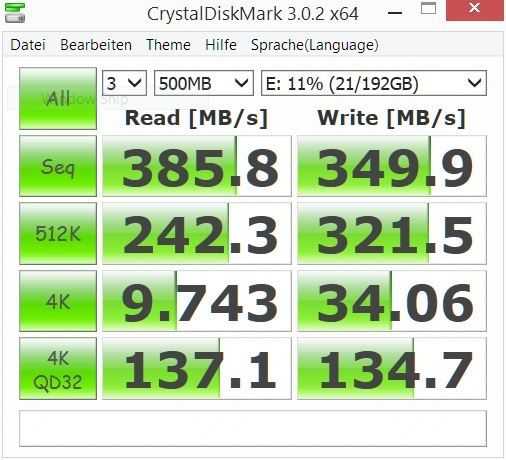
I’ve just installed the new Runcore Pro IV SATA-2 SSD drive into my Gigabyte Touchnote. I think we’re looking at one of the fastest disks ever to be seen in a netbook and one of the best CrystalMark scores we’ve ever seen here. (*1)

crystaldisk-ssd crystalmark-ssd
22864 is about 4x what we normally see on a netbook or UMPC with an HDD.

127MB/s read speed is twice as fast as the original 160GB SATA disk.

Theoretical figures don’t translate one-to-one to changes in user experience though and as the SATA drive in the Touchnote was already fast at 60MB/s read, real-world differences won’t be as extreme. Booting up was quicker (at about 30 seconds, 40 seconds including POST for this heavily loaded, 1 month-old installation is 20-seconds quicker than normal) and applications are starting almost instantaneously.  IE7, Movie Maker, Adobe Reader, Windows Live Gallery, Chrome, Paint Shop Pro all start (first run after boot) in 1 second or less. Hibernation wasn’t noticeably quicker and standby is, understandably, the same. As far as battery life and heat are concerned, I’ll have to do some more testing.

There were a few issues with duplicating the disk but none of these can be attributed to Runcore. I have a pre-release prototype drive without the USB port so I had to use True Image to copy the original 160GB and squash the partitions into 64GB. The second problem is that the Gigabyte install uses a Grub (or Lilo, I’m not sure which) boot loader which allows access to the restore partition. On copying the disk, the boot loader didn’t work so as a fix, I tried an XP and Linux CD image in order to re-write the MBR. Unfortunately FixMBR on XP didnt work and my CDROM isn’t playing well as a boot drive with the BIOS on the Touchnote so after messing around for a few hours I had to download Ubuntu Netbook for USB installation and install Ubuntu just to fix the boot loader. It fixed the boot loader but the recovery partition is now inaccessible. I’ll have a play around with Ubuntu 9.04 for a while and then clean it up next week. I’m sure other netbooks are going to much simpler than this one!

The question now is, is it worth it? I’ve lost about 80GB of drive space that I was using to carry around some media and as the SATA drive was already fast, the end-user difference isn’t that great. The 64GB drive costs around 50% of the cost of this, already high-end netbook, and with such a low-powered platform, there are obviously other bottlenecks that will come into play so at the end of the day, its a tough call. I’ll run with it for a week and report back then but with the Gigabyte Touchnote performing so well with it’s 3G, Draft-N, multi-touch pad, BT2.1, ExpressCard/34 slot and touchscreen, it’s tempting to keep it installed just to highlight how far the netbook platform can be pushed.

In the meantime, I can definitely say that if you if you have a year-old laptop that needs a refresh (this drive is going to work well with HDD-happy Vista) or if you simply want one of the fastest drives available, the RunCore Pro IV is fantastic value.

Stay tuned for a video over the next few days. Check out the Runcore press Release and if you want to be early in line, pre-order form here. The Pro IV will be shipping in just a few weeks.

(*1) A fast 1.8” SSD in the Everun Note UMPC beats this by a big margin due to the relatively powerful CPU. and GPU [See an example here.]

Runcore Pro IV SATA SSD with USB enclosure announced.

Tags: , , , ,


RCP-IV-S2500hr I haven’t done much work with SSD upgrades since my CF conversion on the Q1 Ultra which, seriously, unleashed the device from the slow hard drive and turned it into a different kind of UMPC. Since then I’ve been watching JKKmobile (the king of SSD mods!) carefully and after using the SSD-based UMID MBook am convinced that a good SSD is ALWAYS worth having on a UMPC. Access speed, R/W speed, noise, heat, power and ruggedness are all positives. It’s only the capacity and cost that you need to think twice about.

Runcore sent me a 2.5” SSD a few weeks ago that I haven’t unwrapped yet as I’ve been busy with the UMID, Q1EX, Touchnote and Viliv S5 but now that I’ve seen the press release and learnt that it’s the new Pro IV 32GB SSD I’ll probably test it out next week by dropping it into the Touchnote. It will give it a big speed bump but with the 2.5” drive taking 10-15% of the power of the device, the SSD should give me a significant improvement in battery life. I’m expecting 15 mins extra to take the Touchnote up to a reliable 3.5hrs battery life on the standard battery.

The ProIV is available in 32, 64, 128 and 256GB sizes with a very useful USB-enabled enclosure that makes cloning a very simple process. “This process should not take anyone, including a novice user, more than 10-20 minutes to complete. A 15-day free trial of Acronis True Image for PC and Super Duper for the Mac are included on the drive.”

Tweektown have already done a test on a high-end test rig and seem to be extremely happy with the device, even when compared to high-speed hard drives but I do have one problem with the device, it’s not really for UMPCs. UMPCs generally use 1.8” 4200RPM drives of up to 60GB and swapping these out makes a huge difference. When it’s a reasonably fast 160GB drive that you’re swapping out, it’s a different matter. This device is really aimed at traditional laptops where swapping out a 2-year old HDD and re-installing a fresh OS is going to make an unbelievable difference. Runcore have agreed to send over some 1.8” drives that I can test in UMPCs so I’m looking forward to that.

Check out details in the Press Release and the pre-order form here. The ProIV should start shipping on 15th May.

UMID Mbook Boots to XP in 30 seconds

Tags: , , , , ,


On of the key features of the UMID Mbook M1, apart from the processing power, form factor and battery life, is the speed of the SSD. What better way to demonstrate it than to show a boot sequence. Here’s proof that it boots in 30 seconds from pressing the button to being able to se the start menu. The OS is Windows XP Home with about 30 processes running. Update: One correction on the video; the UMID weighs 338gm (measured), not 490gm as shown on the video.

Detailed info, including a new gallery and links to review articles and videos are available in the updated UMID information page.

Weekly Netbook Roundup 2/16

Tags: , , , , , , , , , , , ,


Welcome back to another edition of the WRN roundup, here is some interesting items from this week:

  • Sony Vaio P battery life: Standard vs. Extended — Jenn of Pocketables.net continues here thorough coverage of the Vaio P with tests of the 2- and 4-cell batteries. Click through for a full chart featuring the length that the batteries lasted while running different tasks. While the 2-cell battery probably won’t satisfy your daily computing needs, the 4-cell managed to last just over 6 hours browsing the web (with one hour of that taken up by playing a flash video).

SDXC standard pushes speed and storage limits.

Tags: , , , ,


sdxc SD cards have always been handy items for the mobile user. If you’ve got a set of kit that uses it, it’s often the quickest way to transfer large amounts of data but with the SDHC limits being way below what most people would require for, say, a large music, video or even photo library, it can’t really be used for serious storage.

SDXC is the next in-line standard from the SD association and it promises to break those limits by offering storage up to 2TB. The other interesting thing, for mobile fans, is that they would be fast enough to perform as small, cheap drives meaning mobile device manufacturers can offer a basic OS and let the reseller or user make up their own storage offerings. I assume it will push the price down too. I wouldn’t expect them to have the error correction or wear-leveling that SSD drives have but with a theoretical TX rate of 104MB these would be perfect as storage devices.

The standard is expected to be ready this quarter so expect mainstream devices next year.

The next-generation SDXC (eXtended Capacity) memory card specification, announced today at the 2009 International CES, dramatically improves consumers’ digital lifestyles by providing the portable storage and speed needed to store weeks of high-definition video, years of photo collections and months of music to mobile phones, cameras and camcorders, and other consumer electronic devices. The new SDXC specification provides up to 2 terabytes storage capacity and accelerates SD interface read/write speeds to 104 megabytes per second this year, with a road map to 300 megabytes per second.

Press release. Via Gizmodo.

Win EeePC and Dell Mini SSDs at JKKMobile

Tags: , , ,


runcore

Don’t waste time reading this, get on over to JKKMobile where you’ve got a chance to win an SSD.

JKKMobile

Equip your Dell Mini 9 with 32GB of flash for $100

Tags: , , ,


mini 9 ssd 

Maybe in honor of jkk’s ‘SSD week’ last week, Dell has recently put an option into their Mini 9 configuration interface that allows customers to select 32GB of SSD storage (previous max capacity offered was 16GB). It will add $100 to your price if you jumping up from the 4GB option, but that price isn’t too bad as long as the speed of the SSD is decent. Be sure to stop by jkkmobile for lots of good info on SSDs with good price:speed ratios. If you are the hardware type, it may be more effective to buy the cheaper 4GB SSD option on a new Mini 9, and upgrade it yourself.

[Engadget]

Take 20 to learn all about SSDs

Tags: , , ,


JKK kicks off his ‘SSD-Week’ with a highly recommended 18-minute video introducing solid state disks (SSD), their advantages, the difference between MLC and SLC, explaining wear-levelling and the different connectors available. He gives some recommendations about read and write speeds to look for, talks about SSD life and gives some nice demos. He also teases us about some new device that he has lined up for later in the week.

jkkvid1

View the video over at JKKMobile.com

JKK’s SSD week.

Tags: ,


ssdweek You’ve read the theory, now hear the reality about how SSDs work together with modern netbooks and UMPCs.

JKK has a bunch of SSD articles lined up this week in his sites ‘SSD Week.’ Testing, Q&A and from what I’ve heard, maybe a new product or two!

SSD Week, all this week and JKKMobile.

SSD pros and Cons from Allegiance Tablet PC Experts

Tags:


ssd1 John Hill, the CEO of Allegiance Tablet PC Experts has blogged a nice list of things to think about when looking at the choice between hard drive and SSD.

I have the Raon Digital Everun note 24GB SSD version in front of me right now for a hands-on article I’m writing on and its interesting to read and think about some of the points he’s made while I do my testing. Take this one for example.

When failures occur, they tend to occur either ‘on write’, or ‘on erase’, rather than ‘on read’. With traditional HDDs, failure tends to occur ‘on read’. If the drive detects failure on write, data can be written to a new cell without data loss occurring. If a drive fails on read, then data is usually lost permanently.

I disagree that all SSDs will have "Extremely fast write" but that’s probably because I see a lot of cheap drives!

Thanks Jon, for a good list.

JKK tests Eee SSDs

Tags: , , , ,


Fed up with the slow speed of the SSD in your Eee PC? Want more storage than what your device currently has? Look no further. Jkk has received a bunch of different Mini PCIe SSD from an online retailer and put them to the test. There are two different types – the faster and more expenisve SLC, and the slower and cheaper MLC. Unfortunately Asus uses the MLC one on some of its devices which results in them being quite slow. If you feel confident enough to swap the disk out in your Eee, head on over to jkkmobile for more information.

Samsung SSDs aiming for low cost PC market.

Tags: ,


Forget the low cost PC market Samsung, there’s a million people out there that could benefit from a bit of SSD love on their daily compute.

"We’ve refined our manufacturing techniques and redesigned our low-density SSDs to get what the @low-priced PC market is looking for in the way of improved cost"

samsungssd

What I suspect is happening here is that Samsung have designed a product that can be made in the millions for direct sale to netbook OEMs. You might find these on Ebay at some point but don’t expect them to be easy to get hold of for the average punter.

"Samsung’s new MLC-based SSD at 32GB capacity will read data (sequentially) at 90MB/s and write it (sequentially) at 70MB/s – performance levels much greater than low-density SSDs on the market today. The 16GB reads at 90MB/s and writes at 45MB/s, while the 8GB reads at 90MB/s and writes at 25MB/s."

VIA GottabeMobile. Source AkihabaraNews.

Intel, Sandisk, TDK launch solid state drive solutions for ultra mobiles.

Tags: , , , ,


ssdIntel have launched their 4GB and 8GB SSD modules (these aren’t drop-in drive replacements) at 1000-piece prices of $25 and $45 respectively. Although the read-speed is a usable 35MB/s, with a write speed of just 7MB/s, they’re not ideal for the pro user.

Sandisk’s offering seems to be slightly better with a ‘streaming’ write speed of 17MB/s

TDK also introduced a new SSD drive. Fantastic capacity and performance but huge cost.

I’ll stick to my CF card mod for the time being.

How-To: Improve the Q1 Ultra UMPC by Replacing the HDD with a CF SSD.

Tags: , , , , , ,


Yesterday, I completed the final part of a series of upgrades that have been done to my Q1 Ultra to bring it up to what is close to my ideal all-round UMPC device. In this article I’ll outline what I’ve done and give you some detail about my most recent upgrade, swapping the 60GB hard drive out for an 8GB flash drive. The difference is quite remarkable. Not only do test results show up to 4x the read speed and 2x write speed but boot-times are quicker and the overall responsiveness of the system is improved dramatically. If you need convincing that SSD’s are fast before you take the jump, check out the video at the end of the (long and media-rich) post. Note that much of this applies to other devices that use 1.8" drives. The Sony UX, Fujitsu U810, HTC Shift and others.

bios1 

Read the full story

Search UMPCPortal

Sales Information


Our Network

  • Big Beach Our marketing advisors. Located in UK.
  • Carrypad Tablets and consumer mobile products
  • Device Manufacturer List List of all device manufacturers, and products, from our database
  • JKKMobile JKKMobile – Mobile computing and hacking – Partner of UMPCPortal
  • Liliputing Netbooks and small-form-factor laptoping – Partner of UMPCPortal
  • MeetMobility Mobile computing podcast broadcast every two weeks – Partner of UMPCPortal
  • Netbooknews Netbooks and other mobile devices – Partner of UMPCPortal
  • Ultrabook News Ultrabook products, specs and news