Another tablet in the mix! Multi-boot possibilities set this apart from the ARM-based tablets.
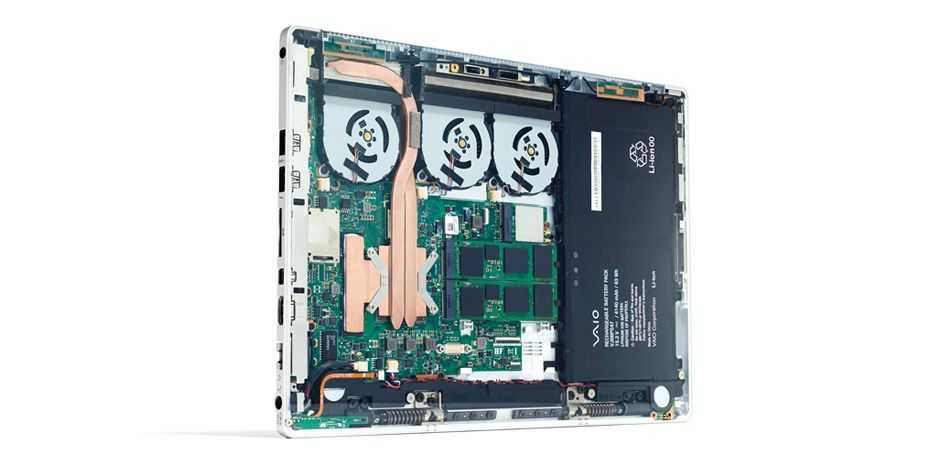
The E-king range of UMPCs, by the company that bought the rights to the extremely productive (but very ugly) Wibrain B1/i1 and the slider M5 UMPC will soon have a 10” tablet offering called the Talent T9. It’s built on Intel’s Oaktrail and is said to be ‘the thinnest’ in the world. Whatever, China! What we really need to see is the device in action.
Specifications look OK with 2GB RAM, an impressive 650gm weight, an IPS screen and 3G options and there’s a big play on the multi-OS options that a traditional PC platform brings. It’s worth watching closely because Intel are working on Meego and Android official builds for this platform. The multi-OS claim is probably more important than thickness.
As for price and availability, we’re hearing about a September availability with some possible hands-on in August but as always, expect that to change. Pricing is completely unknown at the moment.
The E-King Talent T9 goes up against a number of other 10” Oaktrail tablets including the Lenovo Ideapad P1, Viewsonic Viewpad 10 Pro and the Samsung Series 7 Slider which we could see launched at IFA in September. Here’s a list of all Oaktrail tablets.
With respect to Meego and Android for Oaktrail, look forward to news of that from Intel’s developer forum, also in September.
Update: We’ve had confirmation from Simon Thomas at Think4Mobile that this is real. They’re expecting a sample very soon.
Go into our product database, select Tablet Devices (Windows), click the weight and screen size column headers and you’ll get a list showing the lightest 10” Windows Tablet. The only device that comes in at under 800gm is the Viliv X10 which, as we now know, isn’t going to happen. The Lenovo Ideapad P1will be dropping into that list very shortly as one of the lightest Windows Tablets there is. It’s a trend that’s happening more and more now that Oaktrail is here. The great thing is that battery life is going up at the same time and this one even has a digitiser layer. We broke news about the P1 when it was being referred to as the Ideapad Slate back at CES. Lets take a closer look.
The Ideapad P1 will go head-to-head with devices like the HP Slate 500 and Fujitsu Q550 as alternative dual-input slates but I have a feeling the P1 will get quite a lot of attention based on the name.
The 1.5Ghz Oaktrail platform is certainly not going to be a powerful one. Unzipping large packages will be a chore as will any serious multitasking but the battery life should compensate for that with something like a 6W average drain. Expect the P1 to last for 6hrs with Wifi on. The digitiser layer, 3G options, 2GB RAM options, 32GB or 64GB SSD storage, Windows 7 OS options, a docking port and a high-resolution 1280×800 screen mean this is likely to be interesting to many of our audience here.
The other interesting thing is the possibility of Meego and Android for the Ideapad P1. Lenovo have good relationship with the Intel marketing groups. The Ideapad S10 3T was used as a reference netbook for Meego development so there’s a good chance that the Ideapad P1 will get picked up as a reference Oaktrail device for Meego and Android and that could mean even longer battery life and a good reason to think about a 7” version. In fact, reading through the presentation PDF (Available here), it also looks like Lenovo might be offering an app-store. This could be Intel AppUp-based which leans further towards an Intel relationship and increases the chances of Lenovo exploring a Meego build. Yes, it’s a tenuous link but one we need to keep an eye on. Meego-based Chromepad anyone? Multi-boot on this tablet could give the user an important choice.
The Lenovo Ideapad P1 is, unfortunately, targeted for Q4 which means we’ll probably see it at IDF and IFA shows in September with availability in October or November. It’s a shame it’s taking this long to bring it to market as for those that see more than Engadgets fasion-focused eyes, this is an interesting option.
ECS, an ODM who designs products for others to brand and market have interesting 10″ and 7″ Oaktrail products here among the dust on day 0 at CEBIT.
800gm for the 10 Tablet feels quite nice. Availability (for ECS customers) is planned for April. Here are some pics and specs. We’re back for some video-time tomorrow.
Posted from WordPress for Android with the Galaxy Tab
CeBIT is a very traditional, business-like show. Suits dominate and after-show parties are few and far between. Companies like Microsoft often present purely business-focused products and strategies and if you’re expecting another huge pile of consumer tablets, you’re probably going to be disappointed.
For readers of UMPCPortal, our pro-level site (that has, I admit, been pretty dry on news lately) it’s good news because products like the Fujitsu Stylistic Q550 get a chance to shine.
We’ve got the full, official specs in the database now and wow, this is not your average tablet PC.
A 400-nit screen IPS screen, 2GB RAM, remote security, capacitive/digitiser input, fast-charge, removable battery options, 4 USB ports, Gobi 3G option, SSD, docking port and an array mic are just some of the advanced features you’ll find which indicated a pro-level, industry focused solution. It also gives you clues to the price.
The price isn’t available right now but the Q550 has already launched in Japan with a availability stated as March/April. A CeBIT launch is also planned and we hope to get a pricing indicator next week. A guess around the 1000 Euro mark for entry-level configuration is probably not far off.
Note that there’s a lot of talk about 8 hours battery life but a Fujitsu sales site in Japan makes it clear that this is with the extended battery (38wh) in a JEITA (largely idle) test. Take 30% off that for real world figures. With the standard battery, a 19wh unit, you’re looking at 3.5hrs max. That isn’t going to impress many but at under 900gm for a 10” PC, it’s good.
We hope to get some good testing time in with the Q550 and bring you information on graphics, SSD speed and more battery life thoughts.
The HP 500 tablet was an important milestone for low-cost Tablet PCs as it combined the finger-friendly capacitive type input with the pen-friendly digitiser for using some of the important features of Windows 7 at a breakthrough price. The combination is perfect for those wanting true PC productivity in a tablet and really, without that digitiser, there’s a mis-match between hardware and operating system in my opinion.
It was encouraging to see Lenovo Ideapad Slate offer dual-mode operation too and that one pushes the envelope even further by using the Oaktrail platform that appears to be offering quite an advantage in terms of battery life.
A third offering we saw at CES, and one truly ‘built for business’ was the Motion Computing CL 900. Not only are we talking about dual-mode operation on Oaktrail but this is a tablet with a full Gorilla Glass screen for extra ruggedness, IP52 dust and water protection, up to 2GB of RAM and SSD hard drive. There’s an optional Broadcom Gobi 3G module too. The battery is a relatively big 43Wh and it charges in just 2hrs. There’s a lot of unique features here in just 1KG of weight.
Full spec sheet. Click to Enlarge.
Berengere Viale-Brun of Motion Computing was kind enough to talk us round the device at the busy ‘CES Unveiled’ event last week and here’s what we captured.
Acer has taken what seems like an age to get stock of the 1825 PT and PTZ out to distributors but finally I have managed to get hold of one. I will be reviewing it over the next two weeks to give you an insight of the devices capabilities but in the meantime here is the unboxing video.
Specifications;
Windows 7 Home Premium (64 bit)
Intel® Core™2 Duo processor SU7300 (1.3 GHz, 800 MHz FSB)
11.6″ HD Acer LED LCD (1366×768), 2 point multi touch
4 GB Memory
320 GB HDD
Multi-in-1 card reader
802.11a/b/g
Bluetooth
Webcam, 6-cell Li-ion battery
Weight 1.7KG
How does it look to you? Netbook upgrade?
[I'm interested in seeing how Guy's testing goes. With 3G and a fast SSD, this could be a nice upgrade from my Touchnote which, with the extra battery that gives me 8 hours, weighs over 1.5KG! - Chippy]
As the rumours surrounding the HP Windows 7 tablet continue to swirl and with no official response on the matter, no one is quite sure if the project is dead or not. For those who like the form factor and who aren’t interested in owning an Apple iPad, the Jumper JK01-TT may be of interest.
It’s a 10.1 inch tablet running Windows 7 and sports a 1024 x 600 multitouch display. The JK01-TT is powered by a 1.66GHz Intel Atom N450, 2GB of RAM and a 250GB hard drive. It comes loaded with WiFi, 3G, USB, 4 in 1 card reader, 2MP webcam, accelerometer with autorotation and a 3000mAh battery.
I would estimate a possible 2 – 3 hours run time if you’re lucky but given its 1.2kg weight and slim dimensions (11.4” x 5.9” x 0.8”) it does make for a small, full-featured tablet.
As an added bonus the Jumper JK01-TT ships with a docking station, wireless mouse / keyboard and is available at Ownta costing €556.92
Yes, I’m calling this a UMPC. Why? Because it is! It has closer ties to everything that we’ve done over the past four years on UMPCPortal than any social and entertainment ARM-based ‘pad.’ It’s built with UMPC components (Z530 as used in nearly all Windows-based Ultra-Mobile PC’s ) and it runs Windows 7. I won’t be subscribing to the iPad comparisons just because it’s got an 8.9” screen; that would be too simple and would miss the point. As for it being a ‘netbook without a keyboard’ well, it’s closer but still somewhat misleading.
Update: HP Slate information, comparison, specs and links now in the database
The HP Slate looks like it could be one of the best mobile tablet PCs we’ve seen for a long time (could it top my personal favorite, the X70?) and I’ll be working to get some review-time with it as soon as possible but I know already that it won’t impress anyone looking for a slick consumer-centric device. It’s questionable that a 1.6Ghz Menlow will provide enough power to drive Windows 7 satisfactorily too but having done lots of testing with my Viliv S10 multitouch convertible, based on exactly the same hardware and software, I can tell you it works quite well, as long as the SSD is fast. Again, not slick, just productive.
Here’s the latest hands-on article but unfortunately, they take the iPad route. They also assume that it has a broadcom chipset like everyone else; forgetting that the Poulsbo chipset that pairs with the Z530 already has an integrated HD video decoder.
They do manage to uncover a docking station though and that’s a very useful addition, especially if it’s included in standard retail package. [He says, using a U820+docking station to write this article.]
As I was browsing the CES exhibitor list late last night a came across the T10L tablet device. I didn’t have time to post about it so I pinged it across to the guys at GottaBeMobile who have put the details up on a post.
Ports: 3 USB 2.0, 1 PC card, 1 D-Sub 15 Monitor out, 1 ethernet, headphone, mic
Weight: 2.6 lbs
As you can see, it’s based around Intel’s low cost platform. At just over an inch thick and at 2.6lbs, its nicely proportioned too. Could this be another cheap Vesa-mount PC or a Grab and Go dockable desktop? I see quite some potential for devices like these if they can be slimmed down a bit. Under 1KG and 20mm think with 5 hours battery and a $400 price tag (why not – its a netbook with a touch layer added and the keyboard removed!) would make it very attractive portable browser and e-book reader and, given a good range of docks and mounts could ignite a consumer Slate market. The netbook platform and 200 nits brightness figure really hints of low-cost to me so i’ll be interested to see who picks this up.