Posted on 27 October 2011
 iOS 5 just launched earlier this month, and based on the popularity of my article the other week, which focused on actual honest-to-goodness iOS 5 tips and tricks beyond the painfully obvious “you can send iMessages!” variety, I’ve created a new list with an additional 12 obscure tips/tricks. Again, a few of these are not iOS 5 exclusive, but most are. If you’re a brand new iPhone 4S user and didn’t know any of these, don’t fret… these are pro tips. My goal here is to have provided experienced iOS users with, at very least, one new thing they didn’t already know about iOS. Did I succeed, or are you some sort of iOS trivia prodigy? Let me know in the comments, and if you’ve got any other off-the-beaten-path iOS 5 tips/tricks, please share them!
12 More iOS 5 Tips/Tricks:
- Week Weather View In Notification Center — If you are using the Weather Widget in the iOS 5 notification center, you can swipe it to the right or left to reveal weather for the next 6 days. You’ll be able to see High/Low temps, as well as anticipated conditions (sunny, cloudy, etc). Apple decided not to make it clear that this widget swipes to the side for this additional view, so don’t blame yourself if you missed it, I did initially as well!
- Swipe From Camera to Photos — This is a new obscure hidden gesture added in iOS 5; Apple doesn’t make any effort to indicate that it is there (much like #12 on the other iOS 5 tips/tricks post). If you’re in the Camera app, you can swipe to the left to slide the camera away and go to your most recent photo. You can swipe through your photos, and if you swipe back to the front, you can swipe to the camera again to continue snapping photos. This is almost no different from tapping the thumbnail at the bottom left of the app to get to the most recent photo. Oddly enough, you can’t swipe from your most recent photo to the camera if you go through the thumbnail, instead of using the swipe gesture from the camera. Apple, sometimes you are bizarre.
- Launch Camera Directly from Lock Screen — Apple touted this during their iOS 5 announcement, but people were confused because Apple initially demonstrated the camera button button as being directly on the lockscreen. However, the button wasn’t directly on the lockscreen when iOS 5 actually reached consumers. Don’t worry though, they didn’t remove it. Just double-tap the home button while on the lockscreen and you’ll find the button to launch straight to the camera. If you never knew of double tapping on the lockscreen before, you’ll also find playback and volume controls which have existed prior to iOS 5. Nifty.
- Lock Camera Exposure and Focus — Prior to iOS 5, Apple relied on third-party apps to implement this sort of functionality, but they’ve finally decided to bake it right in. You can now lock the exposure and focus level within the native camera app by doing a long-press on the screen (as opposed to tapping). Hold it for a second or two and you’ll see the focus square do a little dance. Let go and you’ll find that the focus and exposure have been locked as indicated by the “AE/AF Lock” text at the bottom of the viewfinder. Tap again anywhere on the screen to unlock and return to automatic mode.
- Use the Volume-up Button to Take Photos — Another Camera app addition as of iOS 5. When using the native app, you can opt to press the volume-up button to snap a photo. There’s no on-screen indication that this should work, so if you didn’t already know about it, or hear it from someone else, you’d probably only discover it by accident. I feel bad for the developers of the Camera+ app: Apple doesn’t allow third-party applications to rebind hardware buttons, but the developers of Camera+ actually sneaked this same ability passed Apple in their Camera+ app. After reports of this Easter egg found their way to Apple, the app was pulled from the store, only to have Apple include the functionality in their own Camera app as of iOS 5! Never let anyone tell you that Apple isn’t a bully.
- Custom Keyboard Phrase Shortcuts — Find yourself regularly typing a specific phrase in SMS, Email, IM, or somewhere else on your iOS device? You can turn that long and commonly typed phrase into something much more manageable with a new iOS 5 feature. For instance, you can have the letters “omw” be replaced automatically with “on my way”. To do this, go into the Settings app > General > Keyboard, and look at the “Shortcuts” section. Tap “Add New Shortcut” to define the phrase and the shortcut text. Next time you type the shortcut text, the phrase will automatically be inserted. Now you can finally stop repeatedly typing out, “Honey, I lit the house on fire, again.”
- Custom Vibrations for Contacts — Custom ring tones and text tones have been available prior to iOS 5 but they don’t do you much good if you always have your phone on vibrate. With the latest update, you can assign custom vibrations to specific contacts so that you know who is contacting you even before you get your phone out of your pocket. Unfortunately this only works for calls and not other notifications (SMS, email, etc.). There are a few predefined vibration patterns, and Apple has even included an easy way to create your own vibes. You’ll find this option in the accessibility section, as I’m sure you can imagine how it would be useful for someone who is deaf and blind. To enable custom vibrations, go to the Settings app > General > Accessibility > and turn the “Custom Vibrations” switch to on. Now go to your Contacts app, choose a contact, hit the edit button at the top right, and tap the “vibration” option. Here you can select from pre-defined vibration patterns, or scroll to the bottom and press “Create New Vibration” within which you can tap and hold on the screen to create any pattern you want.
- Access the Built-in Dictionary From Any App — Apple originally included a handy “define” functionality in their iBooks app, which allowed you to highlight any word in a book and get a definition. In iOS 5, they have expanded this dictionary to be system-wide. In any app that allows you to highlight words, you can hold your finger on a word to highlight it, then tap the “Define” button that pops up from the resulting menu. Now you’ll finally understand why everyone keeps telling you that your epidermis is showing.
- Enable Battery Percentage — This is an old one, but still seems to go unchecked by newbies and experience iOS users alike (probably because it’s hidden in a weird place). Despite the high resolution screen on the iPhone 4S, iPhone 4, and iPod Touch (4th gen), it seems like the default battery icon only has 3 states: Full, half, and OMG YOUR PHONE IS ABOUT TO DIE. Instead of relying on these imprecise icon stages, wouldn’t it be much nicer to have a handy % indicator? Go to Settings > General > Usage > and flip the “Battery Percentage” switch to on. Voila! No more freaking out when you actually have a solid 20% battery life left.
- See Which Apps are Hogging Your Storage — This is a new feature for iOS 5 and it’s particularly handy for when you are crammed for space and can’t decide what apps are worth deleting. Some apps are dubious because they themselves are only small downloads from the App Store, just a few megabytes or so, but then they may download or accumulate hundreds of megs worth of data during their operation. To find out which apps are taking up the most space, go to Settings > General > Usage and note the “Storage” list. You’ll see your applications tallied based on how large they are, and this figure includes accumulated data. Without including accumulated data, I would have thought that Photosynth was a relatively small app at 7MB; turns out it’s now taking up 147MB total! Now I’ll be much more informed about which apps I should delete when space is low and you will too.
- Enable Emoji Icon Keyboard for Free — Emoji icons are a standardized list of hundreds of emoticons which are popular on handsets in Japan, but that won’t stop them from being used elsewhere. I’m very confused as to why Apple allows paid apps in the App Store which claim to “install” Emoji icons when they are built into the phone for free. You can easily enable the emoji keyboard by going to Settings > General > Keyboard > International Keyboard > Add New Keyboard > find and tap “Emoji” in the list. Now when you go into any app that uses the keyboard, you can press the globe icon at the bottom left to switch between your standard keyboard and the emoji keyboard, which has all of the icons sorted neatly into categories. If you get tired of the emoji keyboard, remove it by following the same steps, except use the “Edit” button at the top right of the Keyboard menu.
- Invert the Screen Colors as a Prank (or because it looks awesome) — With the proliferation of iOS devices, iOS pranking has become a reality among friends. I usually like to take a screenshot of the homescreen and set it as their background, but this particular tip that I’m about to share with you seems perfect for Halloween. This is another accessibility option, and I’m presuming that it helps provide better contrast to those who have exceedingly poor eyesight. It also looks rather cool and will frighten your friends who may think their device is on its way out the door. Go to Settings > General > Accessibility > flip the “White on Black” switch. Enjoy.

Posted on 17 October 2011
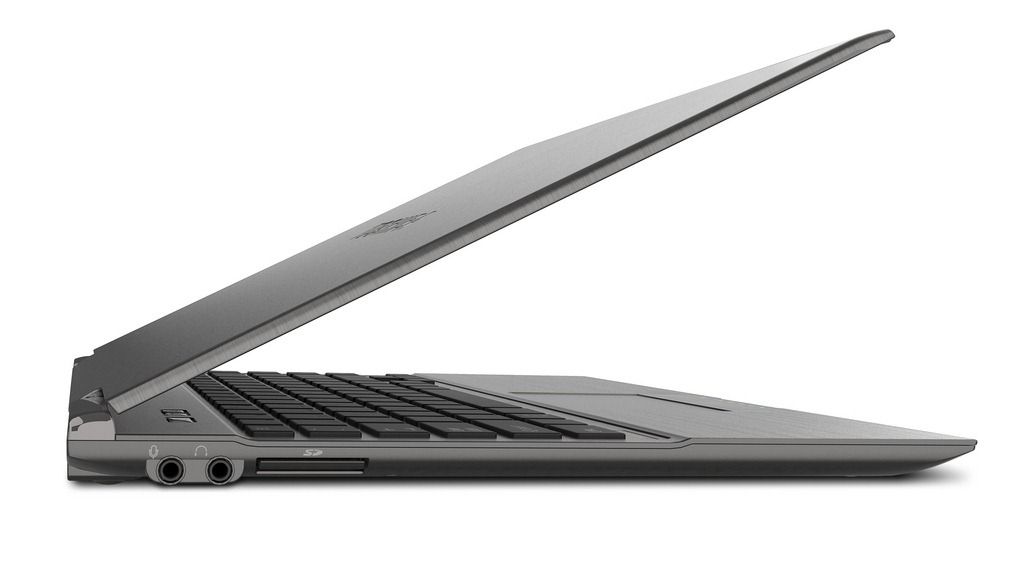
Buying an Ultrabook isn’t going to be simple. Not only do the products all look similar but the internals are similar too. How do you make a choice between an Lenovo Core i5 Ultrabook that looks the same as a Toshiba Core i5 Ultrabook that costs the same? The devil, unfortunately for the consumer, is in the details so to make the process a little easier I’ve listed some hints and tips here that you might want to think about before buying. I’ll update it as often as I can and will add in important tips from anyone that comments below.



Last update: 25th June 2012
Read the full story

Posted on 14 October 2011
 iOS 5 launched on the 12th, and new iPhone 4S owners will be greeted with Apple latest OS when they receive their phones today. I’ve seen far too many “iOS 5 Tips/Tricks!” articles today that feature nothing but obvious things like “you can tweet stuff!” or “look there’s a notification center!”. So I’ve compiled a list of some actual iOS 5 tips and tricks, and I’m hoping that at least one of these is brand new to you. Most of these are iOS 5 specific, a few are oldies, but hopefully still new to you. Check it:
- Open in background in Safari — though I’m still annoyed that Apple only brought tabbed browsing to iPads running iOS 5, leaving the iPhone and iPod Touch out in the rain, they fixed one of my major browser annoyances by allowing you to open pages behind the one you’re currently viewing. Annoying, you need to enable this through the Settings app, but it’s there none the less. To turn it on, go to Settings > Safari > Open Links > select ‘In Background’. Now when you go into Safari, you can hold down on a link to get a list of options, one of which is ‘Open in Background’. Click it and you’ll see the link jump into the window button, and it’ll open in the background without making you watch that slow window-opening animation!
- Private Browsing in Safari — It isn’t hard to theorize why Apple didn’t parade this option around when they unveiled iOS 5, but you can enter into a ‘Private Browsing’ mode in Safari, for whatever your purposes might be. Again, this is annoyingly activated through settings, instead of being easily toggled from within Safari itself. To turn it on, go to Settings > Safari > and flip the ‘Private Browsing Switch’. When you toggle this switch, you’ll be prompted to keep all existing windows or close them.
- Use the Flash LED as a Notification Light — I’ve always enjoyed testing Android devices that have notification LEDs because with my iPhone, I’m constantly flicking the screen on to check for new notifications. Of course, Apple will probably never add a flashing notification LED because they probably wouldn’t think it pretty enough for their precious iPhone. If they ever add such an LED, you can bet your bottom dollar that it’ll pulse gently, not flash. It’s an Apple thing. And because Apple is… Apple, I was surprised to find that they added the option in iOS 5 to use the camera’s LED flash as a notification light. It isn’t exactly as it seems though… Apple added this as an ‘Accesibility’ option, an effort to help disabled people use their devices more easily. But hey, that won’t stop you from using this feature. To turn it on go to Settings > General > Accessibility > and turn on the ‘LED Flash for Alerts’ option.
- Week View in Calendar — This one is downright confusing, and there’s no one to blame but Apple. By default, across the bottom of the Calendar application, you can see the options to switch between the List, Day, and Month views. As of iOS 5, you can rotate your device and see your schedule in a Weekly view. Pretty neat, but unnecessarily hidden if you ask me.
- Hourly View in Weather — Also an iOS 5 addition, you can now get by-the hour weather for the current day from the native Weather app. Go into the weather app and tap anywhere on the current weather card. You’ll see the ‘Hourly’ text under the location name light up, and you’ll get the view of 12 hours of upcoming weather for that location.
- See Specific Stock Prices in the Stocks App — If you’re a serious investor, I’m doubting that you’re using the native Stocks app, but if you’re a weekend trader, it might get you by. I’m actually not sure if this is an iOS 5 addition, but it’s handy none the less. Go into the Stocks app, rotate to landscape view to get a larger graph, then run your finger along the grab. You’ll be able to see specific prices for that stock at any point along the graph. The Stocks app also updates live now, so you can watch the price as the trading day progresses. Don’t forget that you can swipe between your stocks while in the large-graph view.
- Print Map Directions — Sometimes, having a backup paper map will save you from the dreaded dead battery situation. In iOS 5, you can now print directions from the Maps application which is pretty cool if you’re configured an AirPrint printer. To print directions, go to the Maps app, get yourself some directions (or as Siri to do it) then hit the ‘peel’ button at the bottom right corner of the app. The map will peel away, revealing some additional options, one of which is Print. From there, you can specify how many copies you want, and which printer you want to print to.
- Put Newsstand into a Folder — If you have no use for the new Newsstand app that comes along with iOS 5 and are annoyed that you can delete it like other apps, it has been discovered that you can actually trick it into going into a folder. To accomplish this, start with any 2 apps on the home screen (make sure Newsstand is on the same page. Hold down on one of the apps to get them to wiggle. Drag either of the two apps onto the other and drop it. A folder will be created, and right after you drop one app on top of the other, drag Newsstand into the folder. If you time it right, it’ll slide right in, like a good app. Do not click on Newsstand when it’s in a folder, it will cause your Springboard (technical name for the home screen environment) to crash. This isn’t a big deal as it will restart momentarily, but it’s not something you want to happen if you’re in the middle of something important. The source of this solution appears to be from Coding Massacre, so credit to them! I can only hope Apple doesn’t fix this bug with a later update to iOS 5, because I’m doubting I’ll use Newsstand at all.
- Send More Than One Photo at a Time Through SMS or iMessage — This isn’t new to iOS 5, but it’ll be even more handy now that the messages will start flying with iMessage, which did indeed come along with iOS 5 (it also works with SMS and email). If you try to attach a photo to an SMS or iMessage, you have to select them one at a time. If you want to send a bunch at once, launch your Photos app, hit the square/arrow button at the top right after going into an album, select the photos you want, then hit Share, then Message at the bottom. Now you can enter your friends name at the top to send via SMS or iMessage (or hit the email option instead of message to send by email).
- Minimize the Keyboard in the Messages App — Apple finally gave us a way to minimize the keyboard in the Messages app as of iOS 5. Prior to the update, you couldn’t minimize the keyboard once you brought it up (this doesn’t apply to iPad users as they have a minimize keyboard button on every app!). Now when you go to scroll up to read previous parts of a conversation, the keyboard will minimize automatically. Thanks Apple… it’s about time.
- Create New Calendars and Photo Albums on Your Device — Now that Apple has ‘cut the cord’, allowing iOS 5 (and beyond) devices to run without the need of a computer, they’ve tried to move some of the computer stuff onto the device. Now you can create calendars directly on the device (which will be synced to iCloud), and you can make your own Photo albums, which was always a pain to have to do through the computer. Photo Albums are a bit iffy as you can’t put a photo in an album then delete it from your camera roll. If you do try to delete it from the camera roll, it’ll be deleted out of the album too. I suppose this will be handy for people who use AirPlay to show slideshows on their TV. To make a new calendar, go into the Calendar app and hit the ‘Calendars’ button at the top left. Then press the ‘Edit’ button, also at the top left. Now you’ll find the ‘Add Calendar…’ option in the iCloud section. If you can’t see this option, you probably don’t have iCloud enabled (you can do this through your Settings app). To create a photo album, go into the Photos app. Go to the Albums view and press the ‘Edit’ button at the top right. On the left, you’ll see an ‘Add’ button and which will prompt you to give your new album a name, then ask you to add photos to it.
- Album Art Swipe Gesture — This is one of the least known iOS tips I know of. I came across it completely by accident. It’s existed long before iOS 5. I may have discovered it back when I got the first-gen iPod Touch (yeah, like pre-App Store). It’s really not that useful, and you wouldn’t think it would be used that often, but for some reason I seem to use it all the time when navigating my music library. If you’re in the Music app on the Now Playing screen (you’ll see album art and play/pause controls at the bottom), instead of pressing the little arrow at the top left of the screen to go back to the library view, you can swipe to the left on the album cover and it’ll take you back to library view. Again, this isn’t anything revolutionary, but it’s so strangely hidden that I wonder if Apple even remembers that it’s there. Whatever the case, I use this gesture every time instead of hitting that little arrow button.
- Change Font in Notes — I don’t tend to worry too much about fonts, but if you’re a font fiend like my pal Dante Cesa from Engadget, this may be of interest. You can toggle through a whopping three different fonts for use in the native Notes app. With a whole three to choose from, I know you might just lose your mind trying to decide, but hey, you can always flip a coin or something. I think I’ll go with Helvetica.
So there you have it folks, 13 fine iOS tips, many of which are new to iOS 5. So how did I do, did I manage to stump you on a tips you didn’t know about prior? Or do you have some incredibly unknown iOS or iOS 5 tip that you want to share? Drop a line in the comments!
Posted on 03 July 2009
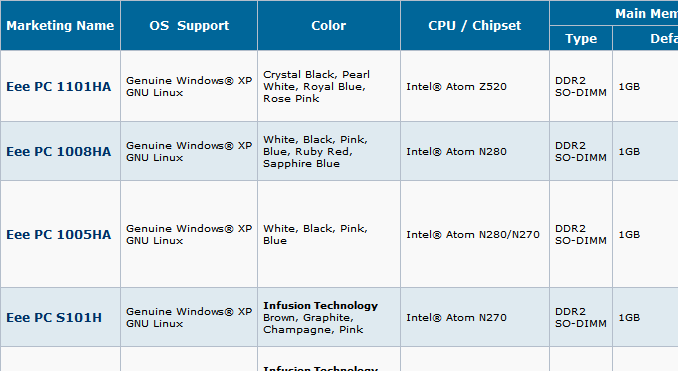
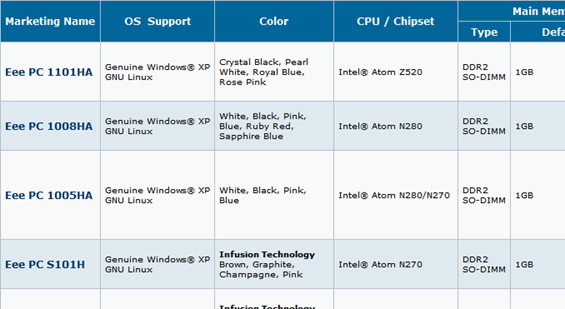
We occasionally joke that Asus seems to release a new netbook every week, however, one glance at their Eee PC product comparison chart, and you’ll find that our little joke isn’t exactly that far from reality. The comparison chart lists a whopping 27 (yes, twenty-seven) Eee PCs. You can compare to your heart’s content by looking at 19 different categories and seeing how each different model stacks up to one another. Asus even makes it easy for you by offering the whole chart in the website version or even PDF flavor!
Posted on 28 March 2009
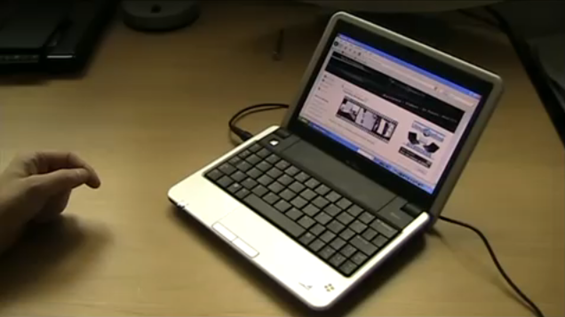
Jkk has a great little video showing you how to squeeze the most visible page space out of your Firefox browser. As he mentions, there are lots of add-ons to help reduce the interface size giving you more space for viewing your favorite websites, but jkk’s solutions increase the size by a good deal without the use of any add-ons. He achieves this by moving a lot of the UI elements and getting rid of space stealing bars. All of it can be done in just a minute or two. Now if only Firefox would incorporate tabs into the title bar of the window (like Chrome does) you’d have about as much space as possible within a browser.
Posted on 09 July 2008
Like most people, I’m a big fan of anything that will save time. I find that there are many shortcuts to assist us in the way we interact with our computers that will help us work more efficiently. Firefox is definitely my most used application and thus I utilize many of its tricks and shortcuts. A while back at MPCT, I shared a trick to help squeeze more bookmarks into your bookmark bar. This is especially helpful for mobile computers running at lower resolutions. Similarly, I hope this trick helps people increase the speed at which they can access sites from small computers, such as those with painful to type on keyboards… (continue reading)
Read the full story