
Tag Archive | "umid"

Mobile Reporting Kit V7 Aims for Sub-2lb (1kg) Flexibility.

Tags: , , , , , ,


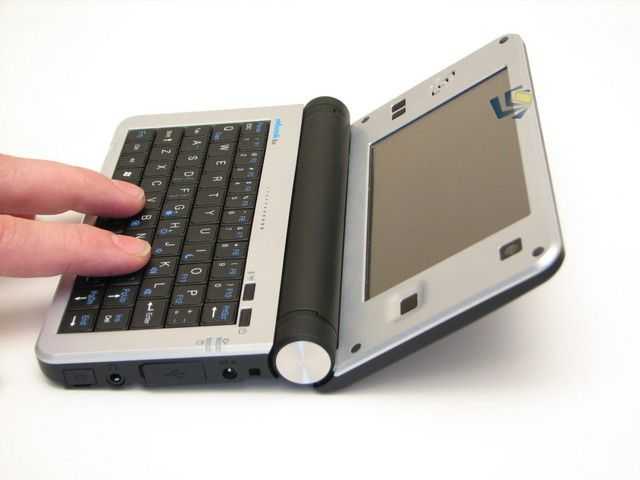
Lightweigh Media Blogging KitMobile World Congress is going to call for a significant refinement of my ultra mobile reporting kit (see below for previous versions) which means leaving the netbook in the hotel safe and traveling as light as possible. I aim to be roaming with only a man-bag and with about 1KG/2.2lb of equipment which is quite a challenge. Quality and speed of reporting during the day may suffer but I’m prepared to take the hit in order to be mobile and quick. Here’s a detailed look at my MWC setup as it stands just a few days from travelling.

The initial kit list looks something like this:

Hardware (825gm / 1.8lb)

  • UMID BZ as PC and USB power source. Including mains charger cable.
  • Nokia N82 as camera and backup 3G tether.  Including spare battery.
  • Mifi 2352 as primary 3G hotspot
  • USB cables for charging and connecting

Optional (about 500gm due to heavy aluminum mic.)

The bag

Oh the stress of choosing a bag. Right now I’m leaning towards the Jack Wolfskin one because it can be worn in on the back or front of the body and it looks, well, less man-baggy!

MWC Man-Bag Choice

IMG_4720 IMG_4714

Capabilities

  • Text blogging
  • Photo Blogging to blog, twitter etc.
  • Video Blogging
  • Live video streaming (as per V6 of the reporting kit – See sample video at base of article)
  • Normal PC activities.

Live one-take Video demonstration (15 mins)

Here’s how I would use the kit to post images and videos with text.

UMID BZ Video  Demo Test

Yup, problems occur but in previous and recent tests it  looks like it will take about 5 minutes to do a 2-paragraph blog post around a photo. Video really depends on Internet bandwidth but with the mobile reporting kit I can close the lid of the UMID and leave it to continue posting to YouTube. You have to be careful of time-outs in this case because re-starting the uploads usually requires a full upload again.  Here’s the image I took during the video. As you can see, quality is excellent (click to enlarge.)

Other notes

Weight including adapter cables: 829gm (1.8lb)

Cost

  • UMID BZ: $549
  • Photo camera: Around $300 but get one with BT and Xenon flash.
  • Mifi: $250

Improvements and optimisations.

Could a Motorola Droid/Milestone do all this? Yes. Photo’s to Flickr and editing and re-posting from Flickr is easily possible. Video also possible. Live video using QIK also possible. Text entry with Droid keyboard also possible. Cost: Around $500 including an extra battery (or two!) It’s a great single-device option and way, way lighter than what I’ll be carrying.

The issue with using a Droid is that you don’t have a PC with you for ‘everything else.’ That includes basic video editing, 100% full web access, USB accessories support (printing, usb sticks, usb cam for example) high quality audio recording using USB mic/audacity, audio/video streaming using UStream, connectivity to LCD screen and full size keyboard and use of all the normal desktop client software such as Firefox, Tweetdeck, Paint Shop, LiveWriter, Skype and anything else that a PC would be flexible for. It’s basically a trade-off. Using the UMID is way more expensive but it gives that flexibility to use to a full desktop tool-set if required and that, to me, is worth it’s weight in gold. If either the N82 or UMID die, I’m left with one working device which is a nice backup strategy.

The N82 video quality (test video here) could be improved a lot. I’d love to see a photo camera with high-compression, 720p video recording and checking across the range of smartphones available today, the Omnia i8910 would make a better choice for video with it’s 720p capability. File sizes could be a problem though so HQ VGA at about 2mbps H.264 would be perfect. Anyone out there done extensive phone-cam testing?

Battery life is an issue and will require careful management. Fortunately the UMID BZ is proving excellent in that respect and just by closing the lid I can make it go into standby or hibernation. Returning for these standby modes is 5 and 20 seconds respectively. The UMID is returngin a regular 4.5-5hr in-use battery life. Despite that, I’ll carry a mains charger with me because I may have to charge the Mifi or the N82. Both can be charged via USB which is a huge bonus. The Mifi can even be used while it charges.

Update: In a 34 minute test I saw 17% battery drain indicating 200 minutes of battery life. About 3 hours! (Device closed with screen/touchscreen off)

Embedded 3G in the UMID. Yes, this would be great. No question. There’s no need for a Mifi if you’re only using one 3G-capable device but even in that scenario, i’d probably have the Mifi with me as a backup. The antenna on it is superb and it comes in really handy for a table of five net-less bloggers!

Your suggestions welcome.

Please feed-back in the comment section below. I love to hear how people are using their mobile kit. Are you mobile blogging at MWC? If so, lets meet and have a chat about the kit on video.

I’ll post a follow-up after MWC.

Previous versions of the ultra mobile reporting kit.

V6 (Jun 2009) is here.

V5 (March 2009) is here.

V4 (Sept 2009) is here.

V3 (Feb 2008) is here.

V2 (Sept 2007) is here

V1 (March 2007) is here.

Hat-tip to Jenn at Pocketables who successfully used the flickr-to-blog method at CES 2008.

Thanks to UMID for the loan of the BZ. If I didn’t have the UMID here, I would have replaced it with the Fujitsu U820 as a second choice. The BZ really is the best choice out there right now.

Update:

Live test recording: Video/Audio stream recorded by Ustream

UMID BZ. 1 hour, Live, Unedited Video Review with JKK and Chippy. (Updated)

Tags: , , ,


Update: New, 4-part video’s are included below.

Thanks to everyone that joined the /live session yesterday evening. 600 pairs of feet stepped into the room and we had a lot of interactivity in the chat room which was great!

The first hour of the live session is now available on YouTube for those of you that missed it. Bear in mind that this is the quality that we stream out so it’s not exactly HD but you’ll get everything you need from it.

Specifications and links to more videos and reviews are available in the UMID BZ product page.


UMID BZ at Dynamism (and in our Database and Gallery.)

Tags: , , , , , ,


IMG_1966 IMG_1941 IMG_1946

UMID BZ details, videos and links to articles and gallery in the Product Database.

There’s a review and video of the UMID BZ coming just as soon as I receive the missing power cable from UMID (due in a few days) but in the meantime, I’ve added it to the database and finished a photo shoot. If that’s enough to tip you over the edge then Dynamism is the place you need to look next.

They’ve got the 16GB SSD model in for just $549 which is a relief considering the early pricing indicators and if you order now, you’ll get the VGA adaptor thrown in for free.

In my hours with the BZ at CES a few weeks ago it was clear that they’ve done a good job improving the casing. It’s sturdy, well finished and opens up much wider than before. The optical mouse isn’t as nice as some I’ve tried as the recess tends to feel awkward but as before, the touchscreen is nice and responsive. You’ll need to optimize Windows XP for that 1024×600 screen but that’s not a major issue.

Expect some videos from me over the next week. So far I don’t see any showstoppers. Oh, and by the way, that competitor, the Viliv N5 won’t be available until March so if you need a 4.8” clamshell with XP and lon battery life now, this is your baby.

[Dynamism affiliate links appear in our product database. There are no affiliate links in this post.]

UMID BZ (Was M2) hands-on at Lazion

Tags: , , , ,


Another CES ‘leak.’ This time it’s the UMID BZ 4.8” clamshell UMPC which is very similar to the Viliv N5 we’ve just reported on.

The BZ has also been known in the past as the M2 and also sells as the Onkyo BX and it improves on the M1 design by adding an optical mouse pointer and mouse buttons, standard Line-out and USB ports and a slight modification to the casing design.

The unit runs on the Intel Atom Z520 (1.2Ghz HT-enabled) and battery life tests by Lazion are showing 5hrs figures. According to the report the BZ will be available in mid-Jan 2010. Pricing of $499 has been mentioned in previous reports but this is unconfirmed.

m2r_17

For more images and a translation, head to Lazion.

We’re planning to get both the N5 and BZ in a side-by-side hands-on at CES in just a few days.

Viliv N5 and UMID BZ pre-CES 'leaks.'

Tags: , , , ,


With just a few hours to go before the madness kicks off in CES, news about those two, very similar 4.8” UMPCs/MIDs has surfaced.

The Viliv N5 specs have been revealed…

N5-black

…and the UMID BX (was M2) gets a hands-on.

m2r_17_thumb2

Head over to Naver for more details on the N5 and Lazion for the UMID and stay tuned here because I’ll get hands on with these very soon after arriving at CES.

Via UMPCPortal (UMID News , Viliv News)

Two 5" Clamshells Go Head-to-Head at CES

Tags: , , , , ,


On previous MIDMoves adventures you saw me in San Fransisco and Taipei and at each of those events I got hands on with a new 5” Intel-based MID. I’m expecting both of these new devices to launch while I’m in Vegas for CES in a few weeks so here’s a quick rundown of what I know so far.

N5-hand-small m2-hand-small

As you can see, both devices have an extremely similar design. On the left, the Viliv N5 that was announced just a short while ago. On the right, the UMID M2 that we’ve already had time with.

Both devices will be based on the Menlow platform, have a 1024×600 touchscreen and an integrated mouse pointer. Wifi and Bluetooth too. Questions remain over the battery life but based on what I’ve seen with the forerunner to the UMID M2, the M1, battery life on the M2 should be good. If Viliv continue their run of high-quality UMPCs, the battery life on the N5 is going to be good too.

XP, Windows 7, 3G and SSD options should be available so the only real difference in basic specifications I can see is the GPS on the N5. That’s not a deal-breaker for most so it really leaves two differentiators; pricing and the all-important hands-on testing!

That’s what we’re planning to do at CES in a few weeks starting on the 6th of Jan so stay tuned for this interesting battle of the 5” Clamshells because these two could be great mobile computing options.

(We might get some N5 specs and pics soon so again, stay tuned!)

Dynamism Black Friday Deals

Tags: , , , , , ,


Dynamism has two UMPC deals (good today only) that might be of interest:

  • For $30 off the regular price, you can order the pink or black base model UMID M1 [Portal page]. Both have 512MB of RAM, Windows XP, an 8GB SSD and come with a case and 4GB MicroSD card. The pink version will run you $419 and has a 1.2GHz Atom CPU, and the black version is $469 with a 1.3GHz CPU.
    IMG_0663
  • They also have a deal on the Viliv S7 [Portal page] which I reviewed over at Pocketables.net. I would personally take this S7 deal over the UMID M1 as you get $100 off the top end model, and Dynamism is already throwing in a spare battery — combined with the regularly included one you could run your Viliv S7 for nearly 20 hours straight (going for max battery life)! You can pick up this 3G equipped Viliv S7 for $699 today only, which has a 1.33GHz Atom CPU, 32GB SSD, 1GB of RAM, and runs Windows XP.
    s7

Limited edition pink UMID M1

Tags: , , , , , ,


pink umid 2 The Viliv boys pointed out that Dynamism will be selling a limited edition* pink UMID M1 [Portal page]. Though the UIMD M2 is due out sometime soon — I guess the more colors, the better!pink umidThe pink UMID M1 is $50 less ($449) than the black low-end UMID M1 that Dynamism sells. Unfortunately no, they aren’t giving you $50 off just because its pink… the pink one has a slightly slower CPU – the Atom Z515 at 1.2GHz (vs. 1.3GHz for the low-end black model, or 1.33GHz on the high-end black model). Everything else, however, is the same as on the low-end black model: 8GB SSD, 512MB of RAM, and Windows XP. From the images it is a bit tough to tell exactly how glossy or matte the pink version is, but it appears to be more on the matte side of the spectrum, similar to the black one that I looked at.

*Dynamism has the pink M1 down as “limited edition”, but it isn’t exactly clear whether it is the pink M1 itself which is limited, or the deal currently running that includes a free pink pouch and 4GB MicroSD card.

Viliv and UMID coming to Europe.

Tags: , ,


Mobilx were in touch yesterday with an update on availability of some of the most interesting UMPCs of the year. They will be selling the UMID M1 and the complete range of Viliv devices; the S5, X70 and S7.

Prices start, for the UMID M1, the S5 and the X70, at 543 Euros with the S7 starting at just 570 Euros (all prices inclusive of EU taxes so you don’t need to worry about customs and import costs if you’re in the EU) and if you order now you can expect shipment soon after the 20th November.

If you’re new to the UMPC scene I think it’s fair to say that these 4 devices are probably the most important UMPCs of 2009 and represent a great step forward in quality, performance and price. It’s great to see another reseller picking them up.

For details and prices, check out the UMPC page at Mobilx.

For information from our database, click the images below.


UMID M1, Viliv S5, Viliv X70 and Viliv S7.

Sharp Netwalker gets wobbly early reviews.

Tags: , , , ,


netwalker-pocketables If its not one thing, its the other. The long old story of potential deal-breakers continues.

UMID M1 – Screen angle + USB dongles.

HTC Shift – Battery life + screen res.

Viliv S7 – Colour

and now, wobbly keys on the Sharp Netwalker which, given the importance of keys, is quite the problem. “The keyboard (14mm pitch, 0.8mm stroke) so far is a mixed bag for me…” says Jenn. “I’m not liking the keyboard at all.. key caps bend to all directions.” says JKK.

On the positive side, build quality gets a thumbs up along with the optical mouse, battery life and screen angle but performance is again, a bit wobbly. Standby, application start-up times and browsing speeds appear to be varying between acceptable and poor.

For a two-handed thumb-style mobile device, the Netwalker may have missed the mark. The Ubuntu UI is  unrefined, the keyboard caps not ideal for thumbing and the processing power slightly less than is needed for a smooth experience. There isn’t even any Bluetooth.

At well over $500, the Netwalker is going to have problems competing with the UMID M2 that is said to be launching at $499. Even with 512MB of RAM and Windows XP it will fly compared to this device. Battery life will be much less (at around 4hrs) and the looks and build quality may be slightly less than you’ll find on the Netwalker but for me, the UMID M2 (due to launch in Q4) still has the edge.

Sharp Netwalker information page.

JKK is planning a UMID Mbook vs Netwalker head-to-head. We’ll see if we can get a live session up very soon.

Update on UMID M2 pricing and availability.

Tags: ,


IMG_0558In our haste to get news out about the UMID M2 yesterday, some details about pricing were missed. UMID contacted us to correct a few points.

Entry-level price for the UMID M2 will be $499 and will be with the 1.2Ghz CPU, 512MB, 8GB SSD, Win XP and no camera.

For the high spec version (1GB, Win7) of the M2 the  has not been decided yet.

Archos 9 and UMID M2 picture sets

Tags: , , , , , , , , , ,


Chippy’s spent a lot of time bringing us some quality IDF 2009 coverage. In addition to a video-overview of each of these devices, he’s been able to sneak away and snap some nice pictures of each.archos 9 flat on table Full Archos 9 set on MIDMoves

umid m2 picture set Full UMID M2 set on MIDMoves

Hands-on video overview of the UMID M2 (can you say “optical mouse”?)

Tags: , , , , ,


umid m2 I know I can. You probably read my recent opinion piece on the UMID M1 that I’ve been testing. Among other things, I found the device to have some serious usability issues due to the lack of mouse and the unsatisfying keyboard. While not everything on the M2 is new (it might better be called the M1.5), it definitely tacks on some much desired improvements.

The M2 that Chippy got his hands on is just a prototype at this point and may change somewhat from when the product launches (targeted for Q4), but here is what we know:

  • optical mouse on the screen bezel as well as left and right mouse buttons, opposite the mouse (!)
  • 1.2GHz and 1.6GHz Atom CPU options
  • 1GB of RAM
  • New casing, opens to a further angle
  • No more proprietary USB adapters, there is 1x real USB plug on the right side of the device
  • Windows 7

Have to say that I think the new hinge looks more attractive than the M1’s style, looking forward to seeing the M2 in matte as well. Here’s to hoping that the keyboard get’s some sort of upgrade before the unit gets finalized.

UMID M2 overview video from IDF

Tags: , , ,


UMID pulled out quite the suprise at IDF. A refreshed M1 called the M2 which fixes many of the problems of the M1. 1GB RAM, reworked casing, USB ports that don’t require a dongle and a headset port. The M2 will also be available in 1.2 and 1.6Ghz versions and includes an additional optical mouse on the screen frame. Planned for Q4 (Nov/Dec) timeframe. Note that this is a sample device and the final product may vary from what you see in the video.

UMID M2 gallery available here.

Chippy checks out the UMID M2 at IDF

Tags: , , , , ,


You’ve probably seen that Chippy jumped across the big puddle to attend IDF. He is got his live feed running and we are already seeing some interesting stuff.

Jkk nabbed some screenshots of Chippy showing the UMID M2 just moments ago. Info on the M2:

- New housing
- Normal USB plug (no proprietary dongle)
- VGA out
- 1.2GHz and 1.6GHz Atom CPU options
- 1GB RAM
- Windows 7

Otherwise the same as the M1 (same keyboard, screen, etc). Looks even more like the Netwalker [Portal page] now.

Jump over to jkkmobile to see the screengrabs, and tune in to Chippy’s live stream to see what he is currently up to.

UMID M1 – well built; poorly designed

Tags: , , , ,


IMG_0663 You’ll probably recall that I got my hands on a matte black retail version of the oft mentioned UMID M1 a few weeks ago. In the initial unboxing, I noted that the build quality felt really good on the retail version. There were a few unsettling reports of some poor build quality on pre-retail models, but all of those seem to have been put to rest with the retail version finally sifting through to folks.

That’s great and all, but a well built blending machine isn’t going to bake good bread, is it?

I strive to find a viable use for the UMID M1 [Portal page] that isn’t already filled by a much better gadget. I really didn’t want to lambast the unit, it feels great as a device, but the moment you want to do something with it, there is a sense of “who the heck designed this thing and how did they expect me to use it?” There are glaring design and usability issues here that I just can’t deny, even if this is a pocketable computer that is capable of running a full desktop OS. It is clear to me that the designers of the UMID M1 must not have had a clear idea of who would be using the device, or what they would be using it for.

Keyboard

IMG_0660 Aside from removing the keyboard all together, there aren’t many changes you could make to the M1’s keyboard that would make it worse. Before I even begin to explain, let me just set you up with a mental image: Skis on a car in place of wheels. Doesn’t make sense? Exactly. That’s what the M1’s keyboard feels like to me.

The device is plainly small enough that it should have a thumb-board. What is even more ironic about this is that the M1 is actually spacious enough to allow for a great thumb-board. However, the designers of the M1 managed to find the perfect balance of FAIL. I see the keyboard as the perfect combination of thumb-board and touch-type keyboard – if you were looking to perfectly negate the strengths of both and exemplify the weaknesses.

The keyboard is designed with touch-type keys. You know, the ones you are used to regular laptop. They are super small, but have a touch-type pitch (the distance the key moves up and down). This means that thumbing the keyboard is very hard. I wish it was more easy to explain, but the short of it is this: because your hands are gripping around the sides of the device to hold it – your thumbs come in on a very flat angle relative to the keys from the sides of the device, instead of nearly straight down as they would on a standard keyboard. The touch-type pitch means that it is really hard to realize when you’ve actually pressed the keys all the way down. It is especially hard to hit the keys toward the center because you must stretch your thumb to reach, and this brings them in at a near 90 degree angle, making it close to impossible to press the key without pressing another key, and let alone recognize whether or not you’ve landed a proper press of the key to register input.

Ok so thumb-boarding doesn’t work out, why not just touch-type? Unfortunately, I would go so far as to say that it is impossible to touch-type exactly as you would on a regular laptop using the M1. It is just too small. If you want to even consider touch-typing, you’ll need to drop a few fingers that you are used to using. So let’s say somehow you are comfortable touch typing on this thing. Great, now you run in to the next fail of design.

(continue reading on page 2…)

UMID and Netwalker MIDs. Where ARM and Intel meet.

Tags: , , , ,


The UMID Mbook (#11 in the charts today) represents one of the smallest most efficient PC’s in the world. The Netwalker (#8 in the charts today) represents one of the most powerful ARM-based devices in the world. Both platforms are capable of running desktop operating systems and being designed into a handheld form factor. This comparison photo proves that.

umidnetwalker

The image comes from a side-by-side photo set and review that appears on PC Watch. It’s actually the new Kohjinsha PM on the right but it’s the same device as the UMID. Check out more images and thoughts on their site. [translation] (Via JKK)

The question is, how does XP on the UMID compare to Ubuntu (ARM version) on the Netwalker? PC Watch focuses on the UMID in their article but stay tuned because JKK should be getting a Netwalker very soon so he’ll be able to answer that question.

I suspect that the differences between the platforms will become very clear when using Firefox which is available on both systems. On the Netwalker you’ll be waiting 50% longer for page loads and wondering why flash doesn’t work everywhere. On the UMID you’ll be happy that the browser is quick because you’ll get less runtime when using it. The classic ARM vs X86 trade-off.


News Discussion

Commenting continues long after an article has left the front page. Keep up with the latest updates on our discussions page

Become a Member of UMPCPortal

Join the forum and join us for discussion about all aspects of ultra mobile computing. Ask questions about devices and usage scenarios and learn from owners and experts. Join up here. If you're already a member, login here.









