


I surprised myself yesterday morning when I managed to get live digital TV working at 120kmh. I had heard reports that the dual-tuner DVB sticks in ‘diversity’ mode were good but never expected it to be this easy to get live TV working in the car.
I was using a Terratec dual-tuner diversity DVB-T USB stick connected to a Wibrain B1H UMPC for this test. DVB-T is an over-the-air (terrestrial) digital TV standard that is common in Europe (not in the U.S) and without any real testing of antenna positioning inside the car was able to get a smooth signal at all city speeds. On the autobahn I was up to about 80kmh when it started to drop out but by moving one of the antenna I was getting a good signal at 120kmh. Of course, reception quality depends on where you are in relation to the transmission tower but even so, I didn’t exactly do much to optimise the antenna positions and I dare say that I could have got things working even more smoothly if I’d have tested out a few more positions. For under 100 Euro, this is a great way to add TV to the car if you already have a CarPC, ultra mobile PC or Laptop. Taxi and mini-bus drivers take note! More notes and a video after the pic…
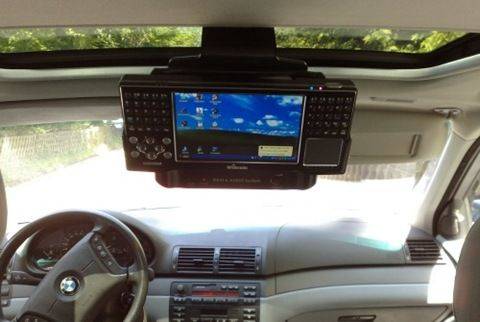
In the picture above you see the Wibrain mounted on the sunroof glass. The car mount suction cup is excellent quality and I have no doubt that it would stay there for days but you’ll need to fix some sort of security band to it if you’re going to do this. Having a PC drop 10mm onto a car dashboard is one thing but a 1 meter drop onto the center console is something completely different! For this test I had the WiBrain mounted on the dashboard. The USB tuner, loaned to me by Terratec for a home PVR project I’m doing, is the Cinergy DT USB and is a great bit of kit. I’ve used the Piranha in the past and it was good too but this one is the one to choose if you’re in a fringe area (I can get a good signal in my cellar) or want to do any sort of traveling. If you’re a football fan living in Europe, buy a one soon. The Euro 2008 tournament begins in 32 days time and in many countries, the matches are being broadcast over public free-to-air (FTA) channels.
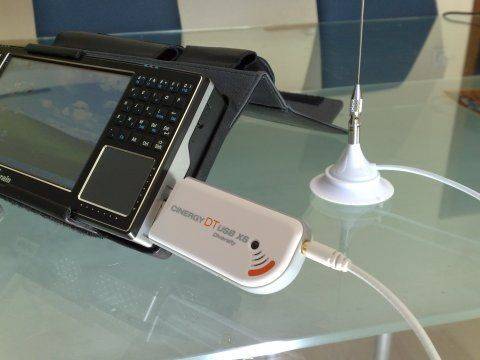
In the image below, you see the DVB stick connected to a WiBrain with one antenna. You can choose to run the dual tuners separately (good for picture in picture with Windows Media Center) or to combine the tuner signals (diversity mode.) It also picks up DAB radio signals but I don’t have any in my area which is a shame. I’d love to have digital radio in the car.
The Wibrain handles the DVB-T stream well. In my area its up to 3mbps (MPEG-2) and the CPU is at about 60-70% load (*1) Changing channels takes about 3 seconds. You are able to live pause (into a recording buffer) or record using the program guide (a program guide is transmitted with the DVB stream or you can use the TVTV online service which I’ve used many times in the past. The Home Cinema software, although fairly basic looking, provides a lot of functionality. With the supplied remote control you can set up a lot of functions too. For example, you could program a button to start up your navigation software. With the Terratec Home Cinema Software, you also get a Magix software pack that allows to you convert and record to DVDs.
Here’s a video I made that shows the in-car setup and gives you an idea of the performance. Unfortunately it was a very sunny day today so next-time I do an in-car video, I’ll remember to wait until the sun goes down!
Buy links (affiliate) for the Terratec stick (UK and Germany.)
I love the way that UMPCs integrate into cars so easily. With the docking station and it’s included GPS device, some navigation software and a good skin for your favorite media player, you have a very flexible system indeed. Although I love my Nokia N82 in the car for simple navigation and audio, having 60GB of videos, live TV, a full browser, the webcam and the great WiBrain screen makes you feel ready for any eventuality. Even work! One of these day’s I’m going to hire a minivan, load it up with UMPCs and do a city-city tour to see which ultra mobile PC is the ultimate in-car companion. I have a feeling that the WiBrain, with its excellent docking station, is going to be the one to beat!
You can find more information about the Wibrain ultra mobile PC on our Wibrain product overview page which includes specifications, reviews and links to the forum and external Wibrain news and review items. The Wibrain starts at $499 / 395 Euro for a Linux version which, I understand supports a version of the Terratec USB modules (See this how-to.) The Wibrain UMPCs are available at Dynamism in the U.S. and at Mobilx (aff.) in Europe.
(*1) Note that the DVB-T standard can support much higher bitrates than I get in my area and your local DVB-T signals could be at a significantly higher bitrate. I’ve heard of people having problems at higher bitrates so check out your local stream bitrates before you buy. My estimate is that the WiBrain can support up to about 3.5mbps of MPEG-2 stream.


















hmm, would that sunroof “solution” hinder the rear-view mirror?
CNN is free OTA in Europe?
TSO. A little bit, yes. Its workable by moving the UMPC slightly to one side. Alternatively, mount the UMPC on the side window for a single user or clamp it under the headrest. Loads of options!
Travis. Yes but its CNN Europe.
umpcs and BMW mix well ;)
This device doesn’t know DAB radio. It has only DVB Radio.
Hello just stumbled your site and been browsing around some of your posts and just wondering why you chose a WordPress blog dont you find it impossible to do anything with? Been thinking about starting one.