
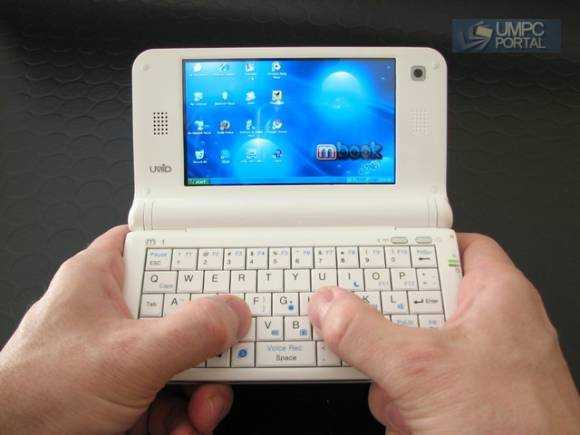
The UMID Mbook is a groundbreaker. The first pocketable clamshell device to be able to run Windows or Linux-based software on an Intel platform is a great achievement and a huge step forward in technology. It’s also an attention-grabber. People are immediately drawn to the form factor and immediately understand that this could be a fun, productive and flexible device. It first appeared in Nov 2008 and went on sale in Korea in late Feb 2009. After a recall due to build quality issues, it’s now appearing in Ebay channels. Resellers are also getting export retail samples and this is what we’re testing here. The UMID Mbook M1 in export retail finishing sent over by Mobilx.eu
UMID M1 Overview
If you haven’t seen the UMID M1 before you might look at the images and think ‘netbook’ but it’s not. It’s a mobile computing device. In fact, with the XP version we have here we wont hesitate to call it an ultra mobile PC. A 3rd Gen UMPC. That means it’s small enough to be used productively in one or two hands in almost any scenario. You don’t need a table to work with the UMID and the battery life is long enough to enable you to work up to 5hrs between charges. If you’re the sort of person that hates a dead mobile phone battery at 2pm in the afternoon but loves a professional level mobile web experience, the UMID is exactly the device you should be looking at.
Initial experience
Its an exciting device to unbox (see unboxing video here) and there’s a good set of accessories. A good quality English manual is included too. Opening the UMID Mbook up for the first resulted in a shocking ‘click’ though and a feel around the device gives the impression that the quality of the plastics aren’t up to scratch. The keyboard feels good though with a nice mechanical action. Most ports are blanked off so the lines are fairly smooth. It looks clean and stylish. The shiny white finish may, or may not attract you!

If it hadn’t had been for the creaky plastic and the clicky screen hinge, the first five minutes would have been perfect but you’re left with a little worry. UMID need to work on this. (*1)
Specifications
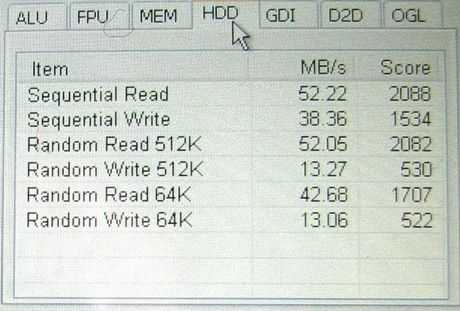
For such a tiny (pocketable) and light (330g) device, it carries a huge amount of power. The 1.3Ghz, hyperthreading-enabled Atom Z520 CPU returns impressive computing power and a noticeable increase in speed over the Compal/Aigo MID that has been tested a number of times here. Windows XP home runs on 512MB RAM which, although quite shocking in this day and age, is really not a problem. XP Home uses a very small memory footprint leaving space for the usual mobile desktop application suite. The best part of the package though lies in the SSD. UMID have chosen one of the fastest stock SSD’s I’ve seen in a ultra mobile PC (Sony Vaio P and Samsung Q1 U SSD excepted) and certainly the fastest storage you can put in your pocket. Not only does it speed up application startup but it also helps with the shortage of memory. If disk swapping needs to be done, it’s going to happen quickly. The fast SSD is a master-stroke and within just a few weeks of use, highlights how slow HDD-based UMPCs are in comparison.
Full UMID MBook specifications at UMPCPortal
From the outside.


Around the right side of the device you’ll find a DMB antenna (local Korean digital terrestrial TV), a DC input, a USB and audio breakout port (requires dongle, see below.) The micro SD slot , built-in mic and SIM card slot (for 3G-enabled versions) are positioned along the front along with a stylus. The left side is blank. The battery, a cylindrical package, slots in on the back and is a useful 18Wh capacity.
Opening up the device you’ll find an 1024×600 screen with bright colours and a good LED backlight. Above the keyboard on the top-right are buttons for on/off and wifi/BT enable.
The Keyboard.
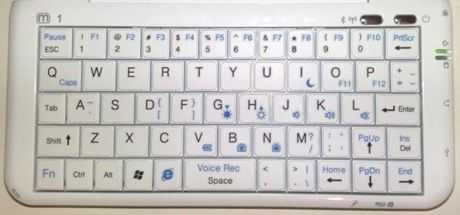
The keyboard is designed to be ‘thumbed’ while being held in two hands and in that mode, it’s a very comfortable keyboard. Numerics and Function Keys are provided along with a series of FN-shortcuts that start applications like Windows Internet Explorer and the Voice Rec(order) app which is quick and easy to use and returns good results with the built in mic. (Good for recording interviews or thoughts for transcribing.) There are issues though.
- The travel on the keys initially feels too deep for thumbing. (Although great for tablet-top use and over a period of two weeks, not as bad as first thought.)
- The Question-mark and quotes keys require a FN-Shift three button combo (not as bad as it sounds as the Shift and FN keys are easily pressed together under one thumb.)
- There is only one Shift and Ctrl key. Sticky-keys options under Windows can help here though.
We also have to report a slight (sub-mm in the top-right) bowing-up of the keyboard after a week of use. This is not impacting use of the keyboard at all but its noticeable when you look closely. [*1]
Overall, the keyboard is easier to use than on-screen keyboards and gives flexibility in use as a thumb, table-top ‘peck’ keyboard and one-handed ‘peck’ keyboard.
The USB/Headphone dongles.
This could be a deal-breaker for you so pay attention. There is no 3.5mm headphone or mic jack and the USB port is a mini port that requires an adaptor. (supplied.)


The headphones supplied use a special jack and are low quality earbuds. Bluetooth A2DP works well though and the built-in mic is surprisingly good. See notes on Skype below.
Screen
The screen is excellent. Colour and brightness are superb from this LED-backlit 1024×600 4.8 inch part allowing use in bright daylight use (not in direct sunlight though.) Resolution is high and the touch layer works really well. UMID have implemented drivers with cursor stabilisation which makes touching elements on the screen with the built-in stylus or even the finger easy. Use on Windows XP will require the use of large icons and a boost of the font sizes and window elements but This can be done easily in Windows XP.
There is another important note here though because of a real problem with the angle that the screen opens up to. It simply won’t go back far enough for the most comfortable thumb-typing experience because the screen ends up pointing at your chest. This means you are constantly adjusting the device for the best thumbing comfort and then the best viewing angle. The screen doesn’t stay in multiple positions either so when leaning back or lying (it’s a great way to browse the web!) you’ll find that the screen flops forward 5-10 degrees making it even worse. This is the most annoying fault of the UMID and really seems like a major design error.
Screen Viewing Angle
Left-to-right angles are excellent but in the vertical plane, you’ll see a fading as you look down from above the screen. This is noticeable when using the thumb typing method due to the screen angle problem mentioned above.
Micro SD card slot
The micro SD card slot cover is very poorly designed. In fact, we would advise to simply break it off! It feels like it’s going to break off within the first few weeks anyway so you might as well save yourself some stress. Micro SD cards are so small that it’s also very fiddly to get it in and out. Buy the biggest Micro SD card you can afford, slot it in as extra storage and don’t expect to be swapping it out regularly.
Power / Wifi buttons.

The XP-configurable power button (sleep, standy or power-off) sits next to the Wifi and Bluetooth control button. Both Wifi and BT are enabled at the same time but you can disable the Bluetooth radio from the system try icon. As the Bluetooth device is on the same LAN adapter as the Wifi , we haven’t found a way to run the BT only. The other thing you’ll have to get used to is that after returning from standby, hibernation or on a fresh boot, the Wifi and BT are always turned off. It’s a fail-safe power saver but it will catch you out 50 times before you remember to turn it on manually each time!
Performance
Overall the UMID passes most performance tests with flying colors and on some areas, sets new standards. The 16GB SSD installed in the test version here returns some excellent speeds and makes the device feel far more powerful than most other UMPCs. CPU based performance is good too.
CrystalMark test results
We run CrystalMark as it’s something we’ve been using for a long time and it gives us a benchmark we can interpret well.
CrystalMark 2004R3 [0.9.126.452] (C) 2001-2008 hiyohiyo
Crystal Dew World http://crystalmark.info/]
-=-=-=-=-=-=-=-=-=-=-=-=-=-=-=-=-=-=-=-=-=-=-=-=-=-=-=-=-=-=-=-=-=-=
CrystalMark Result
——————————————————————-
Display Mode : 1024 x 600 32bit (ClearType)
CrystalMark : 21940
[ ALU ] 4405
[ FPU ] 3714
[ MEM ] 3509
[ HDD ] 7524
[ GDI ] 2301
[ D2D ] 208
[ OGL ] 279
The overall score there beats many UMPCs but it’s the CPU and HDD that really shine. A separate disk read/write test result is shown below. It’s way above the average for a device in this category.
Video performance.
The UMID Mbook uses the Intel US15W system controller hub which incorporates a GMA500 graphics co-processor along with video decoding hardware for WMV, H.264 and standard MPEG-4 (DivX, Xvid.) Unfortunately it looks like the drivers are still not pulling the best out of the 3D hardware and under XP, it’s a difficult job to find video filters that can link in to the hardware decoding. We’ve seen H.264 working extremely well under certain conditions and know that 720P decoding is even possible using the CPU alone but some tweaking (or waiting for someone to come up with a foolproof how-to) is going to be required to get the best out of it. There are some reports that the latest, beta drivers for the chipset are improving the 3D experience but at the moment, Google Earth and iTunes cover-flow are almost the limit of it’s capability. Stay tuned for more information on 3D performance as drivers are still in early-stage development.
Out of the box, expect the following video performance figures to be easily achievable.
- Divx 6mbps
- H.264 2mbps
- WMV 4mbps
- MPEG2 16mbps
Results vary with filters and playback software but these figures should be considered baseline.
Audio.
Audio performance from the supplied headphones is poor and the output stage itself seems to be poor too. Using high quality headphones and the supplied adaptor, doesn’t help much. Better results will be obtained through a BT adaptor running the A2DP stereo protocol. This is not a HiFi device!
The built-in mic is excellent for general use and although the mono speaker is quiet, it has reasonable clarity.
Heat and noise.
The UMID is fanless and it is possible to get the device warm. As the air input is on the base of the device, heat build-up is noticeable when the device is in use on a table-top. Charging the device while on a soft surface gets the underside of the device very hot indeed but in handheld use and idle-state use on a table, there’s very little build up at all. Although we haven’t tested it extensively, it is possible to leave the device on, closed and in a pocket. This is something we want to test further as in testing, leaving the device on with the Wifi off is resulting in over 6 hours of usage meaning you’re just seconds away from opening up the device and starting to use it. When connected to Wifi the device lasts for about 5 hours when the lid is closed and we’ve heard from people testing the 1.1Ghz version of the UMID that up to 6 hours is possible using the same setup. That’s extremely impressive.
As the device is fanless and has no rotating disk, the only thing you can hear is a tiny amount of noise from the power components if you hold it to your ear. To all intents and purposes, it’s silent.
Stability.
We’ve experienced one or two strange situations with the touchscreen. We can’t confirm that’ it’s the device itself or an effect created by Firefox but sometimes you just can’t click on anything in Firefox. A log-out and log-in is required to fix this. It’s happened about three times in two weeks. We’ve also had one incident where the disk got corrupted. It was fixed automatically on booting. We suspect this was to do with an ungraceful shutdown on battery-empty.
Boot-up, standby, hibernate speeds
One of the party-tricks of the UMID Mbook is its boot up speed. After two weeks of use we’re still able to push the power button and get to the start menu in XP Home in 30 seconds. There are SSD upgrades on mobile PC’s that will beat this but for an out-of-the-box boot sequence with no tweaking, we find it impressive. Hibernation in/out is also very quick (Largely due to the 512MB memory) and standby is always 2-3 seconds.
Battery life.
The UMID carries an 18Wh 2-cell battery. To put it into perspective, its about 60% of the size of most netbook and ultra mobile PC batteries and about the same as the battery packs you’ll find on the OQO 02 and the Fujitsu U820. We have seen specifications on a 4-cell battery option but a spare 2-cell is really all you’re going to need.
Worst-case battery life (Wifi on, web working) is slightly under the 3.5-hour mark. Best-case with Wifi-on is about 4.5hours. Playing back a medium bitrate film under CPU will return around 4 hours. If you can configure the device to decode video in hardware, expect another 30 minutes on top of that. As mentioned before, we’re getting reports that the 1.1Ghz version is turning in even better results although there may be some penalty in terms of longer times for certain computing tasks.
Using the LaptopMag web-page loading test that starts a browser, loads a page, pauses for 10 seconds, closes the browser and continually repeats with a cycle of different websites, we were able to get 4hrs and 10 minutes. (Credit to LaptopMag for sending a copy of their test script.)
Mouse control
Where’s the mouse control? You’re looking at it! The touchscreen is the only way (apart from Windows accessibility options that allow you to use the cursor keys) to control the mouse. You can do this with finger or the built-in retractable stylus. Using the default settings on Windows XP on this 1024×600 screen is definitely going to result in some frustration but fear-not, there are two things that can help. The first has already been done for you in the touchscreen drivers. UMID have enabled cursor stabilisation and ‘constant touch’ which, while we have no idea if they are hardware or software changes (we suspect software) they work well to increase the hit-rate on icons and window controls. The second option is to run through a quick set of XP display optimisations. Increase the ‘DPI’ to ‘Large (120 DPI)’ in the advanced display settings and use the appearance tab under Display Properties. Under the ‘advanced’ button you can access a set of controls that let you increase Window buttons, fonts and scroll-bar widths. Spending time with this can really help the usability.
We also installed Fences to help partition the on-screen icons into groups. You may want to try this too.


Webcam
The quality of the webcam is good for such a small device. Recording using Movie maker at a relatively high 1mbps bit-rate resulted in better-than-expected results. It also works with Skype although you will be hitting CPU limits that will keep the frame rate down. Streaming with Ustream again returned better than expected results. Not totally smooth but certainly acceptable for a quick broadcast.
Application tests.
- Firefox3, Chrome, Opera, Tweetdeck and Thwirl all tested perfectly.
- Skype V4.0.0.224 works well with built in mic and speaker. Normal quality video works at a slightly reduced frame-rate.
- YouTube – works well All normal quality YouTube videos tested well in windowed and full-screen mode. All HQ videos tested worked in windowed mode. Many worked perfectly in full-screen mode too. (Always-on battery mode) No HD YouTube support.
- Google Earth (4.2.0205) worked reasonably well in DirectX mode. Certainly not as smooth as on a desktop or laptop but usable.
- CoolIris plugin for Firefox worked with few stalls or hiccups. Good.
Firefox load times.
- Firefox application startup time: 3 seconds.
Page load examples (full script and flash support over Wifi.)
- UMPCPortal: 6-7 seconds
- Google News: 1-2 seconds
- CNN.com 6 seconds
- Facebook 3 seconds to login screen
- uk.yahoo.com: 2 seconds
- Techmeme: 4 seconds
- Gmail (full version): 7 seconds
- Google Reader (633 items): 4 seconds
Overall, page loading times were extremely fast.
Gaming.
We haven’t tested any games with the UMID Mbook.
WiFi/Bluetooth quality.
Bluetooth quality was not extensively tested. The system uses BlueSoleil version 5.4.244 which, in our opinion based on a number of devices running the same stack, is a stable and easy to use stack.
We had no problems at all with Wifi configuration or reception. Reception appears to be slightly better than average. The Marvell sd8686 only supports B and G modes.
TV module.
The TV module was not configured and only supports Korean protocols. A DVB-T option would be perfect for many people in Europe but unfortunately, it looks like the device will only be delivered with the Korean-standard DMB TV module.
Package contents.


The UMID was supplied with a basic pouch-style bag, the two dongles for USB and audio, a spare stylus, an English manual, a lanyard and a Windows XP Home CD. We didn’t get any pics of the packaging in our gallery but or friends over at Pocketables did in their very good unboxng photo-shoot. Be aware that some markets and resellers may receive different package contents.
Optional accessories.
So far we haven’t been made aware of any optional accessories.
Who’s the target customer?
This is clearly an advanced mobile device and with the keyboard, it’s speed of operation and ability to run a desktop operating system it’s going to appeal to a number of different types of people.
Microbloggers and Mobile Bloggers. Getting the best out of contact feeds and social networks is something the UMID excels at. The version we had did not include 3G but there is a version with 3G. Tethering via mobile phone is also an option. The keyboard is flexible enough to be used for quick emails and blogs via thumb or table-top pecking.
A home-bound quick-access internet device. Perfect for looking up TV schedules, transport timetables or booking tickets and searching online databases. You’ve got quick, full-web access in a stylish package.
Video playback. The 4.8 inch screen and long battery life provide an excellent PMP experience.
This is not a device for digital photographers due to the difficult-to-access SD and USB ports.
The form factor and lack of GPS would be an issue for those looking for a navigation device.
Summary
We’re impressed with the technology in the UMID Mbook, the processing power, the battery life, the screen and the fast SSD. We’re not impressed with the fiddly micro-SD slot, headphone and USB ports though and these, we’re sure, will be major issues for a lot of people. Build quality could also be better. Despite these issues, the UMID is a device that you keep going back to and keep wanting to take with you, even if you don’t have any ‘computing’ activities planned. It’s a very flexible, and fast, pocket companion. One might say, a pocket microblogging rocket!

Full specifications along with links to related articles in the UMID product page.
Pricing and availability
No pricing or availability at the time of writing. Guideline, entry-level prices are ranging from $500 to $700 and we’re hearing that imports will be available through resellers in May. We’ll update when we hear something definite.
Thanks to Mobilx for sending the UMID Mbook over. Their sales page is available here.
(*1) UMID are said to be looking at improving the build quality and it’s possible that final retail versions will have a better construction.










Big UMID Mbook M1 UMPC review http://cli.gs/m3WmAZ
hi steve: do u happen to know y when i install xp during the inital setup screen, after copying the files needed for setup halfway, it crash and display error blue screen. could it be cause due to damage everun note harddisk zif cable> If so where can i buy the cable otherwise my everun note will have to go to the dustbin already.
Thx Bryan for the quick feedback. I’m looking into this and a couple of similar leads.
Shun,
Are installing Windows XP to Everun note from scrath ?
I tried very hard before but failed.
The service technician “pour” the whole system into my Everun noted (as an external hard disk) by using ghost 12.
If you need the image and neccessory tools, please send me your e-mail address.
Tai Pang
Thank you for the great review. I like this part the most:
“…keep wanting to take with you, even if you don’t have any ‘computing’ activities planned.”
10 years ago, I always asked myself “should I take my latop with me?” whenever I went out. Then I had the Libretto and never asked that question again.
Since I had my OQO a year ago, I still have been asking that question, because it is still a little too heavy and battery is too short.
Now I have this and I never ask that question again.
TV module is bad…
they say they can’t get signals in subways while other devices works fine…
“If you’re the sort of person that hates a […] and a professional level web experience, the UMID is exactly the device you should be looking at.”
Might want to fix that sentence, otherwise good job. :)
Thx. Im surprised that’s the only grammatical error found so far. I was proof reading it at 3am which is never a good idea.
Well, to be brutally honest, you do mix up its and it’s with each other *a lot*, and not just in this article. That’s my pet peeve actually, but I just haven’t wanted to fill the comment sections with grammar complaints.
Oh, fix this part: “its a very comfortable keyboards.”
Thanks, and please excuse me. :)
Fixed! If you dont want to feed back errors in comments, use the contact form above. Regards
Steve
It has an book form and is perfect for net browsing so it is an netbook.
Umpc is something special and it`s very shure,not book form!
IMO, an Ultra Mobile PC can and should take different forms to please different people. Netbooks focus on price and not mobility.
The UMID running xp is definitely a umpc in my eyes.
Not to mention it has a touchscreen! :D
It`s an pocket pc then :)
Which, in fact is what umid call it. a pocket pc.
from this review qand others it sounds like umid made a shoddy umpcbut got saved by the form factor it chose. i would like to wait for some other company to make a umpc with the same form factor,because , lets face it , everyone knows thatit is the most useful and sensible form , only that they build it better.
Not a shoddy umpc, just a shoddy casing quality.
Judging by the information so far, the UMID’s shortcomings and only real general weaknesses are these:
* connectivity (it definitely needs a full USB port!)
* limited screen angle (case design flaw)
* casing quality (will be fixed after a first successful round)
If they fix those in their next version, that and the inevitable evolution after the first version will make it a killer device. Eee PC 701 had too small a screen and weak battery life but I still bought and liked it. Eventually it evolved into the best netbook so far, the 901 Go.
In addition to those general faults, for me personally this UMID is a bit too expensive right now, it lacks the 3G I definitely need and could use a separate (optical) mouse pointer. If all that improves, it’ll become a must-have device for me.
Hm. http://tinyurl.com/cljek5
Thanks for a thoughrough review, Chippy! Certainly an interesting device, and while I generally prefer keyboards, this one doesn’t appeal enough to me. Especially the part about the angle of the screen, that would be a major problem for me. Still slightly better than JKK’s MacGyvered Logitech + Viliv combo though ;)
There are lots of things that worry me about this device, especially the screen hinge. It doesn’t make sense that it can’t go all the way back. Do you know if there’s a reason they designed it that way? Even with all it’s failings it seems like the only viable replacement for my OQO. In that vein, I’ve made a list of good and bad points, from my point of view:
Bad points:
Cheap plastic
Broken hinge
No mouse
BT and Wifi interconnected
No USB
No mic input
No 3.5mm out
512MB RAM – DNS 10 needs as much as possible
Storage space – need minimum 60GB
Price
Good points:
Battery life
Mic
Fast startup
Fast SSD
Anything I’ve missed?
Thought I would answer some of the points with my own observation after a few days with the machine. (Tell me to shut up if you have heard too much from me)
Cheap plastic, yes but doesn’t appear to fall apart and looks fine.
Broken hinge, I have not found it too much of a problem, it goes back the right amount to hold it in your hands. If you put it on a desk you find yourself needing a high desk, coffee table is a problem.
Mouse, get a tiny one and plug it in, or the touch screen is excellent.
BT and Wifi interconnected, I don’t know how much more battery life you would get by switching one of them off, but I have not been able to flatten the battery in a day with normal use.
No usb, not true, miniplug usb with adaptor of you can use a cable and a female to female adaptor. or make your own cable.
no mic input, try this, SL300 USB Studio Microphone, it’s bigger than the mbook!
No 3.5mm out, not entirely true adaptor supplied, but it is big and ugly. I want to buy one of the plugs realy and make a cable with an inline socket.
512MB ram works fine due to fast SSD memory for swap file.
Storage space, well I’m just about running out with office 2007 and Portable Ubuntu on here as well, but ordered an 8GB mini SD card.
Price, too much I agree, but not compared to OQO-2 which is half as good IMHO.
Now for my bad point no VGA out, and I’m struggling with the USB to VGA adaptor I bought.
Quick note as i sit outside a cafe connected over bt, screen at 80% (not sunny here)
I had the device on, in my pocket, inside the pouch, for 30 minutes and there was very little heat build up.
This always-on usage mode is something that should be highlighted.
For me, the usb and headphone issues can be solved via BT. If i need to connect a cdrom, the dongle is fine and ill leave it at home.
Build quality is a worry for me but the main issue is the screen angle. If i can get one of these for 550 euro (not including 3G) I think, for me, its going to be worth it and ill put up with the screen issue. Until something better comes along of course but thats always going to happen.
Speaker needs to be louder too but it looks like ill be switching to a2dp headphones for phone and umid now.
P.S. Heres the UMID in action. Taken on n82, txd to UMID via bt, txed to flickr via BT (over the same N82!)
Link
You need to just set your phone up for direct flickr uploads. Works like a charm, I do it on my n95 :)
Yes i can do that and sometimes i do but the post processing is faster on the umid than on an N82. (tags, title, description, cropping, copying url, posting to twitpic etc.) This is the difference between smartphone and umpc microblogging. Control. Quality.
Not too many A2DP headsets available (if you mean mono?) I got BT8040 by Jabra.
The pocketables forum is reporting a bios update for the UMID
and in an other thread apparently tere are some software upgrades also
Thanks. Havent noticed any BT quality issues yet so ill hold off on that bios upgrade myself.
Sorry, my computer hiccuped and the last sentence was lost. The second thread is for the Viliv
Chippy, if I connect to the Spring wirless network via one of these aircard597
and you have to use one of those big funky plastic adapters on the side to connect it. How in the hell do you hold this UMPC in your hand and thumb type?
The EKing has the USB on the top, which makes the most sense.
You use a thin cable like this and leave the modem in your pocket:
Link1
Link2
I would never use this with an external 3G dongle. I’m using it via BT tethering. Lower speed perhaps but much more mobile. (plus phone batteries are cheap. Even some BT/3G phones are cheaper than dongles!)
Alternatively, wait for the ‘MiFi’ product.
http://www.umpcportal.com/tag/mifi
Just cut off the two nipples on the body and the two nipples on the battery, the screen will be opened up fully to 180 degree. I have not done this yet but will. The only thing I worried about this mod is the cable might get too stretched, then I saw the internal photos and no longer worry about it – the cable is VERY long.
Yep, you can cut those “nippies” ..but then it no longer stands on table nicely..
Oh, I see, so it’ll flip over as the screen is relatively heavier than the keyboard? However, I still think it’ll be better than now and there should be an easy cure for the new issue.
I seem to recall a fixup mod on a samsung nexio where he used a pinch clip to keep a top heavy pda from falling like that. I’m sure something similar could be engineered.
http://www.fixup.net/tips/nexio/index.htm
Did you try? :)
Naw, the screen angle really doesn’t bother me, so no need to mod.
I’m thinking about getting rid of that antanna though, maybe turn that spot into headphone/mic jack. OR find some super cheap BT headphones
How can you use windows xp if you have not mouse ?
You can click left and right using your finger apparently. Point for click, point and hold for right
At long last, this is the best design I have read about for a umpc in over 5 years of watching this market.
But there are always design problems with umpcs aren’t there?
-The case design for thumbboarding sounds awful
-the small 512MB memory
-the lack of a mouse pointer is pretty inexcusable.
Hopefully these guys have cashflow enough to keep evolving this model and we don’t end up in another OQO situation.
Thank you Chippy for an excellent and very thorough review. This device, for all its flaws, still looks like the best solution for me as it is pocketable, has a webcam, and runs most stuff that I need. Of course I’d like it to run a GPS, but I’ll just have a phone for that part. The one thing I’d like to be able to do, although I’m not exactly sure how to, is show powerpoint via a projector. I guess that would entail using the USB dongle, and some type projector with a usb-in. Anyone with suggestions of how to accomplish this?
You can get USB->VGa adaptors.
I just got a U2V SVGA Adaptor, am using it now with my m1. The picture is clear running at 1024 x 768 but looks a little washed out. I suspect a lot of that is not running at the monitors native resolution. The only problem I have now is not being able to attach a mouse. Have tried this adaptor on 2 USB hubs and it doesn’t work. I think I need a higher powered hub.
“We have seen specifications on a 4-cell battery option” means that they are actually working on making an extended battery available?
Not necessarily. It was an early spec sheet which usually means it’s just a tease for investors/resellers. I’d rather see cheap, available 2-cells and an external charger than a 4-cell.
S.
Dito.
I meant fully agreed.
Thanks for the great review Chippy.
Anyone had a chance to compare the read/write performance of the 16G and 32G SSD versions?
I saw the benchmark Chippy made, if anyone with the 32G SSD can run the same benchmark and post it, it would be great (hint to Fixup…)
The price difference between the 16G and 32G is not high but if there is a big tradeoff in performance then it’s something to be considered before choosing the 16G or 32G versions.
Good question, would be great to know…
I think the lack of 3,5mm jack is unacceptable. Beyond that its a very good complete product. Good design, good aesthetic, surprisingly friendly launch price etc.
It can destroy the current and upcoming Nokia tablet with ease.
Again, except the 3.5mm part. With that the M1 is unusable.
Podarena masinka UMID Mbook M1 Full Review – http://bit.ly/Spq49
Is it possible to run Mac OS X 10.5.6 (Leopard) on it for Keynote and PowerPoint 2004 presentations from the Mac side (via VGA)? Then here is an order of thousands for our University.
There is no GMA500 support on OS X at this time, maybe snowleopard might change something? I too would love to have OS X on it (like this Dell Mini I am typing this on right now) but for now no such possibility.
Good overview as always, Chippy!
And some excellent comments, questions as well….
As a citizen of the USA who has been a faithful user of Psion products since 1992, I have mourned the loss of the Psion 5MX, which I believe had the best form factor but was not picked up by enough users. I bought 2 of them since production was discontinued and keep using them. I tried the OQO but could not imagine typing with it. I currently use the Fujitsu lifebook U810 and like it very much, but it is still much too large for my jacket pocket.
If you have used the 5MX, please tell me how the “feel” of the UMID M1 keyboard compares with that. Has a true XP replacement for my beloved Psion finally arrieved???
I believe Jkk mobile said the keyboard experience is better than the psion the other night.
Jkk has both devices
Post the question on his site jkk mobile
better than the psion revo , which is what jkk has, but definately wont be good as the 5mx
I had a 5mx. Im using the umid now. Its hard to remember that far back but remember that the 5mx didnt have as many keys so the keys are smaller on the umid. Despite that id say you will be happy. UMID doesnt have the quality feel of the 5mx bit then again, the 5mx wasnt that well built for long term use.
Steve
Steve/Chippy,
Get a grip. The psion has a far far better keyboard than this- I have mine and my friends right here right now. ITS NOT EVEN CLOSE, so yes indeed chippy does not remember! And so should not be relied upon to comment. This UMID has got all the new goodies, but it does not even use its real estate, theres more room for a great keyboard and a 6 inch screen on the SAME case, please now lets get to reality.
“jer” (aka AL) you forgot say “touch type” this time :)
I’ve got a Diamond Mako (Psion Revo) and an MC218 (Psion 5MX). I can say that for thumb typing this is better, but for touch typing, the 5mx has a better keyboard. It’s better than the Revo for touch typing though. The keys have a bit too much travel, so that adds a little toughness to it.
I remember the Psion 5mx! That had by far the smallest yet best touch type keyboard even to this day. The M1 looks cool, I would love to a longer version that was made for touch type NOT thumb input.
AL / Primaz
If you’re going to try to hide behind another multitude of names you might try and not using the copy and paste as much and try not to sound like a broken record. :)
i have the same problem with the touchscreen using software other than firefox. sometimes the screen does not want to accept input. to fix this i either press CTRL-TAB to switch app focus or click the desktop (also switching app focus), and then click the running application to make it work again.
i think this is a touchscreen driver issue. that said, with its issues and all this is one amazing device.
4 stars out of 5.
-j
Un ultra mini mini portable : UMID Mbook M1 – http://bit.ly/sAKIA [umpcportal.com]
Hi all…I just received my mBook with 32GB and XP…It has quite a good building quality (probably they worked on it in the mean time)…it is a GREAT gadget, and I am very happy with it. The only problem I have is that it came with a Korean manual, and I can’t find an English manual to download..:-(..except that, I am very happy with the device, it’s speed, the screen, and after tinkering a bit with the screen settings, I can read the screen without glasses..:-)
any chance you can run an ssd spet test using crystal disk mark?
many people are asking about the difference in speed between 32 and 16gb versions.
I second that request…. ;-)
Ok…will do during the weekend…and will let post the results….
Ok, here are the promised CrystalDiskMark results:
Seq: 53.54 22.60
512k: 53.37 13.34
4k 7.298 1.239
Read Write
Thanks Ghiora.
Looks like the 32GB version is as fast as the 16GB version on read but much slower on write which would probably make quite a difference in general use (although is probably acceptable if you haven’t used the 16GB version!)
Steve
No problem, glad to be of Help.. :-)
I have but for my old everun a 3G card : Expedite EU870D PCI Express Mini Card Embedded Module
and for UMID ? do you think that it can run ?
i dont think that there a pciexpress mini slot on the umid so, no, it wont work.
Thank for your reply, i must wait 3G version…
Well I got my one today, been installing software and other things for the last few hours, and I’m pretty impressed so far.
Just Thought I would make a few observations.
The headphones that came with mine have the non-standard plug on them so will plug straight in, and they look worse than they actually sound. I would have no problem listening to movies, perhaps not for music, but have iphone for that anyway.
The screen hinge problem is not much of a problem if you plug a mouse in so you not jabbing at the screen.
One of the first things i did was make a mini USB to USB socket cable, as I don’t like the adaptor supplied.
I can’t make VNC work for some reason so been using remote access via msn messenger for now (as messenger was installed) This certainly makes installing software easier on the eyes.
I think I will now state the obvious, this thing is small I can put it in my trousers pocket and not notice it’s there, it’s not just the size but the weight that’s impressive.
Finally it’s pretty quick, but I’m used to the OQO.
Has anyone tried to attach a lanyard, to the place where it looks like a lanyard should go, but doesn’t?
UMID Mbook M1 Full Review http://tinyurl.com/cljek5
Just discovered that the copy of XP Pro on my machine bought from enmotu2009 on ebay is not legal. Fortunatly I have a legal copy of XP MCE that’s not installed anywhwere. If I didn’t this would be a problem with no way to get hold of the ofical Linux distro at present.
I bought my mBook from enmotu2009 as well, why do you think that the XP Pro installed is not Legal??
Well when it arrived with no Disk or Certificate I asked for these to be sent to me and this is the reply I received:
Hi This is enmotu2009
Sorry for inconvenience.
As you can see in item listing (end of Specification) I mentioned I don’t offer CD and COA.
There is no official XP version in here.
Sorry again and please check item listing.
Thanks
– enmotu2009
This little toy is a perfect changeover for my old MDA Vario. If I remember, it is said it runs Windows XP? It really would be an upgrade comparing to a windows mobile 5.0
Only problem is that I didn’t see the price of this little pet. Can you write down how much it costs?
Mine cost £428.17 + Customs fee and Courier customs handling fee.
(and no webcam on this the cheapest model) Plus if you want to be legal add the cost of a copy of XP OEM about another £50.
A look at the future of handheld computers, from Korea! UMID Mbook M1 Full Review – http://shar.es/m9aX
UMID Mbook M1 Full Review – http://shar.es/XQ3O
for those who thought I had the smallest laptop ever, http://bit.ly/BPgMZ
, I present http://bit.ly/BNx3P
also, this computer is too small: http://bit.ly/BNx3P
but I think I like it anyway
Messing w/ a UMID http://om.ly/FyFf at home & my 5yr-old daughter grabbed it, hopped on http://www.terra.com & played driving game w/ ease.
@samlevin Yea, it’s the clamshell one. I used it for 10 min, and gave up on typing with it. It doesn’t even have a mouse! http://is.gd/2sGOc
Taking the UMID Mbook M1 with me to the Dream Theater show. Sucks that it doesn’t have a mouse! How ridiculous is that! http://is.gd/2CNiZ
Ummm – why don't I have one of these??? http://bit.ly/7Dbx9f
I have UMID M1 with 1.33ghz, 512mb ram, 32Gb(SLC)SSD, also black color.
===> I notice the M1 has SLC High Speed like RAM ( using Virtual Ram )
you can allow Virtual memory Set inital to 2048Mb,Max Extend to 4096MB
it real fastest and Load like window 7 also you can use Fully Feature
on Video Editing Software and Save the Video/photo to 16Gb MicroSD card
==
I love the UMID M1 (black with 32Gb SSD (SLC) then Watch out the new M2
Came with 1.2Ghz ( not 1.33 Ghz CPU! ) also there Fully work on Camfrog
and Deaf Visual Confences program Called †Purple P3 Software †then
Operation on deafies use with Pocket Computer to Tel-Visual confences!
–
Also I have own Kohjinsha PA-series 4.8-inch UMPC with QWERTY keyboard.
This Look SAME UMID M1 but better Mouse Control on Side of Screen frame
& Built in VGA port allow to large Monitor to use deaf Purple P3 program
===
Thank from Deafscooter
hi. thanks for review but this link not work:
http://www.mobilx.hu/mobile-internet-device-mid/umid-mid.html
@whrrl – looks like an 'mbook' http://www.umpcportal.com/2009/04/umid-mbook-m1-full-review/
Hello
I got Kohjinsha PM wich I believe is UMID M1 under the Japanese name. The problem is Windows XP on it is, naturally, Japanese.
What should I do to switch the system to English?