
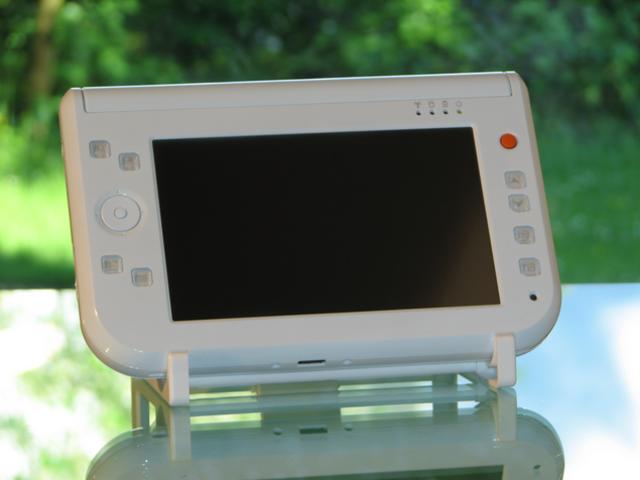
 The 2nd day of testing the Easybook ended with a nice suprise but first let me give my Day 2 opinion.
It started with the realisation that UMPC’s with Windows XP arent anything new in the software department. I think I was expecting some kind of ‘upgrade’ from XP but of course its just like logging into a normal windows PC. Quite boring really. I woke up and read my emails as I usually do. At breakfast I was able to check some RSS feeds which I also usually do with the Pocket PC.
I don’t know why I expected to get more out of a UMPC. I have done enough of research on UMPC’s to know what they are good for and I can tell you exactly why you might need one. Rich browsing, videos, photos, better input capabilities, and all the things that are on my favorite diagram. (below) I’d obviously assumed that having a new form factor would bring something very exciting. What it brings though is not so much excitement but useability and eficiency. Zero learning-curve for user interface and applications. The ability to do desk-based tasks in other places (traffic jams could become productive!) and portability of information, presentations and videos. Peace in the car for the kids (entertainment) and the married couple (navigation.)
Commuters are going to finally be able to play games, watch videos and then switch to Outlook when their boss walks into the same carriage. All standing up!
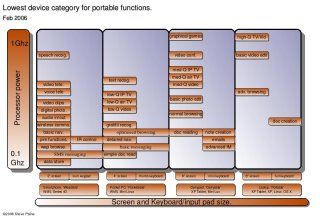
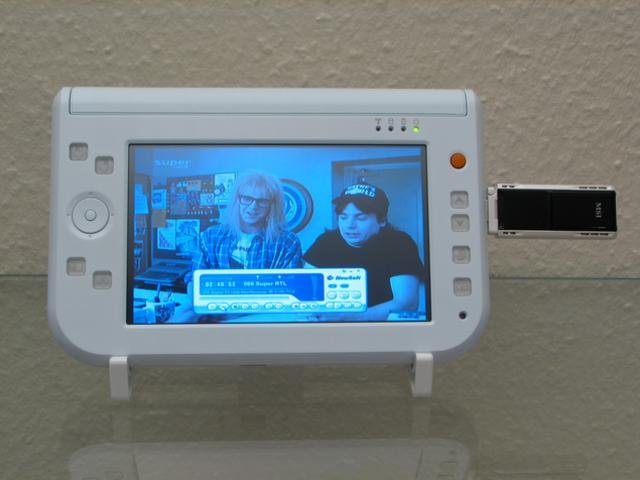
After an hour or two taking photos and videos, I concentrated a bit more on ‘the diagram‘ and tried DVB-T with the MSI mega-sky card. (see pic below) which worked very well. Quite impressive actually. TV and videos are perfect on a 7″ screen. Especially Waynes World which messed up my testing schedule! I tried out some MPEG-4 videos and one of the better quality ones, at 2Mbps, was no problem for the Easybook. Shame there’s no video outputs on board.
 Music creators are going to love UMPC’s. Band-in-a-box music software worked well and was a lot of fun playing drums on the screen. The internal midi device is good enough to do composition on and I can imagine Cubase and a few VST software instruments working well. Winamp worked of course and using the Slimserver MP3 streaming software I was easily able to choose and stream tracks from my server into the Easybook.
I’m not that impressed with the looks of the device. It’s a little industrial for my liking. It needs to have some flair if it wants to compete with the Samsung. Pulling a white book out of a yellow protective bag is not want I want to be doing in public either! I’d have to go for the black version. The build quality seems very good and I love the button layout. It works really well. The mouse stick with push-click is a real advantage. The stand, just like the Q1 stand, is low-quality and is not easily collapsable.
‘Ink’ is not my strong point but I gave it a good try. After 30 minutes trying to write, I gave up and went back to the on-screen keyboard which was fine until I wanted to write an email. At that point I plugged a USB keyboard in. This point has been brought up time and time again and I really understand why the mainstream reviewers keep mentioning it. They are mainstream people and representative of the mainstream target market that these devices are being pushed into. Live messaging, detailed emails, quality blogging and document creation are all going to be a problem for most people without the keyboard. Its an engineering challenge to include a keyboard and could push development costs up but I personally think it will be worth it to embrace keyboard users and open up the possibilities for the devices and bringing more justification to the current pricing.
Finally I sat down and started some battery tests. And this is where the suprise came in. The Easybook P7 doesn’t seem to suffer from the same battery problems as the Eo. 2 hours seems to be no problem for the Easybook P7. 3 hours low-screen useage (wifi off) seems highly possible which makes the Easybook a pretty good contender now against the Q1. The VIA chipset can process MPEG-2 in hardware which means you could potentially stream an MPEG-2 film over wifi (try VLC software for that) and get well over 2 hours. Thay will also apply for DVB-T which is streamed in MPEG-2.
In summary then, the Easybook P7 software is XP and you need not worry about compatibility or having to waste time learning a new system. Screen resolution toggling is painless with the hardware button. The hardware itself seems solid and well built. Switchgear is very good especially the mouse button. It gets very warm on charging but not so bad under battery power. Wifi works well. It passed my ‘2-wall test’ but its not in the upper class of Wifi power. Bluetooth with my 3G Nokia 6280 worked very well. The sound quality of the built-in speaker and headphones is pretty bad. Normal headphones work with the device though and that, or external speakers, will be the answer if you need good sound quality.
The device has very clear advantages for people who’s time is money. Its easily worth the money if you want to grab another 10 minutes productivity a day. It has advantages for the family too. As a second PC its perfect for use around the house, car and on holiday. Its not, however going to wow! the twentysomething consumer sector. Style is lacking. Whether Paceblade needs to attend to that at the moment is another matter. ultra mobile PC manufacturers will want to sweep up the early adopters, some high-margin niche markets, wait for better core hardware, and stimulate the aftermarket product manufactureres before it’s re-positioned into mass-markets.
Today i’ll be trying out a few games (an old version of Need for Speed will be first up.) and also trying out some health testing software and hardware. More photos, some MPEG-2 streaming and some more general useage scenarios. Maybe coffee and an Easybook too!
Steve / Chippy.










Steve, did you checked the BIOS. Please, could you install the Notebook Hardware Control program and in the info you will see the Bios version and date. Also, I would like to have the serial number of that machine to send it to TabletKiosk so they have another batch to compare with the one they sent to us. What’s going on?!
so maybe the battery thing is a timezone thing.. ;)
http://www.camtechsystems.co.uk for all uk inquiries
Hi webmaster!