
GPS Passion is a very very good site for GPS and navigation news and reviews and I follow it every day. They took the ASUS R2H and tested it out with Autoroute 2007 (Streets and Trips 2007 – EU version) and iGuidance V3. (U.S. maps only)
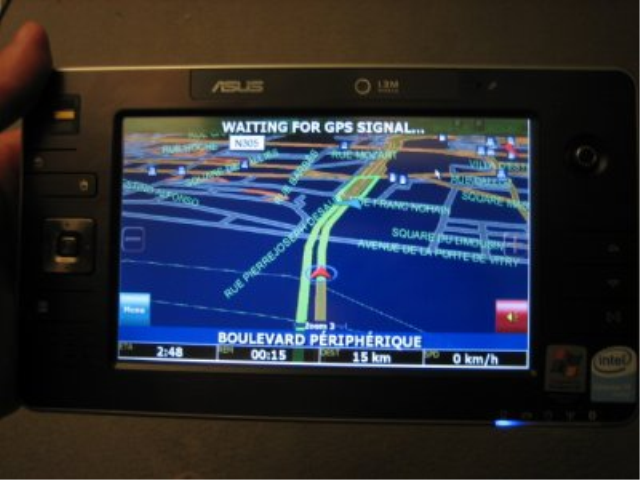
iGuidance V3.0 (I’m confused – I didn’t think this was available with European maps. Mabye this is an old map set in the new software?)
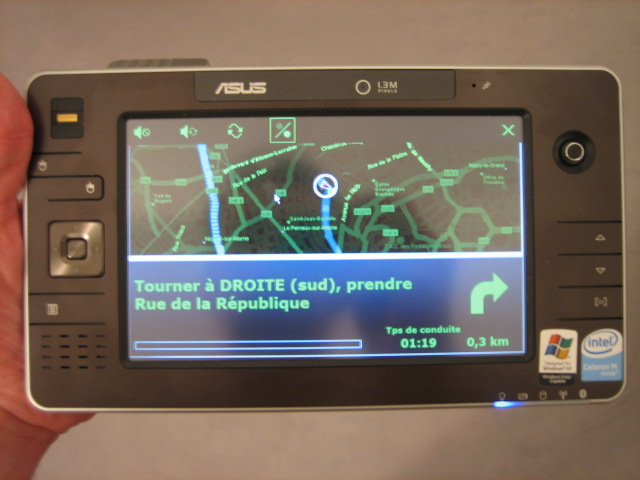
Autoroute 2007.
There are some nice pictures and a few valid comments too. For example there’s a comment about the R2H having a heavy touchscreen. Its true. You can’t use that screen in a car unless you have long fingernails. Its also true that its difficult to find a place to put it but I think that can be remedied with a creative mounting solution.
If you want turn-by-turn directions in a car though, don’t go out and buy a ultra mobile PC just for that job. Buy a PDA-based system. If you already have a ultra mobile PC or are looking for that final element of justification, there are some nice navigation solutions around.
Autoroute (Streets and Trips, Mappoint) iGuidance, CoPilot, Navigon NCK, Alturion, Mapsonic, ViaMichelin, Infomap Navigator, PC Navigator, Touratech QV are all laptop-based navigation software solutions and many of them have touch-screen optimisations.
If you want to take it further and do a bit of tinkering, add some advanced features (reversing cams, audio, secondary screens, streaming services, weather, traffic reports, local info, tracking) then the ultra mobile PC is the best platform on which to build it and you’ve got software like StreetDeck, RoadRunner and InCarTerminal to look at. In fact, you can even do a reasonable job by optimising the program launcher, Windows media player (the Brilliant Black skin has been fixed in Windows Media Player 11 which is now coming through automatic updates on XP TE.) and Microsoft Autoroute 2007.
I’m looking in detail at navigation and carputer software at the moment and hope to have a report before the end of the year but if you have any tips on ultra mobile PC navigation, leave them here and I’ll write them all up in the report.
In the meantime, take a look at the and eo mount and StreetDeck solution by UltraMobileGeek and the Carrypad Carputer series which starts here.
Steve.










Nice blog post. Keep blogging. Please visit mine when you have the time. Thanks.