
This weekend I’ve had the chance to step back from UMPCs and test a top-end device from a mobile device category that started way back in the late 90’s. The iPaq 214, a Windows Mobile PocketPC.
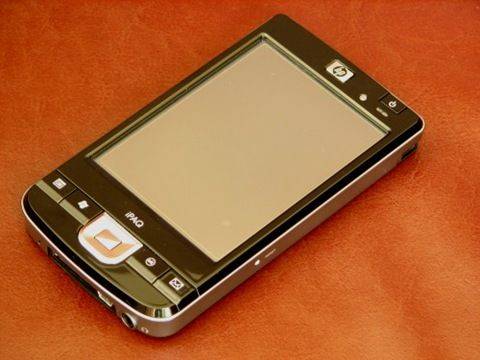
Also known as the iPaq 200,210, 211 and 212, it’s a recent update by HP and and attempt to squeeze what I suspect is the last from the PocketPC market, in the Enterprise segment. The reason I’ve got it is to evaluate Opera Mobile 9.5 Beta, to see how the Windows Mobile software and hardware has moved on since I had my first PocketPC when they were launched in March 2002. Most importantly though I want to take into consideration some of the advances we’re hearing about in hardware and software and to see whether a Windows Mobile-based device really could make a suitable consumer-focused mobile Internet and entertainment device. More after the break…
Thanks to PDAShop.nl / PDAShop.be for the loan of this device.
The UK and NL versions are currently available to order.
There are plenty of reviews out there on the iPaq 214 (see below for links) and most are glowing. I agree with all the positive reports and am happy to say that this is the best PocketPC/Non-smartphone Windows Mobile device I’ve ever used. The 214 uses a high-end processor (624Mhz Marvell Monahans PXA 310 ), which, in the commonly used range of application processors today, is up there in the top quartile. Some of the newer phones like the HTC Touch Diamond and Touch pro and the Sony Experia are (or will be) using higher-powered processors but it’s about the best you can find in a device like this today. In terms of memory and storage, there’s nothing exciting to talk about. While 128MB RAM might be enough for most small-footprint Windows Mobile programs to run in, its not enough for everything and the 256MB flash ROM isn’t enough to store more than a handful of programs. Start thinking about navigation maps and videos and you’ll also have to start thinking about using one of the two memory slots.
On the device, you’ll see big, high resolution screen (4″, 640×480) with auto-brightness sensor and touch capability. The 214 also includes Wifi, Bluetooth, CF and SD card slots, a largish battery in a package weighing 185gm. Its pocketable, but certainly not jeans-pocketable. Its not as small as a smartphone but that’s where an advantage comes in. The 4″ screen is, in comparison with my old Casseopeia E-115 and my iPaqH2210 a major plus. The processor too. Again, in comparison with my older PocketPCs, its amazingly quick. Overall, a top-end device and I really doubt you’ll ever see anything else this capable based on Windows Mobile 6 or even 6.1.
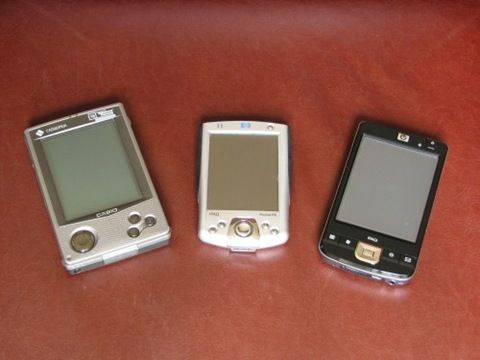
Casio E-115 (2002). iPaq 2210 (2003), iPaq 214 (2008)
There ends the comparison with peer devices then. How about a comparison with Mobile Internet Devices? While the 214 is targeted at business users, its a device that is often seen as a personal information and media device. You don’t need to search far on the Internet to find people using these devices in much the same way as MIDs are intended to be used and if we just focus on the consumer market, the MID is the natural progression from the PocketPC. A consumer-focused information and media device. How does it compare to MIDs and small UMPCs?
Today’s consumer requirements are much more demanding than they were 6 years ago and because of this, I find the iPaq 214 lacking in many respects. Here’s a few thoughts.
- Information is not just about saved documents and web pages. Its about the Internet so why is the standard Internet browser built only to handle web pages from the PocketPC launch era? Nothing short of Ajax-capable browsers with tabbing are acceptable today.
- Why is the media player unable to play a wide range of formats and bitrates required for high-quality viewing? Flash, h.264, wmv and mpeg-4 are all formats that you’ll come across in the online world and consumer devices should be capable of playing these formats without a long-winded hunt for 3rd party software.
- Why is there no built-in storage? Par-for-the course is 8-16GB on a media device these days. Users shouldn’t have to buy and handle memory cards for their main storage.
- Why is the user interface pen-driven and not finger driven?
- Why do I need a contacts, address book and calendar when my phone handles this just as well? (Granted, you don’t have to use it, and given the addition of voice capability, this device could actually be a persons single comms device.)
- Why can’t I access the Internet on the go? Consumers are starting to look for 3G features.
- Why is the user interface so old-school and so boring.
And then there’s the screen size and resolution. 4″ VGA isn’t enough for a quick and efficient, fun and fast Internet experience. Zooming, panning and selecting might have it’s place on 2-4″ screens but these handheld devices can take 4.8″ screens and offer 800×480 resolutions that are readable and largely avoid the distraction of panning and zooming.
Perspective.
It would be wrong of me to direct all the arguments above at Microsoft and HP and expect them to react. We all know that Microsoft is working on WM7 and that HP have only built this device for business use where some legacy applications requirements still exist. As I said before, this is a great Windows Mobile device and from nearly all perspectives, its irrelevant that it makes a poor mobile internet device. Consumers will never see this in the high-street and the IT-literates that might consider this, know what’s available. It’s not difficult to make an informed choice these days. One has also to consider the huge range of hardware and software that is out there that can solve some of the problems I mentioned above. The CorePlayer media solution, 16GB flash cards (that could enable up to 32GB of SS storage on this device), pairing and sharing a mobile phone 3G connection and a multitude of other software and peripherals.
Adding a third party browser.
The browser is obviously at the core of the Internet experience and as we’ve mentioned, Pocket Internet explorer really isn’t good enough for today’s Internet but there is now a new and exciting software option for browsing on the Windows Mobile platform. Opera Mobile 9.5. It’s a big step forward in browser software for mobile devices as it’s technically, very high quality and from the users perspective, easy to use. But that’s just the Internet software. Is the iPaq 214 hardware able to handle all that the Opera Mobile software asks of it and is that VGA screensize good enough? In the the next article i’ll be taking a much closer look at Opera Mobile 9.5 Beta on the iPaq 214.
Part 2 – Ipaq and Opera Mobile 9.5 (not live yet)
Part 3 – Moving forward along the PocketPC Bloodline. (not live yet)
Ipaq 210/214 reviews.
Cnet (Warning – annoying full page pre-roll ad.)










Just two words to have fin with the ipaq:
-netfront 3.5
-Coreplayer
and maybe : resco explorer, resco picture viewer, Diamond adobe pdf reader, mobipocket
wm6 is boring and old fashioned, but it does its job: starting programs
You WILL need third party software to do anything usefull with a windows mobile device, but there are lots of them…
If you’re only out to make it “less boring” you might want to browse through this thread http://www.mobilitysite.com/boards/themes-skins/56984-post-your-today-screen-87.html
[AFX] has made one of the more fancy looking themes here’s one example and walkthrough http://www.mobilitysite.com/boards/themes-skins/146815-windows-vista-desktop-tutorial-landscape.html
But yes they are only skins (though acting as a UI to some extent)
It looks amazing. Now if only it had TouchFLO 3D or a finger-friendly interface and was also a phone…
“why is the standard Internet browser built only to handle web pages from the PocketPC launch era?”
The point is accessing information. While much is made of older browsers not rendering modern web sites fully, most business users just need the relevant (text) aspects of web sites.
“Why is the media player unable to play a wide range of formats and bitrates required for high-quality viewing?”
See above. Video is not relevant to work for most business users.
“Why is the user interface pen-driven and not finger driven?”
Obviously an iPhone driven point, and I’m not sure why the inference that “finger” control is superior to “stylus” control (note that any stylus action can be carried out by a finger with practice).Despite what Apple thinks, a stylus system allows for touch controls and some text entry. Don’t forget that the “finger” system depends on an onscreen keyboard for text entry with the iPhone.
“Why do I need a contacts, address book and calendar when my phone handles this just as well?”
How about the larger screen? How about syncing with a desktop easily? How about easier data entry? How about not draining my typically weaker cellphone battery?
“Why can’t I access the Internet on the go?”
Because many work sites have WiFi.
“Why is the user interface so old-school and so boring. ”
Matter of taste.
The PDA still survives in the workplace due to the ease of reading, battery life, and data entry advantages relative cellphones (including iPhone). These issues are resolving in cellphones with time, but as the issues with battery life in iPhone 2.0 show, they have yet to be resolved.
its really funny about that contacts and stuff.
some people drop in to the internettablettalk.com forum ever so often to ask/complain about why the nokia tablets dont have a built in pim suite.
the ipaq 214 is by design a pda, and by legacy those where basically a digital version of the good old organizer.
funny thing is that these never really took of in europe, where the fast growth of the digital mobile phone networks resulted in people having phones with much the same features.
its yet another of those subtle differences between usa and europe…
as for finger vs stylus. the only thing i can think of is that you do not have something to misplace or drop.
that, and i think one of the design features of the iphone was that it would be free of any lines. even the sim card slot is hidden in the seam between display and back plate in such a way that one need a bent paper clip to get access to it…
but i got to say, next to the mouse, the stylus allows more precise control. it also allows one to fit more stuff on a smaller screen. hell, even with a stylus i find some web site elements to small in default size on my N800. having to blow the page up 200% or more to be able to select between elements with a finger, and then scale it back down again to be able to read most of the text without having to scroll very two lines becomes bothersome, fast.
As a European, I personally don’t go along with the all in one mobile thing nor the idea that isn’t a consumer device. I’m a ‘home’ user, have had my 214 for a few weeks now and I knew exactly what I was buying into. This is a handheld web & streaming media device with a big clear display that is a dream to view and enough RAM and ROM space that nothing much slows it down. I’ve just been for a hike in the mountains and loved the instant response delivered by my CF attached GlobalSat 337 GPS unit powering my location on Fugawi mapping software. This is my 3rd Windows platform PDA in 9 years and it is brilliant in almost every respect; battery life is astonishing, the display is amazing and the responsiveness is on a par with a modern everyday computer. OK, an 800×600 display could have worked with this screen and would make using Opera an even nicer experience but the only real annoyance is the power on when changing CF/SD cards or connecting/disconnecting charger.
I already have a mobile phone and a very good camera. Why would I want to compromise my PDA ?
Well done HP, great effort !
Ross,
Not sure how being a European has any affect on this topic but just to clarify are you talking about BEING a European or being IN Europe?
I personally believe that the people that are against the “all-in-one” devices are not really against that as such but do not want to live with the compromises such devices require at the present. I mean if you find a device that can do most of what you want, it most likely doesn’t have a good battery time, or then doesn’t have a decent keyboard (if any) or it just doesn’t perform the tasks you need/want at a good or efficient level.
Now don’t get me wrong here but why do you:
A) Use a GPS in your PDA instead of a STANDALONE GPS device?
B) Use the camera in your phone instead of a STANDALONE CAMERA?
C) Use CD/SD cards instead of standalone storage device(s)
Do you really never use the address book, calendar, alarm, calculator etc etc on your mobile phone, ever? Would you prefer to have a digital planner, alarm clock or and calculator in your pocket(s)?
Point being if these “all-in-one” devices serve us well and without any SERIOUS drawbacks, I think we ALL like and embrace them, and even get to the point of not even thinking of them as ALL IN ONE devices, we very easily forget that our mobile phones didn’t use to have cameras, calculators and address books.
Tchh ! Read the whole thread ! I didn’t make the point about Europe nor the European PDA versus mobile marketplace but somebody else did a couple of posts above mine – I was just refuting them. :)
As for your questions; A, B & C.
A/. I use the GPS unit with the PDA because it wasn’t just the best value option but is a superb solution. The Sirf STAR 3 unit cost just 47 UK pounds and I already owned the Fugawi mapping software.
B/. Pay attention !I never said I have a camera phone – I have a very basic Nokia supplied by my employer. For taking quality photographs, I need a fully manual controllable large CCD area camera. I have therefore already invested in a very good digital camera again with no compromises.
C/. I use SD cards for all of these devices (Camera, PDA & phone). My memory card investment has always been in MMC/SD so compatibility is a purchase prerequisite for any new gadget. However, even if I decided to dump my SD cards, how would I use a standalone storage device with my camera, phone or PDA or were you just kidding me ;)
I kind of agree with you on the convergence point BTW, i.e you could argue that the ancestor of the PDA was a pocket calculator and the mobile phone a pager and anyone hoping to incorporate a good camera into either was always onto a loser. I think you also understand my point though that no manufacturer has yet made an all-in-one that doesn’t compromise PDA functionality in favour of form factor or pocketability.
So you’re essentially in the same boat as most of us, still looking for the PERFECT DEVICE, just in your case it happens to be a PDA not a UMPC (for now), but then again I am as of today down to two smartphones vs having many times two smartphones and one PDA (Dell X51v) as FINALLY the great prg iSilo for ebook and other data collection is now available for my iPhone :)
http://www.isilo.com/
first off, I have had a ppc’s since the hp ipaq 2200 series. my 210 ipaq is currently 2 years old and I would not change it. second all new consumer end devices in the market at the time that resemble the ipaq are nothing more than pure marketing keeping the user enclosed to certain capabilities, restricted from upgrading memory since that is of course a marketing strategy. 1 year from now a new device comes out with more memory and every kid in the block wants it. while the ipaq 210 needs only change sd cards with are cheaper than a new device and it keeps running. as for new software, oh yeah you need to buy a new device if you dont own an hp ipaq since ipaq can be upgraded unlike any smartphone on the market. qwerty keyboards? seriously! if you can hardly fit two hands on a laptop, and you have to use your thumbs to hold the device plus type, is it useful? I;ve tried it and it sucks! browsers? I have firefox plus opera and internet explorer on my ipaq try getting that into a lousy iphone that has propietary software and music which can not be shared and has to be bought over the net? duh, have people the new kids forgotten how to share? all they can do is buy over the net? I have no money restrictions but I am not a fan of giving my money to someone else when I can put my brains to work to find music for free!. thank you all. make smarter commentaries and take your time reviewing all the cons and pros. sure its bulkier but if it does all a pc does and is smaller than such I dont find anything wrong with it. tomorrow I will see the post form my ipaq after I take it out of my JEANS pocket and open opera.
i applied for data entry jobs over the internet and it is also a good part time job.'”`