
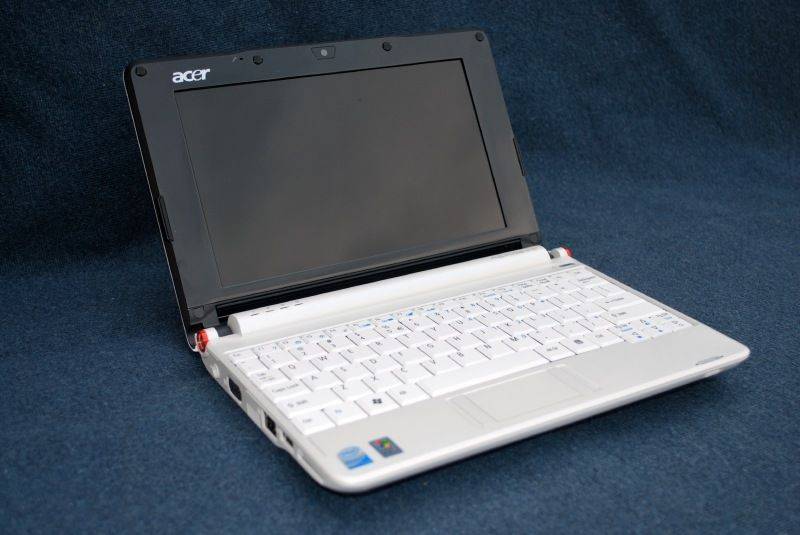
Allow me to introduce you to the recently released Acer Aspire One. The Aspire One is Acer’s first foray into the netbook space. It is nice to see lesser recognized laptop OEMs such as Acer have the ability to jump quickly into the netbook area with a quality product. I have been testing the Aspire One, provided by Dynamism, for the last few weeks and I have had a positive experience with the computer which is the first Atom based device I have used.
The Aspire One that I have been testing has a 1.6GHz Atom CPU, 1GB of RAM, 120GB HDD, and Windows XP ($450 with that configuration). The whole unit can be bought starting at a very reasonable $399.
Hardware Tour
Check out the formal unboxing here.
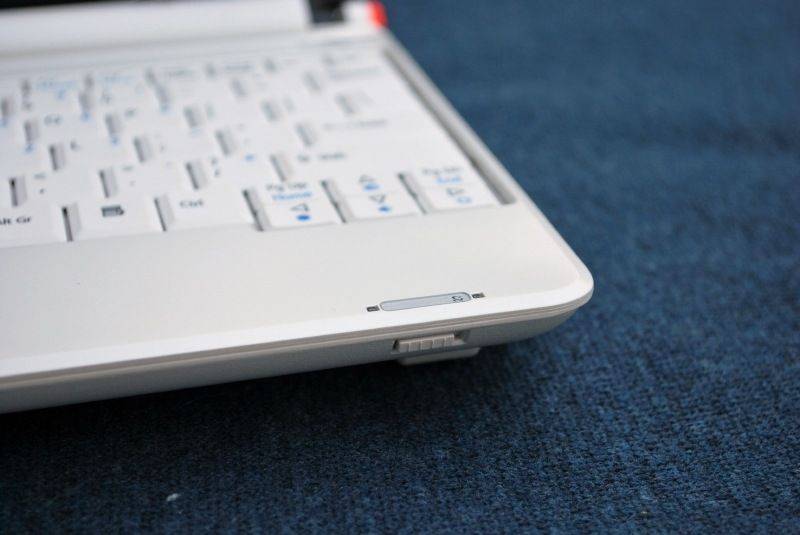
Front: Nothing on the front but a spring loaded WLAN radio toggle.
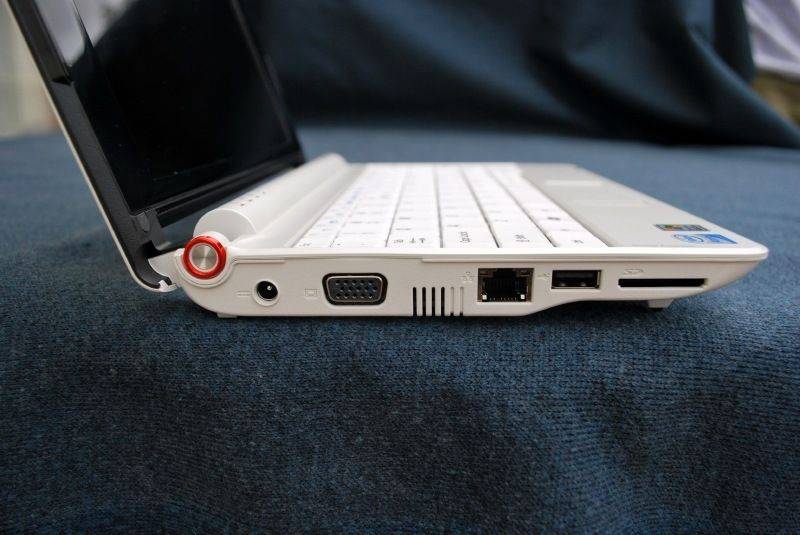
Left Side (right to left): AC plug, VGA output, small vent, 10/100 ethernet, USB 2.0 port, SD slot (SD only).
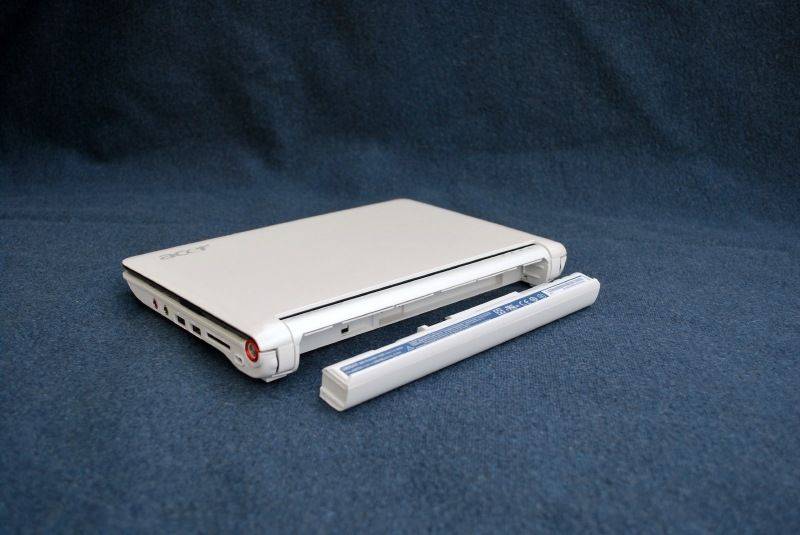
Back: Nothing but battery. Under the battery is a faux SIM card slot, presumably for integrated 3G on later models.
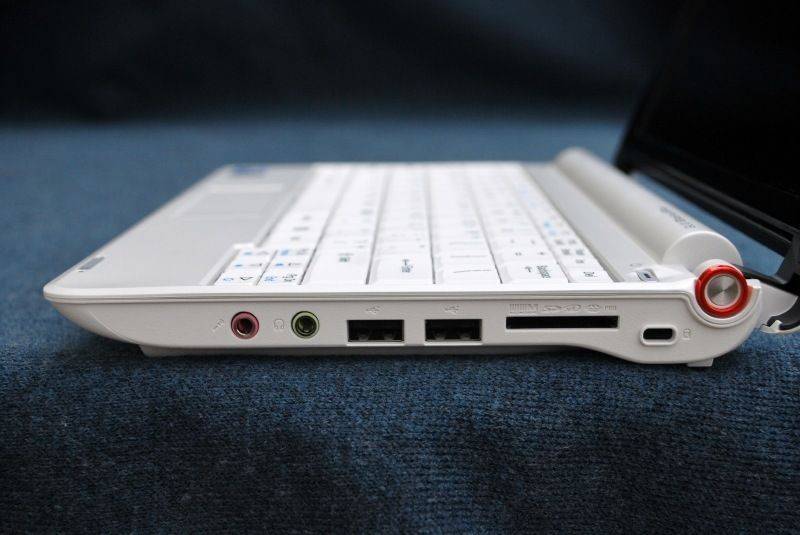
Right Side: Mic input, audio output, USB 2.0 port x2, multi-card reader (MMC, SD, xD, Memory Sick), Kensington lock.
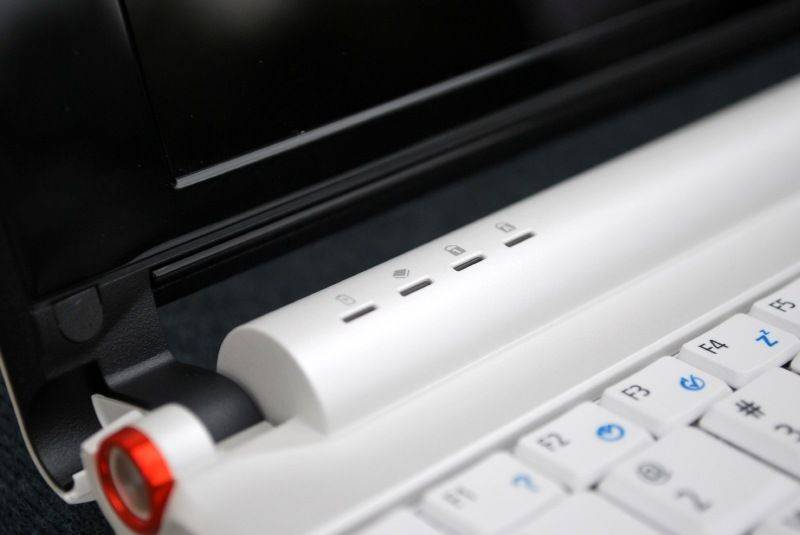
LED Indicators: Battery status, HDD use, Num-Lock, Caps-Lock.
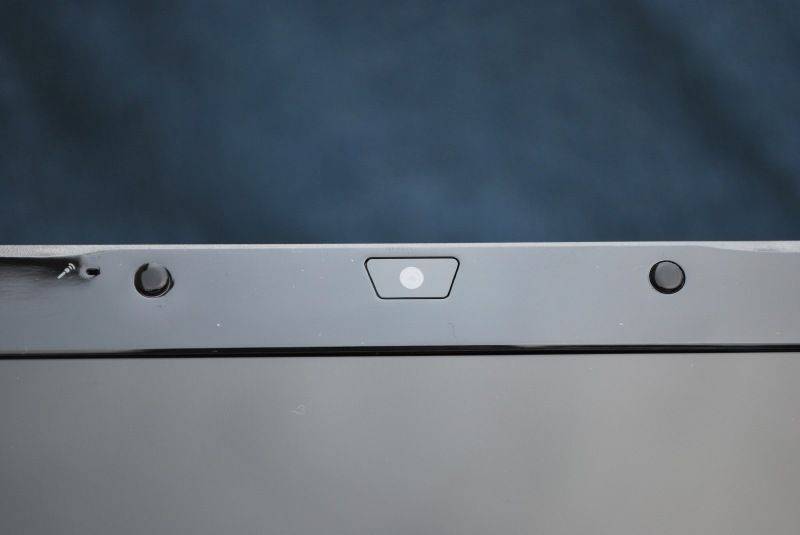
Screen: 0.3 MP camera.
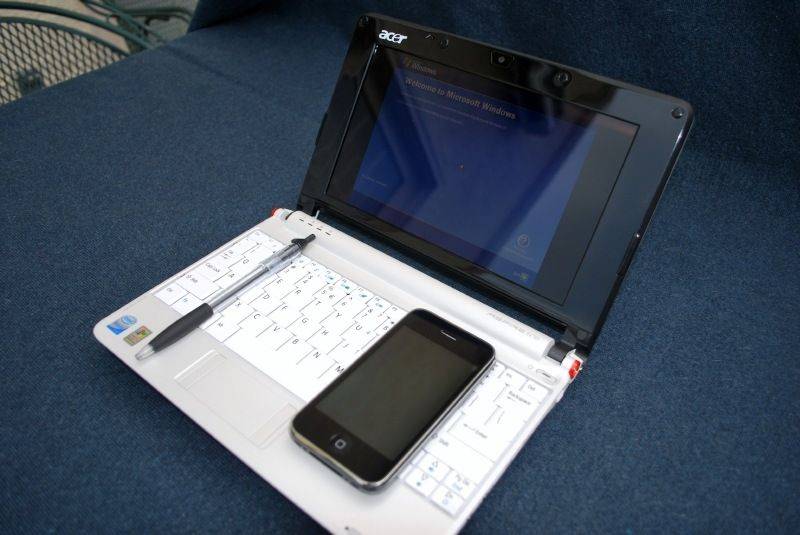
And a quick size comparison shot.










Hey, my friend got one of these so I am checking it out.
One comment about the SD card slots, after reading what you wrote. Doesn’t the Aspire use one of the SD card slots as expanded hard drive storage? So, one of them could be flush, on purpose, to keep you from accidentally hitting it either directly or from the side as it’s meant to be stuck in the all the time?
Just a thought…
Hi Every1, i was not able to use the PS Camera Raw software with this Netbook because the software requires minimum resolution of 1,024 pixels by 768 pixels. Can any1 help please? many thanks,
puedes configurar tu resolucion a 1024×768 pixeles si desactivas el bloqueador para resoluciones no compatibles, y asi podras usar la resolusion q quieras
“It is nice to see lesser recognized laptop OEMs such as Acer have the ability to jump quickly into the netbook area with a quality product.”
isnt Acer the 3rd largest manufacture in the world behind HP & Dell?
Yes it does say “Storage Expansion” near the left SD slot, that could have been their idea behind making it so flush against the device, though they could have added a lever eject.
“It is nice to see lesser recognized laptop OEMs such as Acer have the ability to jump quickly into the netbook area with a quality product.â€
Acer owns Gateway & Emachines and Acer is the third largest computer manufacturer in the world (by sales) after HP and Dell
Acer is in the top 5, and I thought about that when writing the statement, what I am really talking about is known to consumers, and I was thinking about those people who generally go to buy a computer at a physical store/aren’t too involved in technology. Also I’m talking more about the US where people recognize Sony, HP, Dell, and others before Acer. I might edit the statement in my review if I have a chance so it better reflects that.
Thank you for the review, some comments:
1) My local store sells AA1 for $330 (Linux) and $350 (XP). $399 is now too high.
2) EEE PC 900HA is a hell lot better: $344 (XP), 1.3MB camera, 160GB HDD, 1GB RAM, 5.3hr battery life, lighter (the lightest netbook), deadly quiet, very neat 900 case (but Atom CPU)…
3) The only point to go for AA1 is for its larger keys than those on 900HA keyboard. But I love the small keys (just about right size) and I have been using even smaller keys for 10 years. AA1’s keyboard sinks in the middle, pretty bad.
Datavis has the 900HA in stock for $344 + $13(S&H):
http://www.datavis.com/cgi-bin/product.cgi?prrfnbr=479719
Great comprehensive review here that I have linked to on my site. A few points are a little bit off (i.e. Acer isn’t exactly a lesser recognized laptop OEM in my language) but overall good coverage and superb photos.
However, I think consumers may be a little blinded by the cheap price of this PC, when for a nudge more they can get an Eee PC 1000h which I predict to be a superior machine. The Aspire One sure does look great though!
I have the Sapphire Blue 120gb AAO and I am loving it. I find it pretty quick and very portable being able to carry it with one hand walking around. I got it for $350+tax=$379. I was considering getting the Gigabyte M912M but the small keyboard and extra weight is just too much for me to give up. So instead I just purchased the Black 160gb with 6 cell battery for $430+tax+shipping=$485-$129(Microsoft cashback coupon)=$356. I can’t wait to test out the 6 cell battery. Based on the pics I’ve seen I might just stick with the 3 cell battery due to the fact that I hold the AOO with my left hand fingers through the slot under the screen and the pictures show the 6 cell covering the slot.
This is a great deal would you please let us know where you bought it? “160gb with 6 cell battery for $430+tax+shipping=$485-$129(Microsoft cashback coupon)=$356”
Thanks
Go to live.com and do a search for buy it now. It will give you results and click on the 30% off cashback link to ebay. If you do everything correctly you will be eligible for 30% cashback from Microsoft. I checked last night and there are no more $430 AOO, but there are still some $460 ones I believe.
I just checked and the Microsoft cashback offer now says 20% not 30%. But when I clicked on the ebay link the cashback offer doesn’t appear at the top of the page anymore. Sorry, maybe the offer has already ended…
will the synaptics touchpad gestures work in the linux version of the Spire One?
I’ve got one of these baby last week and its GREAT!! just hate the easily scratched bezel though.. (wipe it off with a piece of cloth 2 times and the scratch was there, but its not too noticeable unless I put it under direct light source:D). FYI, it still runs Call of Duty and CS in 800×600 with playable fps, so it worth every penny (in my case its Rupiah:P).
I’m assuming you mean CoD4 and CS: Source, right?
I think he is talking about Counterstrike 1.6 and Call of duty 1… I think
The left hand SD card slot is designed to take a card and used as an addition to th emain memory. That’s why it’s recessed, it’s meant to be left in the machine 24/7.
Prefer the Blue version myself because it’s different, but a nice machine. Webcam isn’t the best howerver!
My A0A 150-1423 – Onyx Black, 160GB Model with XP out performs the test unit straight out of the box far better. 29000 on the Crystal Mark score due to a very superior performing HD. HD scored over 8300. Makes me think they put a quicker drive in these models.
Performance is excellent, keyboard is great – HIGHLY recommended!
AMAZON IS SELLING THE SAPPHIRE BLUE MODEL WITH A BIGGER HDD,1.3MEGAPIXEL WEBCAM, AND A 6CELL BATTERY. FOR 429.99
Its fabulous and I love it. But I was wondering if anyone can tell me how to turn OFF the zoom/upscaling feature? Its driving me mad as I will be typing away happily and for no reason that I can discern it will suddenly change the resolution – sometimes it goes as small as 10% and once it went to 930% Help!!! Cheers
Sonia I am having the same problem and it’s driving me crazy. I wrote to the acer tech site and they told me to consult the manual which doesn’t address the issue at all. So I wrote back again. If I find anything I’ll keep you posted
Thanks Michelle! I was going to register with their technical site this weekend, so I too will def keep you posted if I find out anything. I have a feeling it must be something SO simple that it doesn’t actually appear in any of the “technical” info? But yes it drives you MAD!
I figured it out!!And with the help from Acer tech.
Go into your Control Panel
Choose “Ease of Access Center”, Then “Make the mouse easier to use”, at the bottom of the “See Also” header click on the “Mouse Settings” link, once that box opens go to the “Momentum” plus sigh and unchoose your “Enable pinch” mode. Ta-da now you shouldn’t have any more unnecessary zooming.
*Without Acer Tech help.
YOU’RE AN ABSOLUTE WHIZZ!!! THANKS MICHELLE :-)))))
I am having the same problem with the zooming. However, I do not have in my control panel Ease of Access Center. Can you please offer an alternative to solving the problem.
Thanks,
Betty
Betty-
Start > control panel > mouse > device settings > settings > pointer motion > pinch > uncheck “enable pinch”.
This will take care of it.
Chris
Thank you Chris and Michelle. This annoying ‘pinch’ function has been bothering me for days.
Marc
I have my aa1 for couple weeks now.. $329.00 amazon 350 out the box. the low end machine, white, Linux 512mem 3cell battery. I get about 3 hours on battery.. great reception on wi-fi, very powerful.. I touch type and love the keyboard.. what makes this netbook great is the low end.. Linux does not need a lot of memory and is easier on battery life.. no one mentions that it DOES NOT HAVE A CD DRIVE although it does come with a restore disk. I purchased a external drive ($19.00 ebay) the only way you can put some programs in.. I did crash the AA1 (total lock up) so I turned off and it would not re-boot. I had to do a compleat restore ,, not easy.. not having the external drive. and new to Linux.. I had to use windows machine and create a flash drive with the restore from the supplied CD.. I have a buddy that knows a bit more than me and helped.. so we got it a total restore. i think it was my fault that it crashed..I tried to down load a printer dirver. (unsucessfully) has any else crashed the AA1.. its big trouble.. been working great now. I have a big laptop as most of you have .. so this is like a blackberry or PDA you don’t need Quicken or Photo sofeware on this .. Do get the Lenux.. great OS my first time Lenux. like a car with a stick shift. so much quicker.. I give the AA1 a ten, for the money and portabilty . (really need a spell check) j
I am not very tech savy – but I purchsed this nice little computer for it’s portability. I’m really enjoying it. BUT – when it goes into standby/hibernate if left alone too long, or if purposely closed – I cannot get it back up. Altho it is running I have to use the button and switch it off.
I have tried to research this, but cannot find any references to this problem.
Any tips woild be sooo welcome!
I have the same issue, it dont come out of the standby mode. Any idea what has gone wrong?
On my machine – once it goes to sleep, I press the power key for a second – and it comes back. I have the XP OS – and then I click on my user name – and it returns to the screen I was on before it went to sleep – but again you have to hit the power button. -Andy
This is the setting I did to come out of Standby mode.
Go to:
– start
– settings
– control panel
– power options
– Advence tab
– UNCHECK “Prompt to password when computer resumes from standby”
– Apply and OK
3 things to remember :
1- Make sure this setting is done in the “computer administrator” account.
2- To come out of standby press the power switch (slow flashing orange light
when in standby mode) and it will turn green again.
3- no longer password protected to come out of standby, but still password protected for login
Have fun !
Nice Review Ben!
Does Aspier have caps lock indicator?
I just got my 900ha and posting this from it and it does not have caps lock led.
I still love this little thing.
Original price was $349.99 but I got mine for only $209 shipped using ebay 10% coupon and MS Live.com 30% cashback.
Anyone interested, google for live.com ebay buyitnow cashback.
Many sites list 900ha spec with 1.3mp camera, but eee 900ha actually comes with 0.3mp camera.
Yes, it’s one of the four LED’s next to the left hinge
Has anyone had problems with the wireless function? I had to return mine to Acer for replacement of the wireless hardware. It initially worked on my network, then gradually lost connectivity. My two other laptops have had no problem.
The instructions were not complete, I did not know I had a on off wireless key. Anyway it wasn’t working properly. The second tech call got permission to send it back for repair. The first tech thought it was the fn key being turned off, but that isn’t the way the Aspire one works.
Also, my wired internet cable wouldn’t click into place. Are their different types and sizes of ethernet cables? The wired internet worked ok aside from having to keep tightening it.
Nice computer aside from these problems, and having to send it back for repair!
regarding the wired Internet cable – no they are all RJ45’s. Common issues are that the “tab” on the RJ45 is either bent or “worn out”.
Fantastic review, thanks!
hey its been about 1.5 mths since i bought the acer, and i’ve not dropped even like once, but yesterday when i switched it on there was this funny, recurrent sound (i think from the hard disk).. and i was wondering whether this could b fixed?
hey i too got the same problem……….u fixed it or not? can u tell me too
54 mbs connection???
Been looking at netbooks & saw the Sapphire Blue XP version (120GB HD, etc.) at my beloved Costco this afternoon for $349 & purchased. Very decent keyboard – typing not a problem though the small text on the small screen is a problem for my rapidly aging eyes. Connected effortlessly to my home “N” network – but at 54 mbps ??? A little low isn’t it? Suggestions?
Yes, the wireless on the Acer uses the 802.11G standard (not the faster N standard) which has a maximumspeed of 54 Mbps. So you won’t get better than that, I’m afraid.
The Acer Aspire One is “made” for Acer by “Quanta” -, the same company that makes the VAIO line of computers for Sony.
Great keyboard, generous Hard Drive (120GB) works almost flawlessly under Ubuntu Linux 8.0.4.1 and 8.10. Horrible battery life. Contender? The Samsung NC 10.
Great review, thank-you. So much detail and well balanced points. THis looks like a top notch netbook.
Great detailed review Ben. We are running the Acer Aspire One Note Book contest.
http://www.wantonecontest.com/
If any of your readers want a chance to win the Aspire Note Book, they can sumbit
their You Tube entry here
http://www.wantonecontest.com/Contest/submit-your-aspire-one-video.aspx
Keep up the great work,
Jim
I just got an Acer Aspire One as a birthday gift. It’s my first laptop of any size. My question is: does it matter what kind of ethernet cable I buy to use this in hotel rooms, etc.?
no
thanks, Chris
My Acer Aspire One is great…except that I cannot connect to the internet via the etherent cord. it just says that a network cable is unplugged when is it still plugged in. my wireless does work fine but would like to connect to my high speed connection. i have tried uninstalling and reinstalling the driver from the acer website but that did not work. i am not able to right click on the connection and ‘repair’ it. please help me!! thanks.
How can I turn on the built in camera of an Acer Aspire One ? Who can help me ?
Well, I only have the Linux version so I don’t know if my advice is going to be useful to you, but on that model there is a little program in the “Fun”-section labeled “Webcam”. It lets you take snapshots or record a movieclip.
And there is also a chat-program that may use the webcam, though I haven’t tried it yet.
On Windows: Microsoft’s Messenger program is probably pre-installed; should be able to use the webcam. Anyone know of other programs to use?
My husband just bought me the aspire one and it’s fabulous but how does the built in camera work? I see it listed under drivers and when I click on it it comes up but there’s no software? I’ve never had a built in and I’m comparing it to that of my sister’s mac which has all sorts of functions, I can’t even figure out if it’s just a live thing or if it takes pictures. Can anyone advise?
The webcam itself should be capable of creating snapshots (photo’s) and movies. I have the linux-version which comes with a little program to do just that. On windows you should be able to use Microsoft Messenger to test the webcam.
anybody help me to switch on the webcam on my Aspire One !
To get to the webcam controls, open My Computer > C: (drive) > double-click on the folder for the webcam. In there is the executable, which you double-click on to activate. Create a shortcut of the executable on the desktop for convenience.
HI, can anybody help me to increase the graphics memory from 8 mb to 32 mb of AA1????
Cause there are no setting on the bios to change the graphics memory.
could somebody help me please??
I bought my Aspire 1 the first week it arrived in Canada last summer. I have 2 other laptops and no longer own a desktop.
I really love the portability. It weighs less than 1/3 of my second-lightest laptop and takes a lot less space. A tiny nylon case that fits UNDER my cycling jacket vs. a hefty backpack. Highly recommend anyone get a tiny optical mouse – I got it almost right away as touchpads do not respond well to my fingers.
I touch-type and found the horrible Euro keyboard they sent to Canada (the French eh?)to be very frustrating at first since the left-shift key is the size of an alpha-numeric key to allow an even smaller “special foreign language key” to squeeze in beside it. Found I hit this key more often than the shift key! Oddly, the right-shift key is relatively huge, being about 3 times the size of an alpha-numeric key.
Finally, I just removed the key-cap from the offending key and can type normally again. The only other complaint is regarding the Linpus distro used. I was a Unix system administrator a few years back and I can guarantee this is NOT verey much like Unix! For one thing, even after getting full access to the command line and successfully installing and updating a few programs, I found there is NO MAKE utility!!!!
That means I still can’t print to my home network printer, since I need to make the necessary driver.
I did finally find a stand alone MAKE utility, but have not tried it as it may not be compatible with Linpus.
NEXT, I will be installing Ubuntu or maybe Open BSD to try to get some real usability from the OS.
Otherwise I like everything about this little beast and agree with most of what others have said. Just installed another 16 GB (replacing the 8 GB I put in when I bought it) and have over 21 GB of formatted SSD space. This has got to be the most bang for buck and weight of any internet-capable device. Beats my cellphone and PDA’s all to heck with the ability to touch-type – on, and on and on…
im having a similar problem, my shift keys both have an up arrow and a few other unfamiliar symbols, everytime i try to make a “?” it give me an accented e. wat can i do to fix this ?
Hi All: I have an Aspire One with the 8 GB solid state hard drive plus a 8GB SD card in the left hand slot, running Windows XP. Machine overall is great, but I’m having a problem with accessing the 8 GB SD card in the left hand SD slot. I thought that the second SD card would be managed to appear as part of the internal 8 GB C:drive – essentially making a virtual 16 GB C: drive. That is not happening. But if I try to write to that drive directly, I get a “drive is write protected” message (lock is not on the SD card). So I effectively cannot access the card in the left hand SD slot.
Any thoughts on this? So far ACER support has been mo help. And all of the reviews I read of systems with this drive configuration are running the Linspire OS. does it work differently under XP?
Hi
I have the same model and operating system and am also interested in whether you can join the 2 drives as one virtual drive c
Did you get an answer?
Dan
I have an acer one AOA 150. when I tried to switch on, the power button light stayed on and the 3 lights on the left hand side just flashed once and stayed off, the screen didn’t come on, it turned off by holding power button down for 6 seconds, but wont switch on. anybody had this problem? and knows what the cause could be. would appreciate any help.
i bought my son the original aspire 8.5″ screen, and got my wife the newer 10″ aspire.
they hit the right value/price mark/ utility target for me. the new nine hr battery on the newer aspire seems to on forever when you put it to sleep until needed. love ’em.
My Acer 11.6″ AO75IH webcam software will not run. I found the executable but nothing happens. I’m running VISTA.
hi
from Kenya. We use mostly USB modems to connect to the internet.How do I connect using the Aspire One. It does not recognise the modem when inserted. who can help me?
I just intalled Vista home premium and I cannot activate the wireless device on a Acer 6930 Notebook, does anybody know the key combination, because it doesn’t have any side or front button??
Wich company made the built in camera? Wich software i must take to reinstal this camera? Whith Aida32 or Everest just see an usb 2.0 camera or windows phisichal device see an Agfa e1024.Thks
Please, how do I set the language to English?