
I’ve been testing the HP Mini 1000 MIE [Portal page] netbook for a few weeks now and I’m ready to give some performance information. As you’ll recall, the ‘MIE’ in Mini MIE stands for Mobile Internet Edition. This is HPs way of denoting their custom Ubuntu operating system which runs in place of a typical Windows OS. Unfortunately, because of the OS on the unit I can’t bring you the typical benchmarks. Luckily some benchmarks are already available out on the web from the XP versions which should give you a rough idea of what you will see, and I’ll point you in their direction toward the end of the post. What I can bring you however are some good old fashioned numbers (and maybe a chart or two)!
Video Playback
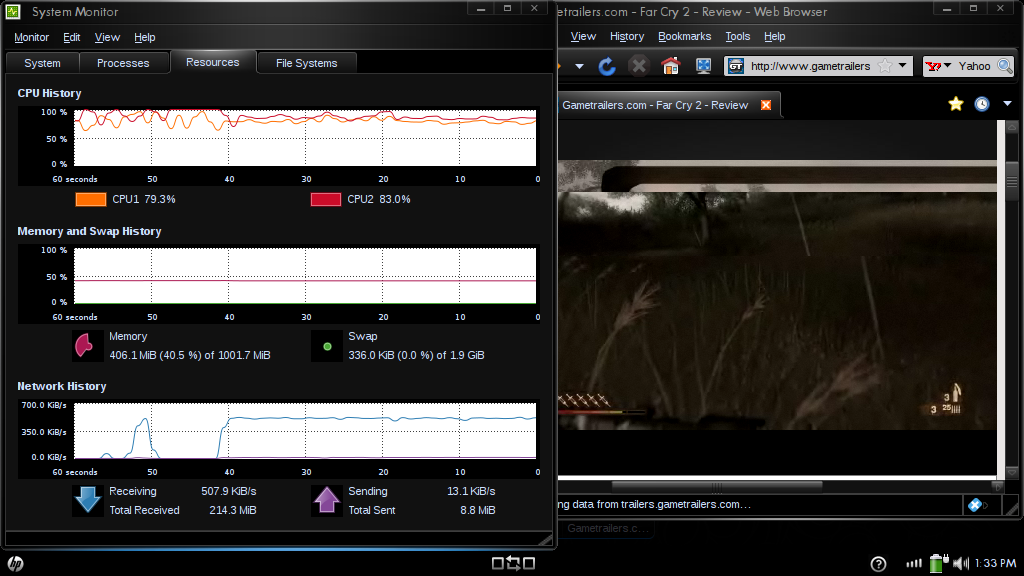
Video playback within a web browser usually isn’t considered a big deal on a desktop computer, but when working with the relatively small resources of a netbook, it can become a bit more serious of a task. In the screenshot above (click to enlarge) I showed the CPU usage graph while playing back a flash video from Gametrailers.com. This is SD footage. Flash HD video playback is too choppy for realistic viewing on the Mini 1000 MIE. I wouldn’t expect to be multi-tasking while listening to music through YouTube in the background. The CPU was around 80% usage during playback.
Boot Times
All tests are done with no apps open. Open apps will theoretically add a small amount of time to hibernate and standby.
| In (shutdown) | Out (startup) | |
| startup/shutdown | 16 seconds | 45 seconds |
| hibernate | 48 seconds | 42 seconds |
| standby | 5 seconds | 6 seconds |
It is clear to see that standby is going to be your best option in most cases, offering a pretty quick 5-seconds into standby, and bringing you right back to your home screen in 6 seconds. Startup and shutdown times seem fairly normal, but something is a bit odd with the hibernation times on the Mini 1000 MIE. In general, going into hibernate should take about half as long as shutdown, or at least be equal in its speed. In the case of the Mini 1000 MIE, going into hibernation takes the longest of any of the boot options.
A few things could be causing this. Let’s quickly define the difference between hibernation and standby. As the computer enters standby, it keeps all of the important OS files, and any running applications in the RAM, and powers down to a very low-power state, using only enough power to keep the data on the RAM alive. This means that it consumes a little bit of power while it is in standby. Hibernation consumes no power because the RAM data is backed up to the HDD (in this case, an SSD), and the computer shuts down completely. When turning back on, the data is rewritten to the RAM from the HDD, and the unit returns to the same exact state that was saved when it went into hibernation. Now that we know a bit about standby vs. hibernate, let’s theorize. One potential cause of poor hibernation times is a bottleneck in communication between the RAM and the SSD. Another reason could be due to the way that Ubuntu handles hibernation.
Either way, it is clear that a full shutdown or standby are your best options. In my testing I’ve seen that the Mini 1000 MIE should provide 70 hours of standby time which is pretty good. Put your computer into standby and come back 7 hours later, and you’ll only be missing 10% of your battery life. Considering you are only 6 seconds away from a full computing experience, I’d say that is a pretty good deal.
Battery Life


The battery on the Mini 1000 MIE is pretty darn slim. Take a look at the photos above. The computer itself says that the 3-cell battery will power it for 2 hours and 35 minutes from a full charge. The netbook is good at delivering this amount of time while you are using the computer for web browsing. While not available just yet, a 6-cell battery should be available from HP in the near future. Keep an eye on their accessories page for availability.
Benchmarks
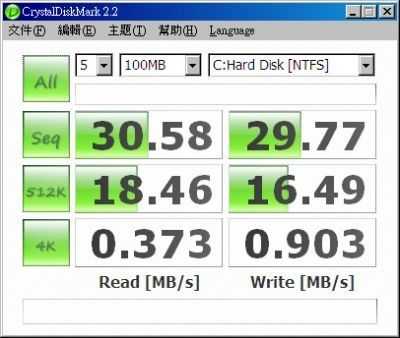
As I mentioned, the non-standard OS doesn’t allow us to run our usual benchmarking programs, but the XP flavored Mini 1000 has been benchmarked by others, I’ll drop the SSD benchmark below, but also swing by this page to see some additional ones.
Check out the HP Mini 1000 MIE coverage roadmap for more coverage on this netbook.










Performance — HP Mini 1000 MIE http://www.umpcportal.com/?p=5881
Did HD flash work on the Windows version? I know with other netbooks with the GME945 chipset, there have been issues with the intel graphics driver taking a lot of the cpu when you watch things like flash.
Also, since they tailored this to the HP Mini, you’d think they’d tweak the boot times a bit more.
I don’t recall flash being as strenuous on the Acer Aspire One but it has been a while. As for HD, non of the current netbooks have on-board hardware video decoding and won’t perform very well with it. When the next gen hits, we’ll should have solid HD playback.
[reading] Performance — HP Mini 1000 MIE | UMPCPortal – The Mobile Internet and Computing Reference Site http://tinyurl.com/dljzd8
One of the reasons hibernation times being bad is possibly due to a poor SSD. Hibernation requires writing to the disk and writes aren’t the strength of flash technology.