
 Since the launch of ‘Origami’ in March 2006, there have been many varying reports about what an Ultra Mobile PC is and why someone might buy one. This guide has been written to help those looking at ultra-mobile PC’s with a view to buying one. Its a long report but we guess that if you’re considering spending over $500 on a UMPC, you’ll want to read and learn as much as you can.
What is an Ultra Mobile PC?
Mobile computing is nothing new. For many years there have been small and portable PC’s. The notebook computer has been a very successful mobile form factor and is the result of the merging of power-efficient technology and a real user need for mobility. Ultra-Mobile computing can be seen as the next step up in mobility. An Ultra Mobile PC is device small enough to fit into a carryable sized casing (generally not pocketable,) uses a reduced-size screen and often uses small keyboards and/or alternative input methods such as natural text writing, voice and touch panels. In 2006, the currently available technology was, for the first time, allowing ultra-mobile computers to be built running an off-the-shelf desktop operating system with a flexible applications suite at a consumer level cost. This, combined with the shrinking of the Pocket PC market has resulted in an increase in market activity for Ultra Mobile PCs. This trend looks to continue as technology develops further, the market matures and users become more familiar with mobile usage of the Internet. Further hardware advances during 2006 and 2007 along with market growth and manufacturer confidence are resulting in a wider range of designs and more choice in terms of features.
There is no strict definition of an Ultra-Mobile PC. Ultra-portable, handtop and web-pad are all similar terms but most of the marketing so far seems to be focusing on the term Ultra-Mobile PC. (UMPC) Our definition is as follows:
A highly portable hand-held computing device with 4-10″ screen, wired and wireless connectivity that is able to load and run common internet, office, media and information applications operated through a graphical user interface.

Microsoft use the acronym ultra mobile PC to refer to ultra-mobile PC’s that conformed to the Origami baseline specification of March 2006 but this has now evolved and the term Origami now refers to software group within Microsoft responsible for developing and promoting UMPC-focused software on the Microsoft Vista operating system. The Wikipedia entry for UMPC is slightly out of date now and refers to the 2006 standards.
At UMPCPortal, we use the term Ultra-Mobile PC and its acronym ultra mobile PC to refer to the more generic definition shown above. Simply put an ultra-mobile PC is a ultra mobile PC by definition! We’ve found that there are two distinct categories of device. The tablet-based ultra mobile PC which has no keyboard and the mini-notebook ultra mobile PC which includes a keyboard or thumbboard.
Previously we said that UMPC’s use currently available technology.’ Although there are exceptions, the consumer targeted ultra mobile PC use current technology in order to be price competitive. This means that you won’t find anything special in terms of performance in a UMPC. They are no more powerful than many budget notebook PC’s. In some cases the only differentiating factor between a ultra mobile PC and a budget notebook PC is the form factor of the device. It causes a lot of confusion as at present, the price of a ultra mobile PC is higher than budget notebooks. If you can understand that the difference is the form-factor and its mobility then you understand what a ultra mobile PC is all about. The form-factor and its mobility advantages are the only unique selling points. In 2008 it is expected that the ultra mobile PC market will be big enough to warrant a separate line of processors and chipsets from Intel, VIA and AMD. Intel have already announced a ultra mobile PC specific CPU and chipset range and similar developments are expected from VIA and AMD. This will break UMPCs away from having to use notebook technology and will help in providing optimised components for more advanced devices.
Who needs a UMPC?
This is obviously a difficult question to answer and one that will be asked many times by people looking at this new segment. The answer is ‘those that want the advantages of full computing mobility.’ Those that want full computing mobility are a fast growing group of people. Through the use of notebook PCs at home, some internet access on mobile phones and a general understanding that notebooks tend to be heavy and mobile phones tend to have tiny screens not quite good enough for a full Internet, video or input experience, people are being drawn to the richer experience being offered by UMPCs. As a second PC in the home a ultra mobile PC can make the perfect choice. There are even UMPCs that can be used as the main home PC and as technology advances, the ultra mobile PC could form the core part of a modular personal mobile PC at work, home and in many new mobile situations.
Mobile computing Device categories.
The following diagram (click to download a PDF version) appears a lot on the UMPCPortal website. It summarises what we believe are the four main categories of mobile computing device, shows where the ultra mobile PC fits in and simplifies the decisions that need to be made when thinking about buying a mobile PC. Of course, a few devices don’t fit well into these categories but for the purposes of understanding your requirements, this is where you should start. More details on ultra mobile PC market segments and definitions in the diagram can be found in the 2006 report here..
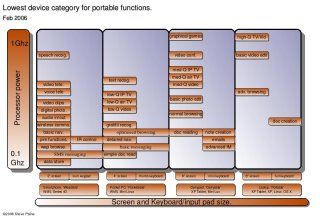
In the diagram you can see the four categories of mobile computing. The ‘wearable’ smartphone is identified by its very small screen and minimal input mechanism. The ‘pocketable’ Pocket PC identified by its slightly bigger screen and more input options, the ‘carryable’ ultra mobile PC with a medium sized screen, more processing power and optional input mechanisms and finally the ‘portable’ notebook PC with its full-sized keyboard and screen and much higher processing power and weight. In each category we’ve identified the common functions that can only be performed by this category (and the more powerful categories of devices to the right.) For example, you can perform most PIM (address book, calendar etc.) functions on a smartphone but if you want to watch high-quality videos, you have to use a ultra mobile PC or better.
In summary, a ultra mobile PC brings you full computing capability in a mobile form factor, with trade-offs and the question you have to ask yourself is: ‘Why do I need mobility?’
Mobility is a multi-faceted advantage and really quite difficult to picture. Intel have made a nice demonstration video that presents an idea of the future of mobile devices. We’re not there yet but things are certainly moving in that direction.
 If you are new to mobile computing, what we can say without a doubt is that the more mobility you have, the more places you will find be able to use your device. For some people, this translates directly into productivity. If you are able to watch a time-shifted training video on the bus, standing up, you will save yourself time. If you are able to lie in bed and read emails before you get to work, again, you will have saved time. For other people, this mobility just translates to more fun and flexibility. Think about having a web browser at your side on the sofa. The ability to check emails, weather, traffic info and news even before you get out of bed. Being able to check on recipe details in the kitchen. Having a lightweight internet access device in the cafe, waiting room, train, bus, etc, etc, etc
As was mentioned earlier though, there are compromises to be made. A mobile device of course is obviously smaller than a normal PC. The screen space is limited and the keyboards are always slower than a normal desktop PC. The processing power inside a ultra mobile PC is less. They have limited battery life and there are cost considerations. In order to decide whether you need a ultra mobile PC you simply have to decide whether the improvement in mobility (and resulting increase in productivity or fun) is worth the compromises. As the price comes down, the designs get refined and the internet access capabilities improve, more and more people are seeing the positive side of the equation.
Types of UMPC
Assuming you want to learn more about the features, advantages and limitations of a UMPC, lets go through the basic designs and then go deeper into specifications and details.
Device designs within the ultra mobile PC segment.
As we mentioned before, there are variations in devices within the ultra mobile PC segment. Every manufacturer is looking for their own spot in the marketplace and will be designing with certain target users in mind. Within the ultra mobile PC segment the devices currently range from low-powered Linux-based mini tablets, right up to high-powered keyboarded formats running Microsoft Windows Vista. The price bracket also ranges from under $400 to well over $2000 but in general, there are only two types of ultra mobile PC device. The ‘tablet’ format ultra mobile PC (without keyboard) and the ultra mobile PC (with a keyboard or thumbboard.) The two categories of device are shown below.
Tablet format UMPC’s (without Keyboard)


These devices generally use some form of touch or pen input to control the device. They may also support handwriting recognition and speech input. Many of the original “Origami’ UMPCs were in this category but in 2007 most devices are being produced with some form of keyboard input mechanism. This trend is expected to continue, especially for devices aimed at the consumer market. Tablet devices have the advantage that they are generally smaller and lighter. Its possible to connect a normal USB or Bluetooth keyboard so they do offer the flexibility and choice.
UMPCs with keyboards or thumbboards.
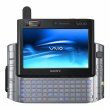


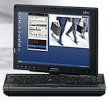
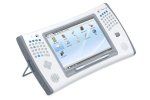
Finding greater popularity and responding to previous customer disappointment or misunderstanding are UMPCs with keyboards in various forms. This segment actually comprises two sub-segments. Devices with normal keyboards for a familiar desktop typing experience, and thumbboard layouts. The desktop format keyboards appear mostly in the larger screened UMPCs aimed at the business markets. Devices take either a notebook format or a convertible, swivel screen format where the device can be turned into a tablet. Thumbboards are being experimented with in many differing formats. From hidden keyboards to split-format keyboards. Many more variants on this them are sure to appear. In general, the convertible designs are aimed towards the higher end of the market. A keyboard is an important element of the ultra mobile PC and should be considered carefully. Read reviews and look at statistics (some stats on the relative speeds of keyboards here) but ultimately, try and get hands on.
For most people, the keyboard (or lack of it) will be the first decision to be made and the answer will depend on how you intend to use your UMPC. (Sofa, Car, Bed, Office, Train, Plane, Coffee Shop, Customer premises) and how much you intend to input into the device. (will you use natural handwriting for brief but ultra lightweight operation or will you need a full keyboard for reports, emails or blogging. Thumbboards will naturally appeal to the younger customer but must not be ignored as a quick input method that, in two-handed operation can be a good balance between input speed and input volume. Here’s a good demonstration of a blog being made using a fabric keyboard.
When making your form factor choice for the first time, don’t underestimate the amount of time you might use the device in a social setting. Once you feel comfortable using a device on the sofa, bed, bus or coffee shop you might be surprised at how often you find yourself using the ultra mobile PC in these settings!
ultra mobile PC specifications and considerations.
Operating system choices.
Choices on operating system in 2006 where limited to Windows XP and a couple of devices running Linux. In 2007 however, we have Windows Vista in the mix and a recent announcement that Intel will support further versions of Linux that will be aimed at the consumer end of the market. If you already have a desktop PC and you run Windows, you might find it easier to get used to a Windows-based UMPC. Bear in mind that in the long-run, it doesn’t always mean that it will be the most efficient choice but generally, users are happier when they don’t have to change their known user interface. The choice between Vista and XP depends on the hardware. The recommendation today is that XP is generally better than XP on currently available hardware due to the maturity of the driver software. There are a few devices being marketed now with Windows Vista pre-installed and there will be more available in the later part of 2007. Vista is widely acknowledged as having a much better touch/handwriting support so if you are considering a slate type device, Vista could be a good option. Upgrading from XP to Vista is not recommended for the average user.
Windows CE and Windows Mobile devices are available but as time goes on, the limitations of the processing power and browser software are becoming more and more apparent. As a ‘thin client’ type of device that might use remote desktop or remote PC software to access and control a remote device over an IP network they can make cheap and very efficient devices but as standalone devices, limitations will become apparent with advanced web browsing (Flash, flash video, dynamic html, Ajax code) and with some media playback.
During the later part of 2007 Ubuntu and RedFlag will release versions of their Linux distributions that will include optimised interfaces and good support for the hardware. We can’t make any comment on these operating systems yet but they could be a nice solution for someone looking for an appliance type device to be used for web-based activities, internet communications and media playback. Pricing on these devices should be noticeably less than with Microsoft Windows based devices. The Linux based devices are likely to have much less support for handwriting recognition.
Apple and Palm are not in the ultra mobile PC market yet.
Disk space
Consider your disk-space requirements. Some people find 30GB to be restrictive. Others, that don’t need to take a video library with them, will find 30GB to be more than enough for storage requirements. In terms of performance, you might choose a faster rotational speed (5400 RPM for example) or for power economy, a small (1.8†4200 RPM) drive. Later in 2006 hybrid flash or flash-only drive options could be available. These will save power but will come with a price premium. Another trend that needs to be considered is remote storage. Web-based storage is advancing in it capabilities and the pricing is coming down. Remote streaming of personal music video collections is becoming a real possibility. Cost of mobile internet access is the major consideration in this case. Examples to consider are Google applications (mail, documents) or Glide (an online operating system that can provide many features normally associated with local application suites.)
Screen size.
Screen sizes range from about 4 inches to 10″ The most common resolution is 800×480 but on a 4″ screen, this can be hard to read. Some devices have screens that support higher resolutions. This can be very useful where you are using software that is not optimised for an 800×480 screen. 800×480 is the minimum needed to efficiently browse websites. Most UMPC’s have 7″ screens and a resolution of 800×480 with some newer devices starting to use the very nice 1024×600 resolution. Take a look at the Pixels Per Inch (PPI) figures available on the product comparison page. PPI figures over 250 can be difficult to use with standard text sizes. We’ve found the optimal PPI size to be around 160-200.
Connectivity options.
 Physical connections. The most flexible and widely used interface is USB2.0. Through the USB connector you’ll be able to attach external disk drives, printers, DVD writers, wireless LAN modules, Bluetooth modules and many other devices. Fortunately, all UMPC’s have USB ports. FireWire is a similar style of connectivity but not so common so if you expect to download data using this method, you’ll need to look carefully at the specifications. Other connection types to consider are below. Many are commonly found on UMPCs but some, such as PCMCIA, PC-Express and HDMI are not often found.
VGA, MIC-in, Line-in (audio), SD card slot, FireWire (IEEE 1394), PCMCIA (Cardbus, PC-Card), Line-out (audio), SPDIF-out (digital audio), Ethernet 10/100/1000, Docking connector, RS-MMC Slot, Video-out (analogue), RJ-11 (Modem), Compact Flash slot, Memory Stick slot, Mobile sim-card slot, Headset i/f (combined Mic+Line), HDMI (HD video), ExpressCard 54/1
Wireless connectivity. The most important connection on your ultra mobile PC is the connection to the Internet and this is generally achieved through the use of a wireless data connection. For wireless connectivity in the home, in hotels, coffee shops and airports, WiFi is a must-have. WiFi types 802.11b (11mbps) and 802.11g (54mbps) are common. Support for 802.11a is not available on all devices. WiFi is good for internet access in static locations but what about internet access on the go?
Cellular internet access, as provided by many mobile phone operators is gaining in popularity, speed and value and can be use for on-the-go internet access in most populated areas either via a mobile phone or via a built-in cellular data modem that you can find on some UMPCs today. The connection method, speed, type and cost of access will vary from area-to-area, country-to-country, provider to provider and even month-by-month! Its a minefield just choosing a service let alone getting connected but when everything is working with a good provider the experience can be a step up from WiFi access when on the move. In the near future, UMPCPortal will be producing a guide to cellular internet access via a ultra mobile PC but in the meantime, take a look at this article from About.com. It gives an overview of how to access the internet via a cellular network.
One of the common ways to access the internet via a cellphone is by using a Bluetooth wireless connection which brings us to the second important wireless connectivity method. In short, make sure you buy a ultra mobile PC with Bluetooth on board. Preferably a device with Bluetooth V2.0 EDR (extended data rate.) Bluetooth can also be used for local connectivity to other UMPCs, mobile phones and even home networks. Its a flexible and power-efficient way to make wireless data connections. About.com also has an article about this.
The last wireless connectivity method to mention is WiMax. WiMax is also known as 4G connectivity and works, like mobile phones, over licensed radio bands. WiMax is an upcoming hi-speed, highly mobile, reliable wireless access mechanism that is likely to become a common internet access method in the next 5 years especially in countries where traditional 3G (cellular data) services have not rolled out as fast as expected. WiMax is not available on any ultra mobile PC available as this report is being written but is expected to be available towards late 2007.
Processor (CPU)
There are a number of CPU’s that are being used in UMPC’s and each has its advantages and disadvantages. For rich web browsing a low-end RISC-based processor (200-400Mhz) is not really going to be enough. Likewise if you want to run XP. Good quality video viewing will also need an X86-architecture processor above the 500Mhz mark. Voice over IP (VoIP) applications should work on all UMPCs but video telephony will require a high-level processor. At the high-end of the processor range you will have the comfort of enough processing power to run multiple applications successfully. The choice of processor ranges from Intel Xscale reduced instruction set cpu’s (RISC) which are low-power, low processing power items through the low-cost AMD geode LX processor which is a standard x86 architecture (as opposed to RISC) part having the advantage of a larger base of software being available. The power-efficient VIA C7-M processor is higher up in the scale followed by the powerful (but more power hungry) Intel devices. If you have specific requirements (like TV output or video processing) there may be a CPU that’s more suited. We have written a detailed report about ultra mobile PC cpu’s which is available in the portal here . The report also contains some information about graphics, covered in the next section.
In April, Intel made some announcement relating to processors on UMPCs. They have put together a UMPC-focused CPU and graphics platform known as the Ultra Mobile Platform (UMP) 2007. (Formerly known as McCaslin and containing a processor known as ‘Stealey’) The platform comprises an optimised Pentium-M processor at 800Mhz and a mobile graphics processor known as the GMA950, a part known to support graphics, video and the full Windows Vista 3D ‘aero’ experience well. Devices on this platform are expected in May 2007.
Intel have also committed to creating UMPC-dedicated CPUs and GPUs in 2008. The 2008 platform is currently known as Menlow.

The UMPCPortal product pages contain processor information for all UMPCs.
Sorting and filtering is available to allow you to quickly choose or eliminate groups of UMPCs.
Graphics processors (GPU)
UMPC’s are generally not built to support graphics intensive applications such as games and video post-processing and if you need a device that will run the latest windows games, you will need to look for a high-end notebook PC. Mid-market UMPCs do generally include 2D/3D graphics acceleration support and are powerful enough to run most types of video playback and even some low-end games. Windows Vista has some specific graphics requirements which are used to determine whether a PC can run certain elements of Vista. Aero Glass, the 3D window effects are only possible on device using the Intel GMA950 GPU or higher. This benchmark is also used to by Windows Movie and DVD Maker software. If you don’t have a high-end graphics processor, these parts of Windows Vista will not run. VIA have recently released a new graphics co-processor for the VIA C7-M ultra low power process (VN896 with Chrome9 capability.) This is expected in future VIA-based UMPCs in late 2007.
Memory.
Memory required is largely dependant on the operating system you want to run. Devices based on Windows CE use very little memory. Windows XP-based devices generally require 512Mb to be efficient. Vista devices require 1GB and Linux-based devices can run in as little as 256MB. Be aware that memory is not often a user-upgradeable item so an extra $100 to double the memory at purchase-time could be a wise move. Extra memory can positively affect the speed and battery life of a device and is highly recommended in a UMPC.
Docking stations.
 One feature that UMPCPortal considers very important is the inclusion of a docking station. Some of the higher-end UMPCs are capable enough to be used as desktop PCs and having used a ultra mobile PC for 3 months in this setup we are convinced its a valid usage scenario for UMPCs of the future. The problem is that most UMPCs are manufactured by people that also make desktop PC’s. You will rarely see this usage model promoted!
The docking station should support docking through a dedicated docking connector or through a PCI-Express connector so as to support direct connectivity and control of a monitor (for dual monitor operation.) Avoid cheaper USB docking solutions if you want to use a ultra mobile PC in this kind of setup.
Currently very few UMPCs come with docking stations. Hopefully this will change in the future.
Battery.
We would all like to have 8 hour battery life on our mobile PC’s. Unfortunately, this is not available in 2007. The balance that the manufacturers have made between hardware design, weight and battery life results in 2-3hrs run-time for devices that were designed in 2006. We expect the battery life to increase by about 20% per year assuming that manufacturers don’t increase the hardware requirements too much.
We’ve written specific reports on battery life in our journal here .
Our predictions on battery life over the next 5 years is as follows.
Real-term battery life predictions.
- 2006 – Average ultra mobile PC life 2.5 hours
- 2007 – Average ultra mobile PC life 3 hours
- 2008 – Average ultra mobile PC life 3.6 hours
- 2009 – Average ultra mobile PC life 4.3 hours
- 2010 – Average ultra mobile PC life 5 hours.
Maximum battery predictions (idle device)
- 2006 – Average ultra mobile PC life 4 hours
- 2007 – Average ultra mobile PC life 4.8 hours
- 2008 – Average ultra mobile PC life 5.75 hours
- 2009 – Average ultra mobile PC life 6.9 hours
- 2010 – Average ultra mobile PC life 8.3 hours.
There are exception of course. Devices based on the AMD LX800, a low-end x86 processor often bring extra battery life at the expense of processing power and graphics support. The maximum that one can reasonably expect in 2007 is 4 hours average use.
 Cost.
Cost.
Cost varies between high-end PDA prices to mid-range notebook prices. In the manufacturers eyes, there is no such thing as an incorrectly priced device. If a manufacturer only wants a limited production run, is testing the market or is directing its device into a specific market or customer, the price may be unexpectedly high. Unfortunately, as consumers there is nothing we can do about that apart from try and evaluate how much the extra mobility, brand value or features are worth paying for. Prices are falling. During the 12 months to May 2007, prices have typically fallen by 10-15% with some Windows-based UMPCs now being available for under $800 (some examples here.) Price reductions are expected in 2007 and even more so in 2008 as more devices come into the market with newer features meaning older devices must be re-positioned on the price scale.
Weight.
How heavy is heavy? When you pick up a ultra mobile PC for the first time and compare it to the average notebook PC you will be amazed at how light it is. UMPCs usually weigh under 1KG (2.2lbs) which is quite easy to carry around. Try using a 1KG device while holding it in one hand and using a finger to touch the screen. It becomes a heavy device very quickly. For tablet devices with a mouse button its possible to use an 800-1000gm device in two-handed mode for a reasonable length of time. For a device without a mouse pointer, one handed operation is used more often and even 800gm can feel heavy. For one handed operation it is recommended to keep the weight down to sub 800gm levels. Unfortunately, devices under 800gms tend to have smaller screens and smaller batteries so there’s another trade-off to be made!
Other features.
As time goes on and competition in the market increases you will see more and more features being added to UMPCs. Some will be generally useful, others useful only to a niche type of customer, other features will be purely marketing-related. The list is long but here are the most common features to consider:
- DVB-T/H and DMB (Digital TV over terrestrial transmissions to be picked up using an aerial.) Is country dependant. Some UMPCs offer these facilities but only in countries where the service is available.
- Built-in GPS. Can be very useful for in-car usage.
- Fingerprint reader. Combined with a good software suite can limit the amount of username and password entry need. Also simplifies the login process.
- Stereo speakers. Generally, speakers on UMPCs are quite low quality due to the size. If its important to you (Kitchen film watching, background music while surfing, video conferencing) then make sure you check out the quality.
- Secondary screens. Windows Vista and Windows XP support secondary screens that can be placed on the back of a screen for example. The usefulness largely depends on how the device is used and the software features that driver the screens
- Rugged builds. In general, mid range and low-end UMPCs do not offer any level of ruggedness but some specialist devices are available. We don’t yet cover these devices on UMPCPortal
- Extended battery options. For all-day operation extended battery options are available with some UMPCs. They add weight and size though.
- Active digitisers. Regarded as the best option for pen input (handwriting, sketching, annotating) but do not permit finger touch response.
- High brightness screens. For outdoor use, high brightness screens are essential. Look for brightness figures over 250 nits for outdoor, under shade and in-car usage. Some mid-range ultra mobile PC devices are available with 280 or 300 nit screens. Specialist devices can offer more. Operation in direct sunlight is generally not possible with normal UMPCs.
- Built in cameras. For web conferencing or video calling, a built in 1.3MP camera can be useful. It is important to check on the sensitivity if you are looking to work indoors under normal home lighting. Some devices also come with forward facing cameras. At this time, there are no UMPCs that offer digital photography class cameras. (Glass lenses, manual focus, optical zoom etc.)
Other aspects to consider.
Style and customer service are the main considerations. Style plays an important part in the ultra mobile PC market. These devices are very personal, a new breed, go out of the house a lot and for many people the style is a very important characteristic. Its personal choice here. I’m afraid we can’t help you!!! Customer service is not something we track on UMPCPortal either so make sure you do a little research. Generally a search for “[company name] problem (blog OR forum)” brings up interesting results but don’t take them out of perspective. Google usually shows xou exactly what you want to search for!!
Should you wait?
The ultra mobile PC market is going to be a fast moving one so waiting for the next device to come is always going to be an option. As this is being written there are devices based on 2006 technology still not available while Intel has already announced next years technology. The overlap is big! As the ultra mobile PC marketplace becomes more competitive, so more effort will be going into design and unique features and within months of buying a devhce, a new model will be announced that will have better features and a better price. This will affect residual prices of devices and you have to be aware that reselling the device to fund a new model won’t be an option unless you’re the type of person that buys for a three month span and then sells the device while it’s still current. Our suggestion is to do what we said before. Be honest! If you’re honest with yourself about what you need and there is a device that matches your requirements then there is no need to wait. You will only be waiting to buy something that does more than you needed in the first place. Your requirements `re likely to mature after you’ve bought the device but over time, you can re-consider your requirements and keep them in mind for your next purchase.
Our opinion on the current devices.
There are over 50 devices in the sector.. In our product database we try to include our opinion on every available device. The database is available in the product portal. https://www.umpcportal.com/products or choose a device from the list in the right hand column here.
Summary.
ultra mobile PC devices are about form factor and mobility. If you think you might nded a notebook computer, think carefully about how you might use it, the money you might spend on screen size, cpu and memory might be better spent on the design aspect to enable more mobility, flexibility, efficiency and fun!
 Further information available on UMPCportal
What started as a little blog in Feb ’06 has, mainly through the good feedback of readers, matured very quickly into a rich portal that we hope is helping users learn and make decisions about UMPC’s of all types. From the little Nokia 770 to the sexy Flybook V5.
The site is split into a number of areas now so here’s a rundown of the content we’ve got that might help you on your ultra mobile PC journey.
This is where you’ll find all the latest news, detailed reports, reviews and research as they are published. You’ll also see occasional posts from ‘Chippy Blog’ which contains the more personal thoughts of the author.
If you’re looking for more details on specific ultra mobile PC products, we have a set of product pages that contain as many specs as we can find (and more that we’ve found out through reviews) on all the UMPC’s we have in the database. In the product pages we also have a detailed comparison engine that will allow you to line-up a shortlist of UMPCs for finer comparison.
More background information about the portal is available at https://www.umpcportal.com/aboutumpcportal.html
Content copyright Carrypad. 2007. Not to be reproduced in full. Excerpts permitted with link-based credit to UMPCportal.com










I am looking for a UMPC with a dial up modem or PCMCIA slot. Can you help me? Thanks.
Mistake on page 4: “The recommendation today is that XP is generally better than XP on currently available hardware due to the maturity of the driver software.”
Great article.