
Some people came away from Mobile World Congress wanting the Samsung Galaxy S6. Others were blown away by a VR headset from HTC. Me, I came away from MWC thinking about the new Microsoft universal folding keyboard. This Bluetooth keyboard is an amazing bit of engineering and I had two chances to check it out at MWC. The videos are below.
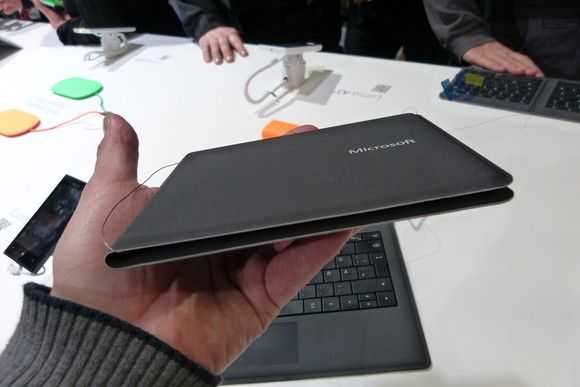
Microsoft universal folding keyboard. My estimate: 120 grams / 0.3 pounds
If you’ve used the Surface Pro type-cover you’ll have an idea of the mechanics of this mini keyboard. It’s slightly smaller than the Surface Pro 3 keyboard I was comparing with and there’s no backlight but, and this is very important, the split keys will take some getting used to. I estimate the weight (the official weight has not been published) at 120 grams. Sizing is about the same as a CD case.
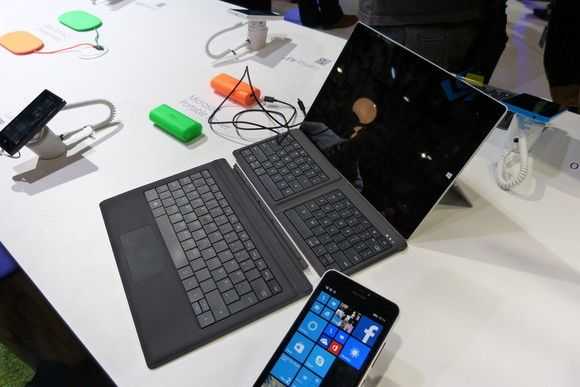
Microsoft universal folding keyboard with type cover and Surface Pro 3
In the 2 minutes of testing before I shot the video below I was all over the place. I had to concentrate on the layout which is never a good experience but after those few minutes I was getting into the groove and found it to be easy to use. The problem is that if you just use this occasionally you’ll have that 5-10 minute familiarization period every single time. Think about that.
The usefulness of the two device switch buttons are questionable, at least at the $99 asking price, but the three keyboard layouts, Windows, Android and iPad/iPhone are definitely useful.
The launch price of $99 is something that takes more than 5 minutes to get used to. This keyboard costs more than a cheap 8-inch Windows PC and that’s just wrong so we’re hoping it drops to the $50-$70 level very quickly. I won’t call this a must-have keyboard, even at $50, but it’s something that serious travellers should take a look at and indeed a great bit of engineering.
Take a look at the hands-on videos below.
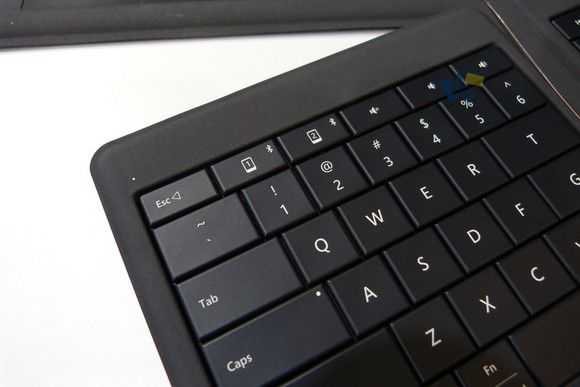
The Microsoft universal folding keyboard comes with two device switch buttons.
Yeah, at $50 it would be very tempting and a good investment for the mobile worker who doesn’t always need to do lots of typing. But what’s worse than the ridiculous MSRP price is that it seems to not have a version with a proper Windows-focused keyboard layout and instead assumes (probably accurately) that anyone willing to shell out $99 for such a keyboard is only going to be using it with iOS or Android devices.
It’s back to debating whether the Wedge or a Logitech keyboard will work with my mobile setup. Shame, as this is exactly the product I’ve wanted for years – especially now that Windows phone will (soon) be supporting BT keyboards.
Needs a trackstick which not many wireless mobile keyboards have which is unfortunate for me.
How well do you think it would work in your lap? I’m thinking of on a plane, with the laptop on the tray table, and the keyboard in my lap.
Did Microsoft give you an estimated release date? I read somewhere that it would be in July.
Thanks for the great site!