
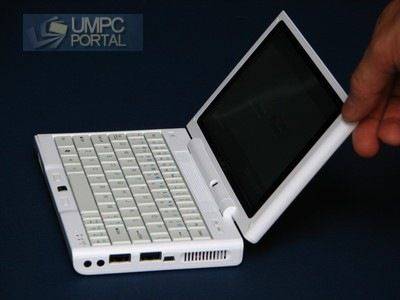
 You might have heard about the Everun Note. Its currently the most powerful sub-800gm laptop around due to its dual-core 1.2Ghz AMD Turion X2 and an ATI R690 graphics solution. When it’s running at full steam, it’s impressive!
Full review of the D30H available here.
Raon have now released two new versions that sit either side of the original and both include an SSD for improved speed, noise and ruggedness characteristics. We’ve had both of them here for a week or so now so here’s a rundown of the features and some notes that we want to highlight.
S16S. Entry-level UMPC.
The first thing, and probably most important thing to highlight about the S16S is its price. We’re seeing it offered, without OS, for under 500 Euro which is a lot less than any sub-kg PCs we know about. For that price though, you don’t get the Turion processor. You get the AMD Sempron 1Ghz processor. You’ll still have the R690E GPU and, strangely enough, a faster system under XP using battery power because whereas the Turion version clocks down to 800Mhz under battery, this one stays at 1Ghz all the time. The trade-off here is that the Sempron isn’t the most power-efficient CPU around and you’ll be sacrificing quite a bit of battery life. 2-hrs online is about tops for this device but if you’re using the device between docked or powered scenarios, or if you buy a spare battery, you’ll probably be happy enough.
The standard Ubuntu Linux build we tested was working apart from the Wifi and standby/hibernation. There’s a simple 3rd-party fix available for the WiFi so that’s not a real worry but the issues with standby and hibernation are more serious. They simply don’t work. Hibernation and shutdown hang every time and using standby means you lose touchscreen and mouse! We’ve tried a recent release of Ubuntu-ultra mobile PC but again, the standby and hibernation issues were too serious to ignore. There are reports of some owners having fixed this though and if that’s true then the S16S makes sense as an entry-level ultra mobile PC Note: We’ve been doing some work with Ubuntu and Screenlets on the S16S which is working out well.
With XP on the device, everything was hunky-dory and working as expected. The SSD read speed is up to 36MB/s which is slightly above what you’ll see on the 1.8″ drives and it shows in the applications startup speeds. Opening Firefox under XP with the Google News start page is done in well under 5 seconds. 3 seconds was common on the second startup which is as fast as a desktop. XP Bootup is fairly quick too. 45 seconds or below with our fresh build. The SSD doesn’t have a fantastic write speed though. 12MB/s maximum is noticeable if you’re moving files about but we haven’t noticed it having any effect in real-world usage. This SSD really does seem to be OK for most uses.
The build quality on the S16S seemed to be better than the D30H we tested before although that was a production sample and this is obviously a final build. The touch layer, screen hinge and casing seems tighter overall but only time will tell on this aspect.
Everything else about the device is the same as the D30H we tested (the D60H is the one you find most often in retail now and it’s exactly the same apart from a having a 60GB Samsung drive instead of the 30GB Fujitsu drive we had) so if you’re looking for a mini-PC for a Linux project, an emergency PC for keeping in the car or briefcase, a coffee-table ultra mobile PC or fancy a bit of hot-desk docking action, the S16S is a very good value choice.
 D24S. Best of both worlds.
Obviously, if you combine the high-end processor with the high-end SSD, you get the high-end Everun Note! Its not difficult to imagine the results either. Faster boot, Fast application startup, quieter operation and more ruggedness. The SSD is partitioned into two with the OS residing on an 8GB partition and the other 16Gb being available for data. Both partitions seem to be the same type of SSD returning up to 37MB/s read and up to 12Mb/s write.
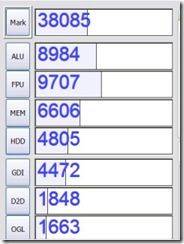
CrystalMark scores absolutely shine under mains power with a result of over 38000. While that might not mean much to many people, let me tell you that the CPU scores (which come in very handy for displaying complex web pages, multi-tasking, complex spreadsheets and gaming) are way more than we usually see for UMPCs. The memory and 3D scores also look good. Only the disk speeds return average results so there’s some room for improvement there. Compare that 38K to the 11.5K of the original Everun and the 20-25K of Atom-based netbooks!
Battery life is about 3hrs with WiFi on although don’t forget that the CPU is locked down to 800Mhz to preserve battery life when not connected to the mains.
As for pricing, you’re looking at 790 Euros inclusive of tax and Windows XP. It’s tending towards the expensive but its cheaper than a lot of other solutions and its certainly one of the most powerful.
Pages: 1 2











Are the mobilx machines equipped with the 3G antenna solution? And which 3G mini pci card can be used in those devices? thanks!
You’ll have to check that direct with mobilx.
As for 3g cards, I know that the Expedite 850D does NOT work.
Steve
Have you tried to see if it is narrow enough to fit in a coat pocket? It seems like a great computer but looking at the specs it seems like it is just a little too wide to be pocketable in a large coat pocket as it is 4.6″? I think most coats can only handle max 4 or 4.25″?
My inside suit coat pockets measure 4.5 – 5.5 inches. Size is US 44reg. I hope this will fit in some.
I sometimes put it in my back pocket but only if im havin to carry something else at the same time for a short distance. Its really not that pocketable.
Steve.
In the initial review of the S16S it was running XP. I checked several sites and no one sells the S16S with XP. How do I get S16S with XP? I am on battery most of the time and this will give me the most performance for the least price.
Mobilx sell the s16s with an xp option but the battery life isnt much better than with linux. 2hrs.
Steve.
I think you mean “lost” not lots?
If this unit has Pixel Qi Screen in Q1 or Q2 of next year, with the projected potential for 5 fold battery time increases (depending on the unit for sure), well that would be interesting as then this would have a 10 hour battery run time with the LINUX version.
Now, the Linux stuff really has not been advertised as being “done” until the 9.04 version due out in April of 2009 (if I remember correctly). So, the Ubuntu version is not finished for this class of device?
I think you’re confused between screen power drain and device power drain. A 1W difference in screen power drain won’t give you a 5-fold increase in battery life. 15% max increase.
Steve
Could you run any temperature monitoring software on S16S at its full speed. The turion version is really hot. I want to know if it is a lot cooler while it is replaced by sempron on S16S.
I havent noticed any difference in the heat at all. The Sempron version is just as warm, if not warmer due to the higher drain required by the CPU.
Steve
another great review :)
perhaps you could make a list of 3G/HSDPA cards that will work with the Everun Note ?
English PDF manual for Everun Note S16S (Ubuntu)
http://downloads.conics.net/everun/ubuntu_manual_en.pdf
I think JKK tested a 3G card on the Everun that worked.
I can’t remember the type though. Was it Sierra Wireless?
Steve
i am using an icon 225 (option) 3G USB dongle. I use it under Vista (which works obviously) and under Ubuntu 8.10 (intrepid) I had to use the HSOconnect tool. with my HP tablet tx2120 it works. It’s a few days now that Ubuntu released updates for Networkmanager and now this icon 225 is being recognized, but i could not get it to work yet.
so, icon 225 3G (HSDPA) DOES work with Ubuntu 8.10. i don’t know other cards/usb devices, but the Huaweis definitely will work as they are pretty much standard.
Chippy
you wrote: “Battery life is about 3hrs with WiFi on” for “Raon Digital Everun Note D24S†– From where an extra hour compared to S16S and D60H, since D24S has the same battery = 5200 mAh (Lithium-ion) – 19 (W/hr)?
My understanding is that D24S should do the same as S16S = “2-hrs online is about tops for this deviceâ€.
In what conditions did you do the tests? Is it because of the SSD? What is changed compared to S16S and D60H?
This comes as a surprise for D24S since S16S and D60H do 2hrs battery in normal operations (Wifi with Movies and/or Internet Navigation). I find this surprising in a good way if this is true.
3G:
Guys, I don’t know about you, but for my Everun Note I’m using the internet shared connection from my “Iphone 3G – 16GB black” using “Cydia – PDAnet” application (connection done with Wifi) and it works great = the connection and download speeds are fast and cool. I’m getting through even if battery consumption is higher. I don’t need any antenna, mini-PCIe card, extra SIM etc. It’s like Shooting two rabbits with one bullet since I carry both my Iphone and Everun Note :)
The Sempron appears to be responsible for the additional drain in the S16S. The D30H I tested had 2:30-2:45 battery, the D24S version is 3hrs. I can only assume that the D24S device is 1) a final version (the D30H I tested was production sample) 2) saving some power by using SSD.
The D24S with an extended battery could be a very interesting 4hr+ device….but expensive!
I’ll be getting the large battery and external charger in Dec so i’ll let you know.
Steve
Is the sempron dual core?
It’s an older single core design similar to the Intel Celeron.
Can it take 2GB of ram ?
Thanks
From the teardown pictures on the net it looks the RAM is soldered on. So the answer is no ;-(
So where are the black ones? Everyone has only white Everuns in stock?
Would Linux work with D24S? Whats the deal with fan controller issue under Linux?
sadly, they will not be making any black Everun Notes
Linux does work with D24S and D60H, but there is no support for the internal WiFi so S16S is supplied with a USB WiFi
(I don’t expect a driver for the internal WiFi)
Just curious if one buys the HD version, can it be changed to an SSD drive later??
yes, absolutely
the Hard Disk versions are identical to the SSD versions, and very fast SSD will be available soon for all Everun Note (1.8″ ZIF @ 5mm)
Thanks for clarifying, Brett….now, if they only made the Note in black…. ;-)
Just ordered a S16S (open box from Dynamism). Haven’t gotten it yet but the only negative (for me at least) was the fan. Would it be possible to go fanless?
The size, form factor, touchscreen, and price were more important to me than the dual core. Besides, the graphics card should still give it a boost over other netbooks. Currently have an eee 701. Considered the dell mini since its already fanless but the larger size killed the deal. I needed something smaller but with a somewhat usable screen. Had an oqo for a bit but the screen just too small; 7″ is my absolute minimum now.
I did some research and a sempron 2100+ 9W should fit (same S1 socket) but might be redundant since the stock sempron is already underclocked (1.2ghz vs 2.0; 25W spec but couldn’t find any info on underclocked drain). And, although the 2100 is designed for fanless operation, would the bios recognize it? Would I have to install a driver?
Assuming it is possible could I just disconnect the fan or remove it and install some sort of mini heatsink?
So by the sound of it the read/write speeds for both the D16S and D24S are the same even though the D24S has the faster 8GB SLC SSD?