
Another gem from the geniuses at www.micropctalk.com. MPCT forum user fiveseven808 has created a wearable computer setup using a Sony VAIO UX380 [Portal page] to power the whole thing. Fiveseven808 was kind enough to give me a good run down of the setup and some images as well.
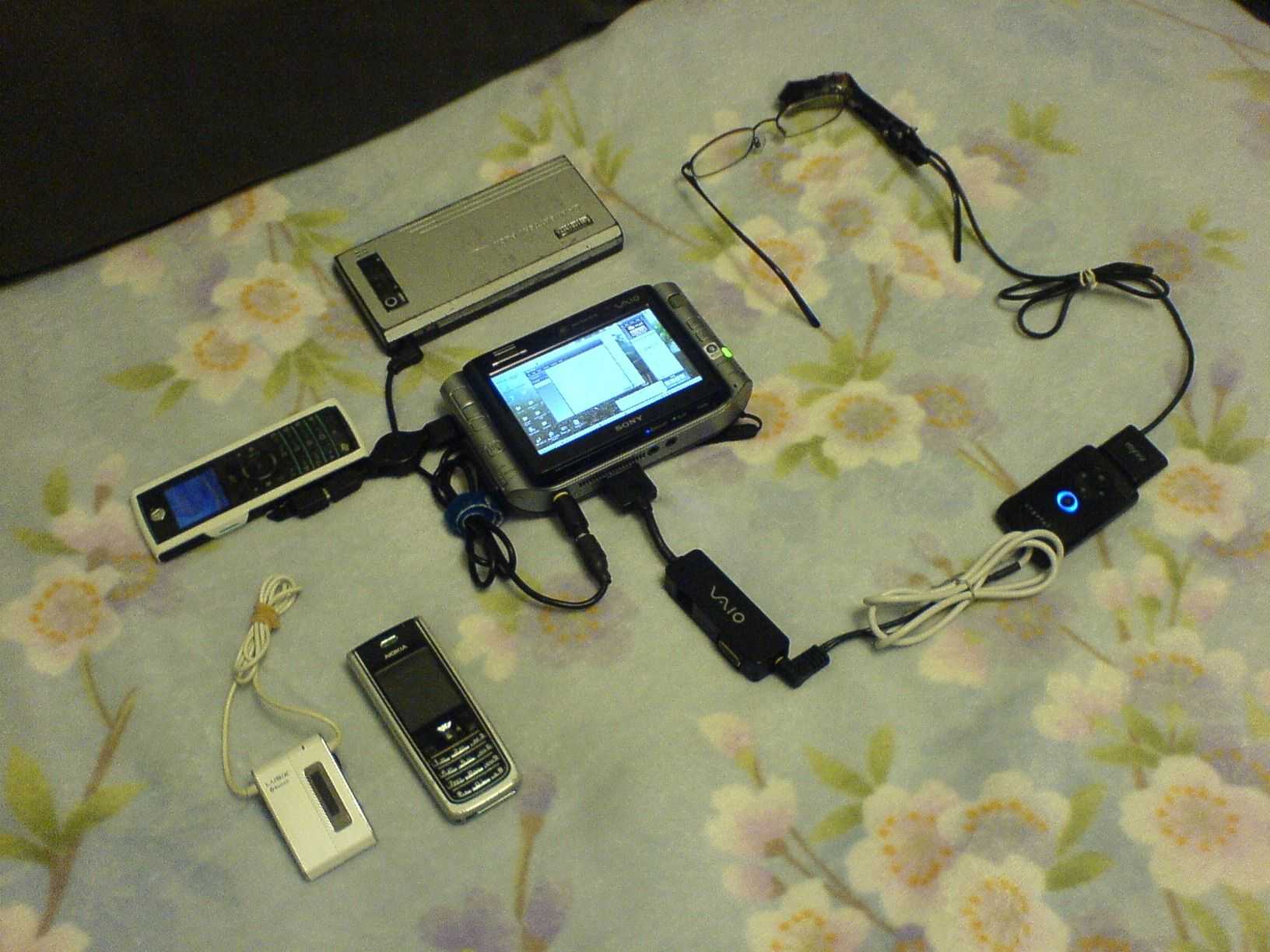

Components include:
Main system:
- Battery geek: BG 14-18-60External battery (60wh)
- Sony UX380N
- VGA/TV/LAN Dongle
- Motorola iDen i425 (for next-to-nothing (but half dial up speed) always-on internet access)
Input/Output:
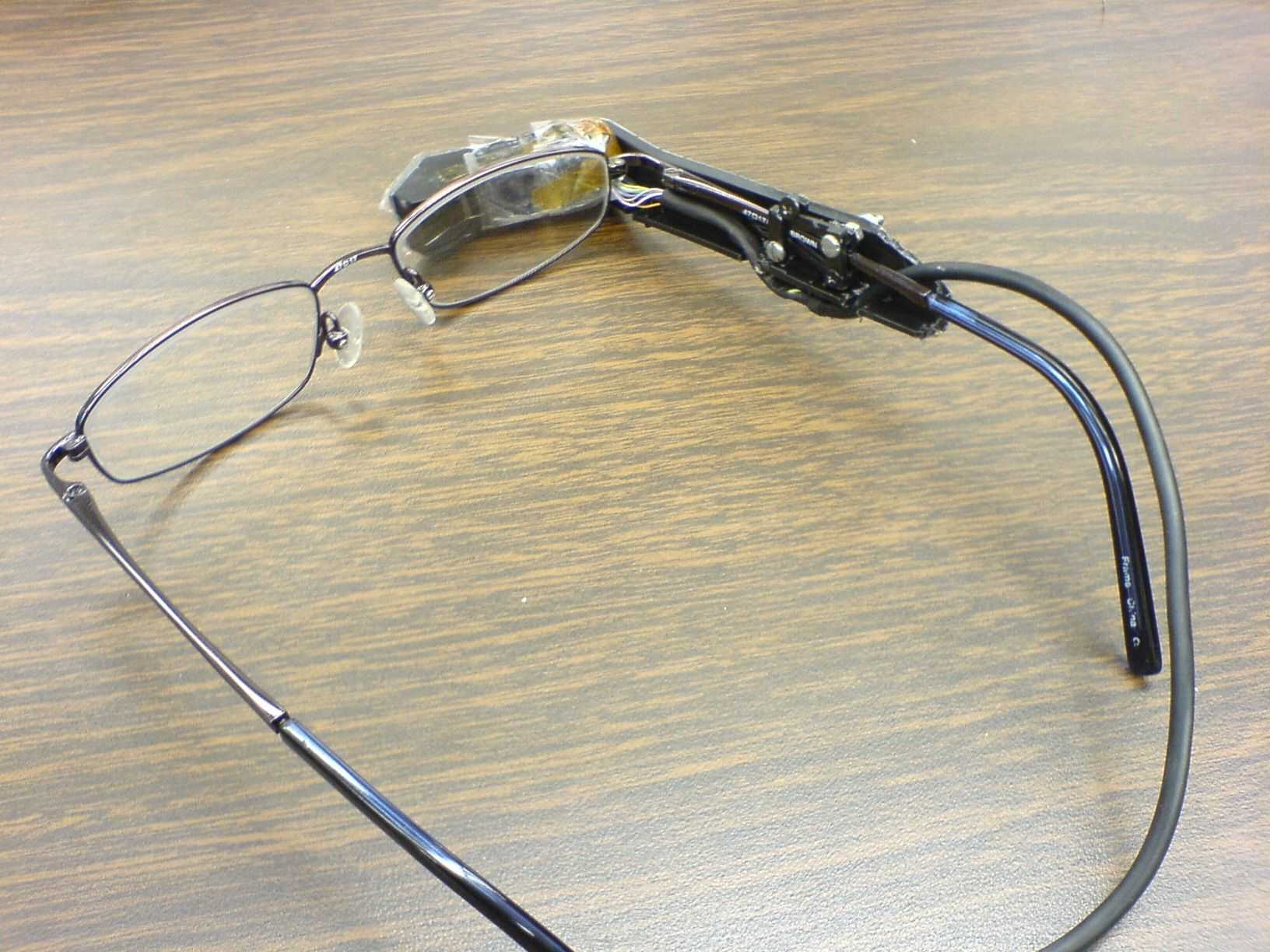
- Modified MyVu Crystal Head Mounted Display
- Bluetooth enabled cellphone (text and mouse input)
- Bluetooth stereo headset (voice input and stereo output)
- ThinkOutside Stowaway Bluetooth Keyboard
- Logitech Bluetooth Mouse
- Bluetooth Frogpad (text input)
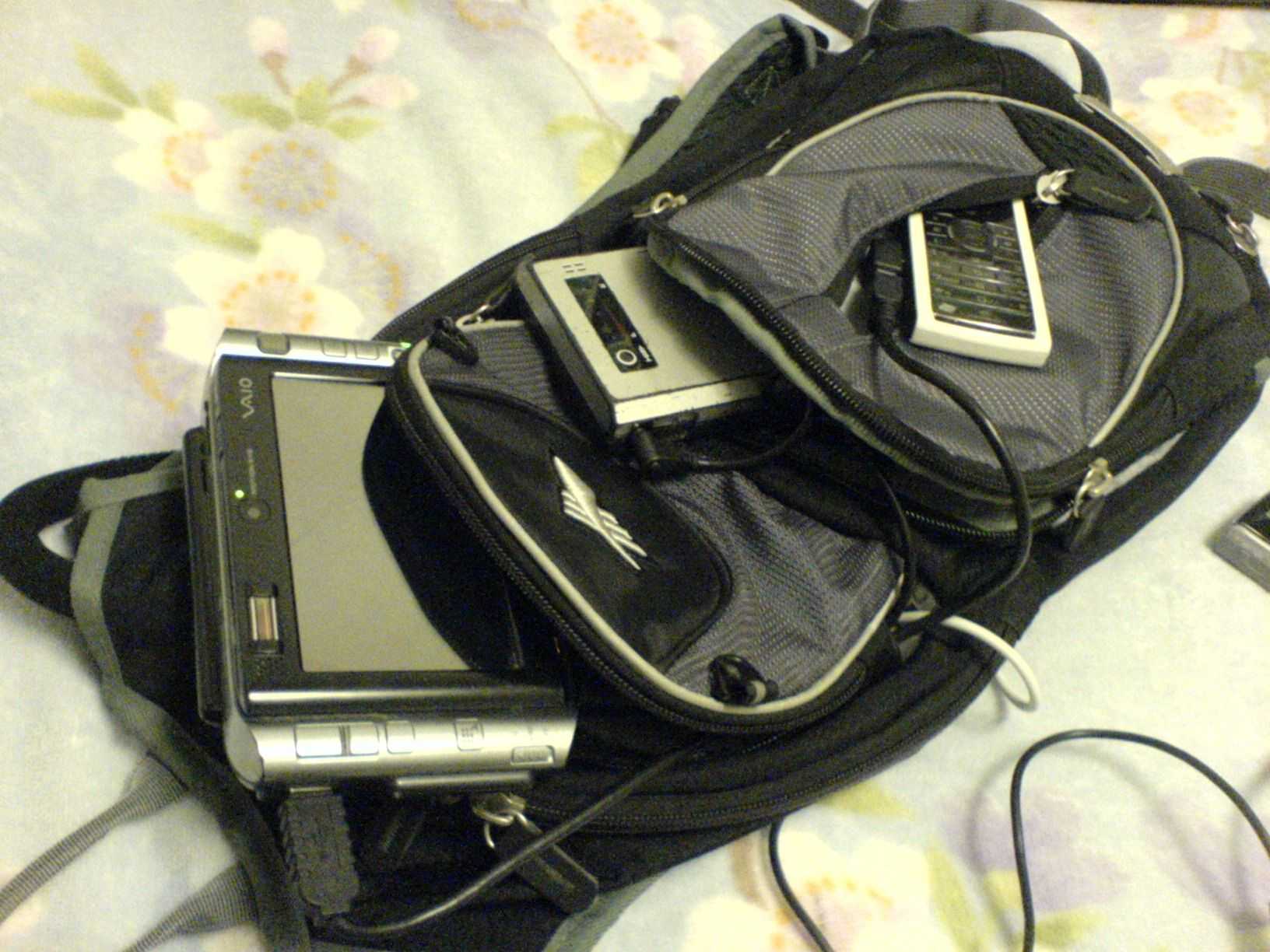
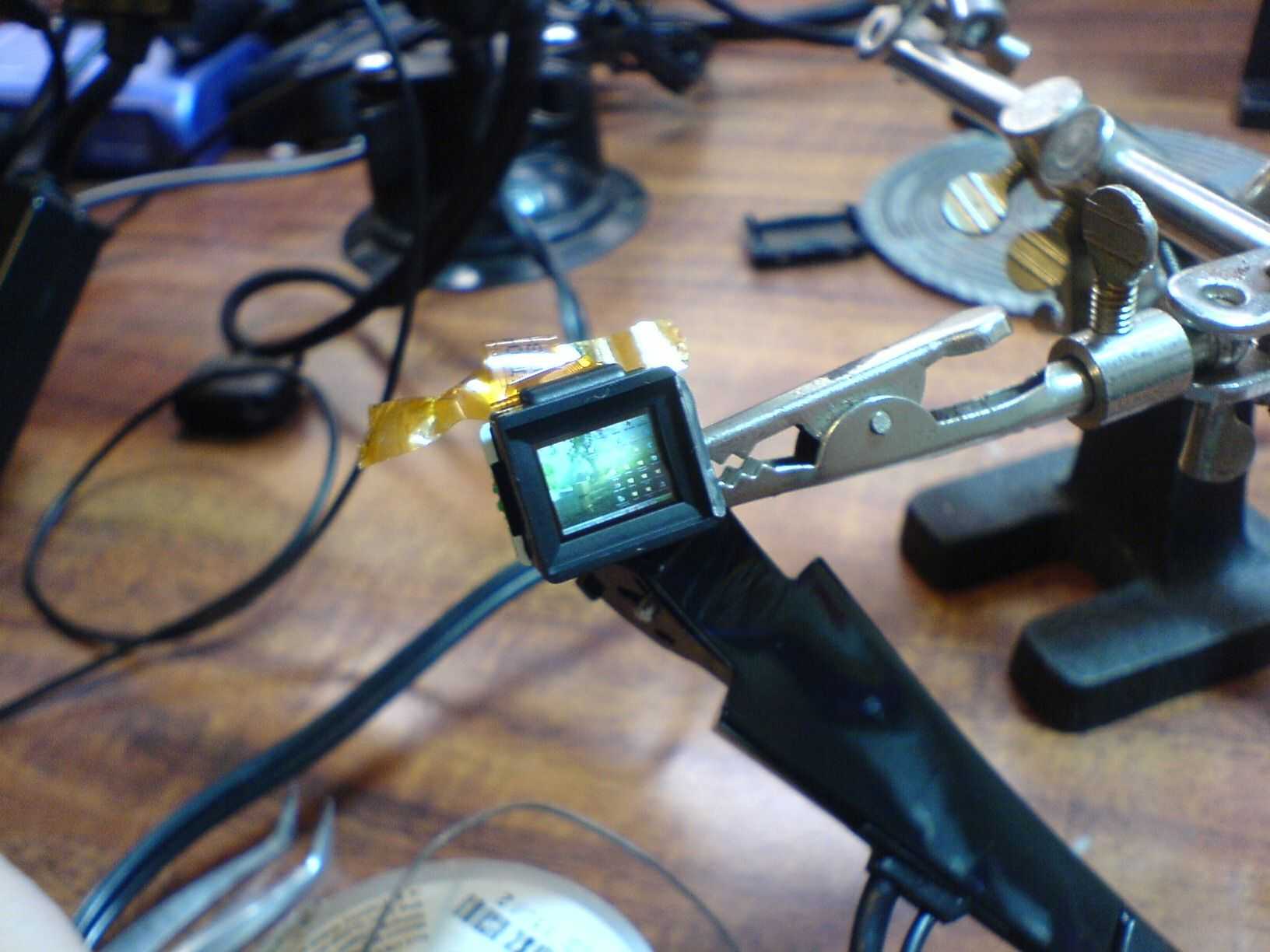
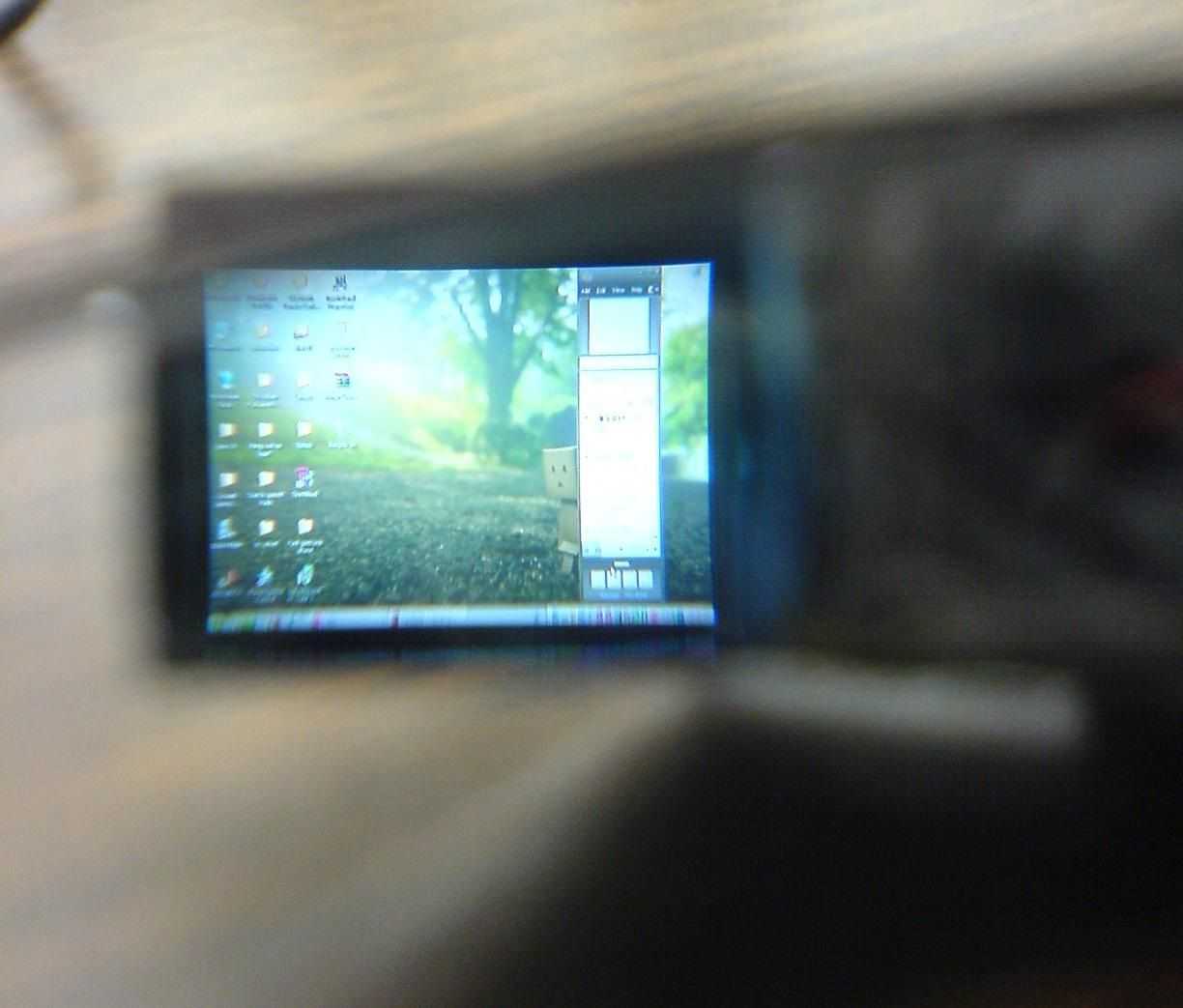
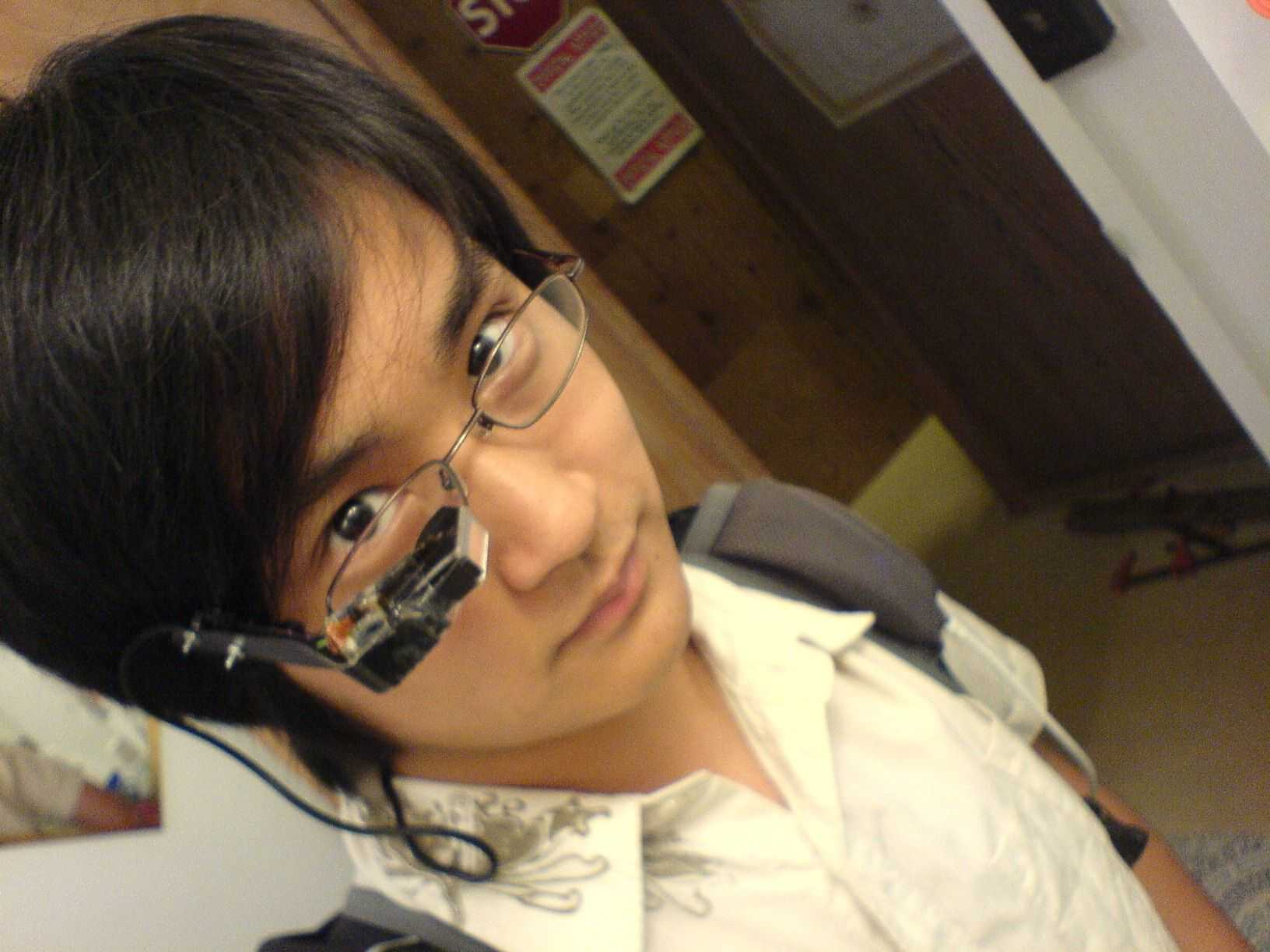
Essentially he took the MyVu headset, removed one of the eye pieces, and mounted the other to his glasses to that he could see his surroundings and the UX’s screen at the same time. The MyVu is attached to the UX through the A/V output port on the UX’s port replicator dongle. With some additional addons he provided his UX with extra battery life via an external battery, and several input methods to communicate with the UX while the rest of the kit resides within the backpack.
Unfortunately I must report that fiveseven’s UX380 recently died due to some physical failures, but I got a chance to talk to him about his initial vision for the project:
I guess my original goal was to design a prototype wearable computing system that is expandable, cheap, compact, yet powerful enough to be used as an every day computer with the possibility of having augmented reality systems and other passive information systems convey useful location based information to the user at all times.
I had a chance to speak with fiveseven and have somewhat of an interview with him that I’ll share in the near future. You’ll be able to read fiveseven’s comments on the project. I personally found this setup, and the idea behind, it very cool. Here is to hoping that he manages to track down another UX to continue his work.










That is awesome and a huge inspiration. Me and a mate have been talking over the past few weeks about building something like this.
RT @Poliorcetes juaker monta un sistema casero de realidad aumentada. Lo que ha hecho más de 1 esperamos verlo en la calle http://tr.im/tOMi
hehe, some future upgrades for him:
glasses that can do stereoscopic video and movement detection with a couple of addons. think AR like whats been demonstrated on phones lately, but 24/7.
http://www.vuzix.com/iwear/products_wrap920av.html
a glove (or pair) that can read signlanguage (or any other movement, if one so configure it).
http://www.acceleglove.com/
Hehe, thanks for the advice. I saw those hosted on tech blogs a while ago, and they do look very promising. The optics look much heavier than what I’m using though, and the weight of the HMD is very important if it’s intended for use longer than the length of a movie. AR is definitely on my list of things to integrate into the system, but there is no currently available software to give it any practical application (unless you were in Japan and had the 2d barcodes everywhere).
Thanks for the links to the glove too. I didn’t know there was a commercialized type of glove like that. Sadly its much too expensive for my purpose and it’s wired. I already have plans for gloved based input systems that are much cheaper and already specialized for my purposes.
hey i was wondering if you can show me the breakdown of the pin out for the myvu video and power. i wanted to integrate a live video feed to display through the myvu.
like say a camera mounted out side of a helmet, and video feed through to the myvu glasses.
thanks.
Cool! its just like the johnny mnemonic movie/book.
Looking forward in development on this device…setup!?
Allways wanted an device like this!!
Cheers
Seb
Cool !
Instead of Sony Vaio UX, viliv S5 might be perfect match for wearable computing application. :)
the Viliv is a bit too underpowered for my use if you ask me. I’ve been using my UX as my main computer for the past 3 years (up until it died), and I can’t imagine dealing with anything less.
When they stick C2Ds in iphone sized devices I’ll be happy ^^
Hi fiveseven808,
Is the screen readable?? Is it clear? Could it be used as a near-to-eye PC system? or are the graphics too small?
RichardF
Hi Richardf,
I am answering my own post!
Can you use video glasses screens for PC work.
I have recently tested connecting a PC to video glasses with 640×480 resolution. These were the Vuzix DV920 model. Yes you can use it to view a PC screen clearly, but the writing is microscopic and almost too small to read. I changed my PC resolution to 640×480. It was more readable but less fits on the screen. I tried writing a Word document using the video glasses but I needed to enlarge the page to 200%. Not much fits on the viewing area and it is difficult to type when you have the video glasses on. I recommend going for a display of 800×600 but this is not cheap. Using 320×240 will be impossible to use!
I am going to hack a 320×240 video glasses display so I can produce a monocle version like fiveseven808. I am then going to hack a Casio portable TV – remember the small battery operated models? These have an AV IN jack which I am going to recreate into an AV OUT jack. This will allow a TV signal to be ported into the video glasses giving portable TV. Since the TV screen will be switched off it should save a lot of battery power. The Casio TV is analog which works in Australia for the next three years, but not as a digital receiver.
William Gibsons world of cyberpunk is awesome with stuff like this and is why I’ve been thinking of building something like this
I remember at MIT in the late 90s there were similar systems being built (wearble computers). Perhaps he should look into it.
What was the total cost? (if you don’t mind me asking) I would bet that there would be a large demographic that would purchase a complete system like this might not necessarily have the time/knowledge to build it themselves. You could think about possibly marketing this device soon as some of these new connectivity technologies are getting closer..
well since he hacked up a MyVu they from memory retail for around $140++ depending on the model. Then your looking at cost of the other devices.
Am I the only one that thought of this:
http://www.thinkgeek.com/computing/keyboards-mice/8193/
Augmented Reality would be fun to develop for a wearable too. We’ve all seen the zombie game on the new Nvidia Tegra processor for mobile devices..:
http://www.youtube.com/watch?v=cNu4CluFOcw&eurl=http%3A%2F%2Fwww.engadget.com%2F2009%2F06%2F16%2Ftegra-might-power-zune-hd-definitely-does-augmented-zombie-real%2F&feature=player_embedded
Amazing! You are genius.:)
Making moves there man.
You could also look into using a wiimote with motion+ once you get the ar stuff working to tell your orientation and movement.
OMG THATS SOOO FRICKEN COOL!
Awesome wearable computer setup is powered by Sony VAIO UX UMPC | UMPCPortal – Ultra Mobile Personal Computing http://ff.im/-5KGja
fiveseven808 –
Why did you not use a jailbroken iPod touch to drive the display? Was it a matter of computing power?
Cracking the case on a touch and wiring the camera into the display would be extremely interesting, especially for AR type tasks. I’m not sure what the signal attenuation would be, though, so the touch might need to be mounted near-head (center of the back, for example) for it to still work.
Thanks for putting this together, very inspirational!
Cheers,
–B
Awesome wearable computer setup is powered by Sony VAIO UX UMPC | UMPCPortal – Ultra Mobile Personal Computing http://bit.ly/7ZgJ4
I’m afraid I have to be a negative voice here. The device is nifty as a toy but is of limited practicality. Try working with it for eight hours straight. The Sony VAIO UX380 screen is bad enough to work with navigation using the eyepiece is not practical. Still, it is pretty darn cool.
any hope for a standard Windows/Mac/Linux os as a wearable computer?
It would probably be much easier. Think of the new T-Mobile Android – its operating system is a modified version of Linux OS. Since Linux’s primary goal is to be adaptable to any needs, I’m sure that any developer willing to donate time to this effort would be able to do it.
9000!?! His scouter power reads at over 9000?!? KAKAROT!!!
http://pic.photobucket.com/spacer.gif
sorry, wrong image
http://media.photobucket.com/image/scouter%20dragon%20ball%20z%20vegeta/ff8123/his_power_level.jpg
now that is one hell of a "PC" http://bit.ly/Sc18y
Wearable HUD computer still looks nerdy as hell: http://tinyurl.com/l8o2pl
Why the hell are all wearable computers designed for the “four eyed”?!?!?!?!?!?
Are the ones with good eyesight nonexistent for them?
If I had to guess, I’d guess that the corrective lenses are easily removable from any set of glasses. It’s really the lowest-tech thing you could change about the whole system, so what’s your problem again, exactly?
Make your own “wearable computer.” http://bit.ly/fv3rZ Easier than a brain implant and less messy to upgrade.
Nice. I’d started work on a similar system – the earlier, low res version of the Vusix glasses (320×240?) is available much cheaper on EBay – I’ve just picked up some for 45 pounds.
I was looking at making my own wearable gloves (homemade bend sensors at indestructables) and make (http://blog.makezine.com/archive/2008/08/how_to_fabric_bend_sensor.html?CMP=OTC-0D6B48984890)
I was going to use an arduino to co-ordinate and decode the glove signals to feed a better input to the PC, and update the display software to use low-res versions (try accessability settings for limited visibility users) to make things easier to read.
Nice work!
Check out this cool wearable PC that some dude rigged up.
http://bit.ly/klzMJ
A Friend sent a link about turning my VAIO UX into a wearable computer. Very cool! http://bit.ly/mxwsM
Greetings all,
Over the years, I found that research in wearable computing took a back seat to other forms of mobile computing. While Thad Starner and Steve Mann from MIT were working on wearable computers at MIT, I also jumped on the research bandwagon in 1998 and focused my work on wearable computer interfaces. I created a multi sensor glove that could recognize the shape of objects I held in my hand, plus used a modified chorded keyboard call the twiddler. We used linux as the os, and wide use of vi, emacs, and other text based software.
I still have my old site up at: http://www.digiman.org/html/main.html
Enjoy!
-Jeff
Para usar: http://bit.ly/Sc18y
Just don’t try using this while driving. If these devices become more common, there will be some idiots that try to use this and drive. I can see the headline: “Pedestrian Killed by Driver Using HUD”
Subtitle: “State Government May Pass Law Banning Use While Driving”
depends, if its used in the same way as the namesake from a fighter jet, it may actually be of benefit.
Awesome wearable computer setup is powered by Sony VAIO UX UMPC | UMPCPortal – Ultra Mobile Personal Computing great article thank you.
Awesome wearable computer setup is powered by Sony VAIO UX UMPC | UMPCPortal – Ultra Mobile Personal Computing#comment-24576#comment-24576 great article thank you.
I remember primass telling me no one would make this out of fear of looking nerdy
"Awesome wearable computer setup is powered by Sony VAIO UX UMPC | UMPCPortal – Ultra Mobile Personal Computing" http://bit.ly/fv3rZ
http://bit.ly/Sc18y
:D me vuelvo cyborg any time soon
Custom Wearable Computer Setup Powered By Sony VAIO UX UMPC: http://bit.ly/klzMJ
This glove would be much cheaper http://www.theperegrine.com/ but it’s not out yet! Also how about using http://www.openpandora.org as the computer? (yeah I know also not out yet) Even if the screen is small on the eye piece, I think I would something with more resolution than 600 X 800.
only “problem” with that glove is that it has no hand shape/motion sensitivity…
Really cool thing. Gadget from the future!
great article thank you
@Blutokia52 lol its umpcportal.com its a site dedicated to tiny computers (UMPC’s) XP. here’s my original article http://tinyurl.com/ktlxt8
Good read, thanks.
I loved the idea behind the whole system, But it kinda looks a bit too Geeky to me:((
is a site, which contain information about recovery operation in New York city.
the late 90s there were similar systems being built (wearble computers). Perhaps he should look into it.
wow..that’s great man, keep it up!
I loved the gadget you wear.. Cool man.. =)
A smart man only believes half of what he hears, a wise man knows which half.
very nice great article thanks
Nice made! Imagine what this would have cost if you had to buy it in retail (made finish)
hey dude.. great post… thanks
ty dude
Wow..Thanks for the great tip Mr. Q.
One of these days there will finally be a pair of glasses with the LCD built into them. Until then I just can’t see something like this being adopted by the masses. Really awesome proof of concept though, I would love to have one!
@digitalkitty 4 ur heads up display ..check http://bit.ly/77twZF and http://bit.ly/rLp98 been look at a few 4 a.r.
Good stuff! Thanks for sharing!
Wow, thats really impressive!
Greets
That is awesome, however I’m good with my iPod Touch, and HTC Hero. It gives me all of my internet fix, and online jones without all the wires. I think we need to make this device wireless and make it more like a tiny internet cell phone device. Not sure the application for it yet….
Very Nice post! Its cool!
This is a very good work. Thanks for sharing.
OMG THATS SOOO FRICKEN COOL!
We find that our clients have different sized enterprises at different stagesof development. Some are new and emerging, while others are well established. Some have large budgets, while others operate with more of a ‘shoe-string’ approach. Whatever your needs are, our professional web designers and developers are available and ready to help you.
Not sure where the keyboard is but I have enough problem with a full sized one!
Başarılar çok güzel siteniz
I read your article with great pleasure. This wonderful article thank you for sharing with us
I did read with geat pleasure as well. Keep on supplying us with these great articles.
Whoa. http://www.umpcportal.com/2009/07/awesome-wearable-computer-setup-is-powered-by-sony-vaio-ux-umpc/
Thanks Bro
saol
eyw
bedava burda bedavaya her ÅŸey burada
Bedava her ÅŸey burda
Thanks teşekkürler