Tag Archive | "Battery"

200mw Internet Access on the Acer Iconia Tab A500

Tags: , , , , , , , , ,


If you measure the power used by a netbook PC when it’s in standby, a frozen unusable state, it uses around 500mW of power.  Leaving a netbook on with WiFi connected in an idle state with the screen blanked, maybe with an email program polling occasionally, you’ll see about 10 times the power usage. In PC terms, 5W is impressive but if you go to the smartphone world and take a look at the figures there, there’s a huge huge gap that needs to be tackled. As smartphones become tablets, become smartbooks, there’s a threat that ‘always-on’ becomes ‘must-have’ and that X86-based devices will struggle to compete in casual computing scenarios.

Smartphones are designed from the ground-up around the concept of ‘always-on. From the moment a smartphone is conceived, every element of the design has to be checked for power consumption which is why a smartphone can sit connected to the GSM telephone network drawing power consumption levels lower than 50mw. That’s 1/10th of the power consumption taken by a good netbook when it’s in a frozen state. Impressive.

But what happens when you connect a smartphone to the internet ? You can use cellular data services to achieve a good rate of connectivity by switching on UMTS for example. Switching to WiFi on a typical smartphone brings faster connectivity and, in a lot of cases, lower power that can be done on cellular networks. A smartphone can run a multitasking operating system and remain connected to internet and voice networks in well under 500mw of power, the same as it takes a netbook to sleep.  In fact, the best smartphones are running in this configuration for over 24hrs on a 5Wh battery which is an amazing 100mw of power usage. Turn on some background internet activities and it will jump to an average 200mw!

What happens if you take an ARM platform that’s in the same processing power category as a low-end netbook. Put it in a 10” screen form factor and do the same test? Actually, it’s the same as a smartphone. The only difference between a high-end smartphone and a smartbook with a 10” screenand a huge battery is the screen itself and when that is off, there’s practically no difference at all.

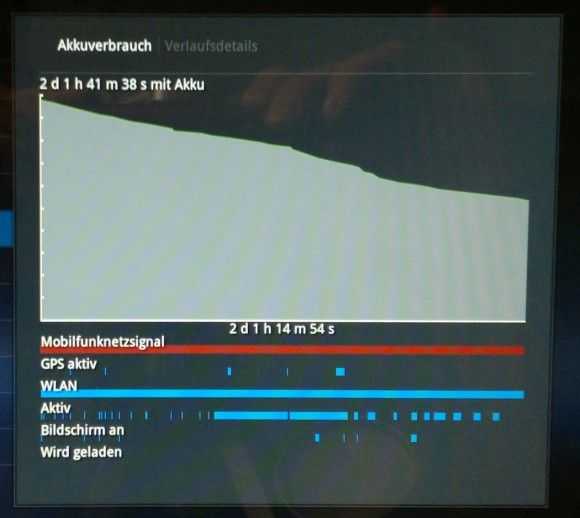
To prove this, I took one of the most powerful mobile computing platforms in a large 10” form factor device with 32GB of storage, 1GB of RAM and integrated WiFi. The device has a 23wh battery (about half that of ‘6-cell’ netbooks. The device is the Acer Iconia Tab A500 Android tablet which runs honeycomb. I connected to the Wifi (at 54mbps) and left the device connected with the screen off while it did it’s stuff in the background. Marketplace checks, email checks, Twitter checks and even some GPS usage by Google Maps. A weather service was running, the volume was set to silent and Bluetooth was turned off.

Over a 48  hour period with a few screen-on moments for checking progress (and a 10 minute in-use period as my daughter grabbed it to use a paint program)  I measured 46% fall in battery usage of which 5% was due to screen-on time. Take away the screen-on figure and you have 209mw of power usage.  The Acer Iconia Tab is nothing more than a smartphone inside!
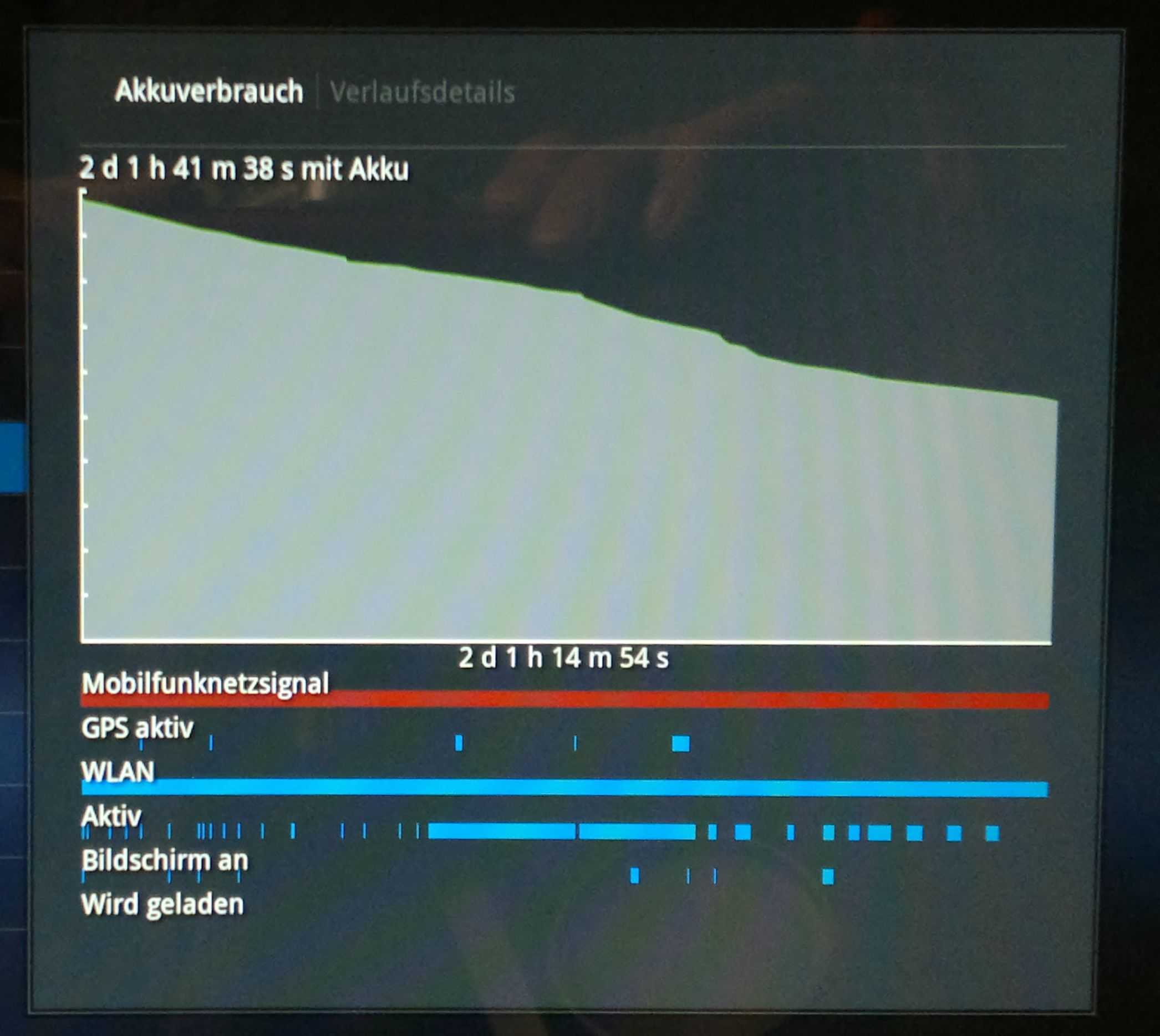
‘Always-on, Always Connected’ will be a ‘Must-have.’

Always-on tests are interesting because it’s a hands-off test that people think only applies to idle smartphones.  In fact, it applies to many computing scenarios. With location, polling, sync, presence, alarms, push updates and of course, cellular voice and messaging becoming the norm in the hand, they will also have appeal on the desk. Not having to wait 5 seconds for a machine to start-up, another 5 seconds for a Wi-Fi connection and another 10 seconds for tweets, emails and other features to catch up is annoying.  There’s also a bunch of other screen-off, connected activities that are interesting. Servers for example. By that, I mean computers and gadgets that serve information to the Internet. This doesn’t just cover web servers. Think about internet-connected weather stations and web cameras, in-car data storage and notification systems. Then there are the devices that just don’t need big screens; Connected musical instruments. Digital cameras with 3G. Internet Radios. Low-power internet connectivity is important for these devices.

Related: Social Netbooks and ARM’s Lock-In Netbook Opportunity.

Summary

The point here is not to highlight that ARM is better than X86, it’s to highlight the gap. This gap is currently a huge advantage for ARM-based platform designers.

  • The first point is, if manufacturers using X86/PC architecture don’t get products to market with active standby soon, with the help of Intel (the only X86 player trying to tackle this problem) customers will have a chance to experience, and may not turn back from, ARM-based always-on products.
  • The second point is that this is a screen-off gap. Current screen technology is killing ARMs advantage in the ‘in-use’ scenario where screens are larger than 7”. It reduces the ARM advantage from 20x in idle to about 4x with a 10” screen being backlit. When the devices CPU is being actively used, the advantage drops even lower to around 2x. [Acer Iconia Tab – 4W. Samsung NC210 – 8W)
  • Finally, the Acer Iconia Tab A500 is a good example of low-power internet connectivity. It’s likely that other devices in this ARM tablet segment hit the same figures.

Keep an eye on high-end ARM-based platforms over the next year or two. Honeycomb and iOS are leading the way into the professional space with their software and application ecoystems and you might find that this always-on advantage starts to lock people in soon.

Pixel Qi DIY Screen Installed and Tested

Tags: , , ,


pixelqidiy90 On the day that I stepped outside with my netbook to connect a solar panel and thought ‘hmm, a PixelQi screen would be nice,’ along comes a DIY article and test from Engadget on how to fit a PixelQi screen. Joanna Stern also gives some thoughts about usability and runs some tests to see just how much battery life the new screen would save over the old. It matches what we expected.

Installation on a Lenovo Ideapad S10-2 seems very straight-forward and the results in the outdoor scenario are fantastic. Viewing angles are as tight as I experienced them at CES earlier this year though so you’ll have to be using this at the correct angle to get the best out of it. Indoors, the screen performs much like any other LCD, LED-backlit screen.

The interesting thing about Engadget’s report is the battery life testing. A lot of people have been raving about saving huge amounts of power by turning the backlight off and yes, expect 1-2 watts power saving in this test but it’s not a real-world scenario. In a normal office scenario with reasonable lighting, you’ll still need the backlight on to view the color. Given that the screen only accounts for 20-30% of battery drain, the maximum that can be saved is 30% but in indoor use, with a 30% backlight setting, you may only save 0.5-1W. On a modern netbook that’s about 10-15%. Engadget’s test shows a 25% difference in battery drain with backlight on (70%) and off. That’s in-line with what we predicted.

Based on battery life alone, it’s not worth the money but how much is it worth to be able to finally use the device outdoors? For mobile computing or even train usage, we think it’s worth it. Interestingly, on a ‘smart’ device like the Airlife 100, the battery life savings would be more significant. You could expect usage to rise from 10hrs to 15 or more as the screen backlight forms a larger part of the power envelope.

Full how-to and report at Engadget.

Official Info on the Mifi 2372 Battery Issue. (Updated with reports from 2352 owners)

Tags: , ,


mifi If you’ve got a Novatel Mifi 2372 (Canada) or 2352 (Europe) model, you might want to read this.

Update: Readers have confirmed that the 2352 is affected. See comments below and check back here for feedback from Novatel. I am in direct contact.

Apparently there have been some battery swelling issues reported on the 2372 related to Bell which have caused the battery door to become jammed. In two cases, it appears that customers have punctured their batteries by using sharp objects to remove the cover.

Engadget have reported the story (in a rather sensationalist fashion considering that this is a safety issue) and we’ve had a call from Novatel themselves who took the time to detail the issue.

Two carriers in Canada have reported the issue and Bell have made the decision to disable their MiFi’s remotely. (There’s a remote-kill feature?) Novatel have kicked off a program of battery and battery door replacements through the two carriers and issued a product advisory.

Note that there is no product recall taking place.

What they fail to address is the 2352 which is the same device with European HSPA bands. Novatel confirmed to us that the 2352 is the same design so one assumes that the same battery supplier is used and that the same problem can occur. 2352 owners out there, please be careful. Don’t use sharp objects to open the battery cover and if you experience a swollen battery, please let Novatel know (and drop a comment here so that we can pass it on too.)

Xperia X10. Is Total Convergence The Answer?

Tags: , , , , , , ,


When the N900 was launched, Nokia positioned it as a total convergence device. It’s a dream (and the subject of my first ever blog post in 2006). The X10 is also aiming to be a total convergence device and does an incredible amount of activities with impressive quality but again I say no; and that’s not all. Battery life is a major problem with every smartphone I’ve ever used. I wrote about the problem back in 2008 and again in January. The X10 re-confirms my theory. There is NO SUCH THING AS IDLE and screens and communications continue to take the lions share of battery drain. Smartphones, when used professionally  as smartphones, don’t bring all-day battery life.

X10compare

Forget talk about cpu idle power claims because it’s totally irrelevant. 2W is the headroom needed to do all the things the marketing people tell you are possible and assuming you ‘only’ use the device for 15 minutes every hour, you’ll need a 7.5wh battery to get you through a full day.

The X10 has a 5.5wh battery which means it’s not going to hit the mark for many. It needs attention, a top-up late in the day and if you’re to be ready for the next day it needs plugging in before you go to bed. That late-day top-up is a big risk if you’re a pro user and relying on being able to take an important phone call or respond to an email at any time and if that risk is there, you’ll need to manage it. In this case it means either a spare battery, a universal charger or, and I suspect that this is going to be the easiest route for many, take a second phone. Either way, you’ve got a second device and a problem.

Corner cutting.

The X10 pushes the boundaries in so many ways but it does it within the confines of a pocketable size, smartphone pricing and smartphone life-cycles and that means (and always will mean) cutting corners. The web experience is great but even though you’ve got 800×480 pixels, the pixels are too small. a 5” screen has always been better for mobile web browsing from the hand and now that people are experiencing even bigger handheld web experiences, the 4” screen has issues. Zooming to click a link is a pain in the backside.

Then there’s the camera. How do you keep the price down and still provide a superb photo solution? You stick to daylight-only scenarios, drop the flash and choose a daylight sensor. The X10 is crap at low-light and flash situations. My 2 year-old N82 beats the pants off it.

How do you keep the design simple, reduce parts costs and avoid having to ship 500 different physical keyboard layouts? You make a tablet device with a software keyboard. Losing 50% of a landscape screen to a keyboard isn’t nice but it’s a great way to reduce the time-to-market costs.

How do you tackle the audio issues? Speakers need space, always. To fix that problem you ship it with a standard 3.5mm headphone port and hope no-one wants to use it as a radio. The speaker on the X10 is far from ‘top quartile.’

A great MID.

A 500 Euro smartphone is an expensive item but when you look at what the X10 is giving you it’s hard to put much weight on the corner-cutting. In terms of mobile internet, the X10 blows away any Intel-based MID I’ve tried. Sure, I’ll have to put up with a no-flash experience but the X10 brings me email, PIM and calendar integration, sync and accessibility that I’ve never had before. The dedicated GMail J2ME app on my old Nokia 6280 was really fast but this is something else altogether. Being able to push information around (sharing with email, IM, Twitter, Flickr, Facebook and other important networks) is easier than on a PC and when you add the always-on feature, GPS (location based search adds a lot of value) a WVGA video capability and an 8MP camera that puts every PC-based 1.3mp webcam to shame, you’ve got something special that goes way beyond browsing. With 4-6hrs full-on web browsing time, 9GB storage and a 138gm (measured here) weight, you can forgive it not having the ability to beat a dedicated digital camera in a low-light photography test.

What have I learnt?

I’ve learnt that I use the Internet too much for a smartphone. Actually I knew that already which is why I’m still looking for the ultimate MID but the X10 serves to re-iterate that point. No smartphone battery can keep up with me.

I’ve learnt that Android fits me perfectly. I’m a Google user and Android brings my services to me in a way that no other device ever has and that means that I won’t pursue a Windows-based mobile internet device. Actually, I never did. I knew that a dedicated OS was needed from day 1 but the choice just hasn’t been there. [History: Carrypad was started in 2006 to journal my question for a mobile internet device]

I’ve learnt that I love having a top-end, stylish smartphone. Just because! (Who doesn’t?)

I’ve learnt that the ARM/Android platform is able to bring a consistently high-speed, multitasking and flexible web experience. I experienced it on the Archos 5 and it’s here again on the X10. Android will easily scale to bigger screens and given the apps, would be able to provide a productive internet experience.

I’ve reaffirmed that the Marketplace is critical. Without it, Android devices just can’t keep up.

I’ve learnt that the X10 may not be for me but I know it will be difficult to part with it. I’ve tasted Google Android at 1Ghz and I don’t want to step down from that. The Dell Mini may be my savior.

HTC Nexus One / Desire, Motorola Milestone / Droid

Many of you have been asking how the X10 compares to these two phones. I’m afraid I can’t comment on the Desire and N1 because my hands-on was with a device that kept crashing but from my brief hands-on with the Nexus One I can say that the experience is very comparable. As for the Droid, I’ll immediately say that the Droid is a better value device. It’s available for under 400 Euros now and has the 2.1 upgrade. It offers similar photo, web and UI experience. If you’re a Google user and smartphone oriented,you’re not going to walk away from a Droid purchase unhappy.

The fact is that all five devices are top quality Android smartphones and offer an experience that will is likely to lock you in to the Android way.

Detailed first impressions and review.

I’m writing about the X10 in detail on a separate sub-blog and have just posted Part 1 of my first impressions. The article highlights three potential show-stoppers so take a look, comment and check back soon for part 2 where I cover the good stuff. Part 2 is going to be much longer than Part 1 I’m sure!

Also on the XperiaX10 blog:

Sample Daylight Photos. Wouldn’t it be nice to be able to create photo’s and videos on a UMPC!

Size comparison. Includes Archos 5, 5” PMP.

Information on the screen.  It’s transflective. Why didn’t UMPCs ever get good outdoor screens?

Unboxing and Open Review (with JKK)

A Warning about ‘Smart’ Device Battery Life.

Tags: , , ,


Over the last 3+ years I’ve spent a rather embarrassing amount of time analysing battery drain on mobile computing devices. It’s become a specialty of mine to look at a device, look at the battery size and then estimate real-world battery life figures for certain usage scenarios although in the netbook world it really boils down to a simple equation – take 30% off what you see on the specifications.

In the world of smart devices (computing and communication devices based around the ARM architecture) the equation is slightly different and as we move to ARM based tablets, pads and MIDs the equation gets even more wobbly because these devices can idle down to near-zero drain rates. Take the 300+hrs standby figures you see on some phones for example. With a 5W battery, that’s a drain of about 16mw, which is 100x less power than even the most efficient of PC-based mobile devices in idle mode.  The problem is, however…

There’s no such thing as idle.

The days of ‘standby’ are long gone as even the most basic of phones are able to play music, access 3G networks, present information on backlit colour screens and run simple background tasks like alarm and event monitoring, location services, email polling and more. Move to a smartphone scenario and that 16mw idle figure is irrelevant. When I tested my N82 a few years ago I was shocked to find out that it could suck 9 batteries dry in a long day of heavy use.

I re-charged the device fully and did a static test using the same apps. Music playing, live GPS tracking (I use Nokia Sports Tracker) and IM via Gizmo. I left the device alone and didn’t use it. After 110 minutes it switched off indicating a 2.1W average drain from the 3.7wh battery. [Source]

n810hsdpaallday

Today I installed an interesting app on my N82 and confirmed those findings of nearly two years ago. Using the awesome (for geeks like me) ‘Energy Profiler’ for Symbian Series 60 I lay in bed for about an hour testing out various scenarios. Sure enough, the phone idled down to about 200mw and by simply streaming some music over 3G the figure shot up to 1W. Turn on GPS via the map application and crank up the volume and the device was using over 1.5W. Just cranking up the audio volume added 20-30% power load on the device!

The CPU is out of the equation

Last week at CES Nvidia announced Tegra 2. It’s one of the most powerful ARM-based processing platforms on the planet. Think 2-4 times more CPU processing power than even the fastest smartphone out there right now. It’s amazing and exciting, especially when you known that the CPU cores only take around 400-600mw under full load. Once again, this platform can idle down to an almost frozen state. The platform is slightly too big and power-hungry for small smartphones at the moment but expect to see this in high-end media and internet phones and upcoming tablets and MIDs. The 4-10” screen range.

When you get to screen sizes of 4” and above, something happens that levels the playing field for Intel somewhat. Their CPU platforms (*1) don’t idle down very well but in a typical ‘internet-connected’ scenario on one of these ‘smart’ devices, that becomes almost insignificant as the screen backlight adds such a huge load to the platform that when combined with Wifi, 3G, BT, GPS and audio, the CPU is just 10% of the total load. Swapping Intel out for ARM would save you just 5-10% battery life in an ‘active’ scenario.

Active standby

I’m a big fan of low-power computing and I understand that that most people won’t be using a device all the time so there’s a distinct advantage to use and ARM platform over a current Intel platform (*1) but usage models are changing and it’s now common to find people picking up a phone to use it once every few minutes and when they’re not using it, the GPS, Wifi, 3G and audio is still running. Simply being ‘connected’, polling the internet is going to mean that your device is going to be using 500mw of power on average. Standby is now an ‘active’ or ‘on-net’ experience.

Extreme Battery life marketing

All this confusion and range of figures is great for marketing teams. The ‘all-day’ connected’ expression will be used a lot along with a lot of talk about standby battery life of ‘days.’ Forget it! The average 4-10” tablet device will be using an average 1W to 2W per hour. Leave the screen backlight on along with a few flash and ajax-filled browser tabs running with a 10” Slate and you’re in the 4W range. The 10W battery that would fit comfortably in such a device suddenly becomes a 2.5hr battery in that scenario.

Warning

You will hear a lot of battery life BS over the next year. Silicon manufacturers are in a truly critical fight to win in the new ‘smart’ devices market and as a result, they will use every weapon. BE AWARE that as devices get more fun, connected and dynamic, you will use them more and battery life will drop like a fly. IGNORE manufacturers battery life claims and wait for independent reviews. That’s what we’re here for!

Related articles:

How long does your smartphone last in ‘MID’ mode?

How big is an ‘all-day’ Mobile Internet smartphone?

(*1) The upcoming Moorestown platform brings a whole new power control architecture to the table in late 2010. More analysis on Moorestown here.

Li-Ion battery technology update. (From #idf09 session)

Tags: ,


I’m reporting from the IDF09 battery technology session.

Here’s what’s been happening in Li-Ion tech.

 Capture_00004

“3% per year improvements in capacity (watt-hours)” If you ask me, that’s peanuts. Chemistry research not keeping up with Moore’s Law ;-)

Capture_00005

Battery packs aren’t just cells…

Capture_00008

11:27 am.

Trends – Thin and light systems and their effect on battery packs. Here;s a nice diagram that explains how cell types affect design.

Prismatic cells 40% more expensive for same capacity.

Capture_00009

Clearly cylindrical cells are more common.

Capture_00010

Next few years:

More than 2600mah in a standard cell. (the ‘18650’ cell)

11:30 Sasmung now talking.

Capture_00013

Samsung say 33% of customers willing to pay $45 for an extra hourCapture_00015

Capture_00014

Capture_00017

Inside a Samsung Cell.

Capture_00018 

Getting technical now…. Samsungs secret sauce for 3.0A

Capture_00020 Capture_00019

New technologys…. Silicon based anode. Getting too technical for me here!!!!

Bottom line: 30% improvement in Q3 2010. Sounds too good to be true. I’ve heard these sort of promises before!

Capture_00022

Capture_00025

11:42 Panasonic presenting…

Strategy slide:

Capture_00026

NNP – Nickel-based New Platform announced.

Capture_00028

Generations of Li-Ion Li-Ion cells. 2nd generation is the currently available technology.

Capture_00030

Reducing pack size to save money with higher-capacity cells.

Capture_00033

11:55 Intel summary slide. 

Capture_00036


That’s all from the battery technology session at IDF09. I’ll continue to report on mobility topics at MeetMobility so check back regularly for updates.

MIDs, UMPCs, Smartbooks. Where Are We on the Timeline?

Tags: , ,


We’ve been talking about the area of mobile internet-connected devices between the smartphone and notebook for a long time now. Many companies have tried with many many different designs but in reality, none of them have been a success. OQO, Flipstart, Wibrain and Raon Digital are proof that it’s a market where many are going to fail before a winner comes along but what is it going to take to make that winner and how close are we to it? Where are we on the Mobile Internet Timeline?

There are three components to a successful mobile internet product. Hardware (including technology and design), software (including UI, apps and community) and the magic pixie dust that is the combination of pricing, branding, distribution and marketing needed to bring the device to the people in just the right way. Unfortunately I don’t know enough about marketing to be able to comment (apart from the fact that I think that certain marketing teams are easily capable of making it happen today) but my experiences with ultra mobile devices and customers over the last 3 years gives me some idea about what’s needed for the hardware and software components.

One of the keywords that I keep coming back to in this segment is the word ‘microblogging.’ In my mind, microblogging is the word that connects to all the elements that go to make up a good mobile internet device. I’ve listed those below.

  • Portability and form factor
  • Always-on, connected and fast in use
  • Content, image and video creation, optimisation and playback
  • Fully web capable
  • Position awareness
  • Local storage
  • Capable of multiple communication methods
  • Flexible, reliable and up-to-date software set
  • Pervasive and low-cost mobile internet connectivity.

I talk a bit more here about my own ideal microblogging device and the markets it addresses but let’s focus on a more generic level here.

Of all the items listed above, the first two are the biggest issues. These are the ones that are limited by current technology and have prevented engineers from creating what could be the ideal device so lets take a closer look at these.

Portability

mid-d-a It goes without saying; a mobile internet device needs to be portable but how portable is portable? Through my conversations with thousands of mobile computing and smartphone fans I’ve learned that it can be vastly different to many people although it largely centers around ‘the bag.’ If you’ve got a bag with you all the time (as I do, I hate carrying things in my pockets) then portability goes all the way up to 7” screens and nearly 2lb in weight. For those that are looking for a jacket pocket solution, forget anything over 4.8” and 1lb. One important thing to note though is that the smaller the device is, the easier it is to hold in one or two hands but that it gets harder to display information. Pixel density can only go so high before websites become unreadable and need to be zoomed. 4-5”, 250gm, 15mm thick and an 800×480 screen is going to be the target in my opinion for the next few years. How far away from that are we? We’re there already. Devices have already been designed with both X86 and ARM cores that achieve this size. [Example]

Form Factor – Style. Keyboard. Screen.

There’s no real answer here expect to say that most styles and form-factors in most materials are possible today. A keyboard creates a thickness problem and a folding screen option would be nice for the industrial designers but I’m confident that given current industrial design knowledge, materials, skills and production technologies, almost anything is possible today. Fasion changes but given economies of scale, anything should be possible.

n810hsdpaallday Always-on and connected

Being always connected means not having to charge a device for a whole day of about 15 hours. This has been possible with mobile phones for along time but we’re talking about a different level of ‘always connected’ with a mobile internet device. This is not a device that will sit idle. Background software will be checking emails, waiting for instant messages, polling social networks, processing GPS signals, updating locations, checking for software updates, playing music, checking accelerometers and ambient light levels, scheduling alarms and the device will probably be in-use, with the screen backlight on, every 15 minutes during the day. Idle devices are a thing of the past and that’s where the technology challenge comes in. Running these scenarios on a phone architecture results in a dead battery within hours. I know because i’ve tested it!

Always-on Internet applications increases the average power requirement of a smartphone by a minimum of 1000% and up to 3000%

gtdbattThe answer here is not to use the lowest power CPU but to use a very closely coupled hardware and software layer that can schedule events at the right times and make sure the device sleeps for as long as possible. In general, low power devices take longer to perform general purpose processing tasks so the power advantages are outweighed by the need to keep screens and radios active. In general, a device that can perform tasks quicker in processing ‘windows’ and then resume to a standby state is probably going to have the advantage. [See this article for more thoughts and view the image on the left.] How far away from that are we? Quite far. We’re in a very early stage of mobile internet software development and unless a golden bullet comes along in the form of new battery technology, the problem will need to be worked on for some time before true all-day mobile internet ‘computing’ is possible.

Fast in use.

Getting a task completely quickly and efficiently means better user satisfaction and more productivity. The days of waiting 20 seconds for a web page to load on a smartphone are over and we need to be looking towards the sub 10-second page load. Ultimately, 5 seconds for every page on the internet. Not only that but applications need to start instantaneously and user interfaces need to react in a physical way in order for the device to become more a part of the user. How far away from that are we? Quite far. The new generations of smartphone are improving very well and reaching the 15 second average page load level along with having great almost instantaneous interfaces but its still the exception. UMPCs and netbooks are into the sub 10-second level for web page processing but still struggle to meet the battery life requirements when doing so. In general we need about 4x efficiency improvement from the X86 based devices and about 4 x processing power improvements in the ARM-based devices. Both sides are moving very quickly towards it but we’re a couple of years away from what I would call a thrilling experience.

Pervasive 3G networks

As for the rest of the list, we’re pretty much there now. Location, storage, video and software is available. It’s just a matter of sticking it al together in the right way and focusing on the limitations above.

The dream of that ultimate mobile internet communications device is spread wide across potential consumer base and the industry itself but we’ve still got a long way to go. 2009 is an early point on the timeline where although devices are possible, customers are burdened with issues. Be it battery life or slow web processing, heavy form factors or tiny screens. The good news is that everyone working in the industry is already working on those problems and we’re now only a short few years away from seeing devices that satisfy everyone.

Tec-City Power Bank Solutions for Netbooks and UMPCs

Tags: , , , , ,


Firstly, I need to point out that Tec-City are manufacturers so you won’t be able to buy these products from Tec-City as a consumer. If you’re a reseller or distributor though, you might want to take a look because they have some good solutions and, clearly evident through my discussions with them about solar solutions, a lot of knowledge.

You might recognise some of the products here. Tekkeon and TabletKiosk have used them. I used one on my Solar-UMPC tour too and was very happy with it until I killed it one day.

31072008637

The two products that I highlight in the video are the MP3450E and the MP2300.

umpcportal 001 umpcportal 002

If you’re a reseller or distributor looking for a good quality power bank solution, take a closer look at Tec-City. If you’re a reseller or distributor that carries these products, please contact us and we’ll link you in to this article.

UMPC Accessory Test: Ultimate-Netbook U2o Universal Power Pack and UMPC Holder. 10% off.

Tags: , , , , , , ,


umtest1Ultimate-Netbook, a big accessory retailer based in Europe, has just announced a 10% discount code (Psst – Use the offer code WEBUMPC to get the discount) for our readers so now would probably be the best time to tell you about two Ultimate-Netbook products that I’ve had for a while. A universal power pack and a universal car mount. For anyone into mobile computing, these two products are well worth considering.

Read the full story

How will your computing habits change when we reach all day battery life?

Tags: , , ,


batteriesThis thought popped into my head today for no reason what-so-ever and I wanted to see if I could get a discussion started.

Imagine this: One year ago, there was a huge battery breakthrough. All of your mobile tech gadgets have a battery that is good for an entire day of computing. I’m not talking about what a big company calls “all day computing” (maybe 8 hours?), I mean 24 hours of continuous use on a single charge no matter what task you are doing.

Now answer these two questions:

  1. How would your current computing habits be different (other than ‘work longer’)?
  2. Two years down the road, what would gadgets evolve into, knowing that they were designed with all day battery life in mind?

When you are done, tag some people who you’d like to hear thoughts from.

Allow me to start:

How would your current computing habits be different?

First of all I think I would remove all of the wireless radio toggle software from my devices. Why turn them off if we have the power? Second, I might carry a more powerful device as my pocket computer. I would probably use the UX180 in place of my current iPhone, knowing that I could get more done on the 180. There probably wouldn’t be much need to turn my devices off so I would have an always online status. Services like Google Latitude would be active on my devices so friends could see me and I could see them.  I used to carry my UX around in my pockets, but I also needed to bring the AC adapter with me.

Two years down the road, what would gadgets evolve into knowing that they were designed with all day battery life in mind?

I think that smaller devices that would function as notifies would become popular. Envision a normal looking wrist watch, that has 3G connectivity and GPS, aggregating all of your notifications (email, IM, social networks, etcetera) and tells you what is going on right then, without having to pull something out of your pocket. I imagine a vibration from the watch letting me know that a friend is nearby (located with something like Google Latitude), and clicking a button on the side of the phone at that time would connect via Bluetooth to my phone and call my nearby friend. The watch would display other short info like micro-blog updates or SMS from my phone right on its own screen. I think that HD content would be much more prevalant, given that even handheld cameras would be powerful enough to do all day HD recording. This might have an affect on demand for faster bandwidth because people would be flocking to YouTube to be uploading or watching lots of HD videos, and they would want to do it with the same speed that they are used to watching SD videos.

Tag, you’re it:

Jenn from Pocketables.net

James and/or Kevin from JkOnTheRun

Also, link back to the people that linked to you, so they know that you responded.

More smartphone battery life red-flags.

Tags: , ,


Jon Stokes, one of my favourite mobility-focused journalists, wrote in ARS Technica about battery life on the Palm Pre a few days ago and brings up one of my favourite topics. Battery life.

It’s a real issue for smartphones now as the platforms reach levels where they can be considered capable of returning an acceptable web experience but when used in such a scenario, the battery life is too short. Losing your mobile communications because you spent 2 hours messing around on the Internet isn’t the situation most want to be in.

n810hsdpaallday

All day battery life on a smartphone!

Read what Jon has to say about the Pre battery life here:

The Palm Pre’s possible Achilles heel: battery life – Ars Technica.

And check out my thoughts on the Pre too. I’d rather see the Pre as a MID than a smartphone. It will still be pocketable but you’ll be able to fit a decent battery on it and still have it in a pockateble format. It’s better for many people to split voice from Internet on separate devices to improve both experiences to the ‘pro’ level.

I’ve also taken a look at this topic in these two articles:

How long does your smartphone last in ‘MID’ mode?

How big is an ‘all-day’ Mobile Internet smartphone?

How long does your smartphone last in ‘MID’ mode?

Tags: ,


I think it’s fair to say that if you use a smartphone like a MID, it isn’t going to last long. My N82 lasts for about three hours; less if I’m using 3G. The iPhone, about 4 hours under heavy use and the Android-based G1 seems to be even worse. The fact is that radios and processing take energy and although your smartphone will sit doing nothing for days on end, once you start using it connected over Wifi or 3G, the clock starts ticking.

There are ways around the problem and, to a certain extent, you can change your usage pattern to help the situation. Picking up emails, sending a few messages and then disconnecting is common practice but it’s not exactly Web2.0 is it! If you want to stay connected and keep services open for real-time internet applications you’re down in the battery-life danger zone. There are a few exceptions of course in the smartphone world but on the whole, it’s only because the battery is big. The Nokia E90 has a  5wh battery. The Athena has an 8wh battery.

I’m not saying that smartphones are poor, I’m just saying that we’re moving to the point where both smartphones and MIDs are requiring big batteries for hardcore web use and that means that fitting them in your pocket becomes a problem.

Do you use your smartphone in an always-connected and active mode? If so, what is your experience. Have you had to reduce your internet usage to preserve battery for voice usage? Do you carry spare batteries. How about a spare phone? Or do you just wait until you are able to pull out your laptop? Let us know about your smartphone battery life experiences  in the comments below. Oh, one last thing. Check out this monster battery pack for the G1…It’s as big as the battery in an Aigo MID and makes the G1 almost as big as an Aigo MID!

g1ext

Source: seidioonline. Via Crunchgear

Save battery life, time, the world! Use a script blocker.

Tags: , ,


Admittedly, its not difficult to imagine a scenario where less CPU cycles result in less power drain and this method isn’t going to magically extend your battery life by much but its nice to see the theory tested to the extreme.

SecTheory.com took a notebook PC, a couple of browsers and measured the battery drain on the Top 100 Alexa sites. They then took the worst offenders, that is, the ones that took the most power drain, and blocked script and ads using NoScript and AdBlock Plus. The results were quite significant. On a Dell Inspiron B130 notebook, with a 1.5GHz Celeron M processor and 1 Gig of ram, running fully patched Windows XP SP2, the power consumption when browsing the worst offending sites dropped by 11W, a 20% reduction. If its a 25W TDP CPU we’re talking about here, I can believe the results because browsing website has grown to be a very CPU intensive task.

The effect would be much less on netbooks and UMPCs but I would expect the same test to save 1W average which is about 10% – about 15 minutes for a device with a standard battery. Of course, its not really normal to be picking the worst offending sites and continuously hitting them either. Under normal browsing use, you probably wouldn’t notice any difference but there’s something else you need to be aware of.

Script not only takes CPU and battery life, it takes time. Time to execute, render and in some cases, time to fetch the remote code. By disabling script you significantly improve browsing speeds on low power devices and by definition, you save battery life. I tried it a few weeks ago with the noscript plugin and I’ve seen many comments on UMPCPortal from users that also use the technique. It really works! You lock yourself out of application sites like Google reader initially but it doesn’t take any effort to enable exceptions for these sites as you go along. No more hung page loads waiting for remote sites to time out. No more of those terribly annoying auto-start video ads that make browsing on a low-end PC a misery. There’s even an improvement in security. Its a win-win-win!

Try it. Install the noscript plugin and see how you get on. Yes, I risk killing all of my advertising income if everyone does this on all their devices and I’m sure there are bloggers out there that will read this and cringe but I trust you’ll only use it on your netbooks and umpcs and put the exception in for your favorite sites! Long live the choice between simple html and web2.0!

Source: Sectheory.com

Hat Tip Samsung. (More on NC10 battery life)

Tags: ,


nc10batt I apologise for my possibly over-extended coverage of the Samsung NC10 battery life. This will be the last post on the matter I promise.

As we’ve seen in previous Laptop Magazine tests and my brief hands-on last Saturday, the NC10 turns in some impressive battery drain figures.

Laptop Magazine have taken the testing a step further and pushed the NC10 to the absolute limit by dropping in an SSD and disabling the BT radio on their web browsing tests. The result…nearly 8 hours of surfing at minimum brightness.

While this may not be the best of real-life tests, it shows that the underpinnings are efficient and that’s exactly what you need on a mobile device.

The NC10 shouldn’t just be crowned the best netbook out there, it should be crowned the best consumer laptop out there. 10" and an Atom 1.6Ghz is good enough for 9/10 consumers so expect it to eat well into 12 and even 15.4" low-end laptop sales.

All the NC10 details and links to reports in the NC10 reference page.

NC10 battery life.

Tags: , , ,


I’ve already posted about this, twice. Samsung have some great engineers.

I had the chance to look at an NC10 (#1 device on the portal right now) at the netbook meeting in Cologne on Saturday and the first thing I did was to measure the minimum drain of the device. Within minutes, I was seeing a fantastic sub-5W minimum drain.

nc10bat

This is lower than on most UMPCs and is a good indication that the electronics on the motherboard, the power components and the screen are well engineered. There’s no point putting in a low-power CPU if you’re going to lose the advantage it with crappy engineering. Take the Kohjinsha SC3. It uses the latest, lower clock, lower power CPU and chipset and yet even after hours of optimising, the base drain on it is no less than 7.5W. That’s 50% more than the, much bigger NC10 that doesn’t even use the low power CPU and chipset.

Battery life outweighs most requirements for me so considering that everything else on the device is up to scratch, I’m seriously thinking of getting a black NC10 as my only laptop and selling the M912 and Medion Akoya. They’re both excelent devices but neither of them are as well engineered as the NC10

Samsung NC10 links and specs in the product pages.

Wibrain i1 shaping up to be first ‘All-day’ UMPC.

Tags: , , ,


One of the distributors of the Wibrain i1 has got hold of a Wibrain i1, snapped a few pics and made some comments in the forum here. If you’re looking the the ultimate Windows XP mobility device with the best battery life and best connectivity for, potentially, a very interesting price, keep reading.

i1side

The 1.3Ghz Atom-based device is based on the old Wibrain B1 design which was, quite frankly, an ugly brick to most people. There are some styling improvements which help it a little but don’t expect young geeks to be fainting at your feet when you whip it out. However, this is an action UMPC, not a flowery style-icon. It has the same easy-to-learn control layout (the Touchpad is the best I’ve ever tried on a UMPC for example) and the same extremely high quality and brightness screen in a package that weighs 500gm. That’s 1.1lbs. It runs XP, has a 60GB hard drive, new SD card slot and re-positioned USB port. The real kicker is three-pronged though. 6hrs+ battery life on the standard 30wh battery, a 3G module and what looks like it could be an amazingly good price for such a setup.

Wibrain claim 7hrs on the standard battery. I’ve seen 6+ on the battery meter in hands-on testing and ‘Digital’, is now reporting 6.5hrs with wifi or 3G on. In marketing terms, this is an all-day UMPC in 500gms.

Final availability is still not 100% clear but early pricing indications at Mobilx look positive. 467 Euros ($600) pre tax without 3G and 532 Euros ($712) pre-tax with the 3G module. We’ll keep you updated on availability when we hear anything.

More links, news, details in the Wibrain i1 information page.

Samsung gets it right Again, Again With the NC10

Tags: , ,


Remember my in-tent Samsung Q1 Ultra test? 9hrs battery life on the Samsung Q1 with 25% backlight? An average drain of 6.9 watts. It was impressive and since I blew up the Q1 Ultra doing some solar-charging tests, I’ve been missing those 5, 6 and 7hr figures. I was just getting over the trauma until I read this article about another Samsung Mobile product with great battery life.

Notebook Magazine have just done a full set of battery life tests on the NC10 Netbook and it looks like Samsung have once again worked their magic. The tests included continuous Wifi-on web browsing in battery saving mode which is a very reasonable test to be doing. Far better than the misleading 2001 Jeita test and much more ‘real-life’ than the Battery Eater Pro ‘turn everything and and run it at full-steam’ approach. The NC10 returned…

  • 12% screen brightness: 7hrs 34mins representing an average drain of about 7.6w which is just a little bit more than what I saw on the Q1 Ultra.
  • 50% screen brightness, the duration dropped to 6hrs 30mins which is an average 8.7W.
  • 100% screen brightness, the test result reduced to 4hrs 38 minutes which is 12.3 watts drain.

More after the break…

NC10

Read the full story

Search UMPCPortal

Sales Information


Our Network

  • Big Beach Our marketing advisors. Located in UK.
  • Carrypad Tablets and consumer mobile products
  • Device Manufacturer List List of all device manufacturers, and products, from our database
  • JKKMobile JKKMobile – Mobile computing and hacking – Partner of UMPCPortal
  • Liliputing Netbooks and small-form-factor laptoping – Partner of UMPCPortal
  • MeetMobility Mobile computing podcast broadcast every two weeks – Partner of UMPCPortal
  • Netbooknews Netbooks and other mobile devices – Partner of UMPCPortal
  • Ultrabook News Ultrabook products, specs and news