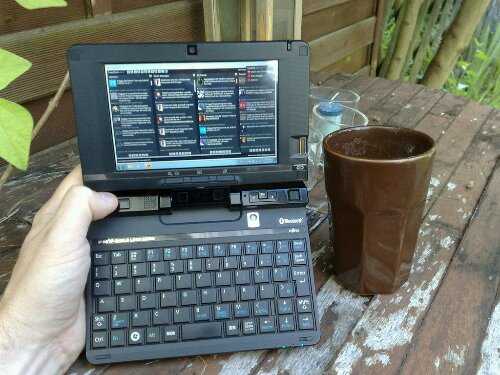
I’ve been giggling for the past hour. I just can’t work out if that portfolio case is a masterstroke or just plain silly but one thing’s for sure, it highlights how small this device is.
We got hold of the Kohjinsha SK3 a few hours ago and ripped straight into it with an unboxing video that you’ll find below. So far we’re impressed with the build-quality, the size and weight, the features, the bright and crisp screen and of course that portfolio case. We’re not so impressed with what looks to be low-end battery life (largely due to the tiny battery) and the Japanese language XP build (a nice challenge!) although the speed of the device seems to be good. XP is helping here. The keyboard is exactly the same as found on the SC3 so you’re limited to pecking on the desktop although thumbing and single hand-hold pecking is also possible. The screen mechanism is solid.
We’ll be testing more over the weekend so watch out for a full hands-on early next week. A live session is tentatively planned for Monday evening (Central Europe time.)
Update: Archos 9 is now in the database with all the specs and links to the important news and videos. Looks like some of the folks over at Cnet.uk had some time to ‘finger’ (their words, not mine) the recently unveiled Archos 9 UMPC. As you’ll recall, the Archos 9 is Archos’ first foray into the world of UMPCs, though they seem to have not realized that there have already been many device like this, and think they are being ‘innovative’ by removing the keyboard from the ‘netbook’ (am I the only one that can’t help but laugh at that?). Actually, let me quote directly from their press release before we move on:
What better innovation for a Netbook than to get rid of keyboards?
Ok, I’ll give you a minute to recover from you inevitable laughter. Got it? Good.
Well then, as I was saying, the folks at Cnet.uk seem to have gotten their hands on an early sample of the Archos 9 and while they didn’t have much time to test the unit for performance, they did snap some pictures for us to examine.
These are the good sides of the device. Be sure to check out the Cnet article for a few more images. After checking out the others, you may agree with me that it appears to be decidedly pre-production. I’m hoping the device will clean up nicely before launch.
One interesting thing to note is that the resistive touchscreen on the Archos 9 is apparently so responsive that the people playing with the unit actually mistook it for a capacitive screen, which is about the best news we can hear without it actually being capacitive. Cnet is actually checking for verification just to be sure that it is resistive as stated in the press release (linked above).
The Always Innovating Touchbook, which made a decent amount of buzz several months ago, should be seeing its first batch of devices released next month, in July. The device is quite unique as the screen can be removed from the keyboard and run as a standalone slate tablet.
Always Innovating just released some new info stating that the first batch would be out in July, however the software isn’t yet finalized:
We are very excited to have nearly finalized the Touch Book hardware. As you know, we are at the cutting edge of innovation with a new processor, a new architecture, a new design and new applications. The Touch Book Operating System will continue to be a work-in-progress over the next few months. As beta software (and not beta à la Google News), you should not expect a flawless experience by July. But don’t worry, we will be here to provide support, and we intend to push frequent updates so as to continue improving the user experience. With your feedback, we will be able to test, refine, and prepare for a final software release later this year.
It is an interesting situation that they have essentially finished the hardware before the software and will now be pushing units out to get feedback from early-adopters. We should be receiving a Touchbook from the July batch, so stay tuned for coverage. Full device specs below:
Two internal batteries 6000 and 12000mAh — it can be replaced with a screw driver
7 USB ports: three external, four internal, three of them may be reserved for wifi, bluetooth and keyboard
Bi-color silver/black case — see photos — with a beautiful dark-red back cover (we decided to go only for red for the first batch as it really jumps out, you won’t regret it).
Secured attachment system of tablet into keyboard
Independent magnet system for the tablet — we don’t want your Touch Book to un-magnetize all your credit cards while carrying it in your bag!
I bolded ‘pressure sensitive’ in the touchscreen spec above as I’m not 100% sure what they are trying to imply. One could say that all resistive touchscreens are ‘pressure sensitive’ because they sense a certain pressure on the screen and translate that to input. However, the specific denotation of ‘pressure sensitivity’ in these specs almost seems to imply that it will have several layers of pressure sensitivity, like that of a graphics tablet. While I think it is unlikely that is the case, it would be quite interesting to have several levels of pressure sensitivity in a small slate unit.
The new info also lists the software that will be shipping with the early units as well as software that is on its way:
All usual accessories (zip, picture viewer, dictionary…)
Support for most standard USB accessories
Java support
Good to see that Fennec is going to be on the device. If you’ll recall, Fennec is a mobile version of Mozilla’s Firefox which focuses on touch input. See our short video demo of it here.
There is also some upcoming software improvements which they hope to bring to the 1.0 release. Those include the following:
Recognition of the Touch Book by iTunes to synchronize your music and video
A Google-maps-based application with GPS support (GPS USB not included)
Some 3D accelerometer-based iPhone games
The ‘iPhone’ games mention is a bit iffy. I’m doubting that they are talking about having actual iPhone games on the phone, but instead probably some accelerometer based games, and maybe some based on existing iPhone games.
I suppose we’ll find out the answer to our questions in July when we get our hands on one.
When you read about the TN70 in the umpc and netbook community you’re likely to hear references to the T91 and the Sony Vaio P along with words like ‘ugly’ and ‘cheap.’ You probably won’t hear much mention of mobility but if you’re thinking about mobility, umpcs and tablet PCs I encourage you to pause for a moment and take a closer look because this bargain basement device (that I’m calling a UMPC) has surprised me by turning out to be well designed and very, very usable. If you think back to the Wibrain B1/i1 you’ll remember a similar story. It certainly didn’t look attractive and the reason was that Wibrain designed something to be usable rather than marketable. The same is true of the TN70. It’s a very usable and very good value device.
Before I get my first impressions down though I have to do a comparison to Kohjinsha SA1. When I bought it 2.5 years ago it cost me over 1000 Euro, ran on the Geode LX500 CPU and served me well until I ran out of patience with the slow processor. The TN70M costs less than half and brings a swivel touchscreen, way over double the processing power, hd video decoding, a fingerprint reader, rotation sensor, optical mouse, web cam, expresscard/34 slot and a much much better keyboard. It even has the same, great battery life. If you’re buying pre-tax, you’ll pay just 337 Euros today. That’s without an operating system but if Windows 7 release candidate runs, (i’ll be testing that today) then why bother with the OS. 405 euro is the price including tax. Seriously, if you’re thinking about a cheap netbook for mobile duties, stop! This Clevo is more mobile, more flexible, more usable than any netbook in almost all mobile scenarios except long-term desktop use.
Let’s put a few things in perspective though. It only has an 800×480 resolution screen so you’ll be experiencing dialog box problems. You’ll also hit problems with some software installs until you switch to a higher, non-native resolution. It’s also pretty ugly. A large screen frame houses useable controls but makes it look like a toy, especially in the white coloring.
In our 1hr live evaluation last night (video here) we discovered the following:
The keyboard is good. Better than the Kohinsha SC3. Not as good as most netbook. It only has 1 shift key.
The fingerprint reader works and the software captures password too.
The mouse pointer on the frame is a very good optical type which gives you great control in two-handed or tablet mode.
Has strong Wifi reception. (b/g modes)
Appears to have about 5hrs battery life (although the battery indicator doesn’t show times)
Has a soft touchscreen with a good level of palm rejection. The screen is matt but has a typical milky appearance in sunlight.
Includes a rotation sensor (although the drive software appears to be broken on this model)
Is as fast as any 1.3Ghz Menlow device for browsing. Sub 10-second average page load times.
Includes a hard drive with a max throughput of 28MB/s
Was silent for the whole 1hr testing session
Has a removable back allowing RAM, HDD and PCI-express mini slot.
Speakers are of acceptable quality.
Microphone level seems low (tested with Skype)
Initial CrystalMark test result:
The graphics driver is extremely old and causes crashes on flash full-screen so i’ll leave you with some images and run down to the studio to install Windows 7. Wish me luck!
We see no point in ignoring the real facts. UMPC is a term in decline and has been for the last 18 months. Despite 2009 seeing more UMPCs than ever before and customer numbers remaining solid, the keyword trends are changing. We’ve held up well and, to be honest, have been one of the longest lasting businesses in the UMPC market so I don’t feel too sad about it but I think there’s a crossroad coming up. I actually think the market itself, the sales numbers and number of new products is on the up and that mobile internet-based productivity is a hotter topic than ever so while the term ‘UMPC’ is dying off, its soul continues. I’m certainly not experiencing a lack of things to write about!
The question is, how do we, UMPCPortal and the UMPC community of bloggers, manufacturers, resellers and fans, adapt to the change in keyword fashion and the increasing number of options in the MID, smartphone and netbook market? How do we best position ourselves to be able to help and assist new people coming into the market and to grow and improve in the future?
It’s getting close to decision time on UMPCPortal and we have some choices. We’ve always covered the high-end of smartphone ‘computing’ to the smaller and lighter end of netbook computing so if we were starting afresh, our name would reflect that wider coverage. On the other hand, there are a lot of people that come here because of the name!
My personal thought it that there needs to be a split between professional, productive devices based on desktop operating systems and aimed at the high-end and specialist end of the market, and consumer focused devices running consumer-friendly operating systems. MIDMoves is one place we could do the consumer stuff while leaving the professional stuff here. With a common forum and product portal, it could work as two front doors to a great customer learning experience with a common community and product information database.
What do you think? There are nearly 400,000 people that visit here each month so it’s important I try and do what’s best for new and existing visitors. If I lose too many visitors, everything comes crashing down. If we increase visitors, we stand a better chance of improving the site, our contacts and our coverage in the future. We also increase our chances of having a real voice and representing what the customers REALLY want. What YOU want.
What do you think is best for the future of UMPCPortal and the ‘UMPC’ community?
The Kohjinsha SK3 that we reported on yesterday has been formally launched for the Japanese market at a local price, including taxes, of about $730. Before I put some thoughts down though, here are the full specs:
We’re clearly looking at the evolution of a good quality UMPC here. The SC3 was well built and had an excellent (arguably the best in the market) screen making it downright stunning for 720p playback and very useful for high-end navigation duties. The SK3 will be just as good if it has the same screen. The size reductions are quite considerable considering it’s got a swivel screen and the weight reduction to 720g is class-leading for a 7” ‘laptop.’ It will be noticeable if you’re using it with one hand. The local price of $733 seems reasonable considering the huge array of connectivity options that the SK3 offers. Finally, it looks Kohjinsha might have changed the keyboard slightly. If i’m not mistaken it’s taken cues from the Everun Note keyboard and enlarged the main character keys. This will help a lot.
On the negative side we can’t ignore the extremely disappointing battery life figures. 3.2hrs battery life on a Jeita-based test is nothing exciting at all and will translate to between 2 and 2.5 hours, possibly less under heavy load. The battery pack is a tiny 17wh and there’s no indication of an extended battery option. This alone is going to be the deal breaker for many. Add the fact that it’s running a 4200 1.8” 60GB hard drive too and you’ve got too very significant reasons not to buy this and to wait for the Viliv S7 (much much bigger battery and battery life, bigger keyboard, ssd options) or even to go for the Viliv X70 and buy a portable keyboard.
Kohjinsha have a habit of creating impressive designs but losing focus on battery life. Two years ago when the SH8 was released I expressed disappointment at the 2hr battery life. That was 2 generations of device ago. Then, the SC3 was released and it was at that point we decided to run a poll. Under 3% of people found 2hrs to be an acceptable battery life. It looks like the SK3 won’t be much better and with new UMPCs turning in 5hr+ battery life, it appears worse than ever before.
We’ll be tracking specs, links and details in the SK3 information page. There’ are already a set of images in the gallery.
Dynamism have just announced a special pre-ordering offer for all three of the Viliv X70 EX models.
Express Model Pre-Order Special:
Free Upgrade to 1.3GHz from 1.2GHz
Free Car Kit
Free Leather Pouch
Free Matte Filter
Premium Models Pre-Order Special:
Free Spare Standard Battery
Free Car Kit
Free Leather Pouch
Free Matte Filter
To be honest, the X70 was good value without this special offer but this makes it even more irresistible. The car kit and leather pouch are excellent quality. I haven’t tried the matte filter but as the X70 has a glossy screen I’d say its going to be worth having too.
The Viliv X70 EX Premium Air has a long battery life, reasonable processing power and built in 3G so it didn’t take me long to start messing about with it as a mobile broadcasting solution and that’s the focus of Version 6 of my mobile reporting kit. Live video.
I spent some time testing different webcams, microphones and configurations and have come up with a 2KG setup that will allow you to do live, mobile broadcasting over Ustream with reasonable quality. The total cost of the solution is under $1000 and the setup can not only be used for live streaming but can be used as a complete Ultra Mobile live blogging solution.
Hardware
What I’ve done is taken the X70 EX and the car kit. I’ve mounted part of the car kit onto the leg of the tripod so that the UMPC can be clamped in. It provides a sturdy screen at a good height when sitting on a chair in, say, a conference room. The X70 EX has Wifi and 3G included. The 3G is HSUPA capable which puts it in the 1Mbps max upload class (assuming you have the right coverage)
I’ve added a 4-way USB hub to the X70 and then plugged in a Philips SPC900 webcam (manual focus) and Samson USB mic. The Philips cam has been chosen because the drivers seems to be very efficient and can produce 20fps VGA framerate while still doing automatic white-balance. Many other solutions I’ve tried including the built-in cam, drop to below 10fps and lower when using the automatic white balance features. Auto-focus would be nice, as would optical zoom and a quality sensor and optics but for the price, the Philips cam does well.
Software
One of the ‘tricks’ I use on the live video sessions is to avoid the use of the browser-embedded video capture software in the ‘flash’ control panel. The CPU requirement is high, the quality is poor and there’s very little control. Instead I use the standalone Flash Media Encoder (FME). It’s an application that takes audio and video inputs and allows you to stream to a media ‘relay.’ More details on this can be found here. On a desktop machine it can be used to broadcast very high quality VP6 or H.264 encoded video but on a UMPC is can be used to fine tune the broadcast for a good balance between quality and CPU load.
Unfortunately you can’t control the end-user stream with the FME so you still have to run the Ustream Broadcast Console. The wonderful advantage of this is that you don’t have to run the broadcast console on the same PC so you have three options.
1) Run the broadcast console on the same PC – Not recommended as it takes a lot of valuable CPU and doesn’t do much except start and stop the broadcast (unless you want to add text and links overlays.)
2) Run the broadcast console on another PC. This could be on another laptop that you have with you or on a remote desktop machine that you access via a remote desktop solution.
3) Get someone else to handle the broadcast console on a remote machine, anywhere on the internet.
The Ustream broadcast console automatically detects that you’re streaming via the FME and allows you to switch directly to that stream. If the stream drops out it gives you the option to drop back to a local video source. It takes some playing with to understand the architecture but its very flexible once set-up.
Settings
After doing some testing with various settings I settled for a total 550kbps average broadcast bandwidth by using the VP6 encoder at 500kbps with a 20fps VGA (640×480) frame rate and size. For audio I used a 48kbps MP3 audio track. If you’re broadcasting music, you’ll want to pump this up to 96kbps or more.
550kbps is a good rate for 3G broadcast on HSUPA. 50% utilisation is a reasonable expectation although you must expect to get some frame loss as the quality of 3G services varies wildly based on usage and position.
Example broadcast.
This broadcast was recorded by Ustream at their servers (not at the source) while broadcasting over Wifi. It gives you a good idea of what the end user will see.
It’s re-sized to 80% of full frame size.
Once again, this is not recorded at source, it’s what the end user is likely to see. I hope it streams OK for you for the Ustream server and apologies for my appearance!
640 x 480 is arguably too big for web-embedded broadcasting but if possible it’s worth doing as when you ask Ustream to record the stream (a single button press on the broadcast console) they’ll be capturing better quality that you can use and post-process later. If you find the upload bandwidth isn’t available though, switching to QVGA and dropping the bitrate to under 300kbps, 15fps, is going to work in most situations.
Using the solution for one-man live photo / text blogging.
To do live video and live photo and text blogging on the X70 EX might be asking a little too much but if you’re not into doing live video, here’s another possible arrangement. Using a Canon Digital Camera (possibly others too) you can replace the video camera and then use the Canon Remote Capture software from the PC. Doing this forces an immediate transfer of the image to the PC where you can drag it into LiveWriter or your favourite blogging software (I prefer LiveWriter as it does some nice image re-sizing) and update a live blog. With a USB keyboard plugged in you can type your text as you go along too.
Other thoughts
The X70 EX will run for about 4 hours over 3G in this setup. That’s one 30wh battery powering the cam, mic, 3G and PC. It’s amazingly efficient. If you need more power though, get the X70 EX car kit which has a car adaptor in it. You can then run the solution from a 12V car battery or general purpose Li-Ion battery. You can even use a 24w solar panel to keep the whole system topped up for a whole day’s broadcasting. If you’re using 3G, make sure its a true flat-rate connection!
The solution is very mobile when in use. By grabbing the neck of the tripod, the unit stays well balanced when walking. You’d need to find a good USB mic solution that could be mounted to the tripod but this shouldn’t be very difficult. I can see myself having some fun with this a IFA in Sept as I walk around the booths!
I’d like to find a higher-quality USB web camera with, if possible, built-in white balance, auto focus, brightness etc. Maybe even zoom and an LCD preview screen. I’m wondering if there are any digital cameras or digital video cameras that can be used in this way. If anyone has any information on this, please let me know.

I need a new keyboard. My Samsung Ultra Mobile USB keyboard appears to be broken so I’m looking at the Aisonic 800M right now. The integrated mouse control is a must-have but can I find one anywhere? Nope. I’ve written to the manufacturer to see if I can buy some samples.
The Ultimate Live Reporting Setup?
While I was thinking about keyboards, I thought about just using my netbook with Synergy keyboard and mouse sharing over a Bluetooth PAN. The advantage of this setup is that you have one keyboard, two PC’s, two screens and the ability to live stream, run the broadcast console AND live blog using a USB-connected camera. It would add 1-2KG to the setup (netbook + cam) but wow, you’d be the ultimate one-man band live blogger!
Alternative solutions.
As an alternative to using the X70 EX on it’s own, you could use a netbook or, for more processing power and the ability to connect a web-cam, a digital cam and to do live video and simultaneous live blogging, a full power laptop. You won’t be able to mount the netbook on the tripod so you’ll lose a lot of mobility but as a laptop solution it should work fine. Choose a 3G-capable laptop with a good keyboard. Something like the Samsung NC10 3G or Eee PC 1000 GO range which offer good battery life too. Overall though, with the car mount, the 12V charger, the built-in 3G and light weight, I think the X70 offers one of the best solutions for mobile use.
As for streaming platforms, Ustream works well but I’m looking to try out Livestream.com soon. They have been working in the Ultra Mobile space recently (and demonstrated a mobile internet streaming solution at Computex) so maybe they have some good ideas. Their basic ad-supported streaming service is, like Ustream, free.
Previous versions of the ultra mobile reporting kit.
Charbax has posted a very good video of a working Archos 9. A couple of points to highlight are the optical mouse and the width which would create a heavy lever-effect when holding in one hand; a problem i experienced with Pepperpad 3 a few years ago. I’m also surprised that there is no HDMI output.
Jkk has tons of video coverage of the now finished Computex 2009. Here he has an interesting 17 minute video of a Q&A with Intel’s General Manager of the Ultra Mobility Group, Anand Chandrasekher. Jkk also rounded up a list of all the people in attendance, as follows:
An interesting watch if you want to understand how Intel is handling the upcoming Moorestown platform and have a chance to see and hear from some prominent members of our blogging community.
You may have seen the Viliv S5 navigation demo from the guys over at Streetdeck recently; now it’s the Viliv X70’s turn. The X70 [Portal page] is larger than the S5 [Portal page], and has integrated GPS as well as 3G data. That means that everything needed to run the great looking Streetdeck software is already under the hood. With the car kit that Viliv has made for the X70 and the Streetdeck software, it looks like the X70 could work wonders as a navigation device. The power of using a full fledged PC as your navigation unit really shows over that of a simple dedicated GPS device. As you watch the demo below, take a look at the map as Chuck drives the car around. You can practically watch the map turn in real time as the car turns. Most of us using dedicated GPS devices are probably used to seeing the screen update every one or two seconds. With the X70’s relatively huge screen, you can bet that it will be easy to operate the Streetdeck interface and see all of the necessary navigational information. Take a look at the video below, the first few mins are a short overview of the device and car kit; the in-car demo starts at 6:30.
[This post is updating with info from the live press conference. There's a live discussion going on from the event here. Thanks to @charbax and ArchosFans for the live feed. Charbax will be posting video from the event and archosfans.com later.]
More updates below but one final update needs to go up here before I lock this post. We’re hearing that this could be a multi-touch device. Unconfirmed at the moment.
Windows 7 with the Intel Atom Z515 (800/1200Mz CPU), 16mm thick. 800gm, BT2.1, 802.11b/g, webcam, 120GB. Diversity (dual) tuner. 3G Option, 9″ 1024×600 screen, ethernet 10/100, external mic, stereo speakers, vga out, 1.3mp webcam, 256mm x 134mm x 16mm
It looks extremely thin. Viliv have a challenger!
Target pricing 450 Euro. Update: Looks like 500 Euro. Availability in Autumn. (Sept/Oct)
Windows 7 delivers a great media experience with the Menlow platform so this makes sense for Archos although I wonder if they’re adding a user interface layer.
I’m worried about the hard drive though. That could be a bottlekneck for Windows 7 as it has been in the past on UMPCs.
What better innovation for a MiniPC than to get rid of keyboards?
ARCHOS once again is leading the way in innovation, with the introduction of the MiniPC of the future, the ARCHOS 9PCtablet. The ARCHOS design team has coupled groundbreaking design with the most advanced technologies, by leveraging their expertise from the design of the Internet Media Tablets. The new PC combines the performance of a high end PC with breathtaking aesthetics, excellent ergonomics and a tactile interface that ARCHOS has built their reputation on. Pure lines, extreme thinness (0.63”), less than 800g and a stunning black finish, the ARCHOS 9 pushes the boundaries of elegance and simplicity on a MiniPC, fulfilling all expectations of the most mobile users.
Intuitive and easy to use, the ARCHOS 9 delivers an unrivalled user experience, and is set to replace the traditional computer. Without a physical keyboard, it provides a virtual keyboard, very easy to use on the the resistive touchscreen, and has an optical trackpoint to let you surf the web, communicate, work and entertain anywhere.
The ARCHOS 9 incorporates the new Intel® ATOM™ Z515 processor, an 80 GB1 hard disk, Bluetooth to tether wireless accessories, and 2 antennas to receive DVBT TV with diversity reception.
And what’s more, the ARCHOS 9 is running Microsoft® Windows 7, the latest version of the most commonly used operating system in the world.
The ARCHOS 9 provides all the power and comfort needed for daily usage.
It combines an impressive performance and a rich multimedia experience to deliver the most advanced PC in the world. Be ready to discover it.
I’m testing a Viliv X70 EX right now. It’s an impressive UMPC with a ‘traditional’ slate form factor designed around a 7” screen but with so many improvements over the 2006 Origami devices, you’d hardly believe it was in the same product category. Remember how we wanted SSD, 1024×600, SD card slot, GPS, Webcam, 5hr+ battery life, HD video decoding and a quality design? Well you’ve got it right here with the X70 EX. I’m testing the Premium Air model which has the 32GB SSD (it’s fast!) and a built in 3G modem. Read the full story
We’ve reported on the Lluon Mobbit UMPC before so none of this is new but I took the chance to go over the device again at Computex. I love the way they’ve integrated a flat touchscreen with no recessed edges because it really helps accessing the start and windows close buttons. Quite important on a Windows-based device!
You can get the full specifications and find links to other news items in the Lluon Mobbit product page.Unfortunately we don’t have any information about availability and pricing outside the local market.
Earlier you may have seen the DigiCube MIDPhone, and the idea behind the XpPhone is not much different. Take a look at the video and you’ll see jkk looking at another slider device which runs Windows XP, and also has voice capability. While I somewhat lambasted the DigiCube MIDPhone for its 2 hours of battery life, the 5 hours that the XpPhone purportedly provides is just barely starting to reach a level of practicality as a phone. Of course these devices are probably best served as concepts of even ultra-early adopter devices, but once Moorestown hits, we’ll have good battery life such that a device (hopefully smaller than this) can be viably always-on and in-pocket, functioning not only as a phone, but a computer as well.
An interesting hybrid device has cropped up at Computex. Combining a netbook with a slate UMPC and running both XP and Android at the same time might sound complicated, but it looks like there is a semi-functional unit on display already.
At the M-Taiwan both there is an HP Mini 1000 [Portal page] which has been fitted to use a VIA C7-M processor, and then fitted with a display which actually has its own 533MHz ARM CPU and runs Android. Essentially the Android slate device functions as the display for the Mini 1000 (running Windows XP) while it is attached, but then can be removed an will function on its own, running Android, as a slate UMPC.
A pretty cool concept definitely, but without any information sharing between the Mini 1000 base and the ARM based slate, I don’t know how productive one could be with this. What might be interesting is if it would be possible to remote control the Mini 1000 base from the ARM based slate. That way you could take some standing notes with the display, then plug it in to the base and switch over to directly controlling XP.
Hopefully you’ve taken a look at JKontherun’s X70 EX coverage over the last few days and seen how sleek the new Viliv X70 EX is. I’ve just picked up an X70 EX Air from Viliv (Thanks Viliv!) The X70 EX Air takes the 1.3Ghz Intel Atom platform and puts it inside a 7” casing with a few additional and important elements. Where the S5 has no cam, the X70 has one. Where the S5 has no built in mic, the X70 has one. There’s also a media slot, built-in stylus and a mini USB port that contains a transfer adaptor. Just plug the X70 into your PC and up pops the file transfer software. (Not tested yet) On the AIR model you’ll also find the 32GB SSD and Huwei Mobile Connect 3G Modem. This is the top-end model. Build quality is, as expected from Viliv, top-notch.
Here are a few notes as I wait for my taxi transfer to Taipei airport…
This model is ‘98%’ ready.
Screen is soft touch.
‘The mouse-pointer stick is not! Again we have a cursor joystick where a mouse pointer would have been better.
On screen keyboard has haptic feedback.
The device feels slightly heavy. This is possibly because I’ve been using the Smart Devices Q7 which is super light-weight.
There’s a small amount of heat build up on the bottom right.
Stereo speakers are surprisingly loud and excellent quality for a UMPC
I’m expecting similar battery life to the S5 (The battery is bigger, but so is the screen.)