

I’ve just completed a full in-depth review of the Dell Venue 10 Pro for Notebookcheck. You’ll find thousands of words, lots of pics and many test results here but if you’re looking for my a summary opinion on the Dell Venue 10 Pro, read on.

The Venue 10 Pro 2-in-1 is available as a 1366 x 768 tablet but I reviewed the more interesting full HD version with docking keyboard and was very impressed with the build quality and features. It’s clearly for business and education and sacrifices some style to provide a full size USB port, 32 Wh battery and a rubber surround on the casing. The keyboard is great (no battery in this one) and the screen brightness is impressive. I also tested a rubber case for the tablet which gave the device more bulk but increased ruggedness and grip.
The Dell Venue 10 Pro has some issues though and the one you just can’t ignore is the 1.5 year old Atom CPU design. Dell didn’t even chose the high-end version of the CPU – the Z3795 – that you find in other business focused offerings like the HP Elitepad, Fujitsu Stylistic, Lenovo Thinkpad and even the Dell Venue 11 Pro. Instead you get the common-or-garden Z3735 which didn’t even outperform a 2014 Lenovo Miix 2 10 that I’ve had for a while. The Z3795 is not only more powerful (with similar CPU performance to the new Surface 3) but it also enables 64-bit operating systems which helps IT departments keep images down to a minimum and enables a range of Linux-based OS alternatives.
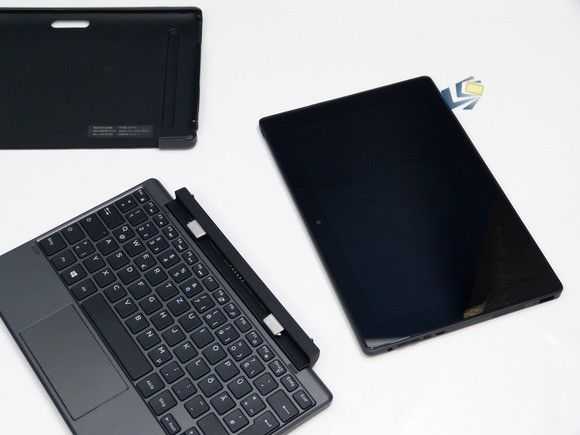
There are some good security option on the Dell Venue 10 Pro though. I enabled Bitlocker file encryption by using a Microsoft account and noticed that there are BIOS options to disable ports, cameras and features. Where businesses are looking for a data-collection device to use with in-house software, the Dell Venue 10 Pro could be a good value option. Security, screen and ruggedness are top-notch for the price.
Total weight is a little on the heavy side and the ‘docked’ thickness is way more than you’ll get with even a Surface Pro 3 and keyboard but you do get a nice keyboard and touchpad and it’s no bigger than a netbook from a few years ago. The 32 Wh battery is worth having too although my review device had lost 16% of its capacity already. Watch out for battery wear if you buy a Venue 10 Pro and return it if you reach 10% wear in 6 months.
If Dell upgrade the Venue 10 Pro with an Atom X7 CPU and a slightly faster eMMC disk then we’ve got a winner on our hands but in its current form it’s a product for vertical markets. Maybe that’s why we’re not seeing it in retail channels yet.