
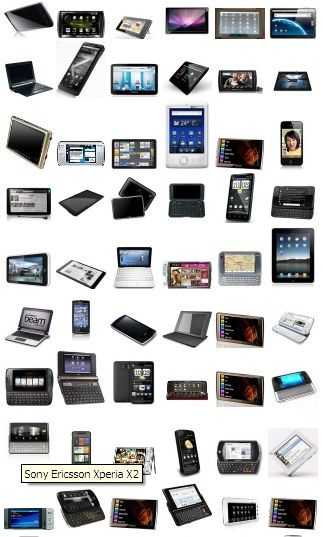
This might seem obvious but we think that many of our readers are looking for a similar product – a consumer handheld internet device, which kinda makes sense because that’s all we cover here at Carrypad!
We wanted to simplify the decision process and short-cut some of the fuss and hype that goes on around the tablet space so we’ve come up with a checklist for you. It’s focused at the consumer tablet but much of this applies to slider and clamshell designs too.
Bookmark this article and when you see a product you like, take a quick look at this list to see if it fits the mould for an enjoyable, usable, flexible, quality handheld internet product.
Handheld Internet Tablet Checklist
Business User?
We’ve got some bad news for you. The market for consumer tablets has just started and hasn’t yet fully evolved into business use cases yet. Some experimentation is taking place and of course, some basic business process can be done on these devices but as of August 2010, we don’t recommend using a consumer internet device for business purposes. For business and pro solutions, look at some of the Netbooks and UMPCs around. These focus on moving the rich desktop operating system with it’s applications and security features, into a more portable form factor.
Size.
Start with size. All sizes have a primary use so have a quick think about your requirements.
- 5 inch screen = single handheld in portrait and landscape mode. Entry-level for web browsing without zooming and panning. Can be under 500gm for one-handed use and ereading.
- 7 inch screen = single handheld in portrait mode only. Excellent size for web and a 1-meter video playback experience.
- 10 inch screen = two hands. Impressive touch and viewing experience and productivity potential. Table-top use.
For more detailed guidance on sizes and capabilities, see this post.
Features.
Once you’ve considered the size of the product, you can start to think about capabilities. Here’s what most people will need to consider.
- Web High quality browser (but not full internet experience with Flash, plugins.) because 50% of tweets, many emails, many facebook updates come with a link that needs a browser. It’s the common denominator of applications.
- User interface Must be finger-focused (if no pointer controls or keyboard are included in the design.) Developing a rich, deep, comfortable and enjoyable UI is a skilled job and takes a long time.
- Applications (built-in or downloadable minimum requirements we expect to see) Facebook, Twitter, YouTube, text editing, email (POP3, IMAP), PDF viewer, Epub viewer, image viewer/editor, mp3 player, video player, weather app, PIM (contacts, calendar with synchronization.)
Technical
Here are the main points to consider.
- Screen Capacitive (resistive is simply too fragile, awkward for consumer devices.)
- CPU ARM V7 architecture (e.g. Cortex) or Intel Z-series Atom Architecture. Even high-clocked ARM6 architecture CPUs (such as the ARM11 products) just don’t have the processing power to support multitasking or the processing requirements of a good browser. ARM11 can be considered for ereading / mobile websites / navigation / audio but not a full, satisfying internet web and application experience.
- GPU Video playback hardware UTILISED BY SOFTWARE. Many products use a capable hardware platform but the software is not optimised for it.
- Battery life 4hrs on-net usage + quick standby (sub 20 seconds) or always-on capable. 4hrs is minimum.
- Resolution 800×480 is the minimum for web. 1024×600 for a 10 inch screen but this depends on user interface.
- Connectivity / Interfaces Wifi b/g , 3.5mm headphone port, storage card slot, USB2.0 host port. (For adding keyboard, hard disk, 3G module. Many devices only act as clients – devices you connect to a PC as use as an accessory)
Design:
Consumers want something that looks good. Cheap plastics, creaky joints and wobbly battery covers don’t help. Kicks stands help a lot. Included cases can extend the life of the device. On-frame controls help save space on-screen.
Price.
For a device that fits the above requirements we’d be looking at a entry level of $300. [August 2010] Good design, good plastics, good components and good UI cost money. If you want to add 3G to your requirements, add $50 – $100 to that price. Consider that the leading-edge smartphones of today are costing $500 or more. Carriers subsidy does not make a low-cost product, it just spreads the cost.
Example products.

Apple iPad. A very high quality large-format device with a class-leading UI and leading applications suite. In the large-format space, there is no competitor to the iPad at the moment.

Huawei S7. Not available yet but from what we’ve seen, a well specified and usable 7″ device. Resistive touschscreen takes a lot away from the user experience however.

Archos 5 Internet tablet. Good value, video-focused tablet. Resistiv touchscreen and no Google applications on the Android-based OS. New models expected from Archos in late summer 2010.

Dell Streak. One of the best quality Android tablets available today. 5″ with capacative screen, full Google Android build. Can be used as a phone.
SmartDevices SmartQ range. Includes 5″ and 7″ devices but all run a basic open-source Android build, come with ARM11-based processors. Relatively good value if you are not looking for a full, fast web or application experience.
Products expected in Q3/Q4.
We’re waiting for products from HP, Samsung, Archos, ICD, Notion Ink, Viliv, Blackberry, Interpad and others. Information on specs, capability and pricing should feed-through during September 2010 with availability expected in Oct-Nov timeframe.
We track as many products as we can in our database and you can view all of the devices here.
The extras…
Our database contains placeholders for a lot of features. You might want to consider this list if you’re making a final decision…
Accesories:
- 12v power adapter
- 3G voice/data modem
- A-GPS (Internet Assisted)
- AC Adaptor
- Accelerometer
- Ambient light sensor
- Bump Case
- Camera Auto-Focus
- Car Mount
- Case
- Compass (Digital)
- Digital pen
- Digital TV receiver
- Docking cable
- Docking station
- DVB-T Module pack
- Extended battery
- Fingerprint reader
- FM radio
- FM transmitter
- GPS Navigation Kit
- Hard Case
- HD Video Accelerator
- Headphones
- Headset (headphones/mic)
- LED Flash
- Xenon Flash
- Mic array
- Microphone
- Multitouch Touchpad
- Optical Mouse Pointer
- Port replicator
- Proprietary cable
- Rear Trackpad
- Scroll/Thumb Wheel
- Software CD
- Stand
- Stereo speakers
- Stylus
- VGA adaptor
- Voice (Cellular) Capability
- WebCam
Interfaces:
- Compact Flash slot
- Consumer IR (remote control)
- Docking connector
- DVI-out
- eSATA/USB
- Ethernet 10/100/1000
- ExpressCard 54/1
- ExpressCard/34
- GPS Antenna socket
- HDMI
- Headset i/f (Mic+Line)
- IrDA (infrared data)
- Line-in
- Line-out (2.5mm)
- Line-out / Headphone (3.5mm)
- Memory Stick slot
- MIC-in
- Micro SD slot
- Micro SDHC slot
- Micro USB
- Mini PCI-Express
- Mini USB 2.0 (client)
- Mini-SD slot
- Mini-USB 2.0
- Mobile SIM-card slot
- Multi-format card reader
- PCI-Express Mini (internal)
- PCMCIA (Cardbus, PC-Card)
- Proprietary connector
- RS-MMC Slot
- SPDIF-out
- USB1.1
- USB2.0
- VGA
- Video-out (analogue)
Further reading –
Things to Consider when Designing or Buying a Tablet-Style Device










No mention of Always Innovating’s TouchBook
….and many other devices but they’re all in the database.
Nice checklist.
Compared to the one I wrote a while ago, we agree on most of the important points.
I also though the RAM is very important, 256Mo at least (but maybe nobody provides less).
And for me a thumboard is very appreciated, though it’s specific to my use: ssh and keyboard focused interface. So there is more free space on the screen (no virtual keyboard and less icons/menus). Also because I want a small device…
Though I don’t have one on my current device, and for what I do most of the time, it’s not that important.
Good point on the RAM. 256M would be a minimum, you’re right.
Also like to see the ability to make hand written notes and usb slots.
HDMI(W/Audio)should be a requirement. Large screen (42″+) HDTVs are the norm in the US, and composite video connectors are becoming more scarce on HDTVs.
One point I disagree with your list is the exclusion of Flash. looking up sites from local establishments in the US (Cinema, newspapers, restaurants, concert halls, etc) are more likely to require flash to view vital content, limiting one to viewing sparce mobile versions of sites if its even available.
I agree with everything else, although a 7″-10″ capacitive screen is kinda rich for $300.
Hi Chuck
I think we’re in a middle-ground with using these tablets as PVRs/video players at the moment. Few docking stations. Very little content in most cases. HDMI would be nice but then there’s the people with analogue TV’s still (UK still has analogue broadcasts for example.) I think HDMI is an opportunity for someone. E.G. Archos who do a good job of turning their tablets into PVRs.
As for Flash, I don’t see consumer tablets as really needing 100% qality internet. Flash can degrade performance and where app-stores are available, some of the flash apps would be better as true apps. Flash needs to be an option I think and we’re moving towards that with Android.
Thanks for the feedback.
Chippy