


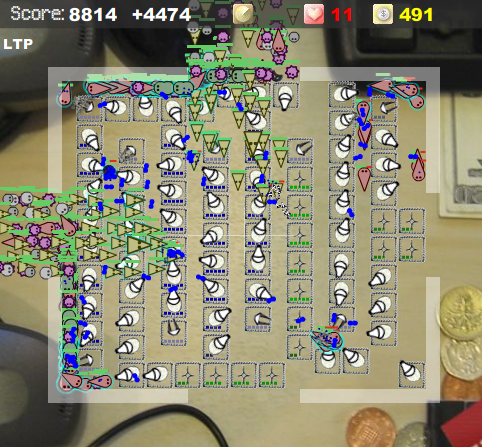
It is time for the third installment of the touchscreen friendly game series. Today I want to show you a game called Desktop Tower Defense:
Desktop Tower Defense is quite obviously a "tower D" game. It is a free flash based game that is played directly inside the browser. It is available in English, German, Spanish, Italian, and French languages. The goal of the player is to prevent the enemies (called creeps) from crossing the map and reaching the other side. For every enemy that the player fails to destroy, and makes it to the other side of the map, a life is lost. When all of the player’s lives run out, the game ends. To prevent creeps from crossing the map, the player has several choices of defensive towers.
continue reading for video demo and more info…

Some towers do low damage but have high rates of fire (good against fast creeps); other towers are the opposite, dealing high amounts of damage, but at a low rate of fire. Additionally there are several special towers which can slow or stun enemies, boost the damage of other towers and so on. There is lots of strategy in this game when it comes to positioning towers. Generally a maze made out of towers can be built so that the creeps will spend the longest possible time crossing the map, and thus gives the player more time to do damage to them. Of course there are several different types of enemies. Without going into too much detail; there are ground creeps and air creeps. Ground creeps must go around towers (allowing the maze strategy to work), but air creeps fly right over towers. The game actually gets extremely challenging if you play to the later stages. Hint: you can click the "send next level" button to send the next wave of enemies if you have already cleared the previous group.
Desktop Tower Defense works well with a touchscreen because every function of the game can be manipulated through an on screen button. This means that there is no keyboard use, and someone with a touchscreen can play quite effectively. It is easy to place towers with your stylus, click on them and upgrade or sell them back for money.




I have played this game and became thoroughly addicted to it. It has a good balance of levels, so that it starts easy and progressively becomes almost impossible.
It was amazing how good it felt to complete it, only then to realise that others had done it and got more points. Recommend to everyone to try!
Of course, BEWARE – it is addictive and can destroy your family life if you let it.
One game that you may want to test is sokoban. You may want to look it up (it has many clones) on the internet. I was almost addicted to it a few years ago until I solved all 50 levels, many of them on a Palm Vx on train trips. So it should work fine in full XP or linux machines with a touchscreen interface.
it’s indeed a highly addictive game!
I finished the easy and medium level reaching the highscore!
Now the hard level :s