


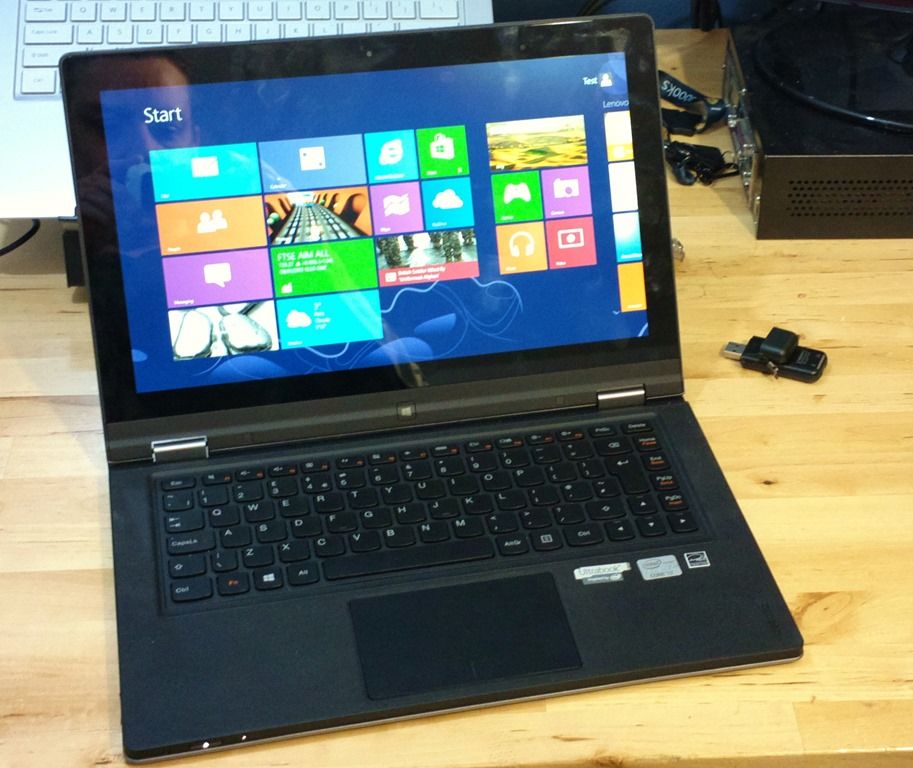
I’m a little bit behind the curve on reviewing the Lenovo Yoga 13 but given the amount of interest that we’ve had on the Yoga 13 over the last year (yes it was a year ago I had my first hands-on) it’s worth spending some time on a detailed review. Before that though, here’s my first impressions after 4-5 days usage.
You’ll find the Lenovo Yoga 13 unboxing here.
I’ve been using the Yoga 13 this week as I report on CES. Not at the show in Las Vegas but from my desk. The Yoga has been one of my desktop PCs (the other was another Ultrabook) but it’s the Yoga that’s been the keyboard. (Via Synergy I’ve been using it as the keyboard for the other Ultrabook too.) So that’s the keyboard covered then. It’s good, but doesn’t have backlighting. The mousepad is, well, OK. I’ve got a USB mouse attached here as I’m moving across three screens but the mousepad seems OK for one-screen use.
I love the IPS screen (essential on a device that will be used in tablet mode) but it’s a little yellowish and not very bright. Where I might be working at 40% brightness on another Ultrabook I’m running the backlight at over 75% here. Still, as long as you don’t need outdoor usage and the battery life doesn’t suffer, it’s OK. 1600×900 resolution should be a minimum on 13-inch Ultrabooks – it’s the perfect balance here and combined with the IPS makes my Toshiba Z830 look like it’s running in a non-native resolution. Yuck to the Z830, thumbs-up to the Yoga 13.
Something that always rings alarm bells is continuous fan. It’s not really possible to get this Core i7 system silent even locked at 800Mhz which isn’t so bad as the fan noise is a relatively low ignorable noise but it tells me that things need cooling inside. I’ve seen Lenovo tuning for cooler devices before so maybe, like on other Lenovo Ultrabooks, you’ll get more out of Turbo on this.
Port selection is a little week. One USB2.0, One USB3.0, full SD slot, combo headset port and full HDMI are all you get even though there seems to be space for another USB port.

Let’s talk about this 1.5KG tablet then….or did I say enough already? Not only is the Yoga 13 too big to be a tablet in my opinion, it’s too heavy. Combine heavy and big and you get a big wrist strain. The Yoga 13 is even clumsy on the lap or belly as a tablet and I’ve rarely had the screen past 180 degrees unless I’m doing ‘that demo.’ I can only agree with other reviewers that say it’s a good laptop but a poor tablet. Without a digitiser I can’t even recommend table-top use for annotations. OK, Fruit Ninja is fun and I want to test Civilization, especially as it has been optimised for Ultrabooks and has touch support built in now.
The speakers are nice!
I haven’t been able to test battery life as I’ve been hooked up to the mains while I’ve been covering CES. (Seriously, i’ve written about 12 articles in the last 48 hours on the Yoga 13) but when I’ve had it in battery mode I get the feeling it’s got a similar level of efficiency as the Lenovo Twist. That wasn’t the most efficient Ultrabook about but at least the Yoga has a solid 54Wh of battery capacity. 6hrs of browsing seems possible although this Core i7 can hit 3.0Ghz so there’s potential, especially in games, to really get some energy flowing out of that battery!
In a Cinebench 11.5 test I got a good score of 2.26 and saw the CPU clockrate hang in at 2.8Ghz for much of the test which is a good sign.
On WiFi and Bluetooth it feels above average although not as good as the Lenovo Twist which has a Centrino WiFi/BT4.0 module. There’s a Realtek module on this one which might be why I could get BT4.0 image transfer working from my Nokia 808. (Update: It’s working now.) I personally prefer the Centrino modules as long as there’s a good antenna design.
The Lenovo Yoga 13 appears, after just a few days testing, to be a good working laptop that has a gimmicky convertible mode. Seriously, I think the Twist is a far better convertible but since yesterday there’s another Yoga to keep an eye out for The Yoga 11S with the low-power Core is coming out in March and that could be a far better convertible product. It looks like Lenovo had the right design but couldn’t get it small enough with a 17W CU inside.
Feel free to ask questions below. I’m covering CES so it’s a bit crazy this week but i’ll check back here regularly.




















The 11S though is rated at 6 instead of 8hrs compared to 13. Although maybe that spec could still change.
Also it’s not much lighter and has same 360 flip design so not too much better as tablet. Helix looks better as hybrid (detachable tablet and digitizer) but lot more expensive.
Hi,
How is the feeling in the hand / gingers while holding the device in table mode? does it not “disturb” the work?
Thanks,
Isaac
Tel Aviv, Israel
It does kind of feel you might break the keys if you hold it with 1 hand (even though it doesn’t).
Holding it with 2 hands or resting it on your lap feels ok though. I’ve heard there would be a cover around keyboard but not sure if that’s convenient.
I’ve got a friend bringing me the Yoga 13 on Sunday as I live abroad. It’s a replacement for a Samsung Series 9 15″ which got stolen, and I didn’t want to pay another $1400. Also I still have the original 128GB hard drive from the Series 9 and have read that you can put it into the Yoga–256GB, awesomeness. I intend to use it as basically an ultrabook, with tablet usage only in my lap, on planes or for reading PDFs. I also have a phone and a Kindle so I don’t need a featherlight tablet for light travel reading.
The problem is that the 11.5 inch is still over three pounds and that is just too damn heavy for something you may want to use as a tablet. I really thought they would bring the weight down to 2-2 1/4 pounds with the 11.5 but they miss the boat again.
Yes only 145 gr / 0.3 pounds difference….
And at same time battery appears to be smaller as well so not sure why it’s not that much lighter.
Yup, a valid point. Current one-piece Ultrabook convertibles have limited usage scenarios. I personally love having a touchscreen but there’s the consumer, casual space that can’t be addressed by an Ultrabook convertible at anything over 1KG
Chippy