


The Dell XPS 12 has been sent for a quick review via the guys at Ultrabook-king.de and I’ve had a chance to do some testing already. The first thing I noticed was how solid it feels. The hinge, frame, casing and keyboard seem top-notch although, probably as a result, it feels dense and a little heavy; Certainly too heavy to be a casual tablet. Here’s a first-report and your chance to ask questions.
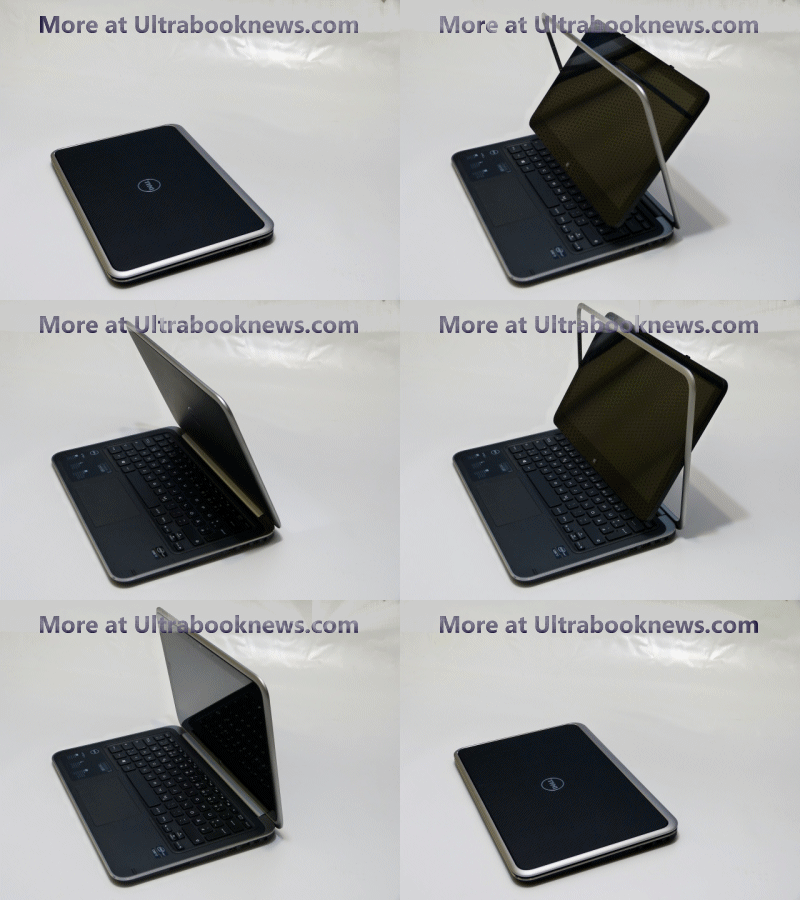
The image above sums-up the unique design of the XPS 12 and shows how this Ultrabook converts into a Windows 8 tablet and I can guarantee you’ll play with the mechanism a lot because it feels smooth, solid and has a nice balance. You may not be using it in earnest too much though because, like the Lenovo Thinkpad Twist [review here], it’s just a little too big and heavy to be a comfortable tablet. Personally I’m not convinced that the Ivy Bridge platform is going to result in any good one-piece convertible designs unless the screen itself can be removed and used without the base. Even then, there are serious design issues and capability limits for Ivy-Bridge based tablets. The Dell XPS 12 doesn’t have a digitizer layer either so you’re missing the capability to annotate, draw or write accurately leaving ‘snack’ gaming scenarios, video playback and, let’s be honest, showing-off as the main use cases. In those scenarios, there are better and cheaper options out there. I’ll be doing further tests in the tablet mode for the full review.
On the general topic of convertibles and dockables – keep Haswell in mind. The convertible is a good idea but it’s going to require the new architecture of Haswell (4th Gen Core, late 2013) to really make the products shine in their different usage scenarios.
Moving to the working fascia, the Dell XPS 12 feels like an excellent productivity Ultrabook. The backlit keyboard is very good, mouse – accurate and screen pin-sharp. The 1920x1080p IPS screen on Windows desktop in 12.5” is a bit too much though. Pumping the font and icon sizes up over 125% makes it look ugly but even at 125% text isn’t that easy to read unless you’ve got perfect vision. The 1600×900 of the Lenovo Twist Yoga is a better native resolution at this size. Colors and brightness seem good though. It’s quiet (silent right now as I type) and relatively efficient. Although it’s only got a 45Wh battery inside (similar to the Lenovo Twist) it reports slightly better power usage figures. There’s not much in it between the Twist and the XPS 12 but the XPS 12 could give you an extra half an hour under Web-working scenarios, I feel.
As for ports, note that you’ve only got a mini DisplayPort 1.1a for external video here. If you’re only going to have one video-out port it’s the best one to have but if you use monitors or projectors with HDMI or VGA input, you’ll need the respective adaptors. 2xUSB3.0 and a headset port are the only other ports which, for a device of this weight, isn’t good. The problem is that because of the frame design, there’s nowhere to put the required tablet buttons so the power, volume and rotate lock button are in places where you’d expect the SD card slot and a third USB port. Trade-offs!
There’s one annoying thing about the design in laptop mode because if you use the touchscreen a little too hard the laptop rocks back. It’s really annoying and spoils the laptop-touch experience.
Other notes:
- Speakers and Maxx Audio processing can offer good results. Some tuning to taste is required.
- Fan noise is minimal when active.
- Mousepad has integrated buttons. I’ve experienced a few cursor jumps on tap-to-click.
- Model being tested here is the top-end Core i7 with 8GB and 256SSD.
- Very little additional software installed on this review model.
- WiFi is a high-end Centrino module with WiDiv and Wi-USB support. Reception quality seems to be very good.
- Due to the frame the XPS 12 feels like it should have a 13.3 inch screen. It’s not something you notice until you bring a 13.3” Ultrabook up alongside it.


As a tablet it’s quite heavy and the default text size can be on the small side.


















Every touch laptop will rock back when you press on the screen, unless it lays flat or is a slider type of convertible.
I was seriously considering getting this because of the better keyboard and fan noise vs. the Yoga, but then I held back… You must buy whatever memory you want now. You can’t get the 4GB and upgrade to 8GB later. And even though the HD isn’t stuck to the mainboard like the RAM is, it’s not as easy to get to as other laptops. So jumping up another $200-$300 seems crazy to me.
Not every touch laptop has to rock back. I have one here, an Intel developer touchscreen Ultrabook and there’s no rocking back. The Twist didn’t rock back either.
Between the Yoga and the XPS 12 I would choose the XPS as it’s more proffesional than the Yoga, an Idepad device. A Twist with SSD is closer to the XPS 12 than the Yoga, in my opinion.
The RAM upgrade issue is, as you pointed out, very important.
Personally I prefer the Lenovo Twist design but the XPS 12 is going to give you a little more battery life.
Steve.
1 typo:
The 1600×900 of the Lenovo Twist is a better native resolution ”
Do you mean Yoga 13 rather? Twist is only 1366×768 and looked too low res to me (after seeing the Yoga 13).
Thanks Luc. I’ve corrected that.