


Connectivity/Reception
In my current area (Philadelphia), Verizon’s 4G reception is extremely good. I don’t believe I’ve ever seen the software report any less than 3 out of 4 bars, and most of the time it’s showing full 4-bar coverage, often regardless of whether or not I’m inside. The 4G reception penetrates through buildings exceptionally well, similar to Verizon’s 3G service. Whereas, in my experience, AT&T’s reception doesn’t hold up so well inside. The only issue I’ve had with regards to the 4G connection is that it will occasionally drop for a reason which I have yet to be able to determine. By “drop inch I mean it’ll stop transmitting and receiving data suddenly. Fixing it is easy enough, just open the software and disconnect, then reconnect. It doesn’t happen too frequently (a few times a day), but it could easily happen in the middle of a lengthy upload or download and inspire some serious ire in a user. Perhaps the issue will be fixed with a firmware update for the device or an update for the computer-side software.
Software
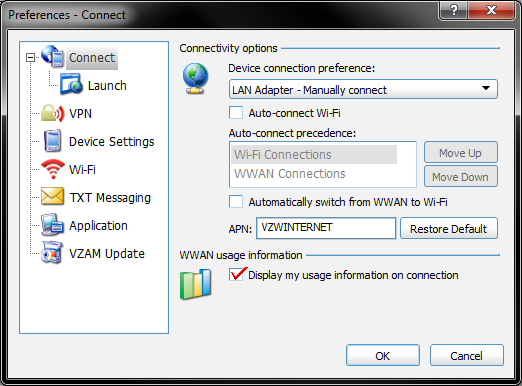
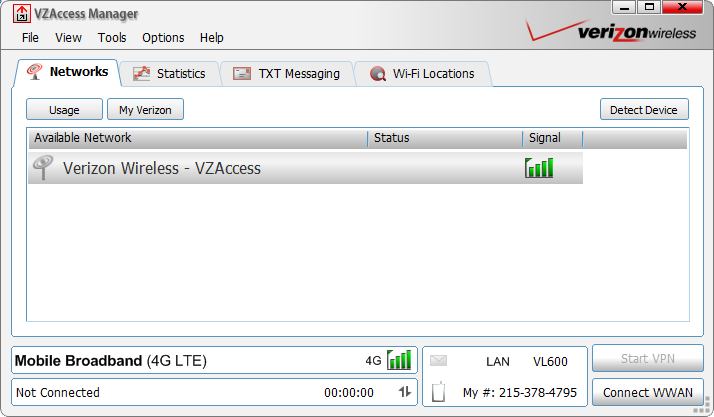 Everything about the VL600 is very straight-forward, but things break down at the software level, which is a real shame. The software, called VZAccess Manager, is easy enough to use for someone who has been deeply involved in computing for years, but is overly complicated for the average user. For one, the software sees fit to include WiFi hotspots that you computer can pick up in the same list that it shows the mobile broadband connection. This in itself is going to confuse more than a handful of people. Not that it’s hard to get connected. Just select the “Verizon Wireless VZAccess inch item from the list and you’ll connect in just a few seconds. However, the lack of any mention of 4G or LTE in the connection name will certainly confuse some initially. The preferences page is far from user-friendly with terminology that won’t be familiar to the everyday user:
 As mentioned earlier, the 4G modem has the ability to send text messages. If you don’t have a mobile phone already, I guess this could be useful, but I can’t imagine that a large portion of users will make use of this feature. It certainly isn’t the pinnacle of SMS either. When composing a message, you can only select contacts from the Windows Contacts application (or enter them manually). Upon sending the message, you’ll be greeted with a ‘sending’ window, and be unable to interact with the software until the text is successfully sent. Then you’ll get another pop-up dialogue box that tells you that the message has been sent. Still you can’t use the rest of the program until you hit the OK button on this window. Very clunky, to say the least. There’s also a Wi-Fi Locations tab which lists (presumably free) Wi-Fi hotspots across the nation. This is well intentioned, and perhaps useful in some cases, but the fact that the catalogue only has some 47 locations listed in the whole of Philadelphia speaks volumes about its comprehensiveness (or lack thereof).
Conclusion
The LG VL600 4G USB modem is a great piece of kit for the road-warrior. Verizon is not currently charging any more for their 4G USB modems than their 3G ones, so the increase in speed will be welcome to those already subscribing to a 3G modem. The currently blazing speeds of Verizon’s 4G will drop with time, but they say that you can still expect to see between 5-12Mbps down and 2-5Mbps up. The modem is fairly easy to use, but the software is certainly the weak-point of the whole operation. An issue that requires you to occasionally disconnect and reconnect is the only real problem I’ve had with reception/connectivity which is otherwise extremely good in this area, even when indoors. The size of the modem could definitely be brought down over time, but luckily a USB extension cable is included in the box to ensure that the modem would obstruct other nearby USB ports.
Pages: 1 2




















Z przyjemnością czytam takie wpisy. Będę tu zaglądać częściej. Gratulacje. Wreszcie coś na wysokim poziomie :-)