


Conclusion
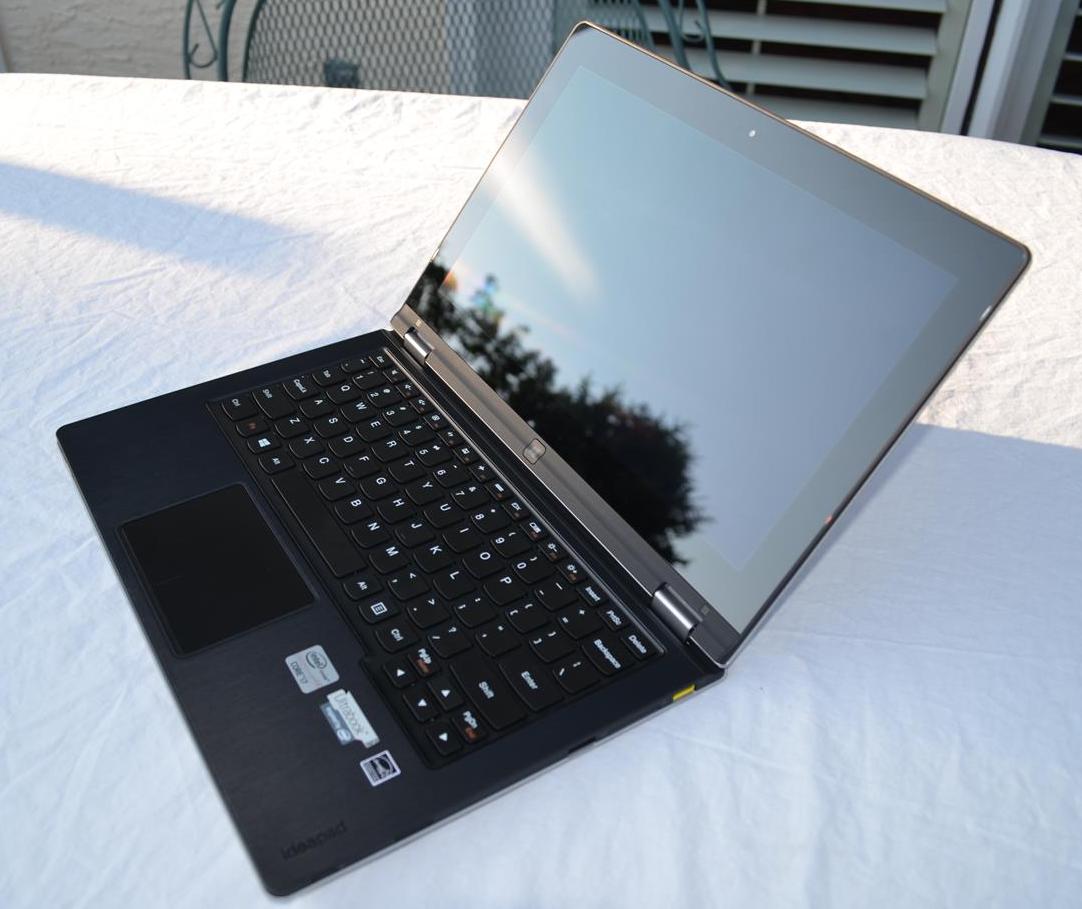
Starting at $749, the Lenovo Yoga 11S is an attractive package; there are no major deal-breakers. The Y-series processor doesn’t seem to lead to significant battery savings, but that could depend on how much you use the unit in Windows 8’s tablet mode. The convertible functionality works well and is a fun trick, but I wouldn’t plan on doing it too often, at least not until Windows 8 Metro gets the apps it needs. Once it does though, the Yoga 11S’s responsive capacitive touchscreen with extremely wide viewing angles will serve you well. As with other 11.6-inch Ultrabook convertibles though, the weight is still such that the primary tablet scenarios are lap- and sofa-surfing, not quite ‘run out the door’ with it.
You’ll either be happy to put up with the small 1366×768 resolution or you won’t — same goes for the thick bezel.
The quality keyboard makes typing (for me) on the Yoga 11S a great experience, though if you have particularly large hands, you might consider the larger Yoga 13. You might also consider the Yoga 13, and its faster U-series processor if you plan on doing heavy desktop work like Photoshop, Illustrator, and video editing. Not that the Yoga 11S can’t handle those activities, but you’ll find them faster on the Yoga 13.
The speakers on the Lenovo Yoga 11S are nothing to write home about, it’s typical small speaker fare: tinny sound lacking in bass. If you plan on listening to music, definitely invest in some headphones. That said, this the first Ultrabook I’ve tested that actually seems to benefit from the included Dolby Equalizer. Yes, it’s a crutch for poor speakers, but it at least makes the sound louder and adds a tad of significantly missing bass, so be sure to leave it on. It still doesn’t come close to the standard set by Asus’ Bang & Olufsen ICEpower found on the Zenbook series of Ultrabooks.
I end up saying this on every review, but it almost always rings true: I wish this thing had 3 USB ports! Unfortunately, most Ultrabooks do not, for reasons I can’t quite comprehend. This might be an issue for some.
The build quality of the Lenovo Yoga 11S is very good aside from a little keyboard flex that I mentioned. The smart choice of soft/textured plastics definitely brings the quality feel up a notch over normal plastic alternatives. The ‘slot-in’ case (not included) is stylish and modern looking, which might appeal to those of you using the Yoga 11S in a work/meeting environment.
If you’re looking for a light Ultrabook convertible, the Lenovo Yoga 11S get’s our vote, just be sure that the slower Y-series processor is up to your needs.


















Great review Ben. Let’s hope the price gets even better over the coming months.
For future reviews can you provide the following:
-WiFi chip and antenna configuration.
-Time graphs of WiFi data rate and latency over a long period.
-Time graphs of CPU frequency under prolonged load. If using cTDP then do this for each TDP setting.
Nice review. I guess the keys in tablet mode really are awkward. That close button seems unnecessary to me as well. I’m surprised Lenovo didn’t provide a groove for easier opening of the notebook.
Oh well, didn’t really think the whole yoga concept was good. Looks like it really isn’t that great after all.
This please. This review is even missing any information about WiFi and how much Turbo can be maintained. It’s as if the Yoga doesn’t have WiFi capabilities.
What WiFi configuration(s) does this have? It’s completely missing from the review.
One question: how is the Ivy-Bridge-Y (I7) compared to AMD’s Temash A6 ?
tried the 11S at BestBuy yesterday. i’m not sure if its just the demo i used, but when in tablet mode, keypress are still registered. isnt it suppose to disable the keyboard when in tablet mode?
Yes it’s definitely supposed to disable the keys — worked perfectly on the unit I used.
40% faster in worst case, and 2.5x+ faster in best case in favor of the Ivy Bridge Y. The Ivy Bridge will get 2x or more gains in scenarios that are lightly threaded, which you will find it to be the case in vast majority of usages.
It’s probably worth mentioning that both the Yoga 13 and Yoga 11S uses single-channel memory. That will hamper the CPU performance a bit and GPU performance quite a bit.
What kind of real world FPS drop for a particular game you know of would a single-channel memory have vs dual-channel? Benchmark number differences usually can’t be easily converted to any kind of FPS differences. Sometimes a large benchmark score difference didn’t have much impact on actual FPS.
I don’t know why anyone takes any unit with a 1366×768 display seriously today, or how PC makers keep getting away with marketing inferior products. Seriously, Google can release a $229 quad core tablet with a 1920×1200 display, 2gb ram, 16gb ssd… and yet PC makers keep releasing $700+ notebooks and tablets with 1366×768 displays.
I’m guessing 20-40% depending on games for the single channel versus dual channel. That would get progressively worse on higher resolutions and settings. That was for the HD 3000, a better performer like the HD 4000 would probably end up little bit worse.
Cinebench GL rendering is actually not very sensitive to memory bandwidth, and neither are the 3DMark benches tested here.
Actually that quad core chip is weaker than AMD E-350 chips on the PC. Using 2GB RAM and 16GB SSD will also save on the money. 4GB vs 2GB RAM would be responsible for about $50 of the cost and 16GB “SSD”(actually a very low throughput eMMC controller) another $150 or so. If you go for the Intel Atom or AMD E series chips you’ll save another $150.
-Then add in margins PC makers require, versus Tablet vendors like Google often close to losing money on the hardware so they can sell apps
-PC makers have too many models, so they are disadvantaged on the volume discount
You will see the resolution disparity quickly close in the next few years. Right now the effort to push 1800p and above displays on the premium will trickle down so you’ll get 1080p in cheap Laptops for example.
I know there are differences in performance, etc. etc. but if you can put a screen in excess of 1080p in a budget tablet and still get good battery life then the arguments for 1366×768 displays just don’t hold water.
At this point I think anything larger than an 11.6″ should at least have 1600×900 displays. I like the 11S but its display completely discounts it as an option for my use.
What’s your use case where the lower resolution would noticeably impact your particular task?
For me, I care more about power consumption, brightness, contrast, viewing angles and glare than high PPI especially on a desktop OS where high PPI causes UI issues. Even setting the DPI scaling causes additional problems.
Its a little heavy for an 11″ device, resolution a little low and I don’t like sagging keyboards.
Lenovo, please don’t let your keyboards slide…