


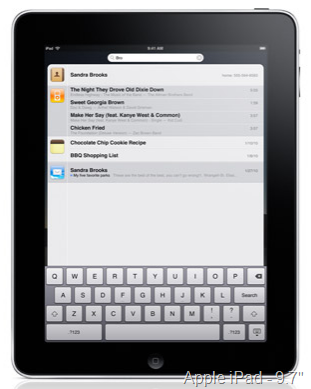
More than the actual product itself, I was excited for Apple’s iPad unveiling because I was waiting for them to show the world their innovative solution to input on a large keyboard-less device. I was very surprised to find that they didn’t offer anything innovative. Instead, the iPad uses a simple iPhone style keyboard (albeit a larger one). The inability to efficiently input text on these large slates is going to be responsible for their extinction.
The companies making these big slates, in an attempt to justify the slow keyboard input, would like us to think that slates are all about content consumption. And surely they are; larger slates will be great for feeling like the web is in your hands. But there is a certain degree of input that will always be necessary to access the content that we’d like to consume (until computers can read our minds, that is…) and people will always want to be able to effectively write short messages when they are connected to the web. My iPhone is all about consumption of web content as well, and I type on it all the time. From tasks, to tweets, good input is a necessity.
Apple changed the landscape of mobile devices by realizing that a well designed on-screen-keyboard (OSK) could have serious benefits, such as being able to remove the keyboard when it wasn’t being used, and being able to dedicate the entire screen to the content.
A good OSK works great with a device that is small enough for one’s thumbs to reach nearly all the way across the screen. The nature of a thumb-board means that only two digits are in the way of the screen, offering great visibility, which is very important for an OSK because of the obvious lack of tactile information. Even the way that the device is held makes the OSK thumb-board concept work well — thumbs come in from the side and are naturally lifted away from the screen allowing the user to see the next key that will be pressed.
As the size of slates increases, people start doing that awkward thumb stretch to try to reach a key that is out of range. In order to do the thumb stretch maneuver, one must change up the grip on their device just to hit one key, then switch it back when they are finished. This slows down the rate of input and starts to break down the overall experience of using the device.
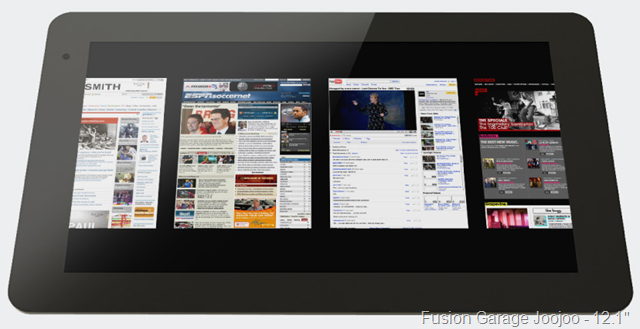
The real issue is when slates get so big that thumb typing isn’t even viable. How can one use something like the iPad while walking? The only way seems to be holding the device with one hand and poking at the keyboard with the index finger with the other. Even if the iPad is sitting in one’s lap, trying to touch-type on an OSK will be a pain. Why? For a few reasons; the first of which is visibility. While the grip on a small mobile device means that thumbs can move quickly and effectively away from the screen, attempting to lay your hands on a large slate with an OSK will sufficiently block the keyboard from view.
What’s more, there are no palm rests on these devices. The experience is not going to be comparable to typing on a physical keyboard. Many of these slates shooting for the edge-to-edge screen look, leaving no room for one to rest their hands if the objective is to touch-type with the OSK. What is someone to do, float their hands above the screen and touch it only with their fingers when they type? If the only alternative is typing with a single finger, users will be begging for something better.
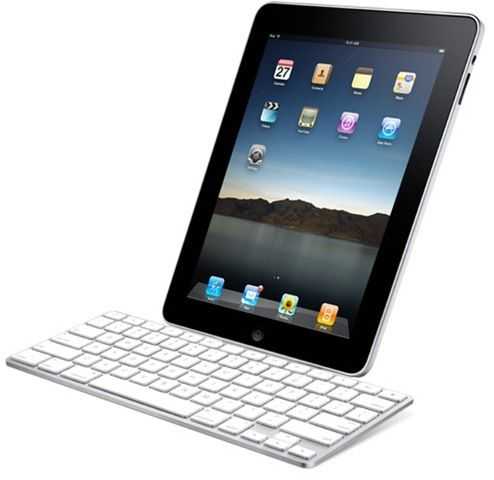
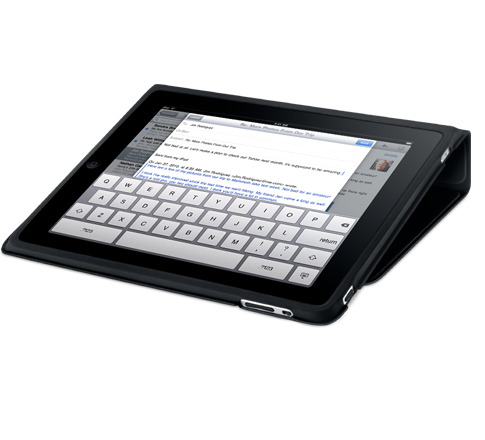
Apple may have anticipated some of this typing frustration by also announcing two accessories which both aim to assist the user in typing. One was a dock that has a keyboard, and the other is a case which props the device up on an angle which is supposed to make the device easier to type on. While these might reduce the annoyance of poor input, accessories and add-ons are not a final solution to the problem. These two accessories, unveiled in the same announcement as the iPad, show that Apple realizes that typing on the iPad is a weakness. Eventually, users may be asking “Why do I have to dock my device to use a decent keyboard? Why isn’t there a better way? inch
A well designed OSK is a major blessing for a small device with a screen size that makes it thumb-typeable, but once you get out of the screen-size range that enables thumb-typing, input will become painfully slow. The door is left open for someone to come up with a good alternative solution to giant OSKs. I’d like to say that written input would be a good one, but that’s already been done quite well on the tablet PC platform, but somehow hasn’t managed to catch on.




















You forgot the third solution. They have said that they will support the use of a bluetooth keyboard, something that many iPhone and iPod Touch users have been asking for a number of years. That concession is convincing proof that on-screen keyboarding on the iPad is not going to work for many people… just like it doesn’t for many iPhone users. Good to see Apple providing the option!
when/where was bluetooth keyboard support mentioned?
every mainstream website bashed 2006 UMPC’s for this very problem, yet those same websites arent even bringing it up with the iPad. i would even argue that UMPC’s did more with the split KB
everything from the UI to the KB seems like Apple almost didnt even try with the iPad. as if software wise the real product was scratched & this was thrown together in the last few months.
I’m glad you mentioned this. I was about to bring it up in the article, but didn’t want to make it too much longer.
You are right… we’ve already been down this path, slate UMPCs were a huge flop because they lacked physical keyboards and their ink input didn’t cut it because they didn’t have active digitizers.
The iPad will have a similar problem. It’ll definitely have better OSK performance because of the capacitive screen, and intelligent auto-correcting, but the same core issues remain.
If the resolution in PPI was the same as on the iphone we could split the keyboard to 2 rectangles, one left, one right – a thinner bezel makes thumbs reach more characters.
An additional button on the side or on the bottom to raise the OSK might be needed.
And maybe you know it already:
Companies like CRE have massive glass screens with tactile feedback already!
http://www.cre-electronic.de
There are prgms that can fix this problem… I still use DIALKEYS on my tablets. It breaks up the qwerty kboard into two halfs in the lower corners of the screen.
It’s been out since before my Samsung Q1.
Fix it and pay for it in the appstore? People were crazy enough to buy a dumb iphone though…
Surely the problem with big slates, is that they are big slates. Screen sizes over 8″ just become unwieldy to hold and operate the OSK whatever they do with the software.
Any screen size over 9″ and you may as well bolt on a keyboard. Just as MS Tablet PCs like the TC1100 and LE1600 offered a bolt on keyboard, Apple have followed suit (but in portrait!?)
I’m not a touch typist but I thought that technically you shouldn’t rest your hands on the desk – I know people who purposefully move the keyboard to the edge of the desk so that their hands have to hover.
The problem with resting the iPad on the desk is that the reverse is not flat – you’ll end up chasing it around the desk as you type! Hence the extra accessory as mentioned in the article.
On a slightly different note, it seems like a split OSK ensures you can thumb type on a large slate – I think even the 10″ Viliv s10 does this from what I remember.
For those of us who do not type the MS tablet input panel works great!
Every other interface seems lacking.
Well, good point! Right after the iPad presentation I was thinking all the way about the possibility to write standing, holding the device with two hands and writing using two thumbs…
I have to end up that measures are what we should care about: being 18 cm wide, if held in vertical-portrait position, the ipad SHOULD be thin enough to reach even the most central key with both thumb without have to strech or change position of hands…
That will be the very first thing I will try when I will have the possibility to hold one of those pads in my hands…
This isn’t substantially different from a netbook. Netbook keyboards are, really, just boat anchors that keep the screen from falling over. To do real typing, you need an external keyboard anyway. The mid-range tablets (iPad, Adam, etc.) just do away with the useless keyboard, and add a touch screen to use for incidental input while you’re in a spot where you can’t hook up a keyboard. The mid-range tablet is the (superior) evolution of the netbook.
The advantage here will go to the Adam, which has the most flexibility for keyboards (Bluetooth and USB) as well as “swype” input coming to Android. The iPad, in contrast, is much less flexible (no word on being able to use general USB keyboards, just the one dock; and only rumors about bluetooth keyboards).
I hated touchtyping on my 4.3″ HTC HD2. However a great solution for me to massively increase text input speed was a software called “swype”. Basically you have a normal keyboard but dont have to lift your finger, just start with the first key then drag your finger continuously over all the letters in the word. It recognizes the turns, hesitations etc and recognizes the words pretty accurately. Systematically it can be used with ANY touch based screen (maybe resistive is difficult). Check it out on youtube. Is much faster for text input for slow touch-typers like me.
it surprises me that they had not found the time to get hold of a screen that could handle more then two points of input.