


I’ve never been a big fan of tablet PCs. A ultra mobile PC with 5-7 inch screen, yes but the classic tablet pc with digitizer and 11.6 or greater screen size was too awkward for me, Too heavy to hold in one hand, with poor battery life and screen input limited to a pen with a focus on handwriting, was far from my idea of fun or productivity. The Lenovo Ideatab Lynx, an 11.6 inch tablet PC is a completely different story however and is easily the best 11.6 inch tablet PC I’ve used, and that includes the original Samsung XE700, a well-crafted tablet PC with Core CPU and a digitizer. The Lenovo Ideatab runs Windows on an Intel Atom platform.

Now I’m not saying that the Lenovo Ideatab Lynx is the best 11.6 inch tablet and I know there’s a huge difference between this and a pro-level Core-based tablet with Digitizer and handwriting input. I must also say that I haven’t fully tested any of the new Core-based Win 8 tablets yet but the Lynx is working well for me and I feel it hits a very nice sweet-spot in the market. Weight, size, price, features, touch, OS. The Lynx is well-balanced and while it’s not going to be a winning consumer tablet, I bet it finds a lot of friends. The Lynx I have here is the 64GB/2GB model which is retailing in my locale for 55o Euro. I only picked it up yesterday but I’ve given it some serious testing over the last 24hrs.
The 11.6 inch tablet design is very much a productivity-first design, especially when you can add a comfortable keyboard to the mix. At 635gm (1.4 pounds) it’s light enough to serve as a consumption device too though. In portrait mode it really feels like you’ve got the future of the newspaper in your hand. Seriously, if 11.6″ tablets hit 500gm I bet we’ll have another hot segment on our hands. This is the coffee-table tablet!
Is Atom good enough for the job of productivity? It depends on your definition of productivity but it’s fair to say that it’s not going to be good enough for most people as a daily drive for office-type activites. For me, 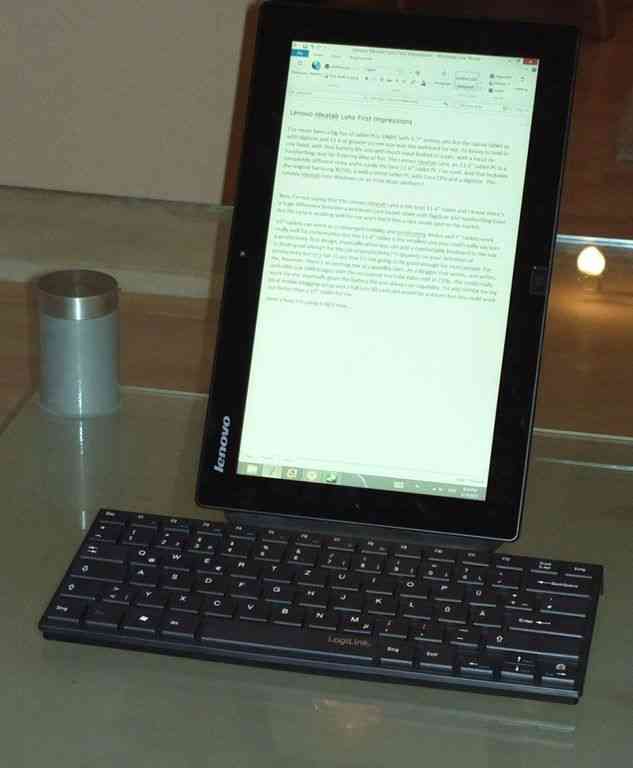 however, there’s an exciting mix of capability here. As a blogger that writes, and writes, and edits sub-2MB images with the occasional YouTube video edit in 720p, this could really work for me, especially given the battery life and always-on capability. I’d add HSPDA for my ideal mobile blogging setup and a full-size SD card slot would be a dream but this could work out better than a 10 inch Windows 8 device. I can think of a lot more customers that would get good value out of the Lynx too, not least the long-distance traveler; Having Windows behind the entertaining Metro/Modern/Win 8 Store is perfect for that scenario.
Here’s how I’m using it right now (see image) because I haven’t got the keyboard dock yet. That comes next week.
Here’s a rundown of the device itself.
Screen. Bright, not incredibly punchy in terms of color but is IPS which is a must on a tablet. 1366×768 is OK for me but I know that many would expect more. For reading, there would be an advantage with 1600×900 of course.
Build. Strong. No flex. No creaks. Plastic back feels a bit cheap. One thing I must point out is that the edges are not smoothly chamfered which could have given the use a more comfortable experience. If the Lynx was any heavier it would have been a serious negative point.
Ports/features: No rear cam. Micro ports could be a pain (usb, hdmi, sd on the tablet.) Speakers are loud, not brilliant quality. Dual-array mic. There’s a micro-USB to USB converter included and you can plug in a micro-USB charger which seems strange considering it’s a host port. Check out the unboxing video, below, for a closer look at the ports.
Software: Apart from a Norton package (removed immediately) and a Sugar Sync service (Acer cloud sync) it’s refreshingly free of additional software.
As for performance, you shouldn’t expect much difference between Clovertrail tablets due to the high level of integration inside – due to Connected Standby requirements. (Always on.) The Lenovo Ideatab Lynx does, however, beat the Acer W510 on PCMark7 purely because the eMMC write speeds are a little faster. On every other benchmark the two devices were almost exactly the same. The WiFi appears very slightly weaker on the Lynx which is a disappointment. It has the same Broadcom WiFi chipset as the Acer but I was hoping for better antenna design. In general the WiFi is relatively weak.


 All Clovertrail Windows 8 tablets are always-on capable but this one has a nice little trick because the micro USB port on the underside can be used to charge the device. This also serves as the docking port so clearly the dock will charge the tablet whenever it is connected a battery-to-battery charging setup that wastes quite a bit of energy. I’ve just connected in a pocket USB charger which can deliver 1000mA and the device is just managing to charge at a very very slow rate. I doubt it’s pulling the full 1A available. This is the first time I’ve ever charged a PC from a smartphone power pack. You can also see I’m using a Bluetooth keyboard. Total cost was about 55 Euro for the charger and keyboard. The Lenovo Lynx keyboard costs 155 Euro! One other advantage to this charging setup is the extremely small and light charger which delivers 5.2V up to 2000ma, similar to some tablet chargers. I love this idea of Micro-USB charging.

I’m not sure you’d need this charger during a full day out though because battery life is as good as I’ve seen on the Acer W510. I’m sitting here typing with WiFi on, Bluetooth on and screen-on in about 2.5W of usage enough for about 10 hours typing from the tablet battery alone. Based on what I’ve measured on Clovertrail before, you’ll struggle to get less than 6hrs battery life from the tablet. Video playback with WiFi off should run for over 10hrs if I have my maths right.
A quick word on Clovertrail performance now. It’s Atom, as we know it. It’s not a powerful compute platform but it returns a full and accurate web experience faster than most Android tablets. The graphics performance has been pumped up a little over previous generatios too; I was surprised how smooth a game of Reckless Racing was from the Windows 8 store. Audio playback and video playback hardware is included along with accelerated video encode. You’ll get about 2X the render performance that you saw on Netbooks which brings short 720p clips into scope at around 1X real-time rendering.
The SSD is not a SATA drive on any of the Clovertrail tablets as Clovertrail only supports eMMC which is usually soldered-on just as it is on Android tablets and the iPad speeds aren’t stellar but it’s acceptable, rugged, silent and efficient. 75MB max read, 33MB max write (sequential.) Oh, on noise there isn’t any. No fan here!
I’ll leave it there for now and hand-over to you for questions. The keyboard dock will arrive some time next week and I’m really looking forward to that because if the keyboard is typical Lenovo style, I’m going to get on very well with it!
The unboxing video and a few more pics are here.




















So, has this overthrown the Acer for you?
I’m testing as many as possible at the moment. Won’t make a decision yet!
Just posted videos of the Dell Latitude here.
http://www.umpcportal.com/2013/01/dell-latitude-10-gets-unboxed-with-huge-battery/
Can anyone comment on how the Modern IE and desktop IE differ in terms of rendering, standards compliance and general capabilities? For example, on Android and the iPad I sometimes get rendering and form input issues. Let’s just say I wouldn’t do any online shopping or banking with an Android or iOS browser for fear of something going wrong. Would you say that the Modern IE is just as capable as the desktop version? Also, the same question for Chrome. Too bad there isn’t a release version a Modern Firefox app. Thanks.
it’s windows. just install your favorite browser.
Does the Lynx multi-touch recognize 10 concurrent touches or 8?
Does the multi-touch intelligently detect palm (and/or palm-edge) touches such that it can be configured to ignore palm touches vs finger touches?
Hej, does it support active digitizer?
No active digitizer on the Lynx
Does this have the usb power and wifi issues like tablet 2?
Wifi quality is poor. What’s the USB charging issue?
The USB on Tablet 2 doesn’t have enough power to drive external hardisks or DVD drives not externally powered. It only works on lighter devices like flash drives.
More details on http://forums.lenovo.com
I’ve tested an external hdd (2.5″) and it worked.