


Resource Monitor
If you find that your computer is constantly jumping between Energy Saver and a higher clock when it should be relaxing, the culprit might be harder to find. In this case, I’d recommend checking out the Resource Monitor which can easily be launched by pressing the start button and searching for ‘Resource Monitor’. Once open, head to the CPU tab and then sort by ‘Average CPU’ in the Processes section. This will show you the average CPU consumption of each process over a 60 second period. This is helpful for finding CPU-hogging processes that intermittently steal processing power:
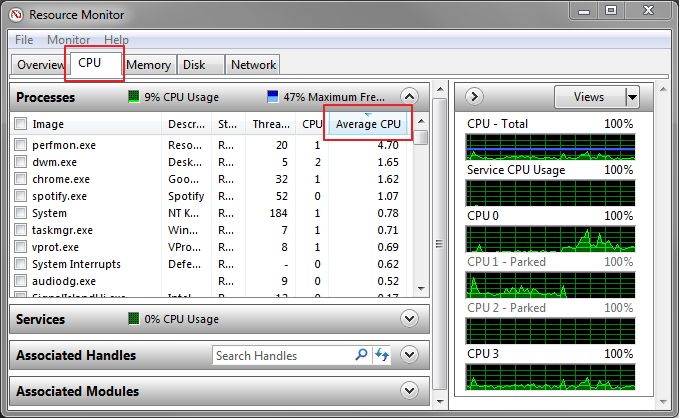
If you find any anomalies, track them down through Google and find out what they are related to and see if you can remove them safely. You can also right click in this list to ‘End Process’ and see if your processor is correctly entering Energy Saver mode. (Note: don’t worry about the perfmon.exe process, that’s the Resource Monitor!)
Preventing Programs and Processes from Starting at Boot
In many cases, naughty processes are the result of programs that have been set to start up when your computer boots — usually annoying updaters, quick-launchers, and toolbars do this without your permission. To prevent these things from starting up necessarily you can use a built-in utility. To launch, press start and search for ‘Run’. Once you have the Run window open, type ‘msconfig’ and press enter. Now go to the ‘Startup’ tab and uncheck the boxes of unnecessary items to prevent them from starting up during boot (be sure you know what you are disabling before you prevent something important from starting at boot).
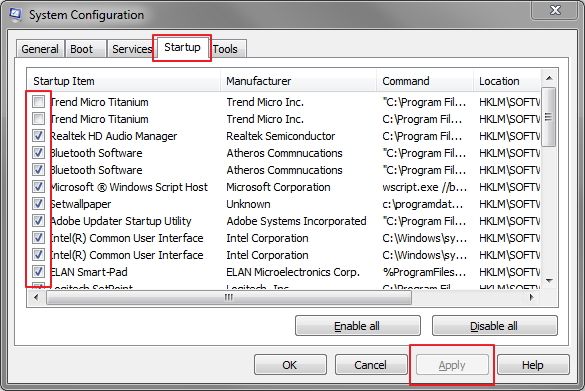
With the above techniques, you should be able to root-out any offending programs or processes that might be preventing your Ultrabook from reaching the Energy Saver state, good luck!
Pages: 1 2




















I really like these longer and informative posts. Keep up the good work… man I sound like one of those spam bots I get all the time on my blog. :)
I love seeing articles on maximizing battery life. Now I’m just waiting for the article on Ivybridge’s 13 Watt TDP mode and associated testing… ; )
I’m yet to see it being user switchable in a retail Ultrabook. Hopefully soon tho.
You’re right. I just checked out 2 Ivybridge ultrabooks yesterday and neither had a configurable option buried anywhere in the advanced power profile settings…. ; (
Any battery saving techniques for Linux other than PowerTOP?
You could use Jupiter, although most of the power regressions have been in the kernel itself lately. 3.5 fixes and improves power management a lot. From what I heard, 3.6 is supposed to bring even more significant optimizations that almost brings parity to Window$!
http://www.jupiterapplet.org/
Turbo Boost Monitor is useless for Core i3-models, considering they all lack (CPU) Turbo Boost.
But, if it will install on Core i3, it will allow you to see that your CPU is correctly entering into Energy Saver mode. Turbo Boost is only the function that overclocks past the standard clock speed, all Core CPUs can enter Energy Saver though.
Anyone know of any battery life comparisons between default installs of Windows 7 and Ubuntu 12.04 on the same notebook with the same usage patterns? I’m still using Ubuntu 10.04 and would like to see how 12.04 fares without any kind of tweaks. Thanks.
I’m interested in this too. I’d like to know what kind of battery life loss I can expect with 12.04 when compared to Windows 7. Hopefully, there are some power saving enhancements in the new LTS beyond just the new kernel so I don’t have to spend time installing 3rd party power management scripts.