


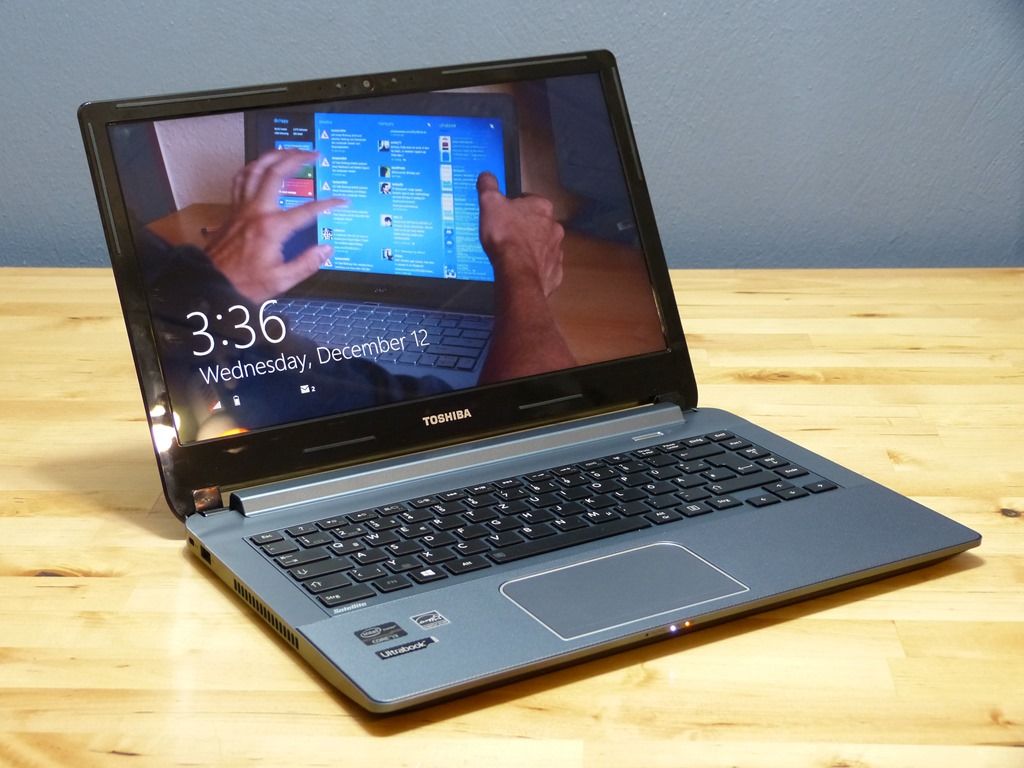
I thought we’d be getting a Toshiba U920T Slider Touchscreen Windows 8 Ultrabook through the post this week but I was wrong. It wasn’t until the video unboxing that I found out it was actually the ‘budget’ Toshiba Satellite U940 (U945 in the USA.) I’ve left the out-take in the overview video below. What we’ve ended up with is more than just a surprise, it’s a surprise pleasure because after only half a day of testing it’s clear that this is a well balanced Ultrabook with a few almost unique and very usable features.
Let’s get the reality out of the way first. This is not an ultra-thin, ultra-light, highly-specified Ultrabook. It weighs 1.7KG which, while good for a 14” mainstream laptop, isn’t good for an Ultrabook. The screen is a glossy 1366×768 and there’s only a 43Wh battery on board. It runs a Core i3 processor. It’s plastic.
What the Toshiba U940 is though, is a really honest budget Ultrabook that doesn’t have a single fault that I can find so far. In fact, there are parts of this Ultrabook that out-perform Ultrabooks costing double the $699/699 Euro that you can pick this one up for.
Let’s start with this image…
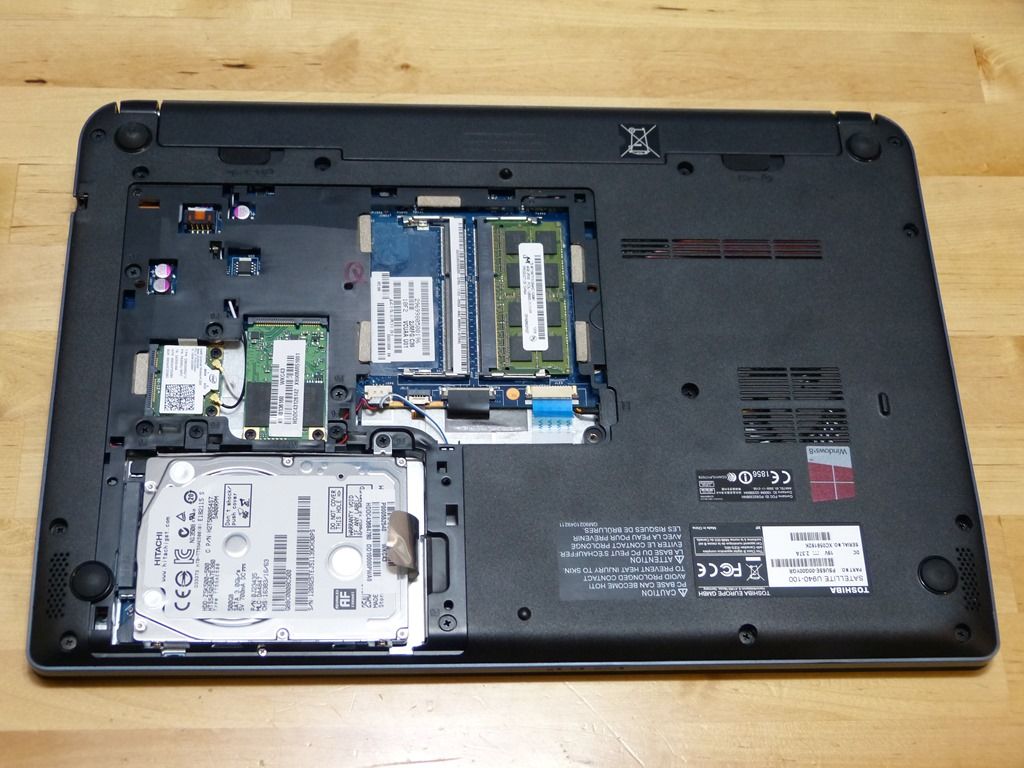
In the middle – two memory slots. On the bottom, a SATA 3 500GB hard drive. Above the hard drive is an mSATA slot with a 32GB Samsung SSD on-board. To the left of that an Intel Centrino 2-channel 2.4Ghz Wifi/BT4.0 module.
Across the top is a removable 43Wh battery. Official Toshiba pares cost from $99/99 Euro down (I’ve seen one Toshiba original for 66 Euros although they’re not widely available yet) and on top of that the Toshiba runs quite efficiently. I’ve got more battery tests to do but we’re looking at top-quartile efficiency with background drain that beats a Lenovo Thinkpad X1 Carbon. I’m typing with a few Chrome Tabs running, Wifi-On, screen at about 25% in eco mode and it’s silent and offering 5hrs of total battery life. With a little clean-up and an SSD that could be 10-15% more.
It took me about 10 seconds to remove the rear panel as it’s secured with one screw. Thank-you, Toshiba!
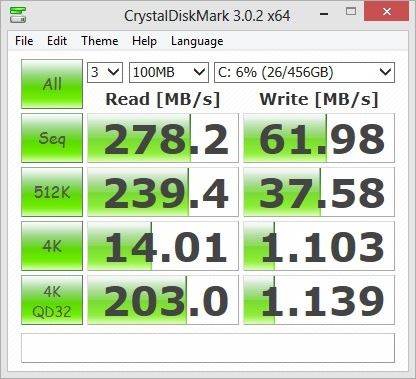 Those drives are linked together with Intel’s Rapid Storage drivers which use a RAID controller to speed up some of the storage. I’m not sure how it works in detail but this is one of the best Hybrid HDD setups I’ve tested so far. See the results on the right. Write speeds aren’t high but read speeds, right down to 4K block sizes, are excellent.
While the casing cover is plastic it doesn’t creak and although I don’t rate the finish, it’s clean. It’s not ugly.
The keyboard is better than the one on my Toshiba Z830. The keys are the same size and use the same mechanism and are very shallow but there’s I’m typing with more confidence on this one. The space-bar doesn’t miss a beat as it did on the Z830 I have. the whole keyboard is back-lit too.
As I type this the fan isn’t rotating but it does come on occasionally. Eco mode seems to immediately turn it off though so silent typing is possible on the U940.
The Synaptics Touchpad is very nice indeed. Two finger scrolling is smooth.
Speakers are poor.
Screen isn’t IPS and color is a little washed. Those looking for high-end screens for photo and video work need to move along but I’ve tweaked the settings in the drivers and I’m finding it OK for office work.
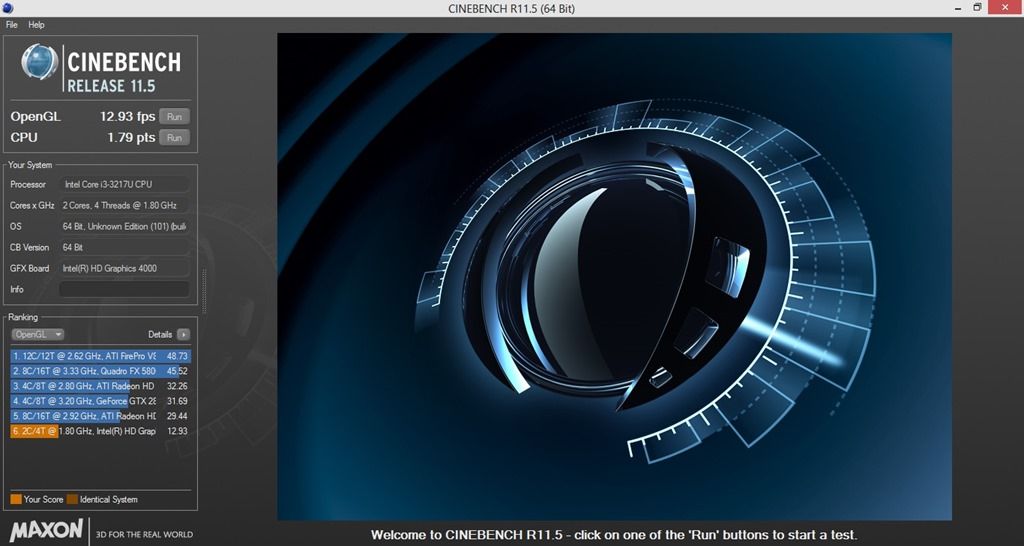 You might be wondering how the Core i3 CPU affects things. Don’t worry. The Ivy Bridge Core i3 at 1.8Ghz offers CPU performance similar to a Sandy Bridge Core i5 and the GPU performance is on par with Core i5’s. The 3217U is turning out to be a gem where value-for-money is concerned. A Cinebench CPU test returns 1.79 under battery power which is similar to many Core i5 Sandy Bridge units and way above what the old 1.4Ghz Core i3 could produce. The GPU unit has the same clock as other Core units so video encoding, decoding and 3D graphics performance is on par with even Core i7 Ultrabooks.
There’s a good selection of ports on the U940. Gigabit Ethernet, 3X USB3.0, full size HDMI and full-size SD slot.
WiFi is based on a Centrino N2230 and has great reception and WiDi support too. No drops here!
Resume from standby is sub 2-seconds. Cold boot takes just 11.5 seconds. Woosh! That’s very impressive.
I don’t want to get too excited after just 6hrs of testing but I’m getting a great sense of ‘rapidness’ when using this Ultrabook and the performance tests are backing that up.
UK residents might want to take a quick look at Amazon.com right now because it’s just £479.95 right now. (aff. link)
So to summarize, this isn’t a lightweight Ultrabook built from high-end casing materials but it’s a damn honest one that leaves itself open to upgrades and spare batteries. Maybe this is just a laptop with an efficient Ivy Bridge CPU, Intel Rapid Storage, WiDi and backlit keyboard but it’s still one you need to look at if you’re searching in this price bracket.
I wonder how it will perform with another 4GB of RAM and an Intel 520 180GB SSD inside?
Enjoy the overview video below. There’s an out-take at the beginning and a peek into the underside at the end of the video. Drop your questions in the comments below.



















I have a dream that one day Ultrabook manufacturers will stop using crappy non-touch ultra low resolution screens.
Wherever the high bar is set, the mainstream will always be working below it. You’ll have more options in 2013 for sure.
Even their U920t slider on their website has 1366×768 resolution while still costing over 1k dollars. Nearly every model of theirs that comes out has poor resolution, whether they’re budget or premium.
this ultrabook is more notebook
the H (high) Parameter is large comp
to modern devices
i think that at the beggining of 2013
we should discuss real ultrabook staff