


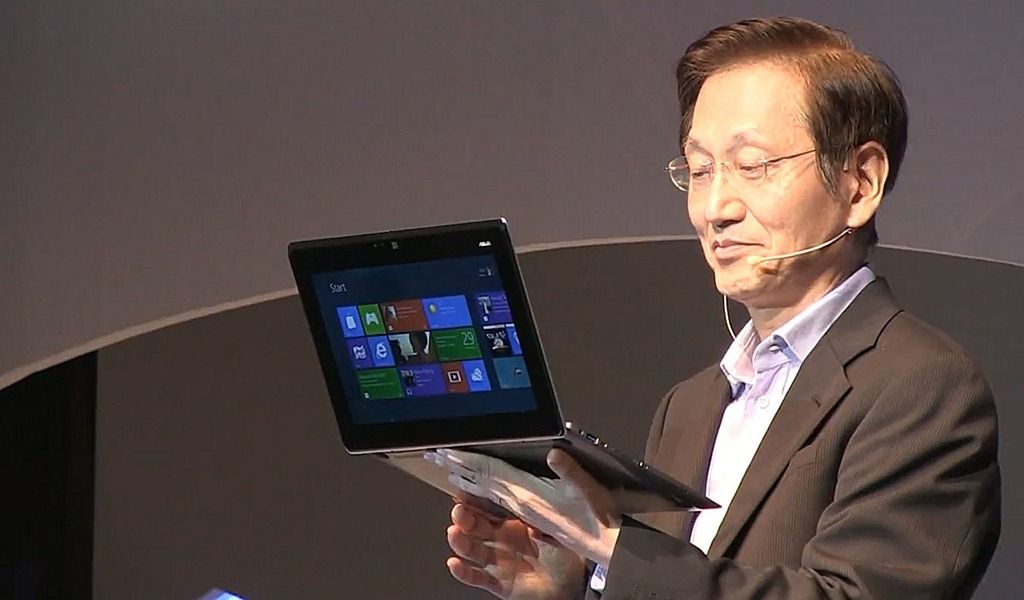
 Jonney Shih is getting somewhat of a name for himself in tech PR circles. He comes across as honest, likable, passionate and funny and his presentation of the ASUS TaiChi was as good as any of his stage appearances. We wish we had been there! The presentation wasn’t without it’s problems, but that’s what we like about them.
It’s worth a look. We’ve added it to a playlist below where you’ll be able to watch a number of ASUS TaiChi videos from Computex today.
What do you think about the TaiChi? Is it workable? Expensive? A PR stunt?



















Man…. I was gonna buy the Zenbook Prime but this beats everything.
The weird thing is though. You can use the screens for different purposes? Isn’t that like running two windows versions?
Example I can be writing a worddocument while the person siting at the opposite side can slide trough a powerpointpresentation. And will changes made in one screen be visible in the other screen?
Don’t quite yet understand how that works.
No Sfu, its entirely like a dual monitor setup. Have you used a dual monitor setup before?
You can configure it to however you want it for a dual monitor/screen device.
Extended: Your Windows desktop is extended to the secondary monitor
Mirror: Whatever is displayed on the primary is shown on the secondary monitor
Single screen on: I’m guessing you can just have one screen on at a time when you don’t need both.
Conclusion: Awesome!
It’s nothing like a dual monitor setup; you can view both monitors at once with a dual screen setup. This is just ridiculous.
If you want a dual monitor setup laptop you can get an external 2nd display that is powered over USB they’re already available.
Adam
I bet all these convertibles and hybrids feature Configurable TDP for Ivy Bridge, with most models featuring cTDPdown in Tablet mode.
I hope its a PR Stunt because this is a gimmicky ridiculous device.
Adam
That’s why they have two devices, the Taichi for people like me, and the Transformer Book for people like you. Both satisfy different needs. I prefer this because I don’t want to have to carry a seperate keyboard/dock.
Personally, the side function of a dual screen device is icing on the cake in addition to that allowing convertible functionality. I could see it being very useful when you want lot of people around you to watch whatever you are doing. And also doing presentations on the go.
Or the Zenbook Prime for normal people that don’t want all the crap that’s being marketed with all these convertibles.
Is that really useful ?
I don’t think a lot people would NEED two screens like this..
Depends on the price though..
I’m questioning batterly life. Same thickness and weight as the zenbook prime..
Battery probably won’t be that awesome. Is the Rear display always on standby mode (like a real tablet)?
i am questioning the practical use of the second screen:
– you can’t use it on the desk, unless you like staring at a laptop screen at a straight 90 degree angle (read: uncomfortable), or you like torturing the other person.
– you can’t really use it while holding it, unless you want to give everybody a dose of seasickness.
– powering 2 screens almost always equals to 2/3 battery life.
– you can use the 2nd screen while the laptop is closed, but the same can be achieved by using a convertible.
now, the question: what does this design give you over the regular convertible?
It depends on usage but all convertibles impose some form of compromise.
Like swivel and flip screens add thicker bezels and the need for stronger hinges.
Sliders tend to limit viewing angles in which you can still use the keyboard.
A hybrid like the transformer means squeezing the whole system behind the screen but that tends to raise the price and isn’t quite easy yet to do… Maybe when Haswell comes out next year.
While this design just slaps on a touch screen behind the screen lid for added functionality without most of the usual compromises. So it still looks and functions like a regular Ultrabook, but has the added options that a touch screen on the lid offers.
Mind when closed it basically works like a slider and can be used like a slate but when open you don’t have to worry about the viewing angle pushing the screen over the keyboard like it would with most slider designs.
Though it has its own limitations, like not being able to use the keyboard and touchscreen together as reaching around to the back of the screen would be cumbersome, and you may have to be more careful with the lid than you normally would be as it wouldn’t do to scratch it up but you could add a protective screen on it. You just can’t use the traditional decal sticker type.
Essentially though, like the others, it depends on usage as to which design offers the best compromise for the user.
Someone who shares their system with someone else for example would probably find this more useful than someone who only had to worry about themselves.
Though individuals can still find it as useful as a slider for either laptop or slate type usages. The rear screen can also be potentially nicer to watch a video than the front as you wouldn’t have to keep the keyboard in view the whole time. It’ll only suck for two people watching opposite sides at the same time because then it would have to be at a 90 degree angle but IPS screen means they can just share one side.
Anyway, you should get the idea now…