


[update: 4.25 hours battery life under load. Report here.]
Finally, as if they were waiting for Hugo to air his unboxing video, the German customs people released my Vega today and I’ve just finished the first round of photography and three or four hours playing with it.
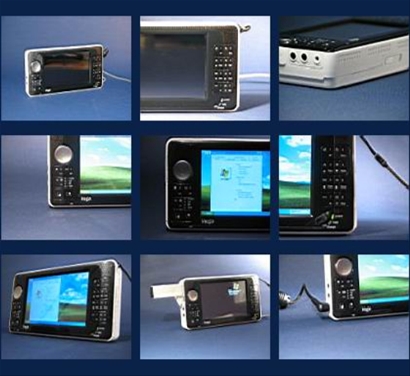
My first opinions are good to very good. Way better than I expected. As I suggested in the previous Vega post, this is going to make a great home/car PC.
I was shocked at how small it was when I opened it up. The same thing happened to me when I opened the Easybook P7. Somehow its just hard to imagine full XP machine on this scale and that’s what makes it so surprising.
The other surprising thing is the battery life. This thing just goes on forever. I plugged in the battery at about 5pm and as I write this at 12pm, there is still 20% battery left. I estimate that I’ve been actively using it for well over 3 hours and the rest of the time the device was on but the screen was off. That’s exceptional. Unfortunately, notebook hardware control doesn’t pick up the battery capacity or drain figures so I can’t get a real-time figure on expected battery life. I’ll do a more formal test soon.
The controls exceeded my expectations too. The little silver disk on the left is not just a cursor disc, its a proper mouse button. Not as good as the one on the Easybook P7 / eo v7110 but very useable. The additional buttons also work well. I’m starting to get used to them now and I can see that they will make window and menu activities very quick indeed. All the function keys are present there too so shortcuts in a lot of programs can be used well.
As Hugo said in his video review at Ubertablet, the screen quality is excellent. I need to test it in direct sunlight but in bright conditions outside it seemed very good. It will go up to 1024×768 which is really too small to use. The default 800×480 is the best resolution for normal use.
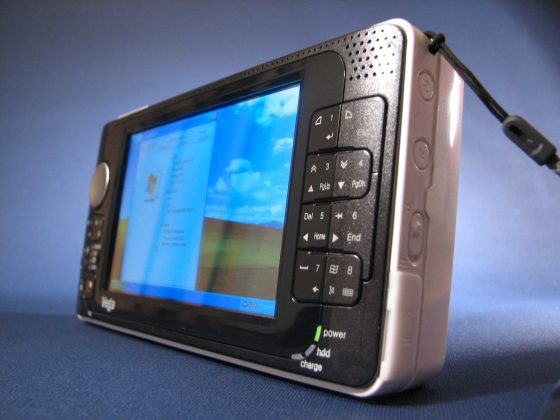
Cool too is the USB mass storage feature. When the device is off or in standby, you can use it as a USB mass storage device. It’s a very easy way to transfer files to and from the device. It doesn’t work when the device is on which makes sense. Two OS’s accessing the same disk is asking for trouble!
The device is not super fast but again, it’s better than I expected. I suspect that when a number of applications are running, the 256Mb RAM is going to run out quickly but for explorer, winamp, trillian and skype there was more than enough memory. Boot-up time is.[testing now]…..60 seconds to Windows login sound. Standby boot-up time is 5 seconds.
Linux? Yes, boot from Live CD works into Ubuntu so if you want to run a web server on it, go ahead and give it a go! It even detected a firewire interface so I assume that’s on the chipset but not present as a physical interface. Don’t expect the GUI to work very well though as the keys and touchscreen don’t work. Open office worked fine although from a CD-ROM its too slow.
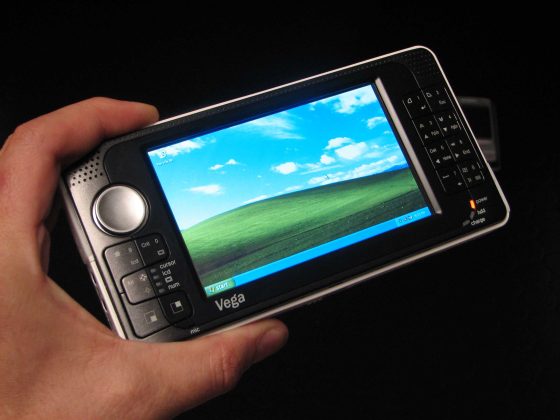
On the downside, the lack of built in WiFi is a killer. I hate the USB WiFi stick. Its such a good looking device and then you have to plug the the stick in. I don’t know why Raon thought they should leave it out. Mad. The same goes for Bluetooth. Without Bluetooth, it will seriously limit it’s use in a car. GPS, Cellphones and Audio devices could all be integrated with this device but if you have to put a USB stick in, it will reduce it’s appeal.
The buttons are not backlit which got me annoyed as soon as I settled down on the sofa this evening. I had to turn up the lights which wasn’t the effect I was looking for. The unit also gets hot which isn’t so comfortable for the hands.
The VGA adaptor cable was missing from this review sample so I couldn’t check the output to a screen and the on screen keyboard is a bit of a mix of English and Korean. I guess they’ll tidy that up for the release versions.
Tomorrow I’ll install some more heavyweight applications on it to see what sort of performance one can expect. I’m not expecting anything in the 3D department but the rumor is that full-screen video should be possible due to the 2D hardware in the AMD chipset.
All in all, its a really impressive device. Definitely not ‘business class’ but certainly useable as a high-end media player, a personal storage, email and browsing device, skype phone and navigation unit.
The gallery is here.
Vega data sheet, (specifications, images and links to other Vega resources)
Steve / Chippy
tags: vega, umpc, lx800, ultra portable
View details of all Ultra Mobile devices in the ultra mobile PC product database.
From N800 to Flybook V5, its all there!




















Hi Steve. I want one of these things but I also wanted to ask a few questions.
How was the feel of the silver mouse pad? Do you think it would work for light gaming like say for an nes emulator? Do the other buttons have any clicky or give to them and are they easy to press? Did you try hardware screen rotation yet? Is the device going to be too hot to handle for long use periods? Thank you. Jerry.
Pointer disc is good. I’m guessing it will be OK for gaming but i’m about to try that later this afternoon.
Keys on right are nice. Have a definate click to them but are not backlit making it difficult under low light.
as for screen rotation, good point. I’ll run that test now.
Steve.
Thanks Steve.
I emailed dynamism to see if they were going to carry it and they seemed likely to in the near future. Can’t wait to get it. Hopefully the retail versions will be bit cooler temperature wise. Are you going to also try to burn a dvd with it through usb? Jerry.
I found a backlight for the keys. That solves the bedroom and sofa usage problems.
Also found a setting where the mouse disc is switched into cursor key mode. Useful for gaming.
I ran Need For Speed (a very old version) and it worked OK. In fact, not much worse than on the eo v7110. I need to try some other games before I make decisions about that though.
Steve.
Steve – thanks! A question, though:
When you say “Definitely not ‘business class'” – what does that mean to you?
Good question Chuck. I should have elaborated on that.
THe problem is that the screen is too small for use with customers. The on screen keyboard is limited too (maybe installing windows XP Tablet Edition on the 512M version is possible)
As a personal device its very good and I’d be happy to take this away for a 2 day conference as my comms and entertainment device.
Steve.
Hi Steve,
is there any chance you could try out some of the newer video codecs when you do your media tests? x264, x264 with high res, wmv, rm quicktime. The files that other pmps normally stumble on.
Much appreciated.
Great report. Looks like an intriguing little device. Two questions:
1. Any idea on approximate cost?
2. What kind of outputs does it have? I’m thinking specifically of hooking it up to a projector to use for PP presentations; much easier than the limitations of a remote, or of having to walk back to the laptop to adjust the image.
Its ony available in Korea at the moment for the equivalent of $700. They are working hard on getting Worldwide distribution sorted out.
It has VGA-out. Would make a nice video source for a projector.
I don’t think it’s powerful enough for full-on Powerpoint presentations (with effects for example.)
I might try that out if I get time.
Steve.