Tag Archive | "arm"

Screen Size Analysis (Sub 12″) August 2011

Tags: , , , , , , , ,


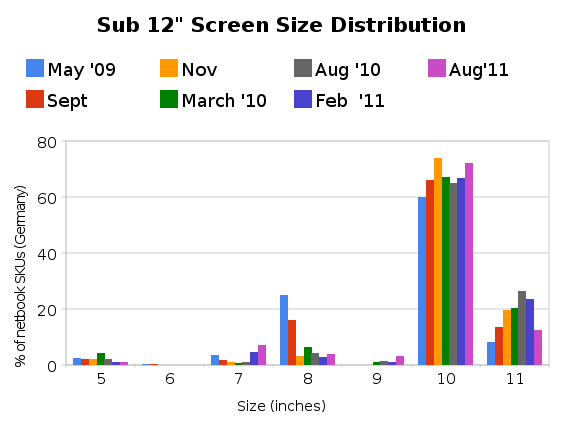
This is the seventh report on sizing trends in PCs below 12” screen size (and above 5”) appearing in the German market through the popular price comparison engine, Geizhals.at (*1) The last one was done in Feb 2011. Once again we’ve seen a big jump in overall numbers. The 7″ segment and 10″ segment have grown while the 11″ segment has shrunk. The 10″ market dominates more in this report than it did in the report of Feb 2011 although there is a clear trend occurring in the 7″ space where growth in products has occurred in all of the last 4 reports.

Number of SKUs in the market

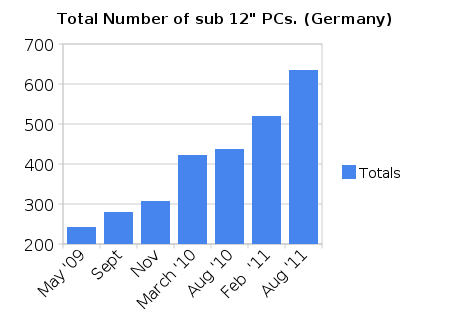
The number of choices in the mobile screen space (above smartphones) has grown over 2x from approx 240 SKUs to over 630 SKUs.


Screen size distribution

The big jump in numbers is clear to see from the top graph. Total numbers jumped by 115 with most of that growth coming from the tablet form factor and the 10″ netbook/notebook sector. Big increases in the 7″ tablet sector (now the biggest number so far) and a reduction in the numbers of 11″ devices mean that  percentage distribution has changed a lot. The iPad2 introduction caused the growth in the 9″ segment.

In the 10″ netbook space which accounts for 75% of the 10″ category there are now 18 AMD C-Series SKUs and 315 Atom SKUs. 64 of the Atom-based devices (20%) use the high-end N570 version.

In interesting statistic is that 1 in 5 devices on the market in the 5-11″ segment are from ASUS.

Across all categories, ARM-based CPU designs account for  23% of all devices, almost exclusively in the tablet sector. It will be interesting to see how that changes over the next 2 years with the introduction of Windows for the ARM processor.

In terms of weight, the tablets mean that the average weight of a device has gone down.  28% of the devices weigh under 1KG.

Meego appears for the first time along with the cheapest and lightest netbook ever launched. The ASUS Eee PC X101.

Chromebooks did not enter the sub 12″ screen space yet. (Acer 700 not available in Germany)

Sandy Bridge (2nd Generation Intel Core CPUs) enters the sector with 14 SKUs from 5 devices.

Total number of tablet form-factor devices:  193 (30% of total)

Cheapest devices:

  • X86/Windows Laptop – Eee PCR101D at 199 Euros. (Was: Samsung N145 at 228 Euro)
  • Non-Windows Laptop (X86-CPU) –  Eee PC X101 (Meego) at 169 Euros
  • ARM Tablet – Debitel One Pad  (Android 1.5) at 59 Euro
  • X86/Windows Tablet – Archos 9 at 370 Euros (was 402 Euros)

In terms of netbook trends, the search and news volumes seem to be steady after their large drop in Q1 (see Google Trends.) Numbers of devices in the market have increased and obviously the introduction of Cedar Trail in Q4 will create news, products and searches in the netbook category. The trend for netbook products, news and search is going to be level-to-rising for Q4 That may, or may not, relate to sales numbers.

In terms of handheld PCs, our focus here at UMPCPortal, it’s a sad story. The online market is now almost totally clear of 5-9″ X86-based Windows devices. It will be interesting to see how the Windows 8 market affects this in 2012.

Warning: Please remember that this is a single data-source analysis of what is happenning today, in the German market. This is not a complete market analysis report. You may use the data and images but please also reference this article which includes this warning.

*1 Based on SKUs, not model families. Data taken from Geizhals  An English language (and UK market) version of Geizhals is available at Skinflint.

200mw Internet Access on the Acer Iconia Tab A500

Tags: , , , , , , , , ,


If you measure the power used by a netbook PC when it’s in standby, a frozen unusable state, it uses around 500mW of power.  Leaving a netbook on with WiFi connected in an idle state with the screen blanked, maybe with an email program polling occasionally, you’ll see about 10 times the power usage. In PC terms, 5W is impressive but if you go to the smartphone world and take a look at the figures there, there’s a huge huge gap that needs to be tackled. As smartphones become tablets, become smartbooks, there’s a threat that ‘always-on’ becomes ‘must-have’ and that X86-based devices will struggle to compete in casual computing scenarios.

Smartphones are designed from the ground-up around the concept of ‘always-on. From the moment a smartphone is conceived, every element of the design has to be checked for power consumption which is why a smartphone can sit connected to the GSM telephone network drawing power consumption levels lower than 50mw. That’s 1/10th of the power consumption taken by a good netbook when it’s in a frozen state. Impressive.

But what happens when you connect a smartphone to the internet ? You can use cellular data services to achieve a good rate of connectivity by switching on UMTS for example. Switching to WiFi on a typical smartphone brings faster connectivity and, in a lot of cases, lower power that can be done on cellular networks. A smartphone can run a multitasking operating system and remain connected to internet and voice networks in well under 500mw of power, the same as it takes a netbook to sleep.  In fact, the best smartphones are running in this configuration for over 24hrs on a 5Wh battery which is an amazing 100mw of power usage. Turn on some background internet activities and it will jump to an average 200mw!

What happens if you take an ARM platform that’s in the same processing power category as a low-end netbook. Put it in a 10” screen form factor and do the same test? Actually, it’s the same as a smartphone. The only difference between a high-end smartphone and a smartbook with a 10” screenand a huge battery is the screen itself and when that is off, there’s practically no difference at all.

To prove this, I took one of the most powerful mobile computing platforms in a large 10” form factor device with 32GB of storage, 1GB of RAM and integrated WiFi. The device has a 23wh battery (about half that of ‘6-cell’ netbooks. The device is the Acer Iconia Tab A500 Android tablet which runs honeycomb. I connected to the Wifi (at 54mbps) and left the device connected with the screen off while it did it’s stuff in the background. Marketplace checks, email checks, Twitter checks and even some GPS usage by Google Maps. A weather service was running, the volume was set to silent and Bluetooth was turned off.

Over a 48  hour period with a few screen-on moments for checking progress (and a 10 minute in-use period as my daughter grabbed it to use a paint program)  I measured 46% fall in battery usage of which 5% was due to screen-on time. Take away the screen-on figure and you have 209mw of power usage.  The Acer Iconia Tab is nothing more than a smartphone inside!

‘Always-on, Always Connected’ will be a ‘Must-have.’

Always-on tests are interesting because it’s a hands-off test that people think only applies to idle smartphones.  In fact, it applies to many computing scenarios. With location, polling, sync, presence, alarms, push updates and of course, cellular voice and messaging becoming the norm in the hand, they will also have appeal on the desk. Not having to wait 5 seconds for a machine to start-up, another 5 seconds for a Wi-Fi connection and another 10 seconds for tweets, emails and other features to catch up is annoying.  There’s also a bunch of other screen-off, connected activities that are interesting. Servers for example. By that, I mean computers and gadgets that serve information to the Internet. This doesn’t just cover web servers. Think about internet-connected weather stations and web cameras, in-car data storage and notification systems. Then there are the devices that just don’t need big screens; Connected musical instruments. Digital cameras with 3G. Internet Radios. Low-power internet connectivity is important for these devices.

Related: Social Netbooks and ARM’s Lock-In Netbook Opportunity.

Summary

The point here is not to highlight that ARM is better than X86, it’s to highlight the gap. This gap is currently a huge advantage for ARM-based platform designers.

  • The first point is, if manufacturers using X86/PC architecture don’t get products to market with active standby soon, with the help of Intel (the only X86 player trying to tackle this problem) customers will have a chance to experience, and may not turn back from, ARM-based always-on products.
  • The second point is that this is a screen-off gap. Current screen technology is killing ARMs advantage in the ‘in-use’ scenario where screens are larger than 7”. It reduces the ARM advantage from 20x in idle to about 4x with a 10” screen being backlit. When the devices CPU is being actively used, the advantage drops even lower to around 2x. [Acer Iconia Tab – 4W. Samsung NC210 – 8W)
  • Finally, the Acer Iconia Tab A500 is a good example of low-power internet connectivity. It’s likely that other devices in this ARM tablet segment hit the same figures.

Keep an eye on high-end ARM-based platforms over the next year or two. Honeycomb and iOS are leading the way into the professional space with their software and application ecoystems and you might find that this always-on advantage starts to lock people in soon.

My UMPC and Netbook Retire Today. AMD and ARM Move-In. What Happens Next…

Tags: , , , , , ,


Intel have dominated my mobile device choices for nearly 5 years but all that has changed in the last 4 months. Today, my UMPC retires and my netbook gets an upgrade.

For the last two, years my main computers have been a Quad-Core desktop that I use for hosting live sessions, podcasts and some video editing, and two mobile devices. The Gigabyte Touchnote Convertible Netbook has been my laptop and a Fujitsu U820 (actually a Japanese version U/B50N) UMPC has been used as my hot-desktop (as shown in this article.)

Today, the two mobile PCs drop away and are replaced with an AMD-based netbook solution and an ARM-based tablet. The Acer Aspire One 522 and Galaxy Tab have become my mobile device choices which means there is no longer a UMPC in my life.

IMG_6889

IMG_6890

The Fujitsu U820 had previously been my ultra mobile computer for expo’s and conferences and I remember using it successfully at SXSW in 2009. Over the last 5 months though its usefulness has waned because the Galaxy Tab has taken over. It fits *my* usage patterns a lot better. I sacrificed some ‘Full Internet Experience’ for weight, battery life, location, social networking apps, built-in camera, always-on and 3G. I talked about this ‘changeover’ last year. It’s now happened.

The Touchnote was still working well and I had no problems with it. After 2 years it’s proved to be rugged and capable but when the Acer Aspire One 522 came along last week it gave me so much more, in less weight and cost. Now that the Tab has taken over ultra-mobile duties to an acceptable level, there’s also no need for the U820.

I’ll miss the touchscreen on the Touchnote but I’m getting better battery life, more processing power,  way better HD and graphics acceleration and my 4GB RAM, SSD and Home Premium upgrade are adding to the experience i’m getting from the Acer Aspire.

The Acer Aspire One 522 is now my daytime desktop as well as my lightweight notebook.

IMG_6892

What happens next?

As 7” tablets get better and better with improved software, faster processing engines and higher quality connectivity there’s more and more that can be done on them. I’m already creating articles, emails, Tweets, IM and images but I see improved video and camera hardware and software coming too. I see accessories that could help the tablet become a unit that everything could be done on if needed. I would have no problem whatsoever using a solution like this for a week if weight and energy restrictions demanded it. The need for an ultra-light netbook is reducing for me. Having said that, the requirement for a PC with a keyboard doesnt drop away completely.

7” screens aren’t comfortable for rich content generation and editing so I still see the need for a netbook or notebook for ‘bum-on-seat’ activities. What I see happening is that my netbook will get taken up a notch into a 11.6 or 12.1” territory that allows me to improve my video work. It’s a project I’ve already started. That could happen very soon as the Asus Eee PC 1215b nears availability.

Smartphone load drops.

As for the pocketable device in my life, I’m finding I use a smartphone less and less now. Dropping back to a 3.5” or even 4” experience for Internet and social networking activities  is painful and I’d rather take the Tab with me than have a large smartphone. My smartphone is now a voice, sms, MP3, USB storage and emergency internet device. The N8 fits in so well here because it also has a stunning camera that allows me to photoblog with ease.

Because of my tablet use, I don’t expect to be putting much load on my smartphone any more and the list of requirements changes totally.

Intel’s next netbook move.

I confess that I didn’t have a lot of faith in AMD’s Brazos solution but they did it. They’ve made a classic disruptive move which will change the face of the netbook forever and, unless Intel repond quickly, take share away from Intel in the low-cost computing market. Well-known features/keywords like ‘HDMI’ and ‘1080p’ that are recognizable to the man on the street will differentiate AMD from Intel and where the price is the same, there’s little to think about. Games are also possible on AMD netbooks and it leaves little room for Intel to play in when it comes to Cedar-Trail.  They’ll have to increase the CPU power (1.66ghz dual-core is a nice figure that looks better, and performs better than the AMD 1.0Ghz solution) and add their thermal monitoring to allow overclocking on a core-by-core basis. 2.0Ghz ‘Turbo’ will be worth seeing. They’ll also have to add the 1080p capability from their Menlow and Moorestown platforms. To beat AMD they will need Wireless Display and hardware-accelerated H.264 and WMV encoding features to help with video format conversion. Longer battery life is a must and this is something Intel is highly likely to deliver with amazingly low quiescent states and very tightly-coupled wireless solutions. Given the likelihood that they will have a lower platform TDP and enable a smaller motherboard size, Intel solutions are likely to be thinner and lighter.

Can Intel enter the always-on tablet space?

AMD appear to be a long way off from having a soft/hard stack that satisfies the requirements for an ultra mobile computing device but I still see big opportunities in the near, 1-2 year timescale for Intel. 2011 truly is just the start of a new era of multi-device computing and Intel have been working on developing solutions to hit all areas of the market for the last 3 years or more. Wi-Di (wireless display), hardware security, thermal monitoring, overclocking and Intel Insider are features that could really add something to a mobile platform and as we look towards higher processing platform capability (including faster busses and rich connectivity) Intel do have an advantage, especially where screen and wireless connectivity take the lions share of the battery drain. As for always-on, their Moorestown and Medfield hardware, coupled with their software solutions, appear to have that covered. Android for consumption; MeeGo for a cross-over Linux-based solution. Windows for a full, pro-computing solution. They have had serious problems getting a partner to make a compelling device but lets talk about this again after the MeeGo conference in May and the Nokia MeeGo product which could also air at that time.

And don’t think I haven’t forgotten about all the advantages that come with having a traditional mobile PC soft and hard architecture. USB host, multitasking user interface, mouse-over, business software, security, multi-user, extended display, remote desktop, upgrades and hacks, printing, ad-hoc Wi-Fi and a thousand other features that you forget about until you need them. If anything, my desire for high quality, flexible productive systems has gone up in the last months and this might sound strange but since the Japan disaster last week, I’ve been looking at mesh networking and emergency computing again and find that an X86 UMPC would be the best place to start. To that end, I’ll be loading up the U820 as my emergency computer.

That’s enough about me. How are you finding the ‘X-Over’ year of 2011?

Note. All my computing solutions have been paid for by my company and are not sponsored in any way. Runcore, however, supplied the SSD that i’m using in the Aspire One 522.

Mobile Computing at CES – X-Over 2011

Tags: , , , , , , , , ,


IMG_6364 This is not the first time we’ve discussed the crossover between pro/productive/full-os mobility and the continuing threat/opportunities offered by mobile operating systems.

See: Mobile Changover – What’s Your Plan? for more from June 2010.

CES 2011 was an absolute whirlwind of crossover products and after a week of note-taking, I’ve put together a report. Following the crossover theme, I’ve published it over at Carrypad!

Report: Mobile Computing at CES 2011 – The X-Over Year

Don’t forget, Meet:Mobility Podcast 62 covers a lot of this ground too and includes perspectives from JKKMobile and Netbooknews.

Report: Timeline for MeeGo Netbooks, Tablets and Smartphones

Tags: , , , , ,


Just a few days after the first ever MeeGo conference I have the best chance ever to take what I’ve seen, heard and learnt to try and predict when and what will happen with MeeGo in 2011. When will versions ship? On what hardware? When will the applications store ship and finally, when will end-products ship both via Intel and Nokia funding and, importantly, through independent vendors.

First let’s remember that MeeGo is an offering to developers, OEMs, manufacturers and other non-end-user customers. Like Android open-source, it will comprise a complete core, a vanilla user interface and a basic set of core applications. Driver support will be limited to common open-source drivers, codecs for audio and video will be limited to free versions and there will be no applications store. While ‘hacker’ types may welcome the new OS, end-users are unlikely to be too thrilled. Journalists that don’t get the whole picture are likely to react with negative reports. Once again, remember that MeeGo on end products will be different to what you see coming out of the MeeGo project.

Let’s also remember what MeeGo is about. It’s an open-source project run by the Linux Foundation and funded by Intel and Nokia for a range of products from mobile phones, in-vehicle entertainment, TV, netbooks, ‘smart’ books and tablets. Intel need MeeGo for their new low-power platforms (Moorestown and Medfield, the handheld platforms, just won’t work without MeeGo although Android is also in the works for these platforms) and Nokia have committed to bringing their next flagship product out with MeeGo. The stakes are very very high for both companies. MeeGo will happen, products on MeeGo will happen and applications on products on MeeGo will happen. But when?

It is possible to get a product out using MeeGo today. The WeTab proves it’s possible but there’s a list of things that need to happen before ‘milestone’ products appear. I also refer to these products as ‘disruptive’ because they will be good enough to compete in the same space as the best-of-breed in their category. There’s also another category of important products and that is those that are not funded by the MeeGo partners. Here’s what needs to happen before the products appear…

Hardware platforms

For netbooks, the Intel Pinetrail platform works and is likely to be the only choice for most of 2011 and until the next generation of netbook platform is introduced. At that point we should expect a lean towards always-on and the addition of hardware video decoding and encoding. The Intel netbook platform should start to look more like the Oaktrail platform proposed for tablets. If we look at the ARM platforms, the dual-core Cortex A9 series of variants is looking interesting for ‘smart’ netbooks and focusing purely on hardware, it’s possible to build a netbook-style device on ARM today. The Toshiba AC100 is one example.

  • Timescales for Intel netbook hardware: Now
  • Timescales for ARM netbook-style hardware: Now

In terms of tablets, there’s a wide range of choices. Intel are offering Oaktrail which can support Windows for a desktop-like experience and MeeGo or Android for the always-on consumer-style experience. Interestingly Intel also offer Moorestown on which only MeeGo and Android will run to provide a consumer handheld experience right down to almost mobile phone sizes. in the ARM world we have a huge range of choices. We’ve seen MeeGo running on Ti (who work closely with Nokia and are likely to be providing the platform for the Nokia MeeGo products in 2011) and on Freescale, ST Ericsson and other ARM-based platforms. These platforms are targeted at the 4-10” segment for highly mobile devices and could potentially be used to make an ARM-based smartbook, just the the Intel Moorestown platform could.

  • Timescales for Intel Tablet hardware Q1-Q3 2011
  • Timescales for ARM tablet hardware: Now

For the mobile phone space, Medfield is the Intel platform that might appear in late 2011 (more likely 2012) and for ARM, lower-power and phone-oriented platforms are available now.

  • Timescales for Intel Handheld hardware: Q2 2011 (Oversize smartphones) 1H 2012 (smartphone)
  • Timescales for ARM handheld hardware: Now

Touch

For the phone and tablet market, touch is critical. The experience needs to be fast, multi-touch and up there with the best-in-class. For that, MeeGo 1.1 isn’t enough. MeeGo 1.2 is being built with multi-touch in mind and this is planned for April 2011. Products built on the Beta versions will not be ready for market until at least two months later so unless Nokia is doing their own private work on multi-touch with MeeGo 1.1, high quality products are unlikely before that. With the next MeeGo conference planned for end of May 2011, it is the perfect time to launch a product that will be available in June or July. Whether Nokia chooses to launch their product at this time is difficult to tell. With CDMA support not planned until MeeGo 1.3 a launch in the U.S. would have to be focused around AT&T or T-Mobile but with stronger support in Europe, it would appear likely that a separate Nokia event would happen in Europe for the launch of their products.

  • Timescales for single touch products: Now
  • Timescales for multi-touch products: Starting June 2011

Battery Life

Intel products will need to be built on Oaktrail or Moorestown for the best possible battery life experience. We are moving to a world where ‘always-on’ will be the standard. ARM-platforms are already capable of offering class-leading battery life.

  • Intel Tablet battery life timescales (Oaktrail/Moorestown) 1H 2011
  • Intel Netbook battery life timescales: (Oaktrail) 1H 2011 (Cedar View) 2H 2011
  • Intel smartphone battery life timescales: (Medfield) 2012
  • ARM battery life timescales: Now

Security

Security subsystems need to be in place for carriers and that didn’t happen in MeeGo 1.1. I’m hearing that 1.2 is critical for carriers so it hits the same timescale as those devices relying on the multi-touch user experience.

  • Carrier security subsystems in place: April 2011. Products. 2H 2011
  • Other products (non carrier): Now

Applications stores

As mentioned, OVI and AppUp are critical. MeeGo will only ship with a basic set of applications and for the best-of-breed consumer devices and to create the developer excitement that is, in-turn, a critical part of the application store, they need to be in place with payment systems.  With OVI expected only on the Nokia devices (Question: What application store will be available for ARM-MeeGo devices that are not from Nokia?) we know that it will be a Q3/Q4 timescale. For AppUp on MeeGo we are seeing some marketing campaigns starting now. Launch is likely to be on the Netbook platform first in order to capitalise on the existing Windows-based AppUp store and to enable MeeGo netbook variants to go out of the door as soon as possible. Remember, netbooks using MeeGo will not need any support for carriers, phone stacks, touch and other elements that can only be delivered with V1.2. Considering that V1.1 is available now and that we’ve already seen proposal OS builds from Linpus, we can assume that existing AppUp partners Acer, Asus, Samsung and Dell will be bringing out MeeGo options likely to drive lower-cost netbooks aimed at entry-level markets initially. Based on that, we should see AppUp for MeeGo netbook UX available in Q1.  For tablet/handheld user interfaces, this might not happen until V1.2 (It’s on that roadmap)

  • Application store timescale for Nokia (OVI/ARM): Delivered with first Nokia handheld product after June 2011
  • Application store timescale for non-Nokia/ARM: Unknown. Currently no support
  • Applications store timescale for Intel / Netbook: Q1 2011
  • Applications store timescale for Intel handheld/tablet: 2H 2011 (After MeeGo v1.2)

Applications

Applications are starting to work their way through already. In the MeeGo release itself, media player, email client, calendar, sync, browser and other applications are already being worked on and there are rumors that KOffice will also be offered but as any smartphone user knows, discovery, sharing, enhancement and customisation through 3rd party applications is critical now. There is already a way for developers to make apps for MeeGo on Intel and ARM ‘target’ devices(SDK available here) but there is no support for the Application store yet. Intel have already set up an AppUp/MeeGo portal though.

Preparing applications for OVI is another story. Ovi is accepting Qt applications which will work on some existing platforms and the Nokia MeeGo products when they are launched.

Monetisation (OVI, AppUp) will stimulate the developer ecosystem and this will happen in the timescales shown above.

Finally – When Will We See A Competitive Product?

What we see coming out of the MeeGo project is a demonstrator. It’s a complete core with a functional user interface. It’s not what we’re likely to see on end products. In order to make a competitive product; One that has potential to seriously distrupt sales of other devices in the sector requires all of the above milestones to be met. Hardware, Application store, touch, battery life and something we haven’t spoken about yet. The customisation, optimisation and branding process takes months and for a class leading product, could easily take 6 months. Adding in codecs, optimising and branding the content stores, optismising the base applications, checking security, spicing up the interface, writing the drivers and testing is a 6 month to 1 year project. Lets assume that with 1.1, the teams were able to start the process of building a product around MeeGo. In April they will get the features needed to finalise the product and then, along with the integration of an application store, you’ve got another 2-4 months of work ahead. The first competitive products, driven by investment from the core partners, will only hit the market in June 2011 at the earliest. For products from other vendors, expect that timescale to go into Q3 2011 because they will definitely hold back to see what Nokia do, what Apple do, how Android develops, how Chrome OS develops, how the MeeGo application stores grow and even, how Android on Intel develops. The first MeeGo products, in all categories, need to be very special to secure trust from external companies. (Note: It’s likely that Intel and Nokia will invest huge amounts in external companies efforts to get MeeGo-based products to the market.)

Note on In-Vehicle0Entertainment and TV

I haven’t covered these two categories in this article as we’re focusing purely on the mobile/handheld/netbook computing market here.

Summary

We could see MeeGo netbooks with AppUp as early as January with ‘features’ such as quick-boot, lower cost, a simple-to-use operating system with a social-networking slant. We’re unlikely to see too much excitement around these early devices though because platforms and applications need to develop to create products with any major selling points. ARM do have an opportunity to get MeeGo on a netbook-style device in order to create an interesting long-battery-life product.

Tablets could appear in the early part of 2011 as 3rd-parties are already working on UI solutions based on MeeGo 1.1 but for interesting multi-touch products, with an application store, this won’t happen until around June 2011.

The first MeeGo smartphone requires MeeGo V1.2 and won’t happen, either on Intel or ARM until around June 2011. That phone is likely to be a Nokia product and its success will be critical to MeeGo.

Everything up until this Nokia/MeeGo phone can be called Phase-1 – led by Intel/Nokia investment. If these products show class-leading features and the developers start to create applications then we’ll start to see Phase 2 products created through independent investment that are true indicators of MeeGo momentum. That story starts in Q3 2011.

Footnote: All timescales are estimates based on current knowledge.

The next MeeGo conference has been announced for San Francisco on May 23rd-25th 2011.

Want a chance to learn more about AppUp? I’m at the Apps World expo in London on the 1st Dec and AppLab in Berlin on the 3rd Dec.

ARM’s A9 goes to 2Ghz in NuFront CPU Targeting the Desk.

Tags: , ,


IMG_5061

While we wait for full tablet and smartphone implementations of the Tegra 2, dual-core Cortex A9-based CPU, NuFront have been working on a high-end implementation aimed at every-day computing.

The NuSmart™ 2816 Computer System Chip is testing in various versions up to 2Ghz. Average power drain (not idle, not TDP) is 2W which puts it in the same envelope as a 1.6Ghz Z6xx Atom CPU (TDP 3.7W)

At a demonstration of the CPU we watched hi-def movies and Android running smoothly but were left with the impression that this chip would work better with a slick desktop-style operating system. In terms of raw power you’re looking at a netbook/nettop style experience although without the possibility of Windows desktop operating systems, it will need some strong marketing and targeting to slightly tighter niches.

The final versions of the NuFront 2816 are expected soon with products following up in Asia shortly after that. We’ll be very interested to see if someone can build on the smartbook theme with a super-light Ubuntu-based solution. Given that Android isn’t ready for these devices, the Ubuntu solution could be better.

Press release PDF is available here.

ARM Cortex A15 – 5x Performance for More Than Just Mobile

Tags: , ,


Just one week before Intel’s IDF will detail more about their mobile CPU roadmap for 2011/2012, ARM have announced some details about their own 2012 high power mobile silicon. Cortex A15 (Codename: Eagle)

Based on a 28/32 nm process (ref: news about 28nm process here) this quad-core design will clock up to 2.5Ghz. That’s 4x cores and 2x clock compared to todays ‘best of.’ ARM say it will provide 5x computing performance. You’ll see it run up to 1.5Ghz in smartphones but I suspect there are some other ‘smart’ opportunities in the netbook space here.

‘Eagle’ Cortex A15 News release.

cortexA15

With the dual-core A9 already reaching up into Intel’s performance space, solutions based on this Cortex A15 will put it directly head-to-head with Intel’s 32nm Medfield platform.

Expect similar power and performance profiles for A15 and Medfield’s Atom core which means the choice of CPU wont be that important for customers any more. The choice lies with the software, designer and, increasingly, the marketing and customer-relations teams.

Intel and ARM have 2 years to get a suite of operating systems ready for these products that range from real-time, through mobile to desktop productivity. I see ARM having a lot of potential with Android but with a lack of productivity applications and a potential patent problem, Intel are in a good position with MeeGo. Having said that, MeeGo will run on ARM CPUs to so in my eyes, what we have here is simply a great range of platforms and operating systems lined up for an amazingly mobile 2012.

A15

Roadmap for Eagle web

More detailed information available here.

Via Slashgear

Expect more details at ARM’s Techcon event in November.

Ti Announces License for ARMs ‘Eagle.’ Cortex A10 / OMAP 5 for 2013?

Tags: , , , , ,


hdr_ti_logo No-one really knows much about ARMs Eagle CPU design yet. I spotted it on a slide at Computex earlier this year but the only real info available is from a presentation back in 2009. It’s the next-next generation high-end core and likely to be produced in a 28nm process but based on the standard lead-time for an ARM architecture to get into an end product I’d say we’re looking at 2012 and 2013 for this one. Cortex A9 hasn’t been introduced in any products yet and Cortex A8 still has a way to go too. To give you an idea of the end-end timescales for a new CPU design, Ti are only now announcing that they have the license. The deal was made in 2009!

If we project our thoughts 3 years into the future we’re going to be in a time-period where Intel CPU’s are likely to be in smartphones and ARM are likely to be in laptops. We could be looking at MeeGo and WebOS or something completely new. Google OS perhaps? Will Windows still be as dominant or will Android or IOS develop to become a truly productive operating system? I wonder if I’ll still be blogging?

Ti’s announcement.

Tegra 2 Javascript Benchmark Shows a Lot of Promise.

Tags: , , , ,


At an ARM event in Taipei this week I was fortunate enough to have a few minutes with a Tegra 2-based tablet prototype known as ‘Harmony.’ It’s a fairly standard tablet with a capacitive touchscreen and weighing in at the 700gm iPad-weight. You’ll see more details in the video below.

The interesting thing was the SunSpider javascript benchmark I did. As you might know, SunSpider is a well-recognized test of a browser’s ability to run javascript and it serves as a good data point for working out how fast a processor is. As far as I know, most, if not all, the javascript processing is done by the CPU.

You’ll see a result of 9.8 seconds on the video which is about the same as you’d see on the iPad. The iPad uses what we believe is an ARM A8 core, or at least something very similar. However, that doesn’t mean that  dual-core Tegra 2 is only as powerful as a single-core A4 CPU because the two browsers are vastly different. The javascript engine on the iPad is super-fast where the engine used on the Android 2.1 browser isn’t.

Harmony SunSpider

  • Android 2.1 on Tegra 2 – 9 seconds (Tegra prototype shown in video)
  • Android 2.2 on Snapdragon 1Ghz – 6 seconds. (Nexus One, Google V8 engine)
  • Android 1.6 on Snapdragon 1Ghz – 24 seconds (Xperia X10)
  • Android 1.6 on Snapdragon 1Ghz -  54 seconds (Dell Streak prototype)
  • Chrome on Atom 1.6 – 2 seconds (average netbook, Google V8 engine)

As you can see there, the Android browser is at least 4 times less efficient in processing javascript on version 1.6 than it is on 2.2. I suspect that version 2.1 is close to 1.6 in its efficiency too which means that the Tegra 2 is over 200% faster than Snapdragon. Given that it has two cores, it’s not surprising. A single A9 core (in my estimate) brings about 20% more raw CPU performance over A8 so the figures look correct.

Add in the 4X improvement that you’ll see with Froyo’s Google V8 processing engine and there you go! Tegra2 with Froyo will be able to process javascript as well as a 1.6Ghz netbook. Just imagine what the 1.2Ghz dual-core Snapdragon will do!

More information about high-end ARM platforms in our primer, here.

We’ve already seen that ARM can beat Atom in certain low-end Atom scenarios and cross referencing to some other figures I have seem to confirm that ARM is going to challenge Atom in raw CPU. If only they could sort the operating system out and get some productivity apps going, we’d have some interesting smartbooks out there.

Chippy Sidenote: 2 cores needs 2x power! It would be interesting to work out the CPU drain figures under these javascript test conditions. Also note that system performance is not directly related to CPU performance. A lot of work has to go into a lot of other hardware and a lot of other software to get a system running ‘fast.’ Please remember that when Intel and ARM enter the clock-speed game over the next few years!

Amtek Prepping 5 Tablets for Computex

Tags: , , , , , , ,


It there is one thing we know about JKK of JKKmobile, it’s his uncanny ability to cover huge amounts of distance at technology shows and exhibitions to produce first-look videos, by the bucket load so when he posts the following about Amtek prepping not 1 or 2 tablets but an incredible 5, we know we are in for a interesting Computex;

jkkmobile

Firstly there is the iTablet Speed-Lite (AE03), packing a Nvidia Tegra 2 1Ghz, 1GB RAM, 2MP camera, 10.1” multi touch display and WiFi. Then there is the iTablet Ex-Lite II (AE04), wielding a Freescale 800MHz CPU, 512MB RAM, 2MP camera, 10.1” multi touch display and WiFi also. Both of these come with a choice of either WindowsCE 6.0R3/7.0, Android 2.0 or Linux and have options for bluetooth, 3G connectivity and GPS.

To add to these is the iTablet Lite (TZ10), sporting an Intel® Atom Menlow-XL Z530 1.6GHz CPU, 2GB of RAM, 10.1” multi touch display, 2MP camera, WiFi, 4200mAh battery, Windows 7 and a choice of either a 1.8” IDE HDD or a 64GB SSD.

Then the icing on the tablet cake in the form of T23A CULV tablet PC and the T23x CULV Series. All of which have Core 2 Duo 743 1.30GHz Intel Montevina Platform CPU’s, 2GB of RAM, 1.3MP cameras, 2.5” SATA HDD’s from 160GB to 320GB and coming with a choice of either a 12.1” XGA digitizer, touch or digitizer and touch screens.

If that doesn’t get your tablet juices going then head over to JKKmobile for the full specifications and pictures.

amtek_AE03 amtek_AE04 amtek_TZ10amtek_T23A amtek_T23X

ARM Products and Platforms Primer and Resource List for Mobile Internet Devices in 2010. (Updated)

Tags: , , , , , , , , ,


This article is updated from Jan 2010. See below for history.

The ecosystem around ARM, its designs and licensee products can be difficult to understand so I’ve been researching the current status and have summarized the important products, brands and technologies in the article below. You’ll find details on all the important keywords and technologies, links to all the important CPUs and platforms, a reading list and some ‘tip’s’ for CES2010 which starts this week. All the information is based on my own knowledge and research so if you spot any errors, please be sure to let us all know in the comments. I know there are some CPU designers and ARM partners reading this site so again, if there’s anything that needs changing or adding, please help us all by adding a comment below.

armarch

Overview of processor architectures in current ARM products

For the purposes of this article I’m ignoring anything other than ARM v7 architecture CPUs. In my opinion and experience the previous (ARMv6, ARMv5) designs don’t provide the processing power needed for the quality web experience expected in  MIDs. Note: Tegra (current version 2009) is an ARM11 multi-core CPU  implementation based on ARMv6 architecture. I expect Nvidia to move to ARMv7 in their next Tegra product.

ARM v7 is a CPU architecture, not a CPU.

ARM V7 is a processor architecture. It’s a design that belongs to ARM and it can be used to build CPUs that can process around 2 Dhrystone MIPS/Mhz. (Wikipedia – Dhrystone) That’s about 2000 DMIPs/Ghz which is not far from the processing power achieved by simple, non-hyperthreading Intel Atom cores also used in MIDs. DMIPs processor performance is not the only measurement of device speed but it’s a good starting point and is relevant to web rendering and web applications.

Processing power

In general, the architecture is being used to make CPUs and platforms running at between 600-1000Mhz (about 1200-2000 DMIPs) although there is one known implementation that has been tested at over 2Ghz. Power consumption per core is said to be around 300mw per 2000DMIPs using the latest manufacturing processes although this figure can vary greatly depending on implementation.

Remember that the CPU core takes only a small percentage of the power drain in a working device where the total in-use power budget including screen lighting, radios, audio, gpu, storage and DC components can span from 2W to 10W. (Texas instruments thinks that a 1W MID is possible though)

In comparison with the Intel Atom CPU the ARM v7 architecture can be used to make CPUs that consume about 1/3 – 1/5th of the power of an Intel Atom CPU for the same DMIPs computing power.

ARMv7 can also be used to make multi-core CPUs where up to 4 cores can be used to provide over 8000 DMIPS of computing power. (Assuming the software is built to handle multi-processing hardware)

(Further note: All these figures based on research, marketing figures, experience, testing and technical documents that I have read during this research.)

ARM does not manufacture CPUs.

The architecture created by ARM is used to do two things:

  • The architecture is used by ARM themselves to make a complete processor implementation which may include other ARM property. The CPU implementation is then licensed out to third parties who can either mass produce the CPU or build and manufacture complete computing platforms including graphics, sound, power, memory, etc. One example is the Ti OMAP 3 and 4-series platforms.
  • The architecture gets licensed out to third parties who make their own processors and platforms based on it. One example is the Qualcomm Snapdragon platform.

ARM have a number of processors that they’ve built using ARMv7 architecture and all fall under the ‘Cortex’ brand. There are real-time and highly embedded versions but the ‘A’ versions are the ones that interesting for general mobile computing tasks. ARM have three versions of the CPU. The A8 (currently in products), A9 (high end, multi-core capable due in products in 2010) and A5 (small, low-cost, due in products in late 2010) versions

Licensees.

When final products are completed by licensees you will often see them marketed under different brands. This is where it gets very confusing so I’ve listed most of the main players below along with notes and links to their various products and brands. Note that some ARM licensees are not made public and therefore no information is available.

ARM Cortex A8

ARM has 9 licencees. 8 are public.

Cortex A8 Product brief (PDF)

Licensee notes.

  • Ti OMAP 3 platforms 34xx 35xx 36xx  using Cortex A8 CPU core up to 800Mhz. Used in Nokia N900, Archos 5 devices for example.
  • Freescale iMX5 family of CPUs based on Cortex A8. Use in the Sharp Netwalker for example. iMX515 is focused at mobile internet and includes graphics co-processing.
  • Samsung. S5PC100 application processor includes the Cortex A8 CPU core (E.g. Odroid)
  • Samsung / Intrinsity – Hummingbird A very specific implementation of the Cortex Core using a tightly defined manufacturing process.
  • Zii Labs ZMS08 Core of the ‘stem cell’ computing platform. (Q1 2010 volume shipment) 1Ghz implementation.
  • Matsushita (Panasonic) Details unknown.
  • PMC-Sierra (storage, switching, routing solutions) Details unknown.

Cortex A9 (Multi-core capable)

Cortex A9 Product information (PDF)

ARM has 9 licencees. 6 are public.

Licensee notes.

  • Ti OMAP Dual-core 44xx platform. Full production expected 2H 2010.
  • ST Electronics Cortex A8 licensee (set top boxes)
  • St Ericsson – U8500 Dual Cortex A9/HSPA Modem platform. (Note Nokia and Symbian will be using this and it includes a Mali GPU and 1080p recording capability)
  • Broadcom (ARM news. No products announced yet.)
  • Nvidia Tegra 2 Dual-core
  • NEC Electronics. No information available.
  • Update: 28 Jan 2010. It appears that Apple may have licensed Cortex A9 for the iPad A4 CPU. (Source) Update: It’s ARMv7. Apples own implementation.

Cortex A9 MPCore Hard Macro – 2Ghz implementation of Cortex A9 using specific TSMC silicon manufacturing process.

Cortex A5

Cortex A5 is a multi-core, low cost ARM V7 implementation previously known as Sparrow.

Link to ARM information

No known implementations at present.

Other ARM v7 implementations:

  • Qualcomm Snapdragon platform (QSD8x50) uses single core CPU (Scorpion) based on ARMv7 architecture.
  • Qualcomm QSD8672 dual core platform at up to 1.5Ghz.
  • Marvell Armada 500 / 510 platform (PDF product brief) Up to 1.2Ghz

Notes for CES 2010 (UPDATED)

Key platform announcements to watch out for at CES 2010. Expect demonstrator products planned for 2H 2010. (All Cortex A9)

  • Nvidia Tegra 2 – Announced.
  • Ti OMAP 44xx – No news.
  • St Ericsson U8500 – Demonstrated by Movial on a set top box.

Expected in MIDs and smartbooks shipping in 1H 2010 on the following platforms. (Single core ARmv7 and Cortex A8 implementations.)

  • Freescale iMX5
  • Ti OMAP 3
  • Qualcomm Snapdragon
  • Nvidia Tegra
  • Zii Labs ZMS08

Product rumors / expectations: CES 2010.

Further reading:

Update: ARM presentation at CES.

I had a chat with ARM at CES and they followed up by sending me a PDF. Here’s one slide from that PDF that is directly relevant here. It lists ‘candidate’ platforms for Mobile Computing. We listed all of these platforms above but it’s good to know what ARM sees at potential platforms.

Click to Enlarge.

Note to PR agencies for ARM ecosystem partners. Put one twitter/web address in the comments and we’ll add it to the further reading list.

If you find the information useful for your work, please consider a small donation to help us continue the work. UMPCPortal is independent and funded purely through donations and advertising revenue.  Many thanks

Updated: 14th Jan 2010

Updated: 18th Jan 2010 (added ARM slide)

Updated: 28 Jan 2010 (added possible Apple licensee (for A4 processor) information.

Updated: 12 May 2010 with more product information

How Fast is Moorestown for Browsing? Faster than an iPad? Does it Matter? Analysis and Simulated Test Video

Tags: , , , , , , , ,


ipad_viliv In press events on Tuesday, Intel launched Moorestown and gave journalists their full marketing package on the smartphone and tablet-focused platform.  The key highlight was ‘performance’ and one element I want to focus on is Web browsing.

In tests I’ve been doing with many devices over the last 6 months using the SunSpider javascript benchmark, the Atom CPU, running at 1.3Ghz, whips the A4 CPU into the ground with a >3X speed advantage. Moorestown, with its 1.5Ghz clock looks to improve that to a 4x speed advantage according to the slide below. That’s a huge win for web-based applications implemented in AJAX.

Of course, javascript is only a component of the total time needed to fetch and render the average web page so I decided to do a real world test.

moorestown-web

To simulate how Moorestown would perform under web-browsing conditions I took the Intel Atom-based Viliv X70, a 7” tablet with a 1024×600 7” touchscreen running Windows XP Home, installed the latest Google Chrome, locked the CPU to 800Mhz and did some random web browsing tests. Remember that the Menlow platform used in the X70 is very close to the architecture used on Moorestown. The CPU are GPU are architecturally almost exactly the same. I side-by-sided it with an iPad which is, according to my tests with the Archos 5, X10 and HTC Desire (all running high-end ARM V7 architecture cores) the fastest ARM-based browser solution out there.

The video below shows that the browsing speed with the Viliv at 800Mhz is almost neck and neck. An 800Mhz Atom on a multi-tasking OS matches a 1Ghz A4 on a single-tasting OS. Ignore the UI and product, this is just a test of web page loading speed.

In the second part of the video I boosted the Atom CPU up to 1.3Ghz, the maximum on this platform, to simulate what would happen when a Moorestown smartphone ran at the highest clock-rate of 1.5Ghz. Remember the CPU and GPU architectures in Menlow and Moorestown are the same although Moorestown has a 200Mhz advantage here, can support faster memory and has a faster GPU clock.

The difference is very noticeable with the X70 rendering pages much more quickly, even with Flash enabled. Move to Firefox and disable flash and the difference is even bigger.

I see real-world advantages here. Faster, full Internet experience and a huge advantage for web-based applications and compressed or encoded content although it has to be said that in this high CPU-load scenario, battery drain on the Moorestown platform is likely to be slightly (although not considerably) more.

Remember, we’re ONLY comparing CPU platforms here and in this simulation, the Moorestown platform is showing great potential. It can deliver web pages, process script, decrypt HTTPS, GZIP and images much faster than the best ARM-based solution out there. It also adds multitasking and large memory support too. As a platform, if it delivers on the battery life claims, Moorestown is going to be a great, high-performance smartphone, tablet and even netbook option.

Recommended reading – Why social netbooks have a ‘lock-in’ opportunity. In this article I talk about key features of a smartbook. Many of these apply to a Moorestown/MeeGo-based product.

Recommended reading – Anandtech on Moorestown. Detailed with good background research and knowledge.

Smartphones Break the 10-second Barrier.

Tags: , , , , ,


I’ve had a theory about web-page loading speed for about three years now. When a web page takes more than 12 seconds to load, a user considers it a slow experience. Anything less than 10-12 seconds and everything is in the green zone. Smartphones are now entering the green zone.

The mobile Internet experience needs to be compatible and quick and if either one of those elements fails, then the customers Internet experience fails.

In my search for the full internet experience in my pocket I’ve spent hundreds of hours testing, analyzing, questioning, discussing and writing about the subject and I have a very clear picture of what is satisfying for the end user. In Sept 2007 I wrote about the extremely poor ARM-based internet experience. Really, it was embarrassing. The best phones of the day were taking nearly twice as long as the slowest of X86-based platforms with small screen sizes and low-quality rendering adding to the overall disappointment.

armvsx86

In October 2009, 2 years after my ARM-bashing article, the ecosystem had moved forward a long way and we saw what was probably the fastest ARM-based browsing experience ever. The Archos 5 was even beating low-end UMPCs. The iPhone 3GS was doing well too. Take another 5 months step into the future to the present day and you now have smartphones beating low-end Ultra-Mobile PCs. Pocketables, always reliable for a good set of browsing speed test results, shows us that there are at least three phones out there that are in the green zone now with the Nexus one and iPhone 3GS breaking the 10-second barrier. If JKK’s excitement about the Milestone and the Android 2.1 upgrade is anything to go by, we can expect the Droid/Milestone to be in that category too. The HTC desire will be joining the club in just a few weeks and following closely will be the Dell Mini 5 and Sprint EvO.

Just to re-cap, that’s pocketable, always-on, fast-internet devices with mobile-focused operating systems, mobile photo and video cams, high speed 3G, GPS, sensors, touchscreen, multi-GB’s of storage and access to thousands of apps costing under 400 Euros.

Related: The Full Internet Experience of 2010

Related: ARM’s lock-in opportunity

It’s not just the CPU.

You might think that ARM and their silicon partners are responsible for the advance but fortunately for Intel, that’s not quite true because in the last 2 years we’ve seen some amazing progress in browser software performance. Javascript processing speed, delayed script processing and other tricks and optimisations mean we’re also seeing improvements on desktop browsers too. I haven’t had time to do a complete set of tests but after disabling Flash on my desktop browsers I’m seeing something like 20-30% speed improvements over results of two years ago.

I’m not going to sit here and defend X86 though because its the ARM ecosystem that deserves the praise here. The fact is that the ARM ecosystem of hardware and software developers has moved forward quickly and shows no signs of stopping. In fact, as ARM tablets and always-on netbooks enter the market, that momentum could increase. With Moorestown and MeeGo on the horizon for X86 there’s a ray of hope for X86 but if that hardware/software platform isn’t good enough (most of us in the industry agree that it needs to move on another generation before it’s ‘ripe’ for smartphones) and the speed of development and investment doesn’t ramp-up quickly enough, Intel will never be able to catch up with the smartphone market.

Social Netbooks and ARM’s Lock-In Netbook Opportunity.

Tags: , , , , , ,


airlife100-2 We’ve had ARM-based mini-notebooks and tablets for years and in recent months we’ve even had the chance to test out some new, high-powered arrivals. The Netwalker, Wirelession 1060, TouchBook and many more. The potential has always been there to make a killer product but no-one has executed correctly yet. The Mobinnova Beam gets close but there’s a lot missing from the OS on that one.

The Dell Mini 5 and Apple iPad might change that and in the world of 4-10” ultra-mobile devices are likely to be the biggest sellers this segment has seen for at least the last 5 years. They combine some unique features over X86 devices that I discuss below. These niche-market devices may not see multi-million sales but there are still big opportunities.

Up at the 10”  netbook segment though there’s a well-established market for low-cost, portable, low-end internet-focused mini laptops. Netbooks have 40 million or more sales to-date and over 100 million sales predicted for 2013. Prices are low, battery life high, performance acceptable and even style is playing a role. Netbooks are just cool and very easy to justify. This is where ARM partners have a superb opportunity…in the Social Netbook.

ARM-partners aren’t in the netbook game yet but they do have a big chance if they use some unique weapons that Intel will have to think carefully about in their next-gen netbook platform. The ‘Social Netbook’ is a huge opportunity for ARM partners.

For the first time this week I finally saw an ARM-based netbook that executes well on what I think are the important unique and ‘lock-in’ features and the device slots neatly into a category of ‘social’ netbooks. Jolicloud beware because the Compaq Airlife 100 is good.

The 4 ARM-Centric Features of a Social Netbook.

1 – Point of sale

First of all we have the point-of-sale element. Selling applications, books, videos, music and other online services adds value to the customer and  value to the sales-chain which, in turn, can bring the price of a product down. Android, iPhone OS and other ARM-centric operating systems have proven that the model works and is important for the future. Windows-based netbooks aren’t POS devices. Intel and Nokia are working on this via their Intel Atom Developer Program and app-store framework but it’s in it’s infancy and needs a lot of marketing, development and commitment from OEMs before it becomes interesting for developers and customers. Point-of-sale is a lock-in feature.

2 – Location Based Services and Social Networking

LBS is becoming very big business and customers are starting to catch on to the idea of local search, local social networking and other location-based services. There ARE solutions for Windows-based netbooks but they are few and far between. Take Google Buzz for instance. The only way you can use the location aspect of this service is to use it on an ARM-based smartphone. Windows just doesn’t lend itself to these services and despite efforts to include ‘sensor’ support in Windows 7, developers are just not developing with this in mind. All the action for LBS is exclusively on ARM-based platforms using operating systems built with this in mind. Intel and Nokia do have a solution in MeeGo but like the Intel Atom Developer Program, it’s a long way away from developers minds right now. LBS is a lock-in feature.

As for social networking, although the majority of it still happens on the desktop, the growth in mobile social networking is phenomenal and combined with LBS is something that an Intel/Windows netbook just can not do right now.

3 – Dynamic User Interfaces.

What’s more interesting? A static workbench or a tailored ‘active’ screen with dynamic wallpaper, active widgets, finger-attractions, location awareness and a neat integration and interleaving of notifications from device and external services? Despite Windows 7 being capable of all these things, it’s not delivering a dynamic, exciting, social-centric experience. How many usable finger-centric overlay packages did you see for Windows 7?  What platform are developers looking at when they want to make a dynamic, mobile friendly UI?  The answer is simple. Most of the work is going into ARM-focused operating systems right now and you only have to look to peoples reaction to ‘Sense’, the UI layer from HTC to see what a difference it makes. Funnily enough, Windows Phone 7 Series won’t be offering tailored overlay layers either so in terms of dynamic, evolving mobile user interfaces, Android is in the best position possible. Again, MeeGo is tackling that issue but again, it’s a long way away from developers minds right now. Dynamic user interfaces are a lock-in feature.

4 – Always on.

I’ve left the best until last. Always-on is a killer lock-in feature and the primary trojan horse for ARM-based products. Always-on is not about in-use battery life, it’s about staying connected and active when you don’t use the device. It’s the smartphone usage model and it’s the reason that many of us, despite having laptops with us, will choose to browse the web or do an email on a smartphone rather than on a mobile computer. We’re simply lazy.

I first experienced this always-on computing model with a productive device back in 2008 with the WiBrain i1 which was able to achieve a nearly all-day connected usage scenario but it got hot, was a little temperamental and was hardly the most attractive design. Since then we’ve started to see netbooks achieving a regular 8-hour connected battery life and we’re moving to the point where that is going up to 10 hours with designs based around Pinetrail and Menlow but they are all 1.2KG or more, all have huge 6-cell (expensive) batteries and all use an operating system and platform that aren’t designed for the out-of-use scenario. With the current mobile operating systems you get always-on in a much more efficient manner (expect connected active-standby times in days on an ARM netbook) and the OS is designed for that usage model too. From core OS functions to notifiers and the ability to light lamps and buzz buzzers when necessary – even based on location. Users understand these OS’ as ‘always-active’ whereas with Windows 7, users are associating a desktop usage model and power-down after use.

Always-on usage is one of the best advantages ARM-partners have in this space and the primary lock-in feature for ARM-based netbooks.

And…

Also worth thinking about are casual gaming, in-use battery life advantages, weight, design flexibility (smaller, fanless designs) carrier channels and subsidization models.

A Warning about ‘Smart’ Device Battery Life.

Tags: , , ,


Over the last 3+ years I’ve spent a rather embarrassing amount of time analysing battery drain on mobile computing devices. It’s become a specialty of mine to look at a device, look at the battery size and then estimate real-world battery life figures for certain usage scenarios although in the netbook world it really boils down to a simple equation – take 30% off what you see on the specifications.

In the world of smart devices (computing and communication devices based around the ARM architecture) the equation is slightly different and as we move to ARM based tablets, pads and MIDs the equation gets even more wobbly because these devices can idle down to near-zero drain rates. Take the 300+hrs standby figures you see on some phones for example. With a 5W battery, that’s a drain of about 16mw, which is 100x less power than even the most efficient of PC-based mobile devices in idle mode.  The problem is, however…

There’s no such thing as idle.

The days of ‘standby’ are long gone as even the most basic of phones are able to play music, access 3G networks, present information on backlit colour screens and run simple background tasks like alarm and event monitoring, location services, email polling and more. Move to a smartphone scenario and that 16mw idle figure is irrelevant. When I tested my N82 a few years ago I was shocked to find out that it could suck 9 batteries dry in a long day of heavy use.

I re-charged the device fully and did a static test using the same apps. Music playing, live GPS tracking (I use Nokia Sports Tracker) and IM via Gizmo. I left the device alone and didn’t use it. After 110 minutes it switched off indicating a 2.1W average drain from the 3.7wh battery. [Source]

n810hsdpaallday

Today I installed an interesting app on my N82 and confirmed those findings of nearly two years ago. Using the awesome (for geeks like me) ‘Energy Profiler’ for Symbian Series 60 I lay in bed for about an hour testing out various scenarios. Sure enough, the phone idled down to about 200mw and by simply streaming some music over 3G the figure shot up to 1W. Turn on GPS via the map application and crank up the volume and the device was using over 1.5W. Just cranking up the audio volume added 20-30% power load on the device!

The CPU is out of the equation

Last week at CES Nvidia announced Tegra 2. It’s one of the most powerful ARM-based processing platforms on the planet. Think 2-4 times more CPU processing power than even the fastest smartphone out there right now. It’s amazing and exciting, especially when you known that the CPU cores only take around 400-600mw under full load. Once again, this platform can idle down to an almost frozen state. The platform is slightly too big and power-hungry for small smartphones at the moment but expect to see this in high-end media and internet phones and upcoming tablets and MIDs. The 4-10” screen range.

When you get to screen sizes of 4” and above, something happens that levels the playing field for Intel somewhat. Their CPU platforms (*1) don’t idle down very well but in a typical ‘internet-connected’ scenario on one of these ‘smart’ devices, that becomes almost insignificant as the screen backlight adds such a huge load to the platform that when combined with Wifi, 3G, BT, GPS and audio, the CPU is just 10% of the total load. Swapping Intel out for ARM would save you just 5-10% battery life in an ‘active’ scenario.

Active standby

I’m a big fan of low-power computing and I understand that that most people won’t be using a device all the time so there’s a distinct advantage to use and ARM platform over a current Intel platform (*1) but usage models are changing and it’s now common to find people picking up a phone to use it once every few minutes and when they’re not using it, the GPS, Wifi, 3G and audio is still running. Simply being ‘connected’, polling the internet is going to mean that your device is going to be using 500mw of power on average. Standby is now an ‘active’ or ‘on-net’ experience.

Extreme Battery life marketing

All this confusion and range of figures is great for marketing teams. The ‘all-day’ connected’ expression will be used a lot along with a lot of talk about standby battery life of ‘days.’ Forget it! The average 4-10” tablet device will be using an average 1W to 2W per hour. Leave the screen backlight on along with a few flash and ajax-filled browser tabs running with a 10” Slate and you’re in the 4W range. The 10W battery that would fit comfortably in such a device suddenly becomes a 2.5hr battery in that scenario.

Warning

You will hear a lot of battery life BS over the next year. Silicon manufacturers are in a truly critical fight to win in the new ‘smart’ devices market and as a result, they will use every weapon. BE AWARE that as devices get more fun, connected and dynamic, you will use them more and battery life will drop like a fly. IGNORE manufacturers battery life claims and wait for independent reviews. That’s what we’re here for!

Related articles:

How long does your smartphone last in ‘MID’ mode?

How big is an ‘all-day’ Mobile Internet smartphone?

(*1) The upcoming Moorestown platform brings a whole new power control architecture to the table in late 2010. More analysis on Moorestown here.

Mobinnova Beam. Lightweight, Mobile, Connected. Could this be the start of Android productivity?

Tags: , , , , , ,


It’s not confirmed right now but the Mobinnova Beam could be the first non-voice Android device to get the full Google seal of approval and if it does, it could become quite the mobile all-rounder.This is the lightest 8.9” laptop-style device we have in the product database!

4268973737_51c68f1b08

The Beam is coming to AT&T with HSPA and Android with a 3D UI and a super light weight of around 820gm. That’s lighter than any other netbook out there thanks to the small, 24Wh battery and fanless processing platform based on Nvidia Tegra 2.

Sizing-wise, the Beam is slightly deeper than the  EeePC 901 but significantly thinner. In terms of battery life, we’re looking at an on-net, in-use life of 8-10 hours (estimated) which means you really could leave this device on, and connected, all-day.

Pricing and availability is unknown right now but we’re watching this one very carefully. If it gets Google approval, it could signify the start of Android-based productivity and that’s why we’re reporting it here on UMPCPortal. This has pro-mobility potential.

Full specs, article links, videos in the Beam product page.

OLPC XO-1.75 will move to ARM CPU.

Tags: , , , , ,


In a significant architechtural move away from X86, the 2011 generation of the XO (One Laptop Per Child Project) will move from a VIA C7 CPU to a Marvell design based on ARM cores.

In an updated article at Engadget, the word direct from OLPC is that it will ‘enable two times the speed at a quarter of the power usage. That version will sell for somewhere in the $175 range.’

Sounds like a ARM Cortex A9 MPCore to me.

If the tech details sound boring though, check out a concept they’re touting for XO-3!

xo3More images and reading at Engadget:

OLPC shows off absurdly thin XO-3 concept tablet for 2012 (update: XO-1.5 and XO-1.75 coming first) — Engadget.

Search UMPCPortal

Sales Information


Our Network

  • ARMShowcase Tracking ARM-based mobile products
  • Big Beach Our marketing advisors. Located in UK.
  • Carrypad Tablets and consumer mobile products
  • Chromebook News Chromebook news, products and specifications
  • Device Manufacturer List List of all device manufacturers, and products, from our database
  • JKKMobile JKKMobile – Mobile computing and hacking – Partner of UMPCPortal
  • Liliputing Netbooks and small-form-factor laptoping – Partner of UMPCPortal
  • MeeGoNews News, reports and inside info from the MeeGo Ecosystem – Partner of UMPCPortal
  • MeetMobility Mobile computing podcast broadcast every two weeks – Partner of UMPCPortal
  • Netbooknews Netbooks and other mobile devices – Partner of UMPCPortal
  • Ultrabook News Ultrabook products, specs and news

Donators (Last 20)

Buy Laptop (€5.00 EUR) Says:
Sep 18, 2011 at 7:43 am

Awesome website, great read!

Jez@SammyTablet Says:
Oct 15, 2010 at 8:25 am

Keep up the good work! UMPCPortal and Carrypad are always a good read :)

MiKeN (€5.00 EUR) Says:
Oct 15, 2010 at 5:13 am

Microsoft AutoRoute Says:
Sep 3, 2010 at 10:46 pm

Trip planning and satnav software for PC

MMORPG Says:
Oct 6, 2009 at 2:07 am

Keep up the great work on UMPCPortal :)

Laptop Computers Says:
Jun 9, 2009 at 8:00 pm

Laptop reviews, ratings and netbook computer buying guides.

Laptop GPS World Says:
May 10, 2009 at 2:01 pm

PC GPS SatNav reviews and forums.

Ultimate-Netbook Says:
Apr 11, 2009 at 2:48 pm

Ultimate-addons supplier of netbook accessories

Steve Paine Says:
Apr 2, 2009 at 8:44 pm

Test from Steve