Tag Archive | "fujitsu"

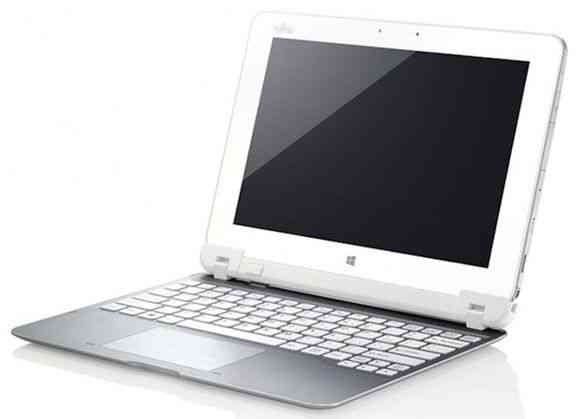
Fujitsu TH40/D Slider Tablet Hands-On

Tags: , , , , ,


image

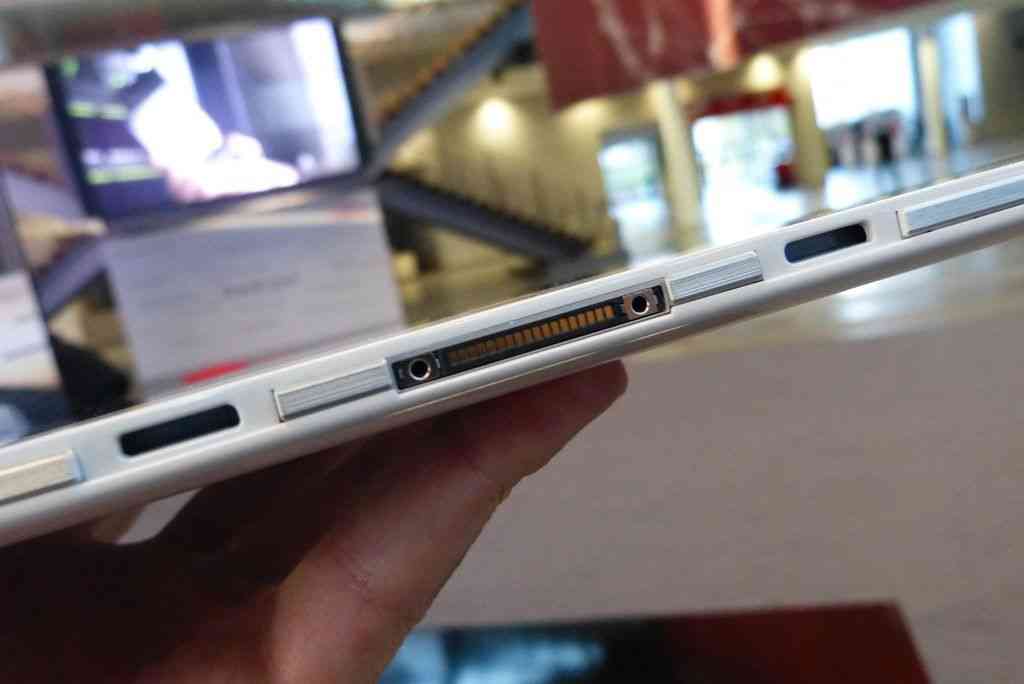
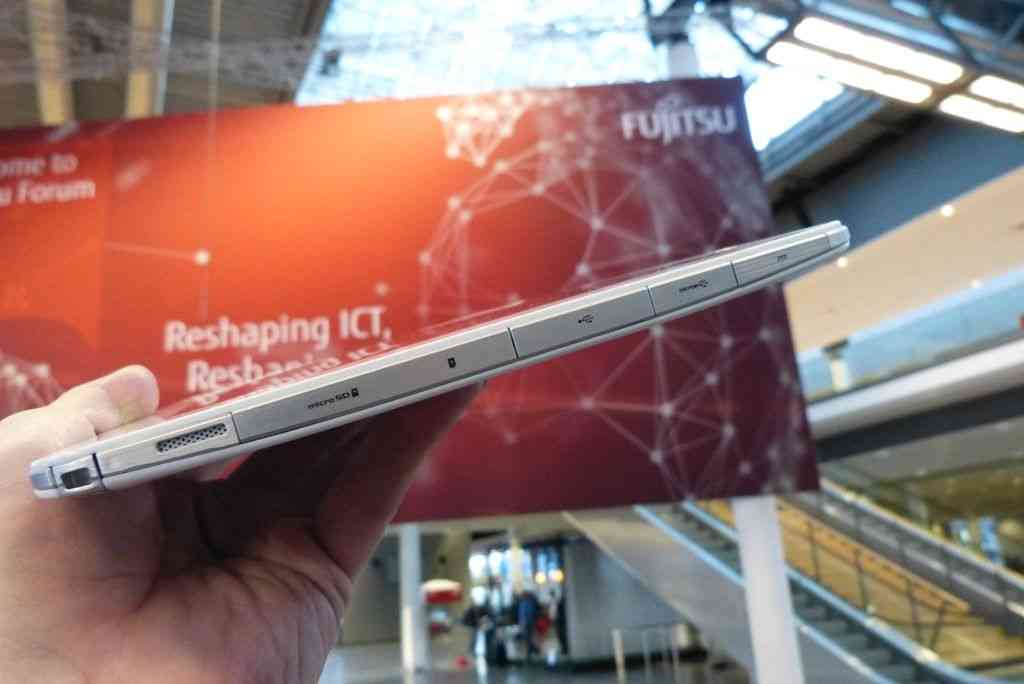
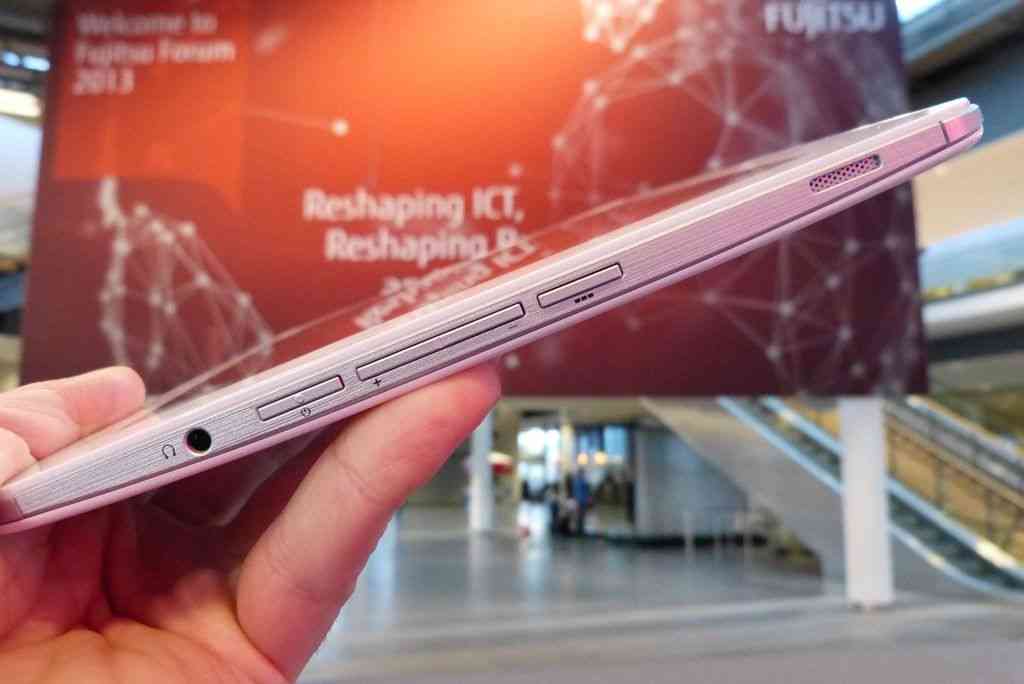
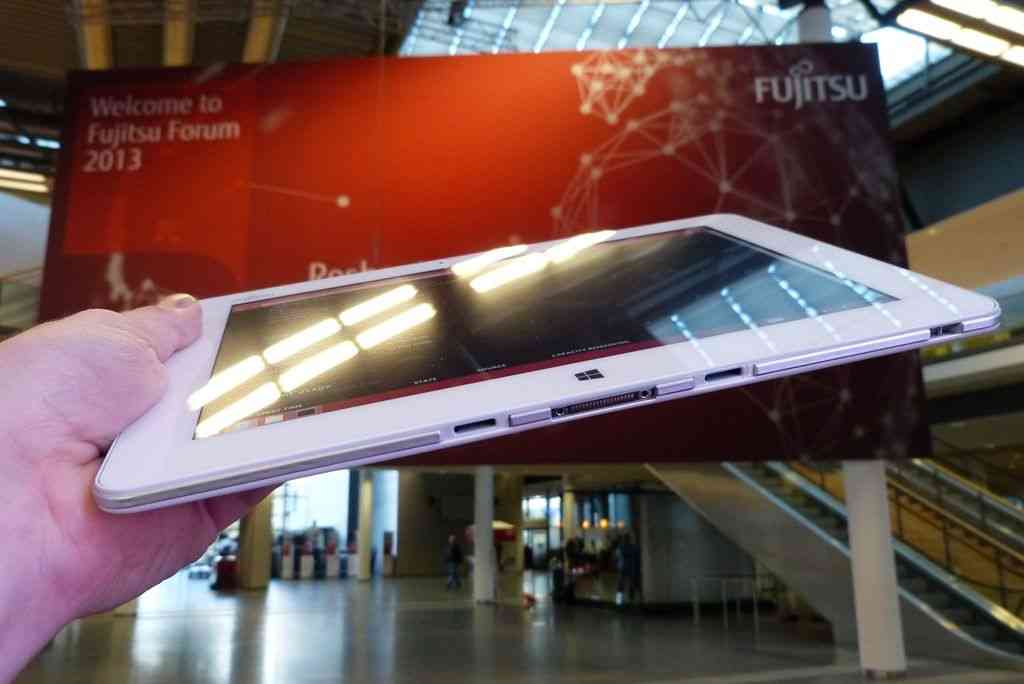
You’ve probably seen plenty of previews of Windows 8 over the last 12 hours or so given that its just gone publicly available as a preview. The operating system offers multiple usage scenarios for touch, mobile and productivity. Devices like the Fujitsu TH40 will benefit highly from Windows 8 as they too offer multiple usage scenarios.

I was really quite impressed with the device after my hands on at the Intel Atom Showcase here at IDF. Of all the Oaktrail devices I’ve tried, this has been the best experience yet. I was left wondering why this is only available in Japan.

image

Look out for the optical mouse pointer. Given my experience with other Oaktrail devices I would put the working battery life, screen on, at about 4-5hrs. Two points I would have to think carefully about are the longevity of the slider mechanism and the processing power which, on Oaktrail, is never really going to impress anyone.

Oaktrail Windows Tablet Reviews Start Slowly at GottaBeMobile

Tags: , , , , , , ,


A few days ago I found a CPU-Mark score for the ‘Oaktrail’ Z670 CPU. It confirms to us in no uncertain terms that the 1.5Ghz single core Atom CPU is, relative to other X86 CPUs, extremely weak and really no different from the first generation Atom CPUs that came before it. The difference with Oaktrail is that the memory and graphics speeds should be vastly superior to that which we saw on the ‘UMPC’ platform, Menlow, over the last few years. Coupled with quality components and good engineering it should be able to provide an acceptable Windows tablet experience and offer some interesting battery life scenarios too. In theory.

cl900 windows tablet

In practice we’re going to have to wait for more Oaktrail Windows tablet hands-on and it looks like the wait for the first Oaktrail based devices has finally come to an end. In Germany the Fujitsu Stylistic Q550 is now shipping and, even better, the guys at Gottabemobile have got both the Fujitsu Q550 and Motion Computing CL900 in their hands. Sumocat (@sumocats) has the Q550 and Chris Lucksted (@DangerousWit) has the CL900.

Lets start with the Q550 and it’s not a good start at all. A ‘bitter core’ is how Sumocat refers to the processor and in the video he’s included in his Fujitsu Stylistic Q550 review, you can see the tablet struggling to handle the Gottabemobile home page with flash turned on. This is an area where GPU, memory and disk speed have little affect because it’s mostly about the CPU working to render the page and execute javascript and flash – a tough challenge and one that got worse since Atom was introduced. The performance we’re seeing here is nothing better than Tegra 2 tablets running Honeycomb. Again, back when Atom was introduced, there was no ARM competitor so this lack of CPU performance increase is now very apparent. Application startup time is fast though and, of course, you’ve got a full desktop operating system at your fingertips which is still the only answer for some customers but it seems obvious that this CPU performance issue is going to be a shock to many customers. Is it the same on the CL900?

Part 1 of the CL900 review series is already up. Unfortunately this article doesn’t include any comments about performance or battery life so we’ll have to wait although reading this line was quite the tease…

a 43 WHr battery providing up to 8 hours of runtime with a 4:1 work/charge ratio allowing the CL900 to charge from zero to full in two hours.

I’m not sure if that’s the marketing talking there or the real world testing. An average 5W drain would be something to talk about. Flipping back to the Q550 review you’ll see some discussion of that in the comments. Sure enough, with the screen brightness turned low, but still usable, there was an indicated 8hrs battery life on the Q550. This is with the 4-cell, 38Wh battery which means Oaktrail is indeed running in a very low power envelope.

It’s the power-envelope that’s the key here. It’s allowed the 10” Windows tablet design to drop the fans and shrink to under 2lb (about 800gm.) The question is, is it fast enough? The trade-off could be too much for some, especially as we’re talking about pro-mobile users here. The Q550 customers aren’t exactly casual internet users.

I’ll be interested to see some SSD speed tests and GPU tests done on the Oaktrail platform and to do some more tests on the SSD (which could, in theory, be struggling and blocking if it’s not good enough.) We’ll also have to wait for more tests. The CL900 part 2 review is expected today.

Fujitsu Q550 Oaktrail Tablet Now Available to Order.

Tags: ,


‘Shipping June 2011’ says the Fujitsu store in the U.S. which means that the Fujitsu Stylistic Q550 (and mass production of Oaktrail) is getting nearer.

The Q550 is a pro-targeted tablet with some interesting features that I reported on back at CeBIT.

A 400-nit screen IPS screen, 2GB RAM, remote security, capacitive/digitiser input, fast-charge, removable battery options, 4 USB ports, Gobi 3G option, SSD, docking port and an array mic are just some of the advanced features you’ll find which indicated a pro-level, industry focused solution. It also gives you clues to the price.

I’m pleased to say that my price prediction of $1000 entry-level was too high. The entry-level Q550 comes in at $730. For that you’re getting the 30GB SATA SSD, Windows 7 Pro, IPS high brightness capacitive touch display with digital pen input and 2GB of RAM. You only get the 19Wh battery ‘quick swap’ battery pack though but for $120 more, you can get the 38Wh battery with a 62GB SSD.  That’s a good option.

imageDon’t forget that there’s the fingerprint sensor, HD video decoder (GMA600), front and rear cams, Bluetooth 3.0 (no H.S. specified) magnesium alloy back cover, strengthened glass. The weight, with the small battery, is only 1.7lbs /  770 grams.

A docking cradle is available but after reading the specs, it looks like it’s a USB/Power unit only.

Full specs and a new set of images available through the Q550 information page.

For Fujitsu, $729 is quite aggressive but there’s one unknown that affects all Oaktrail tablets at this stage – battery life. My estimate is ‘up to 4 hours’ on the 19Wh battery which means 2-3hrs in use.  With the extended battery pack, it would have a useful 6hrs usage time for under 1KG though.

One final thought, MeeGo and Android are being built for Oaktrail. This could be an interesting product to hack around with later in 2011.

Obviously we’ll try and get hold of a review sample of the Q550 if possible. (Any EU suppliers / importers out there care to help support a live review session?)

Full, Official Specs: Fujitsu Stylistic Q550 Windows / Oaktrail Tablet PC

Tags: , , , , , , , , ,


q550 - 5CeBIT is a very traditional, business-like show. Suits dominate and after-show parties are few and far between. Companies like Microsoft often present purely business-focused products and strategies and if you’re expecting another huge pile of consumer tablets, you’re probably going to be disappointed.

For readers of UMPCPortal, our pro-level site (that has, I admit, been pretty dry on news lately) it’s good news because products like the Fujitsu Stylistic Q550 get a chance to shine.

We’ve got the full, official specs in the database now and wow, this is not your average tablet PC.

 Full specifications, links etc. Fujitsu Stylistic Q550 TabletPC

A 400-nit screen IPS screen, 2GB RAM, remote security, capacitive/digitiser input, fast-charge, removable battery options, 4 USB ports, Gobi 3G option, SSD, docking port and an array mic are just some of the advanced features you’ll find which indicated a pro-level, industry focused solution. It also gives you clues to the price.

The price isn’t available right now but the Q550 has already launched in Japan with a availability stated as March/April. A CeBIT launch is also planned and we hope to get a pricing indicator next week. A guess around the 1000 Euro mark for entry-level configuration is probably not far off.

q550 - 6.jpg q550 - 3.jpg Q550 - 1.jpg fujitsu-q550.jpg

All images in the gallery.

Note that there’s a lot of talk about 8 hours battery life but a Fujitsu sales site in Japan makes it clear that this is with the extended battery (38wh) in a JEITA (largely idle) test. Take 30% off that for real world figures. With the standard battery, a 19wh unit, you’re looking at 3.5hrs max. That isn’t going to impress many but at under 900gm for a 10” PC, it’s good.

We hope to get some good testing time in with the Q550 and bring you information on graphics, SSD speed and more battery life thoughts.

Hat-Tip: Gottabemobile

The Secret Life of a Desktop UMPC.

Tags: , , , , , , ,


It’s been about 2-weeks since I last used my daily desktop PC and 2-weeks since I’ve heard that horrible background noise of fan and disk. For the last two weeks I’ve been using a silent, modular, ‘grab and go’ solution based on the Fujitsu U820 UMPC and it’s working out very well indeed. You won’t find many solutions like this out there because this is one of the secrets of the UMPC world that marketing teams and board members get scared about – a multi-scenario device!

U820dock2

Read the full story

Pocketables Takes a Look at the Fujitsu UH900

Tags: , , ,


uh900 Our friend Jenn from Pocketables.net has gotten her hands on the Fujitsu UH900 [Product page] and is wasting no time bringing great coverage of the device to her site. The UH900’s mega-bezel, tiny right shift key, and awkward pointer placement have me a bit frightened, but I’ll reserve judgment until after the full review that Jenn has planned. For now, be sure to check the following coverage from Pocketables.net:

Today only: Fujitsu U810 for $399

Tags: , , , , ,


fujitsu u810 It’s a good day when Woot throws up a UMPC for sale, and today is one of those days. I think this is a first for Woot – they are offering the Fujitsu U810 [Portal page] at sellout.woot.com today for $399. This seems to be a pretty good deal as a quickly glance around the web reveals that you can’t even get a used U810 this cheap, let alone a brand new one. Though the U810 is quite dated, it might make for a good experimental mobile computer if that’s your thing. Brief specs following; see the above linked Portal page for additional details.

  • 5.6” 1024×600 screen
  • 1GB of RAM
  • 60GB HDD
  • Your choice of Vista Home Premium, or Vista Business OS
  • Intel A110 800 MHz CPU

Remember, as per Woot’s tradition, this deal will be gone after today, and could potentially sell out even before then.

Gone Mobile Blogging…

Tags: , ,


As the Smart Q7 doesn’t look like its going to turn up today, (expected tomorrow) I thought i’d relocate for a few hours.

I’ve taken the Fujitsu Loox on a little tour and right now I’m sitting in the park.. More details in my scrapbook website.

Gone Mobile Blogging… Watch and Communicate | Chippy’s HiBlue Lab.

Video: Overview of Windows 7 on Fujitsu Loox U/B50N. (U820/U2010.)

Tags: , , , , ,


I’m afraid I don’t have time to do a written review of my Windows 7 experience with the U820 but I can say that it’s good. So good that I took some time this morning to quickly go over the device and how it works with Windows 7.  Highlights for me (over the Vista build I was running) are:

  • Improved boot-up time
  • Cleaner, quicker, more reliable log-in using fingerprint reader
  • Divx and H.264 support out of the box.
  • Hardware support for H.264 decoding out of the box
  • Great battery life (between 2 and 5 hours depending on use)
  • Vastly improved on-screen-keyboard experience

Windows 7 really does spell the end of XP on UMPCs in my opinion. The only question now is, cost. How much will a touch-enabled version of W7 cost?

The video below is relatively long at 19 minutes. YouTube’s HQ processing may take time so check back later if you want an HQ version.

Note: This video edited and processed using Windows Live Movie Maker Beta with the YouTube upload plugin on the U/B50N.  The render time is much longer than with the old version of Movie Maker (in this case, way over 1hr to process 19 mins of VGA MJPEG 14mb/s source video) but the editing and posting process using this method is very very simple. I’ll have to do some more testing to see if  it’s a valid option for UMPCs.

Thanks to Conics for the loan of the Loox. They have the 2GB version with an SSD option so check it out.

Update: I’m writing aditional notes in the forum here.

Fujitsu Loox U/B50N UMPC as Grab-and-Go, Windows 7 Desktop.

Tags: , , , , ,


After a very successful and stress-free install of Windows 7 on the U/B50N (U820, U2010) UMPC yesterday, I’m now giving it a full test as a desktop PC with full size monitor and keyboard. Using the dock, the screen keyboard, mouse and power can be left plugged in and I can grab the UMPC whenever I need to take Twhirl to the kitchen!

The Loox was already an impressive device but with Windows 7 it’s working so much better. Quick, clean, enjoyable. Not as fast as XP but the trade-off is worth it now. Battery life appears to be better. It ranges from under 5W (wifi-on, screen on, idle = 4hrs) drain through 7W (average Wifi browsing = 3hrs) up to 10W (2hrs) if it’s pushed for videos. Boot time is about 60 seconds until fingerprint swipe and another 30 seconds on top until it’s stable. Far better than Vista was. All touch features are working including floating tip and the on screen keyboard is great in portrait sofa-surfing mode! Even the fingerprint reader is working for Windows login. There’s no audio output on the dock which is a little annoying but USB audio dongles are dirt cheap and there’s always the A2DP route so it’s not a major hassle. With the 1.6Ghz processor (1GB RAM) it’s fast enough for my journalistic and social networking activities although there’s clearly room for improvement in disk speed. A fast 64GB SSD would make this almost unbeatable. (The 2Ghz version with an SSD will be the ultimate grab and go desktop!)

This isn’t a cheap setup by any means but it’s one of the best engineered, multi-scenario UMPC packages you can buy. From tablet to thumbing to table-top and desktop. It’s up there with the 1.8Ghz OQO 2+ and docking station setup I tested. I’m enjoying the U/B50N so much that when I’ve completed the Viliv S5 review (that I’m supposed to be doing right now!) I’ll schedule a full review of this.  When the UMID Mbook goes back to Mobilx this week, the U/B50N will become my main UMPC. Thanks very much to Conics for the long-term loan of the U/B50N. It’s been a pleasure but I really can’t stop thinking about the 2Ghz version you have!

IMG_9057 IMG_9066

IMG_9063 IMG_9067

End of day update:

This is very cool to work with. I always like a dual-screen setup and theres a great feeling of efficiency here but don’t expect this setup to be without limits. I put the Fuji into high-power mode (no speed stepping) and the fan got annoying (in my silent, out of town room while I was concentrating on an article) and there were one or two stutters too many. I think, however, these are coming from my RF keyboard and mouse rahter than the UMPC. I need another session with a hard-wired keyboard.mouse. If you need ONE PC for mobility and desktop and you want to use it a lot, i.e. you need quality, this is probably in the top three with the Sony UX and OQO. I dare say the 2Ghz with SSD and windows 7 will be the ultimate one-pc setup.

Japanese Fujitsu U2010/U820 gets 2GHz Atom CPU

Tags: , , , ,


fujitsu u The Japanese version of the Fujitsu U2010/U820 has gotten a little bump in processing power thanks to a 2GHz Atom CPU. Chippy used a variant of the Fujitsu U [Portal page] to great success on a trip recently and really seemed to enjoy the device. A slight bump in processing power onto a device that Chippy describes as, “…HQ from the screen to the well thought-out control buttons and excellent efficiency”, can’t be a bad thing. The 2GHz variant of the Fujitsu U has the catchy name of ‘FMVLUC50N’ and isn’t yet official in other parts of the world, but you can get it through importers like Conics. Stop by jkk’s link below for some additional images.

[jkkmobile]

Falling for Quality in Texas

Tags: , ,


Strange things happen when there’s a lot of beautiful devices around and a lot of time to play with them. The Viliv S5 was riding high on my personal list of faves but there’s something about the on-screen keyboard I cant get used to. I’m reaching a barrier with it and I think its something to do with the amount of thought needed to remain consistent with the on-screen keyboard. Its a tough learning curve that doesnt seem to be flattening out and considering the amount of content I create while I’m mobile, Its not fitting my needs.

Being able to use the UMID Mbook for a while made me realise how comfortable a real keyboard is. No learning curve, no eye stress and that important tactile feedback. Its certainly got a few build quality issues and the battery life isnt as good as on the S5 but its looking like a great tradeoff for a pocketable device. It feels fast too and after running it through a CrystalMark test, I can see why. The SSD is really helping. I dont like the lack of mouse buttons and again, I have reservations about the build quality but its really breaking through for me as a great MID.

But that’s not what i’m falling for in Texas. What i’m falling for in Texas is something very similar but slightly higher up the quality chain. It’s the Fujitsu Loox U/B50N that Conics have loaned me.

I can sum it up by saying ‘quality.’ Everything about the device is HQ from the screen to the well thought-out control buttons and excellent efficiency. The 1.6Ghz CPU gives me enough power to do basic video top-and-tailing and a bit of headroom when using Skype and Im using the SD card slot all the time for transferring photos to flickr. There are definitely some issues with Vista but in general, its running acceptably. XP would be a lot better but I think Windows 7 could be the one to go for here.

Fujitsu Loox

The question now is, do I buy one?  Do I need one. If I had my netbook here, would my thoughts be different? Pocketability hangs on my thoughts too.

Any Fuji UMPC owners out there care to chip in with a comment about the good and bad of the device?

UC30 UMPC coming with XP, 1.3HGz Atom.

Tags: , , ,


The U2010 / U820 is one amazing bit of tech. At just around 600gm, with an 1280×800 5.6" screen, tiny convertible-screen form factor and an level amazing power efficiency it represents the leading edge of pro-mobile UMPCs. But it’s expensive.

uc40 
More Images at AkihabaraNews.

The new, Japanese LOOX UC40 and UC30 look like they might be trying to address that by offering XP and a new 1.3Ghz variant in the C30. According to AkihabaraNews, "Fujitsu also announced that this move will help them lower their overall retail prices."

  • Loox UC40 and its Atom Z530 (1.60GHZ), 1GB of RAM, 60GB of HDD, its usual 5.6” LCD with a WXGA resolution, a 1.3Mpix Camera, and Wifi ABGN and FM transmitter.
  • Loox UC30, powered by an Atom Z520 (1.33GHz), no web camera, Wifi BGN, FM transmitter.
  • Some reports (Yahoo Japan translation) are mentioning 6hrs battery life on the UC30 with a standard battery. [4hrs real-world usage is not out of the question with the standard battery.]

I doubt the possible price reduction is anything to do with reduction in component costs but maybe they did a deal with Microsoft. Maybe they got hold of a ULCPC-style low-cost license deal. On the other hand, the definition of lower prices here may be insignificant. Even if that is the case, its nice to see more XP / Atom options.

We have a request out to Conics to see if they plan to have these available as exports.

Source: AkihabaraNews

Fujitsu’s 1.6Ghz U820 available in the U.S.

Tags: , ,


The Fujitsu U820 is coming to the U.S. according to both JKKMobile and Pocketables. Don’t expect bargain-basement pricing though as these are firmly aimed at the pro-mobile market with their advanced design and high-end features. (See the reports on the Asia, U2010 version) $999 (introductory offer) buys you the entry-level model with Vista Home Premium and a 60GB drive but if you want the extra features of Vista Business and a 120GB drive, you’re looking at $1299. Both come with GPS and Garmin Mobile navigation software. Leading edge quality still costs a lot of money!

Fujitsu Amilo Mini reminds me of A Citroën

Tags: , ,


amiliomini

Yes, a strange statement to make but its exactly what I though if when I saw it. A design daring to be different but not really having any classic, timeless lines. The Amilo looks cool on first glance but I bet it looks, er, less cool in 12 months!

Fashion aside though, the specs aren’t anything to moan about, apart from the slow-looking 60GB HDD perhaps. The Array mic will help with Skype, the ExpressCard slot will help with multi-device 3G cards and I like the fact that its got Bluetooth. FSC is a German partnership between Fujitsu and Siemens so I’m not sure how this product will translate into other countries [Update - The news item gives us a clue. It could be the M1010] but I’m guessing that if Fujitsu have the rights, you’ll simply see it under a different Fujitsu model name in other countries.

Sascha from Eee PC News was at the launch today and has a few more pics where you can see the exchangeable cover ‘feature.’

Full specs are in the database now.

  • 8.9’’ WSVGA Display (1024 x 600)
  • Intel® Atom™ Processor N270 (1,6 GHz)
  • 1024 MB DDR2 667 MHz RAM
  • 60/80 GB HDD (3600 rpm / 4200 rpm)
  • LAN, WLAN 802.11 b/g, Bluetooth
  • ExpressCard slot
  • USB 2.0
  • VGA out
  • Webcam 1,3 Megapixel
  • Digital Array Microphone
  • Microsoft® Windows® XP Home Edition
  • 233 x 29 / 36 x 175 mm, 1 kg

Via JKKMobile

P1610. Huge price cut in Germany.

Tags: , ,


Has anyone else in Europe spotted a massive price drop on the Fujitsu P1610? For about two weeks the prices have been at the 800 Euro mark. which is about a 50% discount over previous prices.

The P1610 is a well-respected ultra mobile workhorse. Good build quality, hi-res screen, fingerprint reader, heavy-touch screen for reduced vectoring, PCMCIA slot and extended battery capability. It runs XP TE and Vista Business (dual-boot as I understand it) on a Core Solo processor at 1.2Ghz and weighs 1.2KG which is the same as an MSI Wind or Eee PC 901. At its previous price of over 1600 Euros it was out of reach for most people but at 800 Euros, its a different matter.  [Article continues...]

Read the full story

Fujitsu U2010, how does 9 hours of battery life in the color of your choice sound?

Tags: , , , ,


Jenn from Pocketables  shows us a press release from Fujitsu making official the latest iteration of the Lifebook UMPC. We already knew most of the details regarding the Atom based U2010, but the press release has shed light on a few new bits of info. The U2010 will be available in five different colors: Ocean Black, Pink Gold, Cool Silver, Fuchsia Red, and Luminous Blue. Fujitsu is also saying that the U2010 will run for 8 hours on its extended 4-cell battery, or 9 hours with the 4-cell battery and the announced 64GB SSD option. The U2010 looks to be shaping up to be a good sequel to a pretty popular line of UMPCs. Lets just hope that press released 9 hour battery figure is true!

Search UMPCPortal

Sales Information


Our Network

  • ARMShowcase Tracking ARM-based mobile products
  • Big Beach Our marketing advisors. Located in UK.
  • Carrypad Tablets and consumer mobile products
  • Chromebook News Chromebook news, products and specifications
  • Device Manufacturer List List of all device manufacturers, and products, from our database
  • JKKMobile JKKMobile – Mobile computing and hacking – Partner of UMPCPortal
  • Liliputing Netbooks and small-form-factor laptoping – Partner of UMPCPortal
  • MeeGoNews News, reports and inside info from the MeeGo Ecosystem – Partner of UMPCPortal
  • MeetMobility Mobile computing podcast broadcast every two weeks – Partner of UMPCPortal
  • Netbooknews Netbooks and other mobile devices – Partner of UMPCPortal
  • Ultrabook News Ultrabook products, specs and news

Donators (Last 20)

Buy Laptop (€5.00 EUR) Says:
Sep 18, 2011 at 7:43 am

Awesome website, great read!

Jez@SammyTablet Says:
Oct 15, 2010 at 8:25 am

Keep up the good work! UMPCPortal and Carrypad are always a good read :)

MiKeN (€5.00 EUR) Says:
Oct 15, 2010 at 5:13 am

Microsoft AutoRoute Says:
Sep 3, 2010 at 10:46 pm

Trip planning and satnav software for PC

MMORPG Says:
Oct 6, 2009 at 2:07 am

Keep up the great work on UMPCPortal :)

Laptop Computers Says:
Jun 9, 2009 at 8:00 pm

Laptop reviews, ratings and netbook computer buying guides.

Laptop GPS World Says:
May 10, 2009 at 2:01 pm

PC GPS SatNav reviews and forums.

Ultimate-Netbook Says:
Apr 11, 2009 at 2:48 pm

Ultimate-addons supplier of netbook accessories

Steve Paine Says:
Apr 2, 2009 at 8:44 pm

Test from Steve