The sun is shining so it’s time to take a bunch of Windows 8.1 tablets and do some sunlight readability testing. This is an operation where I lay all the tablets in the sun, choose the best one, make a cup of tea and enjoy some reading and Vitamin-D intake. It’s a tough test.
Read the full story
Tag Archive | "screen"

75 Ultrabook Designs Coming – Screen Size Breakdown
Posted on 11 April 2012
Back at CES Intel declared that 75 Ultrabook designs were in the pipeline. Today, at IDF, they gave a breakdown of that number by screen size.
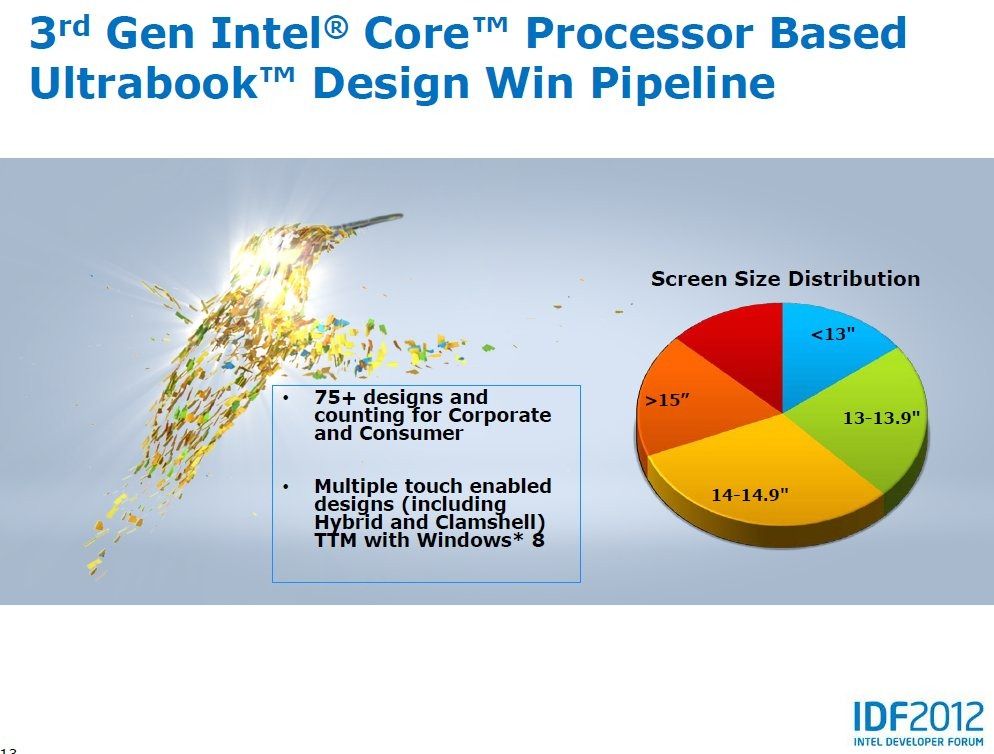
By my reckoning, you’ve got the following numbers…
Ultrabook Ecosystem Technology Requirements – IDF 2011
Posted on 18 September 2011
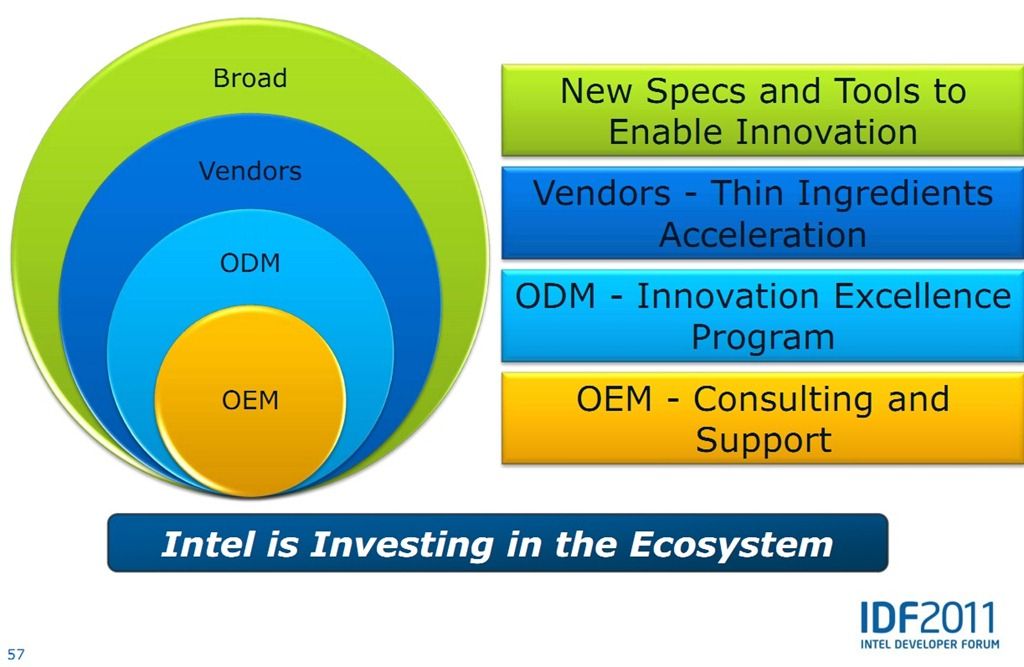
There’s much more to Ultrabooks than “Thin, Responsive and Secure.” In terms of laptop design the Ultrabook is one of the biggest overhauls ever. At IDF last week I learnt just how complex the Ultrabook design is and why Intel is calling-out to the ecosystem to help create the best Ultrabook components and designs.
Read the full story
Screen Size Analysis (Sub 12″) Feb 2011
Posted on 09 February 2011
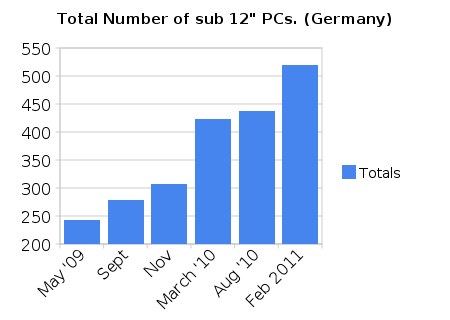
This is the sixth report on sizing trends in PCs below 12 inch screen size (and above 5 inch) appearing in the German market through the popular price comparison engine, Geizhals.at (*1) The last one was done in August 2010 In this report you’ll see a big jump in overall numbers, a reversing of the decline in 7 inch devices and a turnaround in the 10 inch segment.
Number of SKUs in the market.
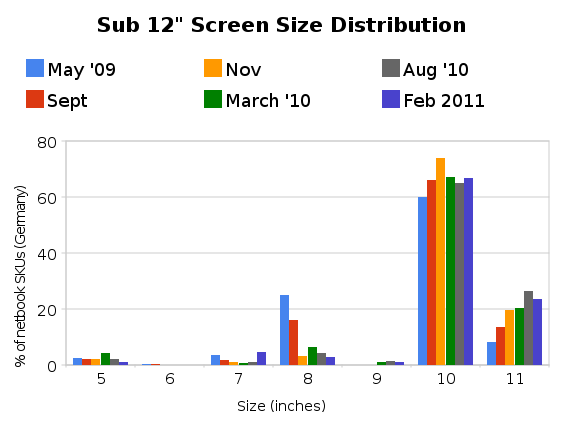
Screen size distribution
The big jump in numbers is clear to see from the top graph. Total numbers jumped by 83 and this is likely to be due to the Christmas season and introduction of new model ranges following IFA 2010. Surprisingly, the 10 inch segment has grown in numbers and %. A lot of this is attributable to dual-core Atom N550 devices.
- Over 20 Intel Atom N550 devices appeared exclusively in the 10 inch category.
- 62% of the devices are running on Intel Atom. One year ago, this figure was 78% Remember that the segment includes some devices running laptop-grade CPUs and there’s an influx of AMD and ARM devices in the top and bottom end of the 5-11 inch range. This is not just an analysis of ‘netbooks.’
- The 7% segment had the biggest percentage growth (over 300%, from a very low starting point) and the 10% segment had the biggest numeric growth (63)
- Including Android, over 14% of the segment runs a Linux kernel. One year ago this figure was 5%. Almost all of this growth is within the ‘tablet’ style of devices.
- Only 13% of the devices weigh 1KG or less. (up from 10% one year ago again, growth is in the tablet segment)
- 18 devices now include Nvidia ION2. All of these are from a single manufacturer – ASUS.
- Total number of tablet form-factor devices 60 (not including 4.8 inch) which is about 10% of the total sub 12% screen size market.
The cheapest devices (based on lowest price offered) are:
- X86/Windows Laptop Samsung N145 at 228 Euro
- ARM Tablet Nexoc Pad 7 (Android 1.5) at 99 Euro
- X86/Windows Tablet Archos 9 at 402 Euros.
Also of note is the larger spread of GPU technologies, the increased us of SSDs (even in the X86/Windows segments) and a large number of dual-core CPUs. Dual core CPUs make up a 30% of the 10-11.6 inch bracket now.
In the last report I talked about a netbook freeze. Certainly the trends for search and news seem to be heading south (see below for ‘netbook’ trend) but the increase in numbers of 10 inch devices indicates that there is still interest from manufacturers. The increase in SKU’s, however, could be misleading as we’re seeing an increase in the number of colour options, CPU options, GPU options and screen options that use the same chassis. Acer and ASUS each have over 90 different model types in the German market in the 10-11.6 inch category.
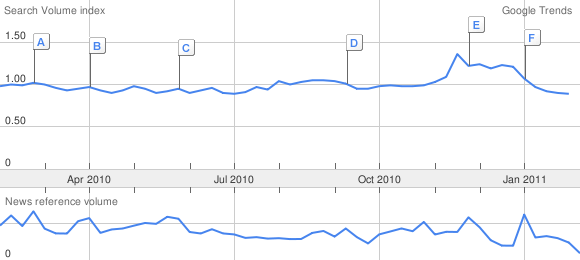
I think most people in the netbook field would agree we’re seeing a levelling of interest and manufacturers are using offers and personalisation to attract sales in this mainstream part of the segment lifecycle.
For mobility fans though the message is clear. There are more options than ever and competition is increasing which will drive improvements in software and hardware very quickly. Certainly we will see the tablet segment grow and it will be interesting to see how the 5-9 inch segments move when we do the next analysis in about 3 months time.
Warning: Please remember that this is a single data-source analysis of what is happenning today, in the German market. This is not a complete market analysis report. You may use the data and images but please also reference this article which includes this warning.
*1 Based on SKUs, not model families. Note that Geizhals have now moved all tablets to a new category called ‘tablets.’ This category was included in the analysis. An English language (and UK market) version of Geizhals is available at Skinflint.
Pixel Qi Screen Upgrade Available To All
Posted on 02 July 2010
I’ve long been a fan of the Pixel Qi screen technology, its ability to work in direct sunlight is something us tech folk have been waiting on for a long time. At Computex 2010 Pixel Qi showed us the technology compared with a Apple iPad and the results are stunning. JKK also got some time with the people at Pixel Qi to show us more how the technology works and the difference it makes to outdoor visibility.
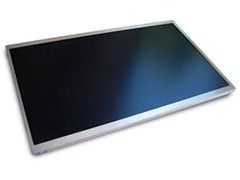
Well we no-longer have to dream of working outdoors in the sun as MakerShed are selling the Pixel Qi 3Qi 10.1 inch upgrade kit. For a cool $275.00 and a little time you can upgrade your own netbook;
MAKE and Pixel Qi announce the availability of a revolutionary LCD display technology from Pixel Qi–the 3Qi display. This one-of-a-kind, plug-and-play 10.1-inch display offers two modes–an easy-to-read, real colour, multi-media mode or a crisp, low power e-reader mode. The sunlight-ready, e-reader mode makes it easy to use outdoors.
These screens rival the best e-paper displays on the market today but in addition have video refresh and fully saturated colour. The e-paper mode has 3 times the resolution of the fully saturated colour mode allowing for a high resolution reading experience without sacrifice to super colour fidelity for graphics. In addition these screens can be used in sunlight.
Currently the only tested models are the Samsung N130 & Lenovo S10-2 but they state that it should be compatible with other 10.1 inch netbooks and are testing more models as we speak.
This is obviously going to be a popular kit and MakerShed are already out of stock. Pre-orders are live for the next batch.
Xperia X10. Is Total Convergence The Answer?
Posted on 20 April 2010
When the N900 was launched, Nokia positioned it as a total convergence device. It’s a dream (and the subject of my first ever blog post in 2006). The X10 is also aiming to be a total convergence device and does an incredible amount of activities with impressive quality but again I say no; and that’s not all. Battery life is a major problem with every smartphone I’ve ever used. I wrote about the problem back in 2008 and again in January. The X10 re-confirms my theory. There is NO SUCH THING AS IDLE and screens and communications continue to take the lions share of battery drain. Smartphones, when used professionally as smartphones, don’t bring all-day battery life.
Forget talk about cpu idle power claims because it’s totally irrelevant. 2W is the headroom needed to do all the things the marketing people tell you are possible and assuming you ‘only’ use the device for 15 minutes every hour, you’ll need a 7.5wh battery to get you through a full day.
The X10 has a 5.5wh battery which means it’s not going to hit the mark for many. It needs attention, a top-up late in the day and if you’re to be ready for the next day it needs plugging in before you go to bed. That late-day top-up is a big risk if you’re a pro user and relying on being able to take an important phone call or respond to an email at any time and if that risk is there, you’ll need to manage it. In this case it means either a spare battery, a universal charger or, and I suspect that this is going to be the easiest route for many, take a second phone. Either way, you’ve got a second device and a problem.
Corner cutting.
The X10 pushes the boundaries in so many ways but it does it within the confines of a pocketable size, smartphone pricing and smartphone life-cycles and that means (and always will mean) cutting corners. The web experience is great but even though you’ve got 800×480 pixels, the pixels are too small. a 5 inch screen has always been better for mobile web browsing from the hand and now that people are experiencing even bigger handheld web experiences, the 4 inch screen has issues. Zooming to click a link is a pain in the backside.
Then there’s the camera. How do you keep the price down and still provide a superb photo solution? You stick to daylight-only scenarios, drop the flash and choose a daylight sensor. The X10 is crap at low-light and flash situations. My 2 year-old N82 beats the pants off it.
How do you keep the design simple, reduce parts costs and avoid having to ship 500 different physical keyboard layouts? You make a tablet device with a software keyboard. Losing 50% of a landscape screen to a keyboard isn’t nice but it’s a great way to reduce the time-to-market costs.
How do you tackle the audio issues? Speakers need space, always. To fix that problem you ship it with a standard 3.5mm headphone port and hope no-one wants to use it as a radio. The speaker on the X10 is far from ‘top quartile.’
A great MID.
A 500 Euro smartphone is an expensive item but when you look at what the X10 is giving you it’s hard to put much weight on the corner-cutting. In terms of mobile internet, the X10 blows away any Intel-based MID I’ve tried. Sure, I’ll have to put up with a no-flash experience but the X10 brings me email, PIM and calendar integration, sync and accessibility that I’ve never had before. The dedicated GMail J2ME app on my old Nokia 6280 was really fast but this is something else altogether. Being able to push information around (sharing with email, IM, Twitter, Flickr, Facebook and other important networks) is easier than on a PC and when you add the always-on feature, GPS (location based search adds a lot of value) a WVGA video capability and an 8MP camera that puts every PC-based 1.3mp webcam to shame, you’ve got something special that goes way beyond browsing. With 4-6hrs full-on web browsing time, 9GB storage and a 138gm (measured here) weight, you can forgive it not having the ability to beat a dedicated digital camera in a low-light photography test.
What have I learnt?
I’ve learnt that I use the Internet too much for a smartphone. Actually I knew that already which is why I’m still looking for the ultimate MID but the X10 serves to re-iterate that point. No smartphone battery can keep up with me.
I’ve learnt that Android fits me perfectly. I’m a Google user and Android brings my services to me in a way that no other device ever has and that means that I won’t pursue a Windows-based mobile internet device. Actually, I never did. I knew that a dedicated OS was needed from day 1 but the choice just hasn’t been there. [History: Carrypad was started in 2006 to journal my question for a mobile internet device]
I’ve learnt that I love having a top-end, stylish smartphone. Just because! (Who doesn’t?)
I’ve learnt that the ARM/Android platform is able to bring a consistently high-speed, multitasking and flexible web experience. I experienced it on the Archos 5 and it’s here again on the X10. Android will easily scale to bigger screens and given the apps, would be able to provide a productive internet experience.
I’ve reaffirmed that the Marketplace is critical. Without it, Android devices just can’t keep up.
I’ve learnt that the X10 may not be for me but I know it will be difficult to part with it. I’ve tasted Google Android at 1Ghz and I don’t want to step down from that. The Dell Mini may be my savior.
HTC Nexus One / Desire, Motorola Milestone / Droid
Many of you have been asking how the X10 compares to these two phones. I’m afraid I can’t comment on the Desire and N1 because my hands-on was with a device that kept crashing but from my brief hands-on with the Nexus One I can say that the experience is very comparable. As for the Droid, I’ll immediately say that the Droid is a better value device. It’s available for under 400 Euros now and has the 2.1 upgrade. It offers similar photo, web and UI experience. If you’re a Google user and smartphone oriented,you’re not going to walk away from a Droid purchase unhappy.
The fact is that all five devices are top quality Android smartphones and offer an experience that will is likely to lock you in to the Android way.
Detailed first impressions and review.
I’m writing about the X10 in detail on a separate sub-blog and have just posted Part 1 of my first impressions. The article highlights three potential show-stoppers so take a look, comment and check back soon for part 2 where I cover the good stuff. Part 2 is going to be much longer than Part 1 I’m sure!
Also on the XperiaX10 blog:
Sample Daylight Photos. Wouldn’t it be nice to be able to create photo’s and videos on a UMPC!
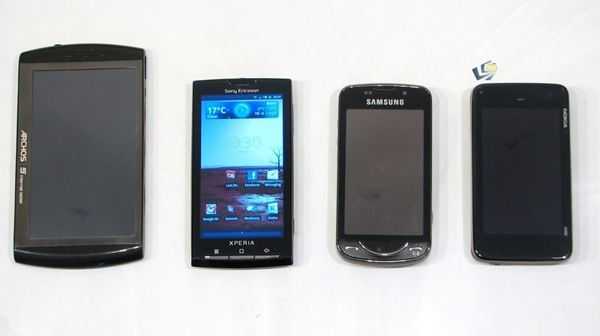
Size comparison. Includes Archos 5, 5 inch PMP.
Information on the screen. It’s transflective. Why didn’t UMPCs ever get good outdoor screens?
Unboxing and Open Review (with JKK)
Screen Size Analysis (Sub 12″) March 2010. ‘Hi-Res’ and Pinetrail Feature.
Posted on 17 March 2010
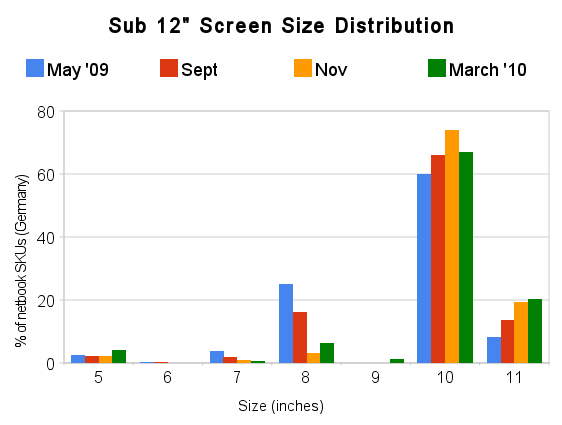
This is the forth report on key trends in PCs below 12 inch screen size appearing in the German market through the popular price comparison engine, Geizhals.at . (Based on SKUs, not model families.) The last one was done in November 2009
In this report you’ll see the big jump in numbers coming from the new Pinetrail devices. Below the graphs I highlight some key numbers.
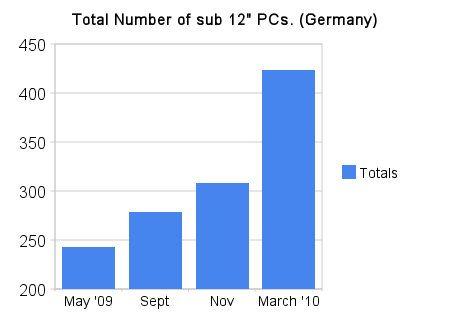
Number of SKUs in the market.
The big jump in numbers is clear to see from the top graph. Total numbers jumped by 115 with Pinetrail making up a large portion of that number. A bigger trend I’m seeing is the introduction of 1366×768 displays. Nearly all of the 101 devices with hi-res screens have appeared in 2010.
Other ‘trends’ that are clear from the data provided in the comparison engine:
- 78% of the devices are running on Intel Atom. Remember that the segment includes some devices running laptop-grade CPUs. This is not just an analysis of netbooks.
- The percentage of devices in the 10% segment dropped but the number of devices still rose.
- There were percentage increments in the 5 inch, 8 inch, 9 inch (ipad) segments. Previous reports showed decline in these segments.
- Only 5% of the devices are offered with Linux.
- There’s a 3:2 ratio of Glossy to Matt screens.
- Only 10% of the devices weigh 1KG or less.
- Very few Nvidia ION devices have reached the market. Only 3% include the ION option and all of these are ION V1. Devices with Pinetrail + ION are expected in the next snapshot so this number should increase.
- The cheapest device (based on lowest price offered) is still the Hercules E-Cafe EC800 is more expensive now – 183 Euros (up from 151) but the cheapest Intel Atom netbook isn’t far behind at only 188 Euros. (lowest price.)
One thing I note every time I do this is that there are a lot of end-of-life PCs still being offered. For example, the EeePC 701 is still hanging around. It’s difficult to measure but it looks like up to 100 of the devices in the market are remnants.
When we look again in June I expect we’ll see a much smaller increase in numbers. The first ION2 devices will appear though and if the ‘tablets’ and MIDs start flowing into the market as promised, we should see growth, albeit very small, in the sub 1KG and sub 10 inch segments with a corresponding increase in non-Windows numbers.
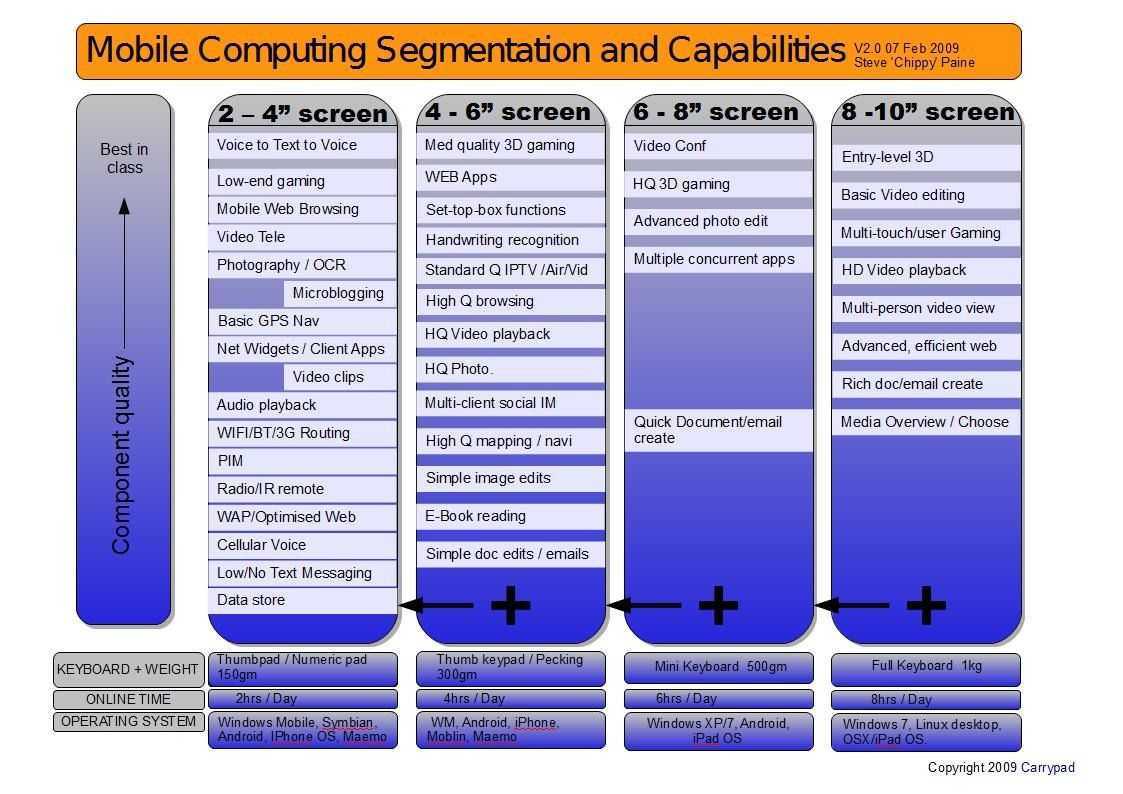
Mobile Computing Segmentation and Capabilities. (Updated from DevMob 2010)
Posted on 08 February 2010
Thanks to the great crowd at DevMob2010 in London last week, I’ve had some good feedback to my scenarios and segmentation diagram which was originally created in 2006 and is now updated and re-published under CC license. It should help as a stimulus for software developers thinking about the possibilities in the space between smartphones and netbooks and can help device designers to think about usage scenarios. Customers will also find it useful to pick out their own usage scenarios and to see what type of device fits with their requirements.
FEEDBACK IS ENCOURAGED. If you have thoughts, please add them to the comments section below.
During my session at DevMob I had a set of suggestions which I’ve added to the diagram. It was interesting to hear suggestions for the 8-10 segment which included Multi-touch/User gaming (many players, one device) and multi-person video viewing. Those are two models that the iPad is targeting very closely. We also added ‘Media Overview / Chooser’ to the 8-10 segment based on the need for screen space for an overview of images, album cover art or video’s.
Many thanks to all that took part in the sessions at DevMob and thanks to all of you that took the time to present and talk about your ideas in this space. I hope to see you all again at the next DevMob2010 and at other events in Europe.
The diagram (V2.0) is available here (PDF)
Notes are shared in a Google Document here.
Update: I’m experimenting with a slightly different layout based on feedback below. The segments have been re-drawn to represent a more fluid crossover point.
V2.1 diagrams are here.
PDF: https://www.umpcportal.com/downloads/devicesegments-V21.pdf
JPG: https://www.umpcportal.com/downloads/devicesegments-V21.jpg
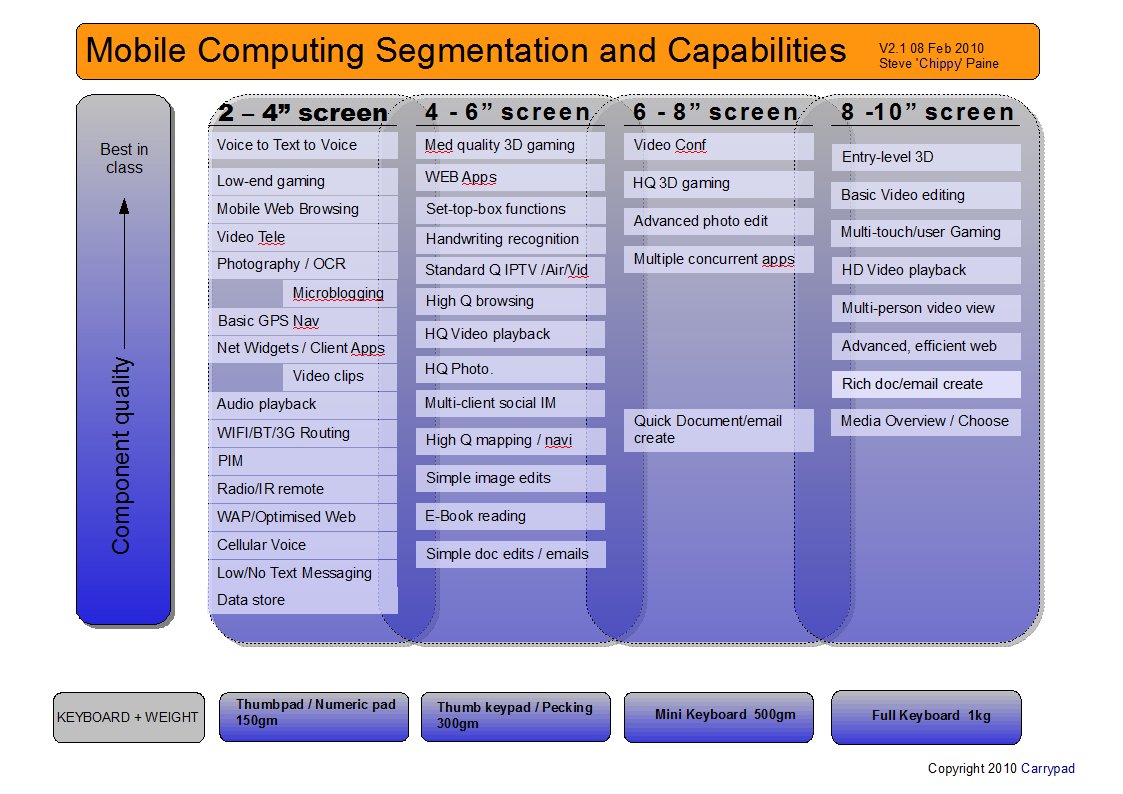
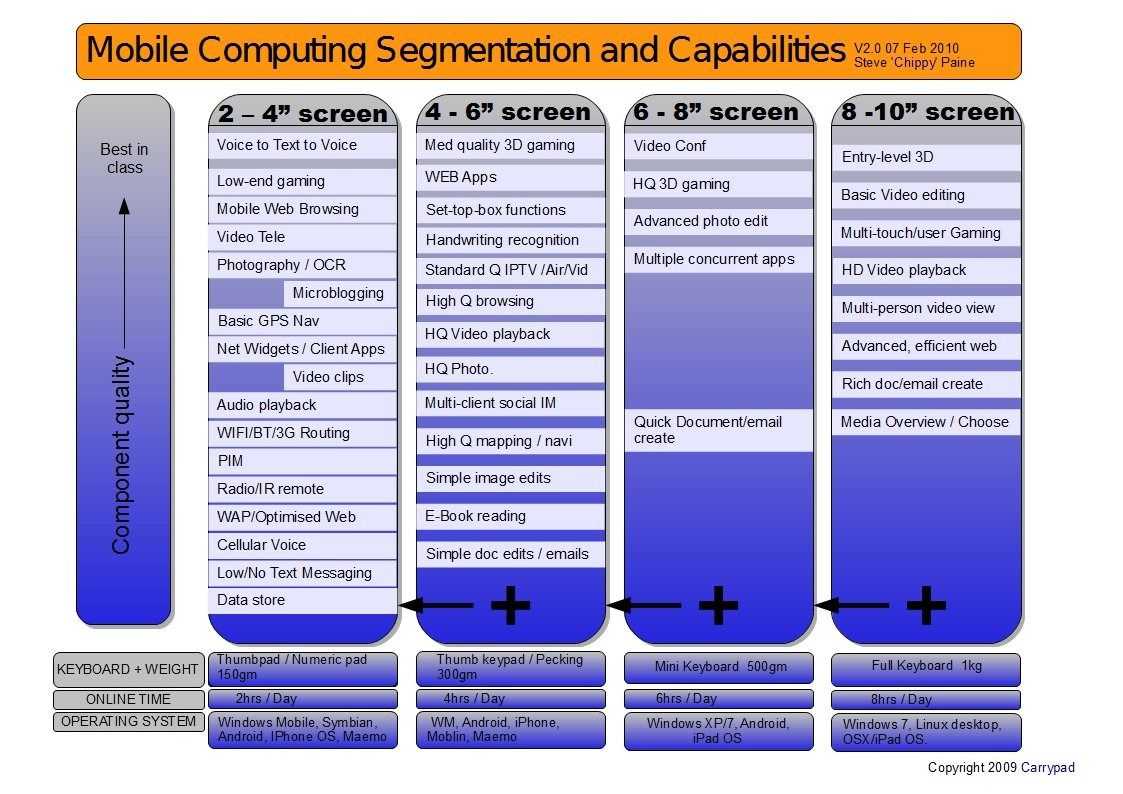
Click for full size jpg image.
Thanks to Intel for sponsoring my trip to London for DevMob and to the Soft Talk Blog team [twitter] for their assistance.

Mobile Scenarios and Segmentation by Carrypad is licensed under a Creative Commons Attribution-Share Alike 3.0 Germany License.


 |
| |||
 |
| |||
 |
| |||
 |
| |||
 |
| |||
 |
| |||
 |
| |||
 |
| |||
 |
| |||
 |
|